

Summary
Paidnice runs a native credit check on every customer, on every plan. It reads how each customer pays you in Xero or QuickBooks Online and gives them a credit score from 0 to 100, shown next to their name.
- How it scores: Every contact starts at 100 and loses points for paying late and for the current overdue position.
- Bands: 80 Excellent, 60 Good, 40 Fair, 20 Poor and 0 High risk. You can edit the bands and add your own.
- Bureau checks: Creditsafe credit checks run through the API on the Custom plan.
Every customer in Paidnice now has a credit score, built from how they pay you.
Free: Payment reminder email templatesCopy the reminder emails for before, on and after the due date.A credit check on every customer, on every plan
Paidnice now runs a native credit check on every contact. It reads how each customer pays you in Xero or QuickBooks Online and turns that into a credit score from 0 to 100. The score shows as a badge next to the contact's name, everywhere the contact appears in Paidnice. It changes as the customer's payment behavior changes, so it is current each time you open it.
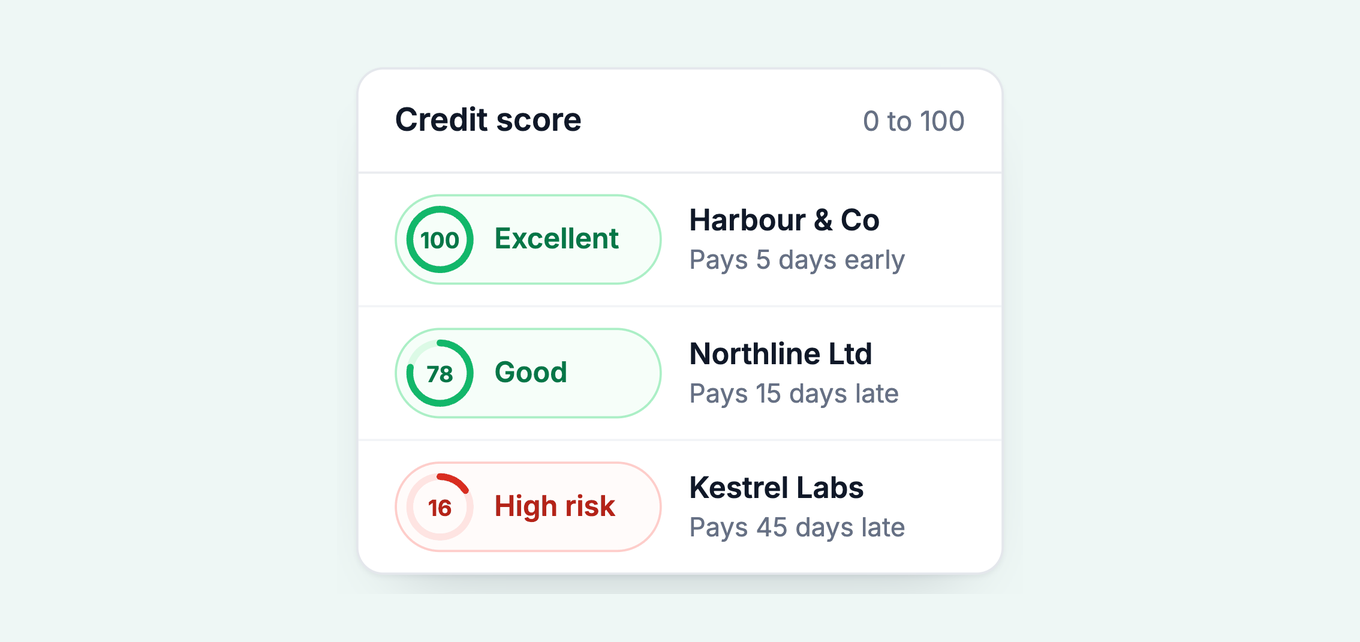
Example customers. The scores are the worked examples shown in the Paidnice app.
How the score works
Every contact starts at 100. It loses points for paying late, and for its current overdue position: how much of its balance is overdue and how old that overdue debt is. Recent payments count for more than old ones.
Each score falls into a band:
- 80 to 100: Excellent
- 60 to 79: Good
- 40 to 59: Fair
- 20 to 39: Poor
- 0 to 19: High risk
Set it to match how you give credit
Go to Settings, then Advanced, then Credit Score to change how the score is calculated. You can change these settings:
- Late payment penalty, up to 65 points
- Late payment threshold, in days
- Overdue share penalty, up to 20 points
- Overdue age penalty, up to 15 points, and the overdue age cap
- Recency half-life, which sets how fast old payments stop counting
- Payment history window
You can also edit the bands and add a band of your own.
Need a bureau check as well?
The native check tells you how a customer pays you. To see how a company pays everyone else, Paidnice runs Creditsafe credit checks through the API on the Custom plan. Bring your own Creditsafe account or use access through Paidnice. Read more in credit control software with Creditsafe.
Where to find it
Open any contact in Paidnice to see its credit score, next to average days to pay and the overdue balance. See every setting on the customer credit scoring page. The score is also part of accounts receivable reporting in Paidnice, so you can see who pays late before you give more credit. To see it on your own Xero or QuickBooks data, book a demo.
Paidnice features in this article
About the editorial team
Denym started Paidnice in 2022 after customers paying late left his own business short on payroll. He has led it to $1 billion collected on time across more than 1 million invoices, and writes about credit control, late fees and getting paid on Xero and QuickBooks.

 App of the Year
