This app is a game changer!Lesley B.
Paidnice is accounts receivable automation for Xero & QuickBooks with Stripe built into the customer portal, so customers pay by card or bank without leaving your portal and the invoice is marked paid in your ledger.
Customers never leave your Paidnice portal to pay. Paidnice writes each payment and fee back to Xero or QuickBooks.
Customers tick the invoices they want to pay, or select all, and pay by card, ACH, BACS or direct debit. Allow part payments and set the minimum yourself.
Paidnice marks each invoice paid and records the Stripe fee. Every Stripe line in your bank feed then has a match ready to reconcile.
Customers preapprove Stripe Autopay once. On the Pro plan and above, payment plans then charge each installment on its date, with card and bank details kept by Stripe.
It’s the debt collection system I’ve been looking for, for the last 15 years.

Paidnice has everything your business needs to run a best-in-class receivables process, from the first reminder to the money landing in your account.
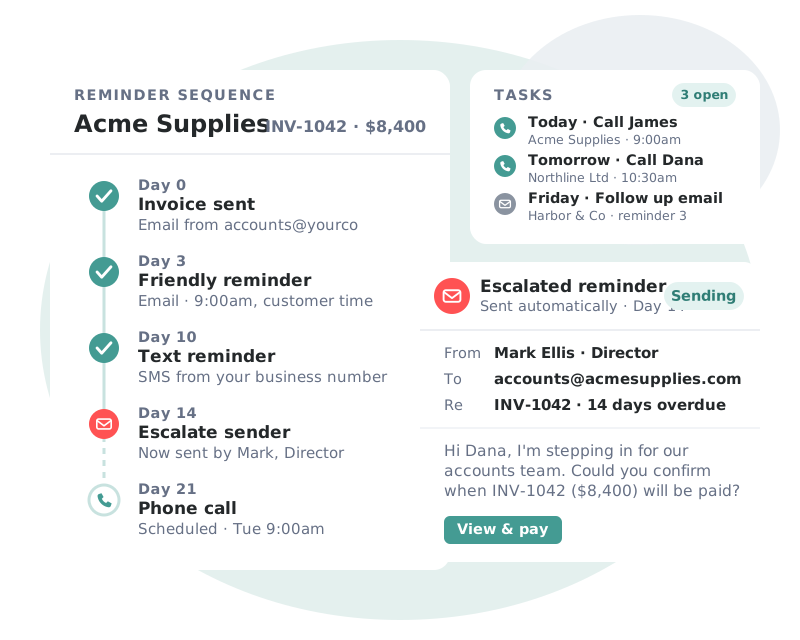
Sequences that adapt to each customer’s payment behavior, so every invoice gets the right nudge at the right moment.
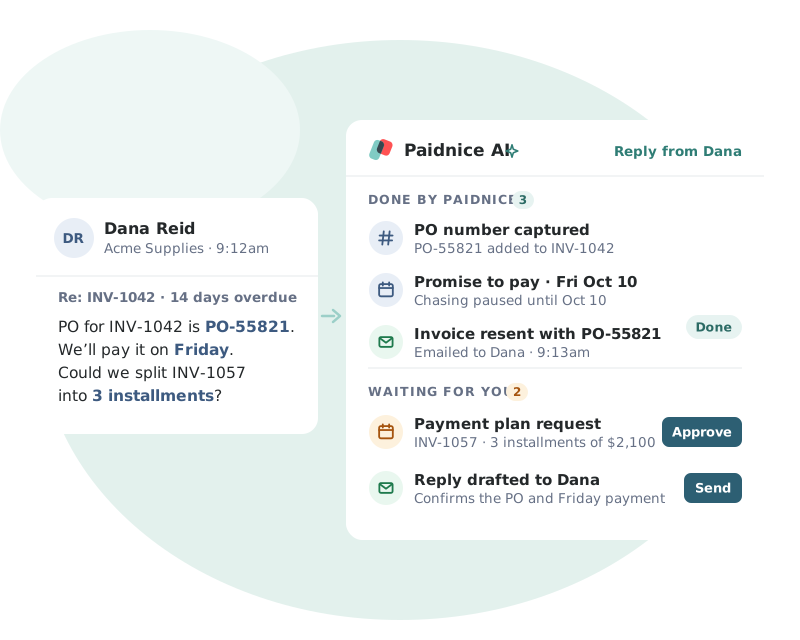
Paidnice AI reads each customer reply and turns it into the next step, so nothing gets lost in your inbox.
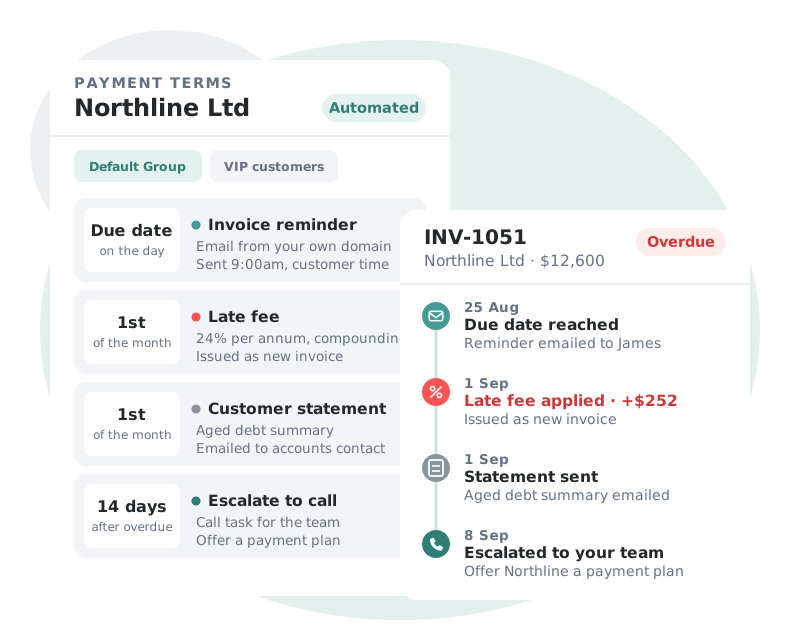
Your policies enforce themselves. Incentives and penalties are applied on schedule and written straight back to your ledger.
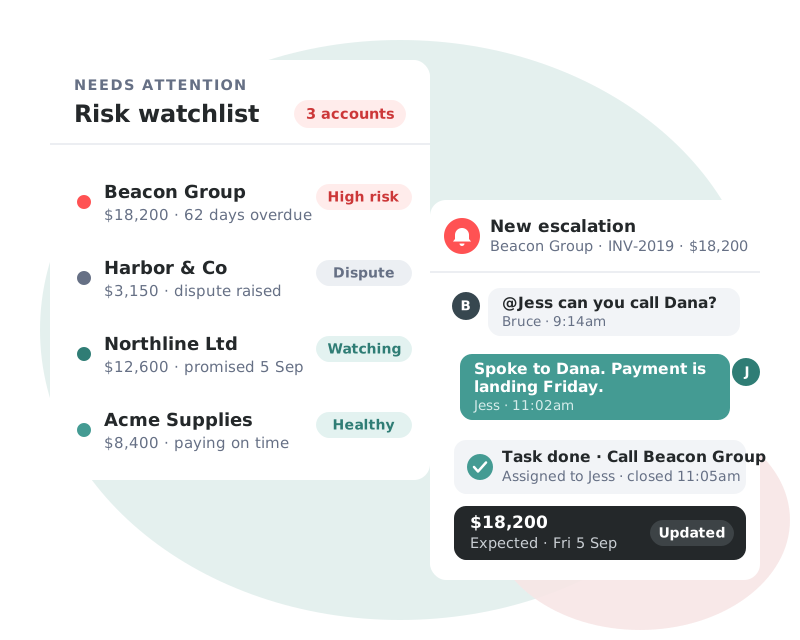
Real-time visibility of your AR health, with the accounts that need attention surfaced before they become a problem.
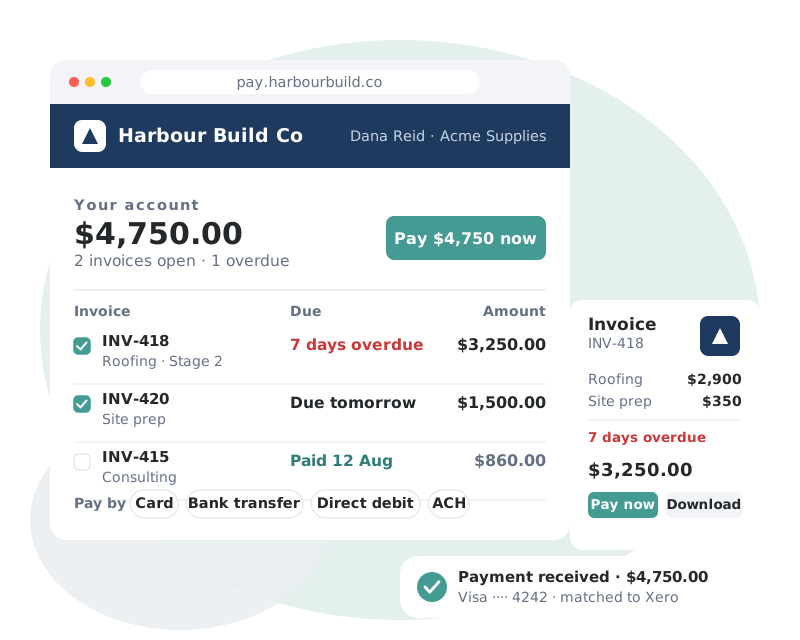
A branded, self-service portal that removes every excuse between your customer and the Pay button.
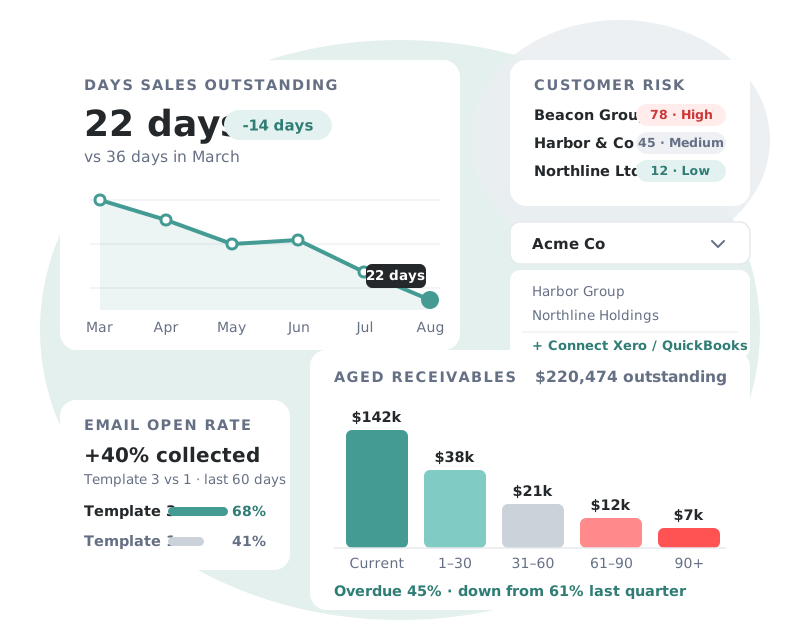
Complete visibility of receivables performance, across every entity you manage.
 Digital Marketing AgencyAustralia
“It’s perfect set-and-forget automation. We went from chasing payments to getting paid the same day we invoice out.”
 Will QuFounder, RankRise

Accounting, payments, CRM and team tools. Paidnice reads invoices from your ledger, takes payment through your provider and logs every email in your CRM.
 Stripe
 Xero
 QuickBooks Online
 NetSuite
 Sage Accounting
 PayPal
 Wise
 HubSpot
 Slack
 Microsoft Teams
 Zapier
 Zendesk
Go to Organization Settings, Payment Providers, Stripe, and connect a new or existing Stripe account. Then pick the bank account for payments and the account for Stripe fees. Read the setup guide.
Card, and direct debit in six schemes: ACH, Bacs, SEPA, BECS, NZ bank debit and Canadian PAD. Paidnice adds no fee to a direct debit. Customers pay on your Paidnice portal and Stripe processes the payment, so nobody is sent to a separate checkout.
Yes. They can pay one invoice, several or the whole balance. You can also allow part payments with a minimum you set.
Yes. Add an optional surcharge, as a percentage plus a flat amount, with separate rates for card and for bank payments such as ACH, EFT or BACS.
Yes. Customers can pay a deposit against an invoice through Stripe, and the rest later.
All of them. Payment plans with Autopay are on the Pro plan and above. See pricing.
Yes. Paidnice uses its own payment rail on the same Stripe account, so your existing setup keeps working.
Yes. The Payments page in Paidnice shows every attempt, including pending bank debits, failed payments and payments that did not sync to your ledger.
Book a call with the founders to learn more about how Paidnice can help you take the pain away from getting paid.
Great hands on experience. Ashley helped us through everything.
 Janet X.App Marketplace★★★★★160+
I’ve contacted support a few times, and Denym has always replied with really detailed and thoughtful explanations, even taking the time to jump on a video call to help.
 Jon M.App Marketplace★★★★★160+
So happy with the service provided by Ashley at Paidnice. The best service I have had from anyone in years.
 Anna H.App Marketplace★★★★★160+
Very simple to set up and the few questions we had were quickly and expertly dealt with by Denym. It has already made a huge difference to our debtor days and has massively helped.
 Jenny M.App Marketplace★★★★★160+

Book a demo to learn more about how Paidnice and Stripe can help you take the pain out of getting paid.