



Summary
No. Xero has no setting that repeats a statement run, so someone opens Send statements and clicks Email every time. Paidnice adds the schedule: set one statement policy, and outstanding or activity statements go out weekly or monthly to the customers who owe you.
- In Xero today: A manual batch from Contacts, Customers, Send statements. There is no schedule and no filter for customers with a balance.
- Xero's plans: The request for scheduled statements has 1,175 votes. It has been In discovery since October 2025, and Xero's last update (5 August 2026) gives no release date.
- With Paidnice: Pick the day and time, send only to customers who owe you, and send one consolidated statement to a parent company. Statement interest is on every plan.
It is the first working day of the month. You open Contacts, choose Send statements, tick down the customer list, untick the ones on a payment plan, and click Email. Next month you do the same run again, because Xero has no setting to repeat it.
Here is what Xero does on its own, what it cannot do, and how to put statements on a schedule.
Can Xero send statements automatically?
Xero cannot. Statements in Xero go out only when a person starts the run. There is no "send on the 1st of every month" setting, no filter that sends only to customers who owe you, and no way to send one statement to a group.
- The request to auto-email statements was posted on Xero's product ideas board on 13 November 2015. It has 1,175 votes.
- Xero moved it to "In discovery" on 31 October 2025. A community manager wrote on 5 August 2026 that discovery continues. Xero gives no release date.
- Repeating invoices do go out on a cycle. Statements have no such setting.
For scheduled statements, connect a Xero app that runs them for you. The steps for both routes follow.
Xero on its own, and Xero with Paidnice
Xero can produce statements, but it cannot send them on a schedule.
- Statements sent manually, in one-off batches
- No scheduling, nothing goes out automatically
- No filter for who actually owes you
- No customer-group targeting
- No send-day or send-time setting
- No statement interest
- Any weekly or monthly schedule, sent automatically
- Outstanding statement, activity statement, or both
- Send only to customers with an outstanding or overdue balance
- Target groups and exclude specific contacts
- Pick the send day and time
- Add statement interest (every plan)
- One consolidated statement for a parent company
How do I send a statement in Xero manually?
You send a Xero customer statement manually from the Contacts screen: open Send statements, choose Outstanding or Activity and the date, tick the customers, then Email, as Xero Central sets out.
- In the Contacts menu, select Customers.
- Click the menu icon at the top right and select Send statements. For one customer, open the contact, click the menu icon and select Send statements.
- Choose the statement type and date, then click Update. Outstanding shows the unpaid invoices on a date you pick. Activity shows every invoice, credit note and payment across a date range.
- Tick each customer you want a statement for, then click Email.
- Complete the fields in the Send Statement window, then click Send.
Should you send an outstanding or an activity statement?
Send an outstanding statement when you want payment, since it lists only the invoices unpaid on the statement date, and an activity statement when a customer queries the balance, since it shows every invoice, credit note and payment in a date range.
Most credit control runs on outstanding statements; some accounts teams ask for an activity statement each month.
Which apps send Xero statements automatically?
Two kinds of Xero app send statements on a schedule: a statements-only app, and a full accounts receivable app that runs statements, reminders, late fees and payment plans from one set of customer groups.
| Option | Best for | Price from | Group statements | Also sends |
|---|---|---|---|---|
| Paidnice | Statements plus reminders | £49/month (Essentials) | Yes, on Essentials | Reminders and late fees |
| Statey | Statements only | £8/month per organisation | No evidence found | Statements only |
| Xero on its own | A few customers, sent manually | Included | No | Invoice reminders, email |
Paidnice also sends SMS reminders, payment plans (Pro plans and up) and posted letters (Pro plans, on request). Statement interest is on every plan. Statey's £8 plan carries a statey.app watermark; £18 removes it, and own-domain sending needs the £40 plan. Prices checked October 2026; verify current pricing.
If you also send reminders, a statement and a reminder built from different customer lists will contradict each other, so one app should own both.
How do I set up a statement policy in Paidnice?
A Paidnice statement policy takes four steps: connect Xero, create an Auto-Statement policy, choose the schedule and audience, then turn off Safe Mode.
1. Connect Xero to Paidnice
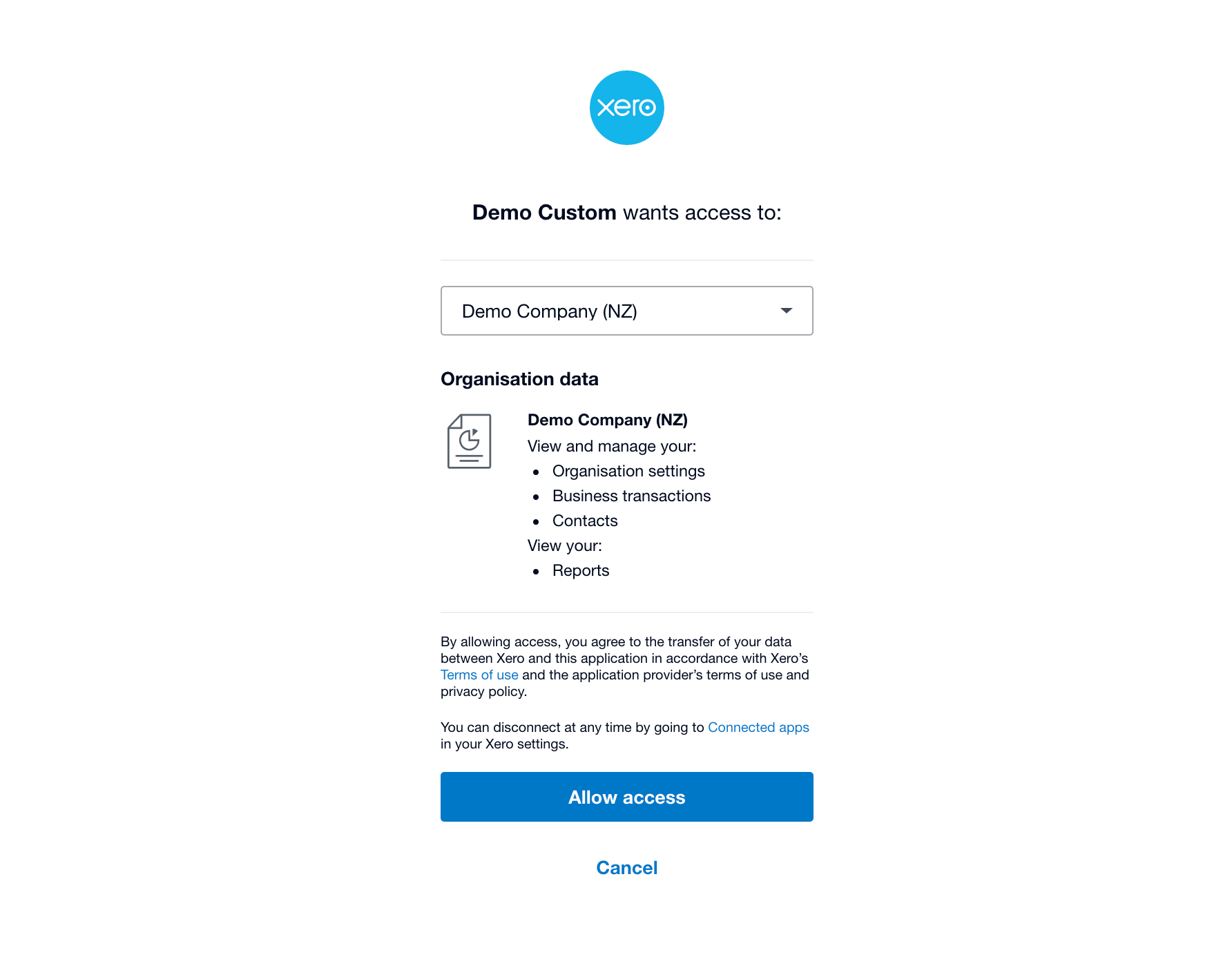
Sign up for a Paidnice account (free, no credit card), then follow the prompts to connect your Xero organisation. Paidnice pulls in your customers and invoices.
2. Create a new Auto-Statement policy
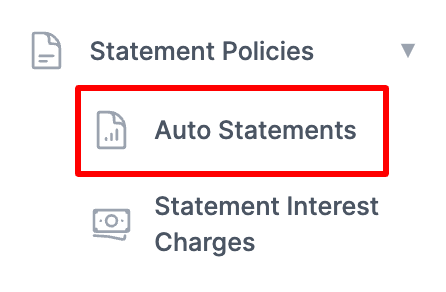
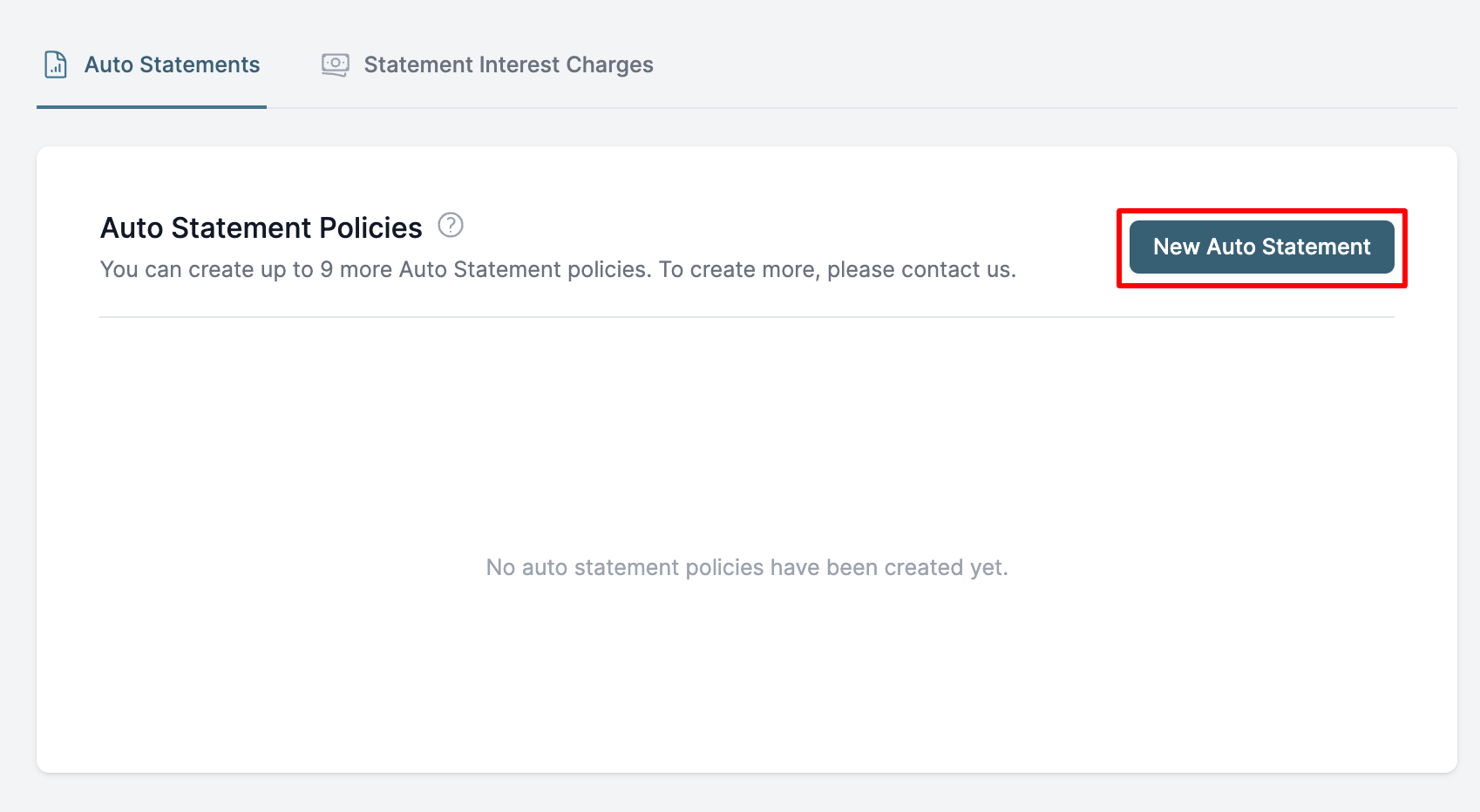
In the Paidnice app, open Auto-Statements in the left menu and click New Auto-Statement.
3. Choose the settings and the customers
The policy screen sets:
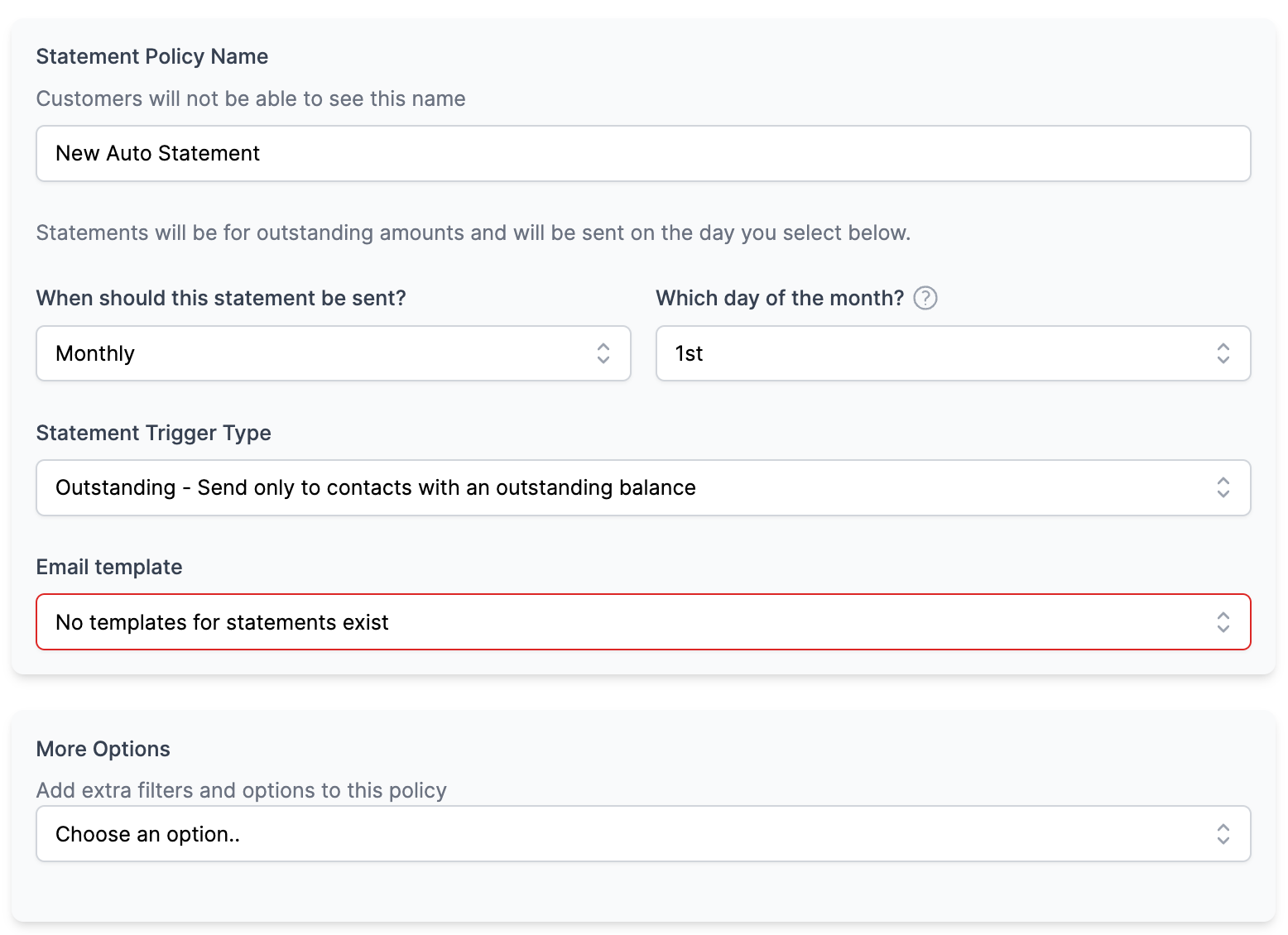
- Which customers it applies to.
- The schedule: any weekly or monthly schedule, on the days you choose.
- The statement type: outstanding, activity, or both.
- The filter: customers with overdue invoices only, or any customer with an outstanding invoice.
- The email template.
4. Go live
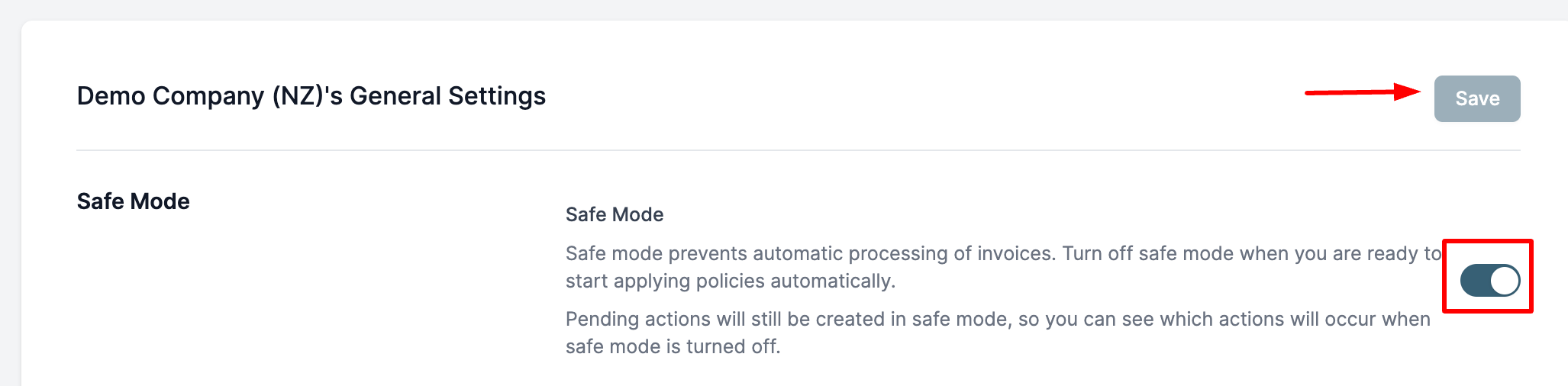
Save the policy, then turn off Safe Mode, which holds automatic sends until you are ready.
What does a Paidnice statement policy control?
A Paidnice statement policy controls the schedule (any weekly or monthly schedule, on the days you choose), the send time, the statement type, the audience, a minimum due amount and named exclusions.
Monthly (Weekdays) moves a send that falls on a weekend to the next weekday. The send time defaults to midday in your Xero organisation's timezone. Paidnice starts at US$69, £49, AU$99 or NZ$109 (ex GST) a month for 150 invoices, and statement policies work the same on QuickBooks Online.
One Paidnice statement policy, set once
Pick a schedule, choose who receives statements, and exclude anyone you do not want to include. Paidnice does the rest automatically.
Excluded contacts never receive an automatic statement, even if they have a balance.
How does Paidnice send one statement to a parent-child company group?
Paidnice sends one consolidated statement to a parent company by grouping its child entities under a nominated parent: the statement lists every open invoice, with one total, and goes to the parent customer. The full setup is in parent-child customers in Xero.
One consolidated statement for a company group
Bill a parent company that owns several entities? Put the related companies into one group, nominate the parent, and Paidnice sends a single statement covering all of them, instead of one per company.
How does Paidnice add interest to overdue statements?
Paidnice adds interest to an overdue statement through a Statement Interest Charge: a policy that charges interest per customer against the whole overdue balance, monthly on a chosen day, and recalculates the figure when the statement is sent, so the amount the customer opens is correct that morning.
The rate can be a percentage per annum prorated daily, or a percentage of the balance at issue time; UK users can follow the Bank of England base rate plus their own percentage. Statement interest is on every plan, and compounds by default.
Can Xero statements go out by post?
Not from Xero itself: Xero can print a statement to PDF, so posting one is a manual job each month. Paidnice can send every statement in a policy to one address through its Override Destination Email setting, which is how a scheduled statement reaches a print and post service. See statements by post from Xero.
For overdue letters and final notices, Paidnice prints and posts the letter on Pro plans and up, enabled on request, for US$2.00 a letter (£1.50 in the UK). See overdue invoice letters by post from Xero.
What mistakes cost you money when you send Xero statements?
Three habits leave balances unpaid for longer or hide what a customer group owes.
- Skipping the monthly run in a busy month. Xero sends a statement only when a person starts the run. Run it on the 1st and skip one month, and an invoice due on the 2nd first appears on a statement about 60 days later, not about 30. Fix: schedule the run.
- Sending a company group one statement per company. Xero sends one statement per contact. A group whose three companies owe £4,200, £1,850 and £3,500 gets three statements, and none shows the £9,550 total (£4,200 + £1,850 + £3,500). Fix: nominate the parent, so one statement lists every open invoice with one total. See parent-child customers in Xero.
- Relying on statements alone. When you chase an overdue invoice, it usually takes 2 to 3 follow-ups to get it paid. 6 in 10 are paid by the second follow-up and 8 in 10 by the fourth. Fix: add reminders between statements. Source: our analysis of invoice data from over 1,000 Paidnice customers. See how many reminders it takes.
Common questions about automatic statements in Xero
Can Xero send statements automatically?
Not on a schedule: Xero can generate statements and email them in a manual batch, but it cannot send them on a recurring schedule, filter to customers who owe you, or target a customer group. To automate any of that you connect an app such as Paidnice.
How do I send a statement from Xero?
Go to Contacts, then Customers, click the menu icon and select Send statements, choose Outstanding or Activity and the date, tick the customers, click Email and then Send. For one customer, open the contact, click the menu icon and select Send statements.
Can Xero automatically send invoices?
Yes. Xero's repeating invoices go out on a set cycle. Statements have no equivalent setting, so a scheduled statement needs a connected app such as Paidnice.
Can Xero combine statements for a group of companies?
Not in one document: Xero sends one statement per contact, so a group of companies gets one statement each. Paidnice sends a consolidated statement: nominate the parent customer, and one statement covering every child entity goes to the parent.
When should you not automate statements?
If you invoice a handful of customers and send statements manually each month, Xero's built-in batch does the job. Automation earns its keep when you send to dozens of contacts, or only to people who owe you.
Xero also applies one reminder schedule to every customer; see where the reminder side stops. With statements, reminders, late fees and prompt payment discounts running on policy, Paidnice customers see half as many late invoices in the first 30 days.
Read the transcript: How to Automatically Send Statements in Xero
Hi there. While you can send Xero statements manually, if you want to automatically send them every month or every week, you are going to need an app for that. So head on over to the Xero App Store and search for Paidnice. Now Paidnice is an app for Xero that extends the capabilities of Xero so that you can run better AR. Now click get this app to install it. And once you are inside Paidnice, you are going to want to set up an automatic statement policy. So you click this one here, automatic statement, and then here is where you can configure everything. So when it should go out: either monthly or weekly, every Monday, which day of the month, which different statement period, and all that kind of fun stuff.
Now you can include or exclude specific customers based on either Xero groups or different different manual groupings and things like this. But for this scenario, we are just going to send it to everybody. We can see here it is already loaded up, and we can see that it is in a draft mode. What this means is we can use this mode to edit all of the different settings, so our organization settings, and we can edit our email template to make sure that we we like the the the language of it and everything else. Now once that is all set up, we can have a look at the actions to be loaded here, and we can see them essentially queuing up here, in our of all of the different customers that will receive these in the future. You can do this you can use you can also approve them at this stage. So just approve them here if you want to push them into like a scheduled state where they will actually go out. Now once you are happy with that, you can turn the policy on and then you do not have to manually approve the release of these. But but yeah, that is how it works.
Now the statement itself is quite tidy. You can include you can update all the details, and you can include aged debt breakdowns and everything else. So yeah, thanks. Well to find out more or to get started for free, head on over to
Paidnice features in this article
About the editorial team
Denym started Paidnice in 2022 after customers paying late left his own business short on payroll. He has led it to $1 billion collected on time across more than 1 million invoices, and writes about credit control, late fees and getting paid on Xero and QuickBooks.
Ashley is a co-founder and lead developer of Paidnice and has built accounting software for more than 10 years. He builds the ledger connections that put reminders, late fees and payments into Xero, QuickBooks and ERPs such as NetSuite and Business Central. Before Paidnice he co-founded A2X, ecommerce accounting software for Xero and QuickBooks.
 App of the Year