

We've heard it from a lot of you. A customer calls, they can't pay the full invoice right now, and you want to work with them. So you agree on a payment plan, maybe three installments over three months, and then the real work begins.
You're tracking dates in a spreadsheet. You're manually following up when a payment is missed. You're hoping your customer actually remembers what they agreed to. And if anyone else on your team needs to know the arrangement? Good luck.
That's not a great way to manage cash flow. And it's not a great experience for your customer either.
Today we're releasing Payment Plans. A new feature in Paidnice that lets you formalize installment agreements on any invoice, track every payment automatically, and keep everyone informed without lifting a finger.
Create a payment plan in seconds
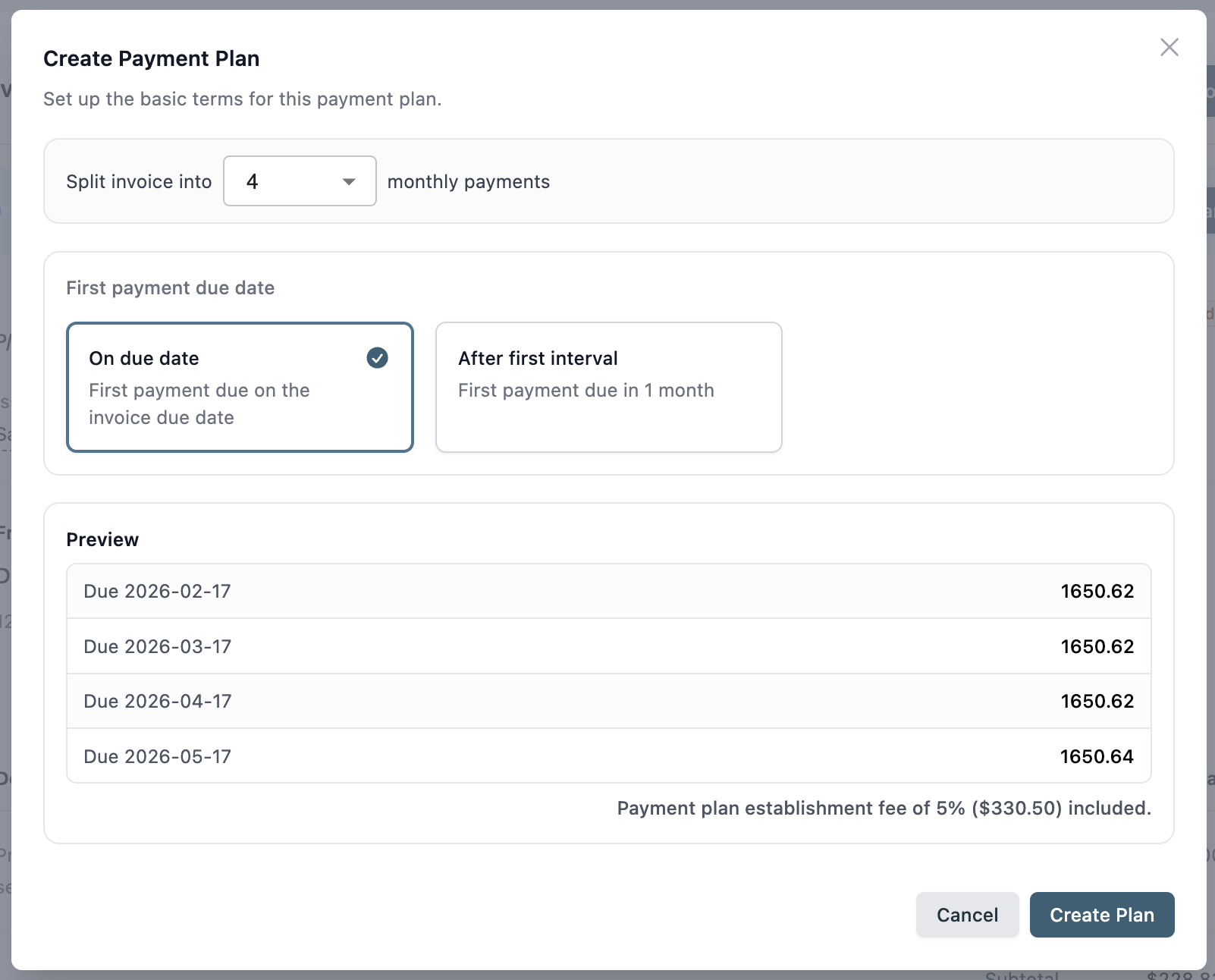
Find any invoice, choose the number of installments, the frequency (weekly or monthly), and an optional establishment fee or surcharge. You get a live preview of the exact dates and amounts before confirming. Once you create the plan, Paidnice takes it from there.
It lives on the invoice, everywhere
This is one of our favorite parts. The payment plan schedule is written directly onto the invoice in Paidnice, in Xero or QuickBooks, and on the customer's PDF. So whether your customer is logging into the portal, or someone on your team is pulling up the invoice in Xero, everyone sees the agreed dates and amounts. No confusion. No "I didn't know."
Automated reminders for every installment
Just like your regular payment reminders, you can now create reminders that fire before or after each installment date. You can BCC yourself so you're notified the moment someone misses a payment, which is especially useful if a missed installment means you need to pick up the phone.
Let customers self-serve their own plan
This one is big for businesses that routinely offer installment options, accounting firms with annual tax invoices being a perfect example. You can configure a payment plan offer in the customer portal, set your own rules (up to 12 monthly payments, for example), and let customers choose their own schedule and agree to it themselves. The plan is created, the invoice is updated, and you didn't have to be involved at all.
Cancel a plan cleanly
If circumstances change, you can remove a payment plan from within Paidnice. The invoice in Xero or QuickBooks is updated to reflect the removal, including any surcharge that was added. So there's no stale information floating around.
Payment Plans are useful in two situations:
When a customer can't pay in full right now. Instead of an informal arrangement that's hard to track, you formalize it in Paidnice. They know what they owe and when. You know when to expect it. And if they miss one, you're automatically notified.
When you want to proactively offer installment options. Think accounting firms, professional services businesses, or anyone with large annual invoices. Rather than waiting for the awkward conversation, you offer the option upfront, and customers can set it up themselves in your portal.
Payment Plans are available on Pro plans and above, starting today.
To enable it, head to your Paidnice settings and configure your Payment Plans setup, you can decide whether to allow customer self-service, set the maximum number of installments, and configure your surcharge.
To create a plan manually, open any invoice and click the Payment Plans option. The setup takes under a minute.
If you are on QuickBooks Online, the guide to QuickBooks installment payments covers the native options and the Paidnice setup step by step.
We'd love to hear how you're using it. Reach out anytime to us here.
The Paidnice Team
Paidnice is accounts receivable automation that enforces your payment terms, trusted by thousands of businesses on Xero and QuickBooks. Credit control and debtor management, run for you.
Try it Now - It's FreeNo card required.



Optimize your cash flow with our suite of financial tools designed for AR professionals. Calculate DSO, aging analysis, late fees, and more.