


Summary
QuickBooks Online has no native way to split one invoice into scheduled installments. It has four routes that get called payment plans: Affirm financing, recurring sales receipts, progress invoicing and Autopay, and none of them puts a schedule on an invoice you already sent.
- Newest native option: Affirm pay-over-time works on invoices from $50 to $20,000 USD in the US only, and costs the standard 2.99% card rate.
- The trap: A recurring sales receipt run alongside an open invoice double-counts revenue, a mistake a CPA flagged in Intuit's own community in June 2026.
- The fix: Paidnice puts a true installment schedule on an invoice you already raised, with reminders and auto-charging, from a Pro plan starting at US$99 a month.
To set up installment billing for a service business in QuickBooks Online, agree the schedule, keep the one invoice open and record each installment with Receive payment. QuickBooks has no native plan tool, so Paidnice, on the Pro plan, moves the invoice due date to each installment and collects through Stripe when it is connected.
Does QuickBooks Online have a native payment plan?
No. QuickBooks Online has no way to split one existing invoice into a scheduled series of payments; what it offers instead are four adjacent routes that solve different problems. A payment plan in this guide means a business customer paying one invoice in scheduled installments that you set. Consumer financing such as Affirm, Afterpay or Klarna is a different product.
Buy now pay later (Affirm on QuickBooks invoices) is consumer credit: the person paying is credit-checked, you are paid in full the next business day, and the option stops at $20,000 and at the US border. A B2B installment plan is you extending the credit: the invoice stays open, the customer pays it down on agreed dates, and you carry the risk until the last payment lands. QuickBooks Online has no native schedule for that second case, and the correction for the most-recommended workaround never made it into Intuit's help docs.
Which QuickBooks payment plan route fits which job?
Each native QuickBooks Online route answers a different question: who carries the credit risk, when you get the cash, and what your ledger looks like afterwards. Match your situation in the table, then jump to the section that walks through it.
| Route | Cash timing | Fee to you | Credit risk | Limits | Best for |
|---|---|---|---|---|---|
| Affirm on invoices | Full amount, next business day | 2.99% (standard card rate) | Affirm carries it | $50 to $20,000 USD, US only, consumer credit check | Consumer-sized jobs where you want the cash now |
| Recurring sales receipt | Spread over the schedule | Normal processing fees | You carry it | Needs signed card authority; cannot sit alongside an open invoice (see the trap below) | Fixed repeating charges that were never invoiced up front |
| Progress invoicing | Per milestone | Normal processing fees | You carry it | Estimate-based; multiple invoices, not one split invoice | Project work billed by stage or percentage |
| Autopay on recurring invoices | Per invoice, on due date | Normal processing fees | You carry it | Customer opts in, recurring invoice templates only | Subscriptions and retainers |
| Manual partial payments | Whenever the customer pays | Normal processing fees | You carry it | No schedule, no reminders, no visibility for the customer | A one-off arrangement you are happy to police yourself |
| Plan app (Paidnice, Partial.ly) | Spread over the schedule, auto-charged | App subscription | You carry it, with enforcement built in | Connected app required | B2B installment plans on invoices you have already raised |
How does Affirm financing work on QuickBooks invoices?
Affirm on QuickBooks Online lets a customer pay an invoice of $50 to $20,000 USD over 3 to 36 months while you are paid in full the next business day, for the standard 2.99% card rate. Intuit and Affirm announced the partnership in February 2026. It is the closest thing QuickBooks now has to a native payment plan, and for the right job it is genuinely good: your customer spreads the cost, you get all of the money the next business day, and Affirm owns the chasing.
The facts that matter, from Intuit's own documentation:
- Works on payment-enabled invoices between $50 and $20,000 USD, in the US only, through QuickBooks Payments.
- Your customer picks terms of 3 to 36 months, from 0% APR depending on their credit check.
- You are paid in full the next business day and the invoice is marked paid automatically.
- It costs you the standard 2.99% card rate (Intuit's rates page).
- It is a per-invoice toggle, and it is not available on estimates, recurring invoices, batch invoices, or subscriptions.
Affirm is built for consumer-style purchases. A landscaping job, a med-spa package, a $9,000 kitchen refit. It runs a consumer credit check on the person paying, which makes it the wrong tool for invoicing a company on trade terms, anything over $20,000, repeat B2B billing, or any customer outside the US. For those, keep reading.
Can a recurring sales receipt pay down a QuickBooks invoice?
No. A recurring sales receipt in QuickBooks Online charges a stored card on a schedule you set, but each receipt records its own revenue, so it never reduces the balance of an open invoice. It is still Intuit's most-linked answer for installments. The setup, condensed from Intuit's guide:
- Get a signed recurring card authorization from your customer first.
- Select New, then Sales receipt, and choose the customer.
- Select Make recurring and set the template type to Scheduled.
- Set the interval, start date, and the number of occurrences.
- Enter the payment method and the installment amount, then save.
That flow works when the charge was never invoiced in the first place. The trouble starts when people run it on top of an invoice that is already sitting in accounts receivable, which is exactly what most searchers here are trying to do.
Recurring sales receipts charge the card, but they do not pay down your invoice. A sales receipt needs its own product or service line, so each one records new revenue. Run one alongside an open invoice and you book the sale twice: once on the invoice, again on every receipt, while the original invoice sits in accounts receivable aging as unpaid.
A CPA flagged this in Intuit's own community in June 2026, calling the recommended workaround "incorrect advice". The clean method for an existing invoice is Receive payment against that invoice for each installment, so the balance falls and revenue is counted once.
Is progress invoicing in QuickBooks a payment plan?
No. Progress invoicing in QuickBooks Online splits an accepted estimate into several invoices, by percentage or amount, as work completes; it is for milestones, not installments on one invoice. Turn it on under Account and settings, Sales, then "Create multiple partial invoices from a single estimate". It is the right tool for staged project billing: deposit invoice, mid-project invoice, completion invoice.
It is not a payment plan. There is no estimate behind a service invoice you have already raised, each stage is a separate document with its own due date, and nothing reminds the customer between stages. Intuit's own guide draws the same line: payment plans give the customer flexibility, installment arrangements are preset. If your customer owes one fixed amount and wants to pay it in six pieces, progress invoicing is the wrong shape. QuickBooks has also been rolling out Schedule Pay, which lets a customer pick a future date to pay an invoice. One date, paid in full. Useful, still not a schedule.
How should a service business choose between a payment plan, recurring invoices and progress invoicing?
A service business picks by when the price was agreed. Use a payment plan when one invoice already exists and the client pays it in parts. Use recurring invoices when each period is a new charge, and progress invoicing when an estimate is split into stages before work starts.
| Situation | Right tool in QuickBooks Online | Why |
|---|---|---|
| Website build invoiced at $9,000, client asks to pay over three months | Payment plan on the one invoice | Each installment goes in with Receive payment against that invoice, so the sale is counted once (QuickBooks help) |
| Monthly bookkeeping or IT support retainer | Recurring invoices | A Scheduled recurring template creates a new invoice each period, and each period is new work (QuickBooks help) |
| Fit-out estimated at $40,000, billed at deposit, midpoint and handover | Progress invoicing | Turn on "Create multiple partial invoices from a single estimate" and bill each stage from the estimate (QuickBooks help) |
Problems start when the tools get mixed. A recurring invoice or recurring sales receipt for an amount that is already on an open invoice counts the revenue twice. If the client asks for installments after the invoice goes out, put the plan on that invoice.
How do you invoice monthly payments in QuickBooks Online?
To take monthly payments on one QuickBooks Online invoice, keep the invoice open and record each payment with Receive payment against it, so the balance steps down and revenue is counted once. The two QuickBooks community threads that rank for this search are the real use cases. Here is the clean answer to each.
"The invoice is for $1,000 and they want to pay $200 a month." Keep the single invoice open. Record each $200 as Receive payment against it, so the balance steps down and your books stay honest. QuickBooks will not remind anyone about the remaining $800, so either diarize the chasing or put the invoice on an automated plan (next section) where each installment reminds and collects itself.
"We take a 20 to 40% deposit, then finance the balance over 36 months." This contractor-style arrangement, straight from a long-running community thread, does not fit any native route. Affirm caps at $20,000 and 36 months on consumer credit. Recurring receipts double-count. The workable structure: a deposit as the first installment, the balance on a written schedule with autopay, and interest (if you charge it) invoiced as it accrues. Put the agreement in writing before the first payment; our payment plan agreement template covers the clauses that protect you if it goes quiet.
How do you offer a payment plan on an overdue invoice in QuickBooks Online?
To offer a payment plan on an overdue QuickBooks Online invoice, keep the invoice open, agree the schedule in writing, record each installment with Receive payment against that invoice, and hand the reminders and charging to a connected app.
- Agree a deposit, the installment amount and the dates with the customer. An overdue invoice is the point of maximum leverage, so ask for a deposit before the plan starts.
- Put the agreement in writing before the first payment. The agreement template takes ten minutes.
- Do not create a recurring sales receipt against the invoice; it double-counts the revenue.
- Record every installment as Receive payment on the original invoice so the balance steps down.
- Decide in advance what a missed installment triggers: a reminder, a late fee, or the whole balance falling due.
QuickBooks will not remind the customer about the next installment or charge their card on the date. Either diarize each date yourself or put the invoice on a Paidnice plan, where the schedule sits on the invoice, installments auto-charge, and a missed one triggers the reminder or fee. The overdue invoice playbook covers deposit size and plan length.
How do you put a true installment plan on a QuickBooks invoice?
A true installment plan on a QuickBooks Online invoice needs a connected app: Paidnice connects to QuickBooks Online and creates the plan on the invoice you already raised, then moves the invoice due date to each installment in turn. That is the layer for "this exact invoice, paid in scheduled installments, without me policing it":
- Pick the invoice, set the deposit and the schedule: weekly, fortnightly, four-weekly, monthly, bi-monthly or quarterly. Installment amounts can differ, so $500 a month with a final settlement payment for the remainder works fine.
- The schedule is written onto the invoice in Paidnice, in QuickBooks, and on the customer's PDF, so both sides see the same dates.
- Installments auto-charge through Stripe once your customer authorizes the plan, and every payment writes back to the invoice, so the trap above never happens. Connecting Stripe to your QuickBooks reminders takes three steps.
- Reminders go out before and after each installment, from your own domain, and late fees apply to a missed installment if that is your policy.
- Customers can also self-serve a plan from the payment portal, inside rules you set: minimum deposit, maximum installments, optional establishment fee.
Payment plans are included on Pro plans, from US$99 a month with local pricing in seven currencies. Businesses using Paidnice see half as many late invoices in the first 30 days, and you can see what that looks like across our customer stories, from a bookkeeping firm that took a six-figure overdue book down by more than half to an events company that went from 20% late to zero. Setup is about 15 minutes from the QuickBooks app listing to the first live plan. If your jobs are consumer-sized, one-off, and under $20,000, Affirm above is the recommendation; where the two overlap, Affirm buys you next-day cash for 2.99%, Paidnice gives you the schedule, the enforcement, and a flat cost.
How does a payment plan connect to the QuickBooks invoice?
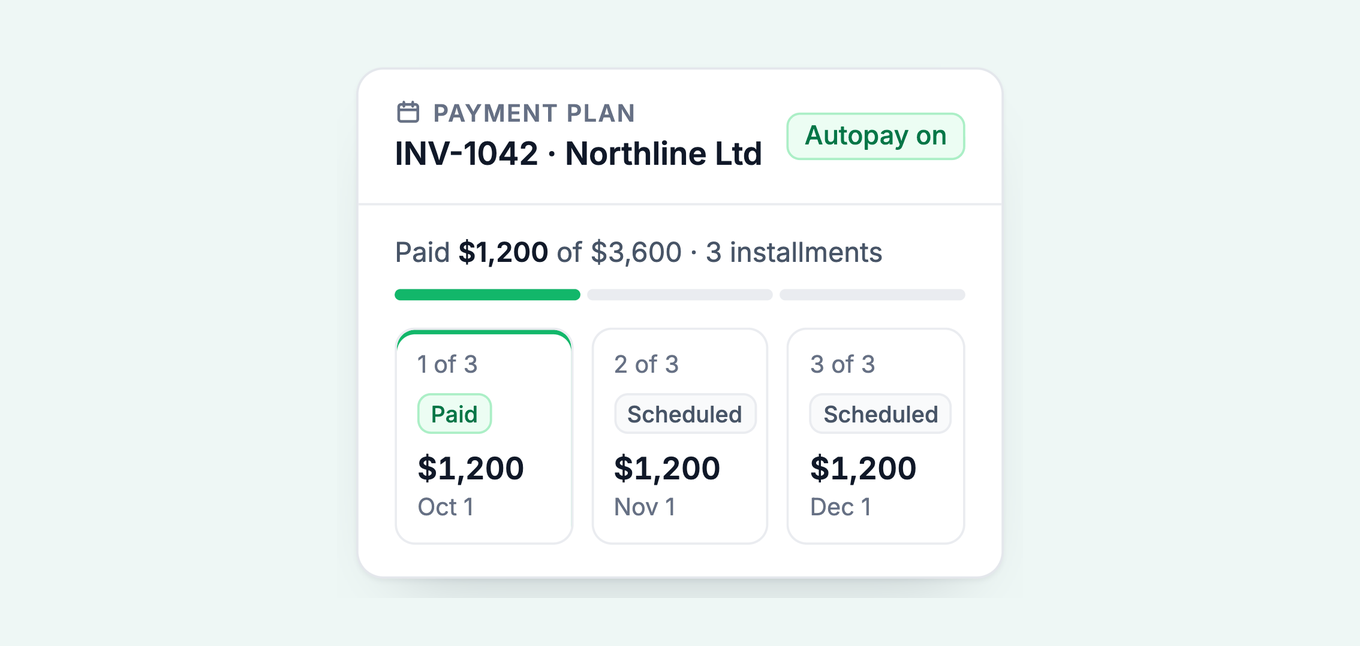
A Paidnice payment plan sits on the QuickBooks Online invoice itself. The invoice number stays the same, and the total stays the same unless you add an establishment fee.
- Before the plan: one approved invoice, no payments against it, one due date. Paidnice puts a plan only on an invoice in that state.
- During the plan: Paidnice writes a zero-value line onto the invoice that lists the schedule and moves the due date to the next installment. Each payment writes back to the invoice, so the balance steps down.
- After a missed installment: the invoice goes overdue again from that date, and your normal reminders, late fees and interest apply.
- After the last installment: the balance reaches zero and QuickBooks shows the invoice as paid.
A plan the customer builds in the payment portal needs no approval. When a customer asks for a plan by email, Paidnice AI drafts it and it waits for your approval. The payment plans feature page has the short tour, the payment plan calculator models a schedule before you offer it, and our guide to the best accounts receivable software with payment plans compares the other options.
How do you keep a payment plan enforceable?
A payment plan is enforceable when the customer signs the schedule before the first installment date and the agreement states what a missed installment triggers. Get the arrangement signed: the agreement template takes ten minutes to fill in, and if the plan is rescuing an already overdue invoice, the overdue invoice playbook covers deposits, plan length, and what to do the day an installment is missed. For the wider decision of when plans help and when they quietly turn you into a lender, start with the complete guide to customer payment plans.
Common questions
Can you set up a payment plan on QuickBooks?
Not on a single invoice natively. QuickBooks Online offers Affirm financing (customer pays over 3 to 36 months, you are paid next day), recurring sales receipts for scheduled card charges, and progress invoicing for estimate-based stages. A true installment schedule on one existing invoice needs a connected app such as Paidnice.
Does QuickBooks offer Afterpay or Klarna?
No. Affirm is the integrated pay-over-time provider for QuickBooks invoices. It covers invoices from $50 to $20,000 USD in the US, costs the business the standard 2.99% rate, and pays out the next business day.
Can a customer make a partial payment on a QuickBooks invoice?
Yes. Record it with Receive payment against the invoice and the open balance reduces. QuickBooks accepts partial payments happily; what it does not do is schedule the rest, remind the customer, or show them a plan.
Do recurring sales receipts pay down an invoice?
No, and this is the trap. Each sales receipt records its own revenue line, so running one against an open invoice double-counts the sale and leaves the invoice aging as unpaid. Use Receive payment for invoice installments, or an app that writes each installment back to the invoice.
What does the Affirm option cost the business?
The standard QuickBooks Payments card rate of 2.99% per financed invoice, per Intuit's published rates. On a $12,000 invoice that is $358.80. Your customer's own cost is 0% to 36% APR depending on their credit and chosen term.
More on payment plans
This QuickBooks guide is part of a set of three companion pieces on customer payment plans. Each piece stands alone; together they cover the whole system.
- Customer payment plans: the complete guide: when to offer them, when to decline, and how to structure the deal.
- Payment plan agreement template: the signed paperwork, clause by clause, free to download.
- Payment plans for overdue invoices: rescuing money that is already late.
About the editorial team
Denym started Paidnice in 2022 after customers paying late left his own business short on payroll. He has led it to $1 billion collected on time across more than 1 million invoices, and writes about credit control, late fees and getting paid on Xero and QuickBooks.
 App of the Year