


Summary
Set up a payment plan in Xero by keeping the one invoice, writing the installment dates in its notes, and recording each installment as a part payment during bank reconciliation (Find & Match, tick the invoice, Split). Xero has no native installment feature; Paidnice adds the schedule, per-installment reminders and autopay to that same invoice.
- The gap: Xero records part payments and, since June 2026, a Stripe deposit on an invoice, but cannot schedule installments, remind per installment, or auto-collect a plan.
- The workaround that backfires: Splitting one invoice into repeating invoices books the same sale twice and leaves the original invoice aging as unpaid.
- The fix: Paidnice, on the Pro plan, writes the schedule onto the Xero invoice and the customer PDF and auto-charges each installment through Stripe or Pinch.
To set up installment billing for a service business in Xero, agree the schedule, write it on the unpaid invoice and chase each installment date. Xero has no native plan tool, so Paidnice, on the Pro plan, moves the invoice due date to each installment and collects through Stripe, or Pinch Payments in Australia and New Zealand.
Does Xero have payment plans?
No. Xero has no built-in payment plan or installment feature. Xero can record part payments against an invoice and, since June 2026, take a Stripe deposit on an invoice, but it cannot schedule installments, remind the customer per installment, or collect a plan automatically. Google's own AI Overview for this query reaches the same conclusion: Xero has no native, automated multi-installment plan builder, and connected apps handle scheduled payments. Searching "Xero payment plans" also returns Xero's own subscription pricing; the steps below are for letting a customer pay one invoice in installments.
What can Xero do natively for installments?
Natively, Xero offers four features that get mistaken for payment plans: part payments, Stripe deposits, the expected payment date field, and repeating invoices. Each is useful, and none of them schedules, reminds per installment, or collects a plan.
| Native feature | What it does | Schedule visible to customer | Reminders per installment | Auto-collects | Keeps one invoice |
|---|---|---|---|---|---|
| Part payments | Records each partial payment against the invoice during reconciliation; balance steps down | No | No | No | Yes |
| Deposits via Stripe (new, Jun 2026) | Customer pays a deposit on the online invoice; balance stays due | Deposit only | No | Deposit only | Yes |
| Expected payment date | Internal planning field for your cash flow view | No (invisible to customer) | No | No | Yes |
| Repeating invoices | Generates new invoices on a schedule | Per new invoice | Per new invoice | No | No (many invoices) |
| Invoice reminders | Chase the whole invoice after its single due date | No | Whole invoice only | No | Yes |
Xero is aware of the gap. The request for installments on invoices has been open on Xero Product Ideas since 2012, carries 252 votes. What Xero shipped in June 2026 was deposits on invoices (515 votes): live for organizations in Australia, New Zealand, the UK, the US, Canada, and Singapore, provided you use Stripe. A deposit can carry its own due date, separate from the invoice due date. Xero's own response on the thread notes it "doesn't yet cover fuller progress-payment and installment workflows". That sentence is the current state of play.
Why does splitting an invoice into repeating invoices backfire?
Turning one Xero invoice into several repeating invoices books the same sale twice: the original invoice stays in receivables as unpaid while each repeating invoice adds new revenue. The walkthrough at the top of Google for this search still recommends it.
A repeating invoice creates new revenue every time it fires. If the work is already on an invoice, adding a monthly repeating invoice for the "installments" books the same sale twice: once on the original, again each month, while the original sits in your receivables aging as unpaid. Your revenue is overstated, your debtor report is fiction, and your accountant gets to unwind it at year end.
Repeating invoices are the right tool when each billing period is genuinely its own charge, a retainer, a subscription, rent. For an amount already invoiced, either record part payments against the original or put the original on a managed plan. If you do split an agreed project into stages up front, that is progress billing with separate invoices per stage, decided before anything is issued, not a repair job afterwards.
How should a service business choose between a payment plan, repeating invoices and progress billing?
A service business picks by when the price was agreed. Use a payment plan when one invoice already exists and the client pays it in parts. Use repeating invoices when each period is a new charge, and progress billing when the project is split into stages before work starts.
| Situation | Right tool in Xero | Why |
|---|---|---|
| Website build invoiced at $9,000, client asks to pay over three months | Payment plan on the one invoice | The sale is booked once; only the cash timing changes |
| Monthly bookkeeping or IT support retainer | Repeating invoices | Each month is new work, so each invoice is new revenue (Xero Central) |
| Fit-out quoted at $40,000, billed at deposit, midpoint and handover | Progress billing, one invoice per stage | Raise a deposit invoice, then one invoice per stage; Xero Projects applies the deposit to later project invoices (Xero Central) |
Problems start when the tools get mixed. A repeating invoice for an amount that is already on an invoice books the sale twice, as the section above shows. If the client asks for installments after the invoice goes out, put the plan on that invoice.
How do I record a payment plan in Xero manually?
Record a payment plan manually in Xero by agreeing the schedule in writing, keeping one invoice with the installment dates in its notes, and applying each installment as a part payment during bank reconciliation. Three steps cover it.
- Agree it in writing first. Deposit, dates, amounts, and what happens on a miss. Ten minutes with our agreement template covers it.
- Keep one invoice, and write the schedule on it. Put the installment dates in the invoice terms or notes so anyone opening it sees the arrangement. Do not split it into new invoices.
- Record each installment as a part payment. When the money lands in your bank feed, use Find & Match, tick the invoice, click Split, and enter the installment amount (Xero Central has the exact clicks). The invoice stays awaiting payment with a falling balance until it hits zero.
What Xero will not do in this setup: remind the customer about installment dates (invoice reminders fire off the single due date, not your schedule), collect anything automatically, or tell you an installment was missed. With one or two plans running, a calendar and some discipline cover it. At five plans it becomes a part-time job, which is roughly the point our customers stop doing it by hand.
Can Xero take a deposit on an invoice?
Yes. Since June 2026, a Xero organisation in Australia, New Zealand, the UK, the US, Canada, or Singapore that uses Stripe can add a deposit to an online invoice; the customer pays it on the spot and the balance stays due on the invoice. It is half a payment plan: money now, commitment proven, but the remaining balance still has one due date and no schedule. The other half, dates, reminders, and collection for the balance, is what the next section adds. If you are choosing deposit sizes, 20 to 30% on overdue balances and up to 50% on new work are the working norms (the reasoning is in the complete guide).
How do I set up a payment plan on a Xero invoice with Paidnice?
Paidnice sets up a payment plan on the Xero invoice you already raised: connect Paidnice to Xero, set the plan rules, open the invoice, choose the deposit, installment count and frequency, and confirm. The invoice must be approved with no payments against it, and holds one plan at a time.
- Connect Paidnice to Xero. Standard Xero OAuth from the Xero integration page or the Xero App Store; a couple of minutes, no data migration.
- Set your plan rules. Maximum number of installments, frequency, allowed first payment dates, an optional establishment fee, and which invoices are eligible by days overdue, so customers can self-serve plans from the payment portal inside those rules.
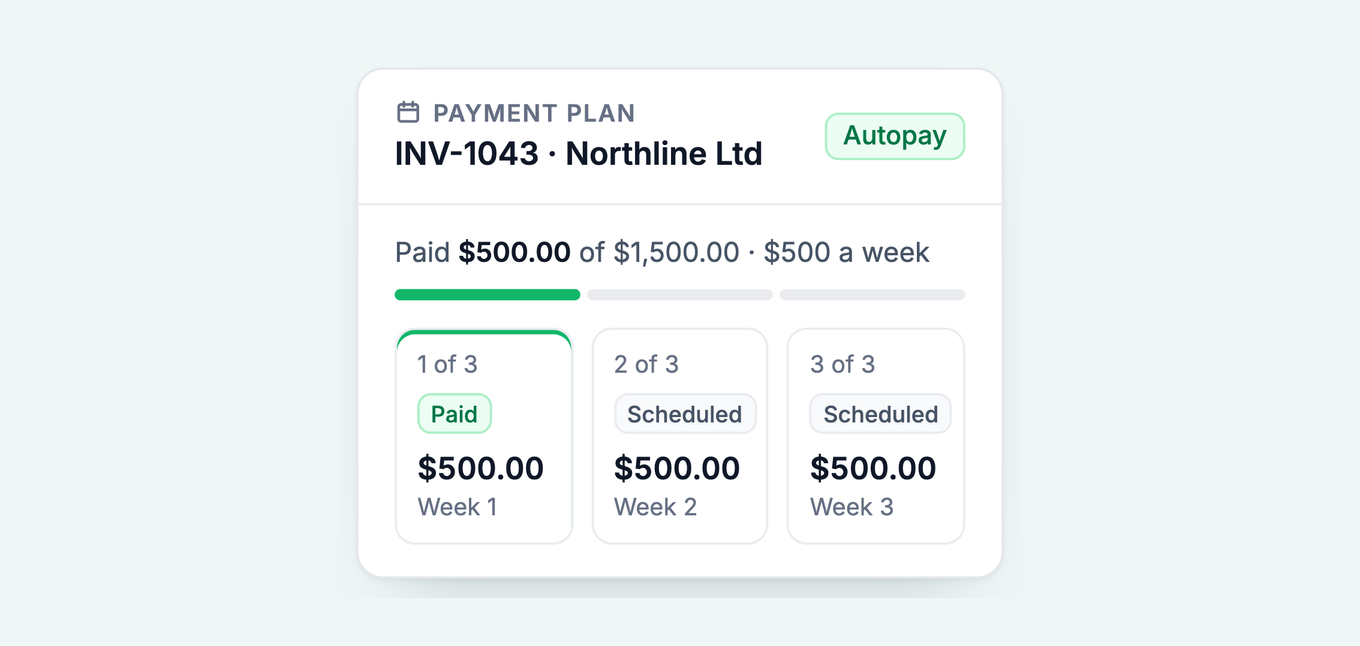
- Open the invoice and create the plan. Choose the deposit, the number of installments, and the frequency: weekly, fortnightly, four-weekly, monthly, bi-monthly, or quarterly. Amounts can differ per installment, so $500 a week with a final settlement payment for the remainder is fine. You see a live preview of exact dates and amounts before confirming.
- Confirm, and the schedule goes everywhere it needs to. It is written onto the invoice in Paidnice, in Xero, and on the customer's PDF, so there is one version of the truth.
- Let it run. Installments auto-charge through Stripe or Pinch Payments under the customer's signed authority, reminders go out before and after each installment from your own domain, and every payment writes back to the Xero invoice as a part payment, so reconciliation looks exactly like the manual method without anyone doing it.
The mechanic underneath is simple: Paidnice moves the invoice due date to the next installment's date, and when that installment is paid, the due date moves to the one after it. A missed installment makes the invoice overdue again, so the normal reminders, late fees and interest for that customer group apply from that date, with no separate workflow to build.
Payment plans are included on Pro plans, from US$99 a month with local pricing in seven currencies. Customers see half as many late invoices in the first 30 days across the base, and the shape repeats through our customer stories: a bookkeeping firm took outstanding invoices from $60,000 to $24,000, an events company went from one late booking in five to none. The payment plans feature page has the short tour, and the payment plan calculator models schedules, deposits, and interest before you commit to numbers with a customer.
How does a payment plan connect to the Xero invoice?
A Paidnice payment plan sits on the Xero invoice itself. The invoice number stays the same, and the total stays the same unless you add an establishment fee.
- Before the plan: one approved invoice, no payments against it, one due date. Paidnice puts a plan only on an invoice in that state.
- During the plan: Paidnice writes a zero-value line onto the invoice that lists the schedule and moves the due date to the next installment. Each payment lands as a part payment, so the balance steps down.
- After a missed installment: the invoice goes overdue again from that date, and your normal reminders, late fees and interest apply.
- After the last installment: the balance reaches zero and Xero shows the invoice as paid.
A plan the customer builds in the payment portal needs no approval. When a customer asks for a plan by email, Paidnice AI drafts it and it waits for your approval. To see how other tools handle plans, compare accounts receivable software with payment plans.
Which payment rails work for Xero payment plans?
Five tools collect payment plans on Xero invoices: Paidnice and Pinch Payments put the installment schedule on the invoice itself, GoCardless and Stripe collect only, and Paythen holds the plan in its own system and syncs by Zapier. Where each fits:
| Tool | What it does with Xero | Installment schedule on the invoice | Best for |
|---|---|---|---|
| Paidnice (our product) | Full AR layer: payment plans on existing invoices, per-installment reminders and autopay, late fees, statements, escalation; writes back to Xero | Yes, on the invoice and the customer PDF | Businesses that want plans plus the rest of collections handled in one place |
| Pinch Payments | AU/NZ payments platform: direct debit and cards, can break an existing Xero invoice into an installment schedule (50/25/25 style splits) | Yes, via its payment plan flow | AU/NZ businesses whose main need is the collection rail itself |
| GoCardless | Direct debit mandates for Xero invoices; pull-based collection, strong in the UK | No, collection only, plan managed by you or a partner tool | UK businesses on bank-to-bank collection |
| Stripe (native Xero) | Cards and wallets on online invoices, now including deposits; scheduled payment of an invoice by the customer | Deposit only | Everyone already on Stripe who needs deposits and card payment today |
| Paythen | Stripe-based payment plans; connects to Xero via Zapier rather than a native integration | In Paythen, synced across by Zapier | Stripe-first businesses happy to maintain Zapier plumbing |
How do I keep a Xero payment plan enforceable?
A Xero payment plan stays enforceable with a signed agreement (balance acknowledged, the schedule, autopay authority, and acceleration on default) and a written missed-installment rule: a retry, a late fee, a short cure window, then the remaining balance falling due. The full protocol, including the scripts, lives in payment plans for overdue invoices. One accounting note worth pinning: for standard invoice-basis GST and VAT registrants, tax follows the invoice, not the installment dates, so a plan spreads the cash without moving the tax point. Confirm your own treatment with your accountant.
Common questions
Can Xero split an invoice into installments?
No. Xero records part payments against an invoice and, since June 2026, can take a Stripe deposit on an invoice, but it cannot create an installment schedule, remind per installment, or auto-collect a plan. A connected app covers the gap today.
How do I record a part payment in Xero?
During bank reconciliation, open Find & Match on the statement line, tick the invoice, click Split, and enter the amount received. The invoice stays awaiting payment and the balance reduces. Repeat per installment until it reaches zero.
Can my customers set up their own payment plan?
With Paidnice connected, yes: customers can self-serve a plan from the payment portal inside rules you set, the maximum number of installments, the frequency, the allowed first payment dates, an optional establishment fee, and eligibility by days overdue. You approve the rules once instead of negotiating every plan.
Does a payment plan change my GST or VAT?
Generally no for invoice-basis registrants: the tax point follows the invoice date, so installments change when cash arrives, not when tax falls due. Cash-basis registrants report as payments land. Check your scheme with your accountant.
More on payment plans
This guide is part of a set on customer payment plans. Each piece stands alone; together they cover the whole system.
- Customer payment plans: the complete guide: when to offer them, when to decline, and the structure that protects you.
- Payment plan agreement template: the signed paperwork, clause by clause, free to download.
- Payment plans for overdue invoices: deposits, terms, and the missed-installment protocol.
About the editorial team
Denym started Paidnice in 2022 after customers paying late left his own business short on payroll. He has led it to $1 billion collected on time across more than 1 million invoices, and writes about credit control, late fees and getting paid on Xero and QuickBooks.
 App of the Year