



Summary
Xero has no progress-claim or retention feature. Raise each claim as a normal Xero invoice with the retention held as a negative line, tag every line with a project tracking category, and keep a draft retention invoice dated to the release date.
- The workaround: A retention line on each claim, a tracking category per project, and one draft retention invoice per project approved when release falls due.
- The trap: The retention invoice is the one most likely to be forgotten, because the release date sits in a contract clause months after the last claim was chased.
- The fix: Paidnice runs reminders, statements and late fees off the same Xero due date, so nothing needs re-entering once the retention invoice is approved at release.
This guide is written for Australian builders and subcontractors on Xero. It covers what Xero's own progress invoice and deposit request do, what a retention is, the ledger workaround, the construction add-ons that fill the gap, the Security of Payment clocks in three states, and how the retention invoice gets followed up at release. For the ledger side, see accounts receivable software for construction.
How do you manage progress claims and retentions in Xero?
Raise each progress claim as a standard Xero invoice, show the retention held as a negative line, tag every line with a project tracking category, and keep one draft retention invoice per project dated to the release date.
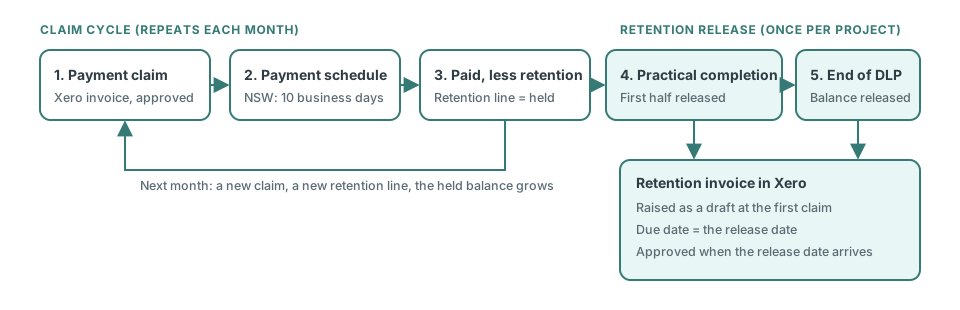
Xero has no progress-claim or retention feature. The request for one on Xero's product ideas board, "Sales Invoices - Ability to specify a % of invoice held on retention", was posted on 1 September 2022, has 59 votes and sits at status Submitted. Xero's Community Manager replied on 22 May 2024 that the feature is not planned for development and suggested a negative line item coded to a retentions account, which is the workaround this guide uses. Corecon's Xero integration docs say the same: Xero has no retainage function, so use a draft invoice approved when retention falls due, with Tracking Categories per project. The full method takes six steps.
- Create a tracking category called Project and add each job as an option. Every claim line, retention line, and cost gets tagged, so the project's retention balance is one report filter away. The tag drives reports only; using Xero tracking categories for reminders needs a connected app.
- Set up two items. "Retention held" as a negative sales line coded to a retention liability or clearing account, and "Retention released" as a positive line coded to the same account. Ask your accountant which account type to use for held retention.
- Raise each claim as a normal invoice. Work completed this period as positive lines, the retention percentage as one negative "Retention held" line. The invoice total is what the client should pay against this claim.
- Raise the retention invoice as a draft on day one. One "Retention released" line for the amount you expect to hold across the project. Set its due date to the contractual release date. Leave it as a draft so nothing is sent early.
- Adjust the draft as the project runs. Each new claim adds to the held amount; update the draft's line to match. At practical completion, split it if the contract releases half then and half after the defects liability period.
- Approve and send at release. When the release date arrives, approve the draft. It is now a live receivable with a due date, and it enters the client's aged payables like any other invoice.
Assumes equal claims. Enter your own contract's percentage, cap, and release split; the figures are the line amounts to put on the draft retention invoice, not tax advice.
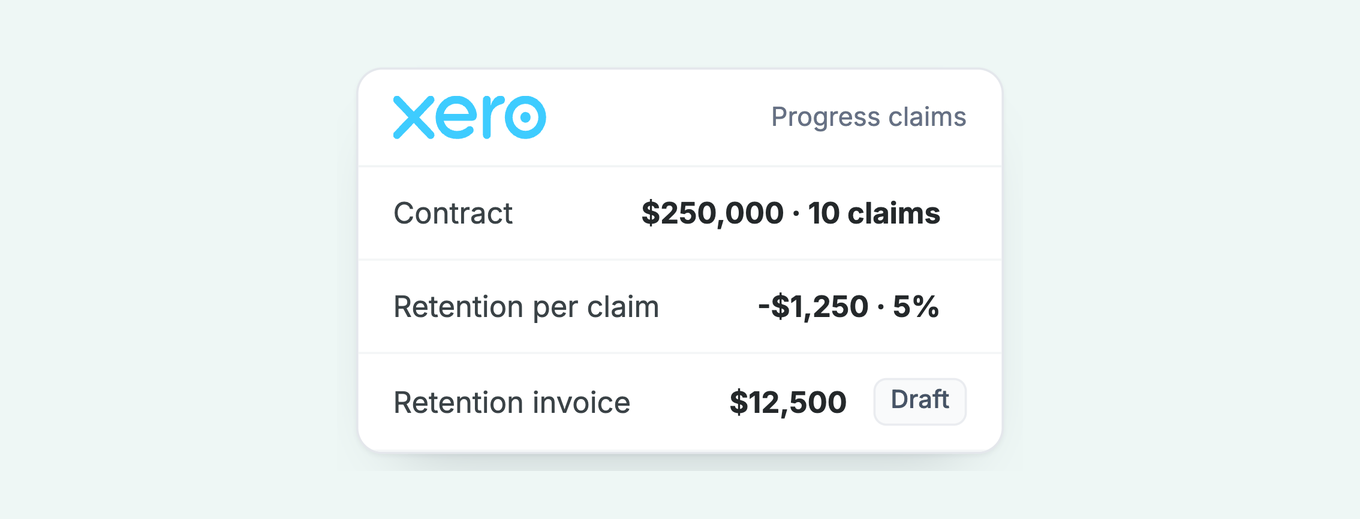
Example: a $250,000 contract billed in ten equal claims with 5% retention carries a -$1,250 "Retention held" line on each claim. The draft retention invoice is $12,500. If the contract releases half at practical completion, split the draft into $6,250 due at practical completion and $6,250 due at the end of the defects liability period.
Free: Payment reminder email templatesCopy the reminder emails for before, on and after the due date.Does Xero's progress invoice or deposit request handle retentions?
No. Xero's deposit request and Xero Projects deposit both cover a single upfront payment, but neither tracks a contract sum, a percentage complete, or a retention held across many invoices.
Two native features get mistaken for progress-claim support; both stop short of a construction claim. The deposit request adds a percentage or fixed deposit to an invoice. It requires Stripe, is recorded as a part payment, and the deposit is revenue that attracts tax. Xero Projects adds project-level deposit invoicing. Re-check the Xero Central deposit article before relying on the exact wording.
| Need | Xero deposit request | Xero Projects deposit | Standard invoice + workaround |
|---|---|---|---|
| Deposit before work starts | Yes, Stripe required | Yes | Yes, as a normal invoice |
| Monthly claim for work done | No | Partial, time and cost based | Yes |
| Contract sum and percent complete | No | No | No, tracked outside Xero |
| Retention held per claim | No | No | Yes, negative line |
| Retention balance per project | No | No | Yes, tracking category report |
| Retention invoice at release | No | No | Yes, draft approved at the date |
| Security of Payment claim document | No | No | No, the claim document is prepared outside Xero |
What is a retention in a construction contract?
A retention is a percentage of each progress claim, commonly 5%, that the client holds back as security for defects and releases in tranches after practical completion. The retention is invoiced last, often months after the last person on site has moved on.
The UK industry norm is 5% of each claim, released in two halves: half at practical completion, the balance at the end of the defects liability period. Australian contracts set their own percentage and cap; check the contract and the standard form it is based on. Build UK has campaigned to cap retentions at 1.5% and eventually zero.
Across the Tasman, New Zealand's Construction Contracts (Retention Money) Amendment Act 2023 deems retention money held on trust from 5 October 2023, in a separate account or complying instrument, reported at least every three months, with MBIE able to prosecute breaches. Australian retention trust rules vary by state and project value, so check the rules for your state before assuming any apply.
In most cases the retention goes unpaid because nobody raised the invoice, and only rarely because of a dispute. The monthly claim cycle is routine; the release date sits in a contract clause months away. A draft retention invoice dated to release is the cheapest insurance against that.
Which construction apps handle progress claims and retentions with Xero?
Payapps, Gojee and Retention Track are the three construction add-ons with documented Xero retention support; Viabuild also appears in search results for progress claims. None of them was found to follow up the retention invoice itself.
No top-ranking page compares these tools with each other or with the native workaround. The table sets Retention Track, the one add-on with a Xero App Store listing checked for this page, beside Xero alone. Gojee and Payapps are added from their own documentation. Viabuild is left out until its retention scope is verified.
| Tool | Built for | Progress claims | Retentions | Xero link | Follows up the retention invoice |
|---|---|---|---|---|---|
| Xero alone (workaround above) | Any Xero organisation | Standard invoice per claim | Negative line + draft invoice + tracking category | Native | Native reminders only, one organisation-wide schedule |
| Retention Track | Retention reconciliation | No | Yes, reconciliation only | Xero App Store listing | No evidence found |
| Gojee (add-on) | Job management for trades | Yes, progress invoices as a portion of the job value | Yes, retention % per job, held and defects liability accounts | Xero Connected App | No evidence found |
| Payapps | Construction progress claims | Yes, claim creates an invoice in Xero | Yes, retentions managed in Payapps | Xero integration | No evidence found |
Sources: Gojee knowledge base, Payapps, Retention Track Xero App Store listing.
The broader trade platforms tell the same story. Buildertrend, Procore, simPRO, Tradify, and Fergus all connect to Xero, and their own integration docs describe invoice, contact, cost-code, and payment sync only. None describes pushing a Security of Payment claim or retention-trust accounting into Xero. They move invoices; the claim logic stays in the trade tool.
How fast must a progress claim be paid under Security of Payment law?
Security of Payment law in NSW, Victoria, and Queensland fixes how fast a payment schedule must come back, 10 to 15 business days, and how long the payer then has to pay. Put those dates on the claim invoice's due date so Xero and any follow-up tool count from the right day.
| State | Payment schedule due | Payment due (if contract is silent or capped) | Claim window |
|---|---|---|---|
| NSW (SOPA 1999) | Within 10 business days of the claim | 15 business days (head contractor); 20 business days (subcontractor, non-exempt residential); 10 business days (exempt residential) | Within 12 months |
| Victoria (SOPA 2002) | Within 10 business days | Maximum contractual term 20 business days; claims monthly from the last day of the month | Extended from 3 to 6 months after practical completion, reforms effective 15 April 2026 |
| Queensland (BIF Act 2017) | Within 15 days | Contract date or 10 business days after the claim; caps of 15 business days (commercial) and 25 business days (subcontracts) | Within 6 months, 12 months in some cases |
Sources: NSW Government Security of Payment guidance; White & Case summary of the Victorian reforms; buildingindustryfairnessact.com.au. Business days where stated. Confirm against your contract and current legislation.
Two practical consequences follow. First, the invoice date on the claim should be the date the claim is served, because every clock runs from it. Second, set the due date to the Security of Payment payment date rather than your standard net 30 terms, so an overdue flag in Xero means what it says.
Beyond Security of Payment, the Australian Small Business and Family Enterprise Ombudsman's collection ladder applies to any unpaid claim: reminders, negotiation, a letter of demand, then an agency or the courts. NSW Local Court small claims run to $20,000 AUD, with filing fees of $179 for an individual or $358 for a corporation. The limitation period is six years.
How do you make sure a retention invoice actually gets chased?
Set the retention invoice's due date in Xero to the contractual release date. Xero's own reminders, and any accounts receivable app connected to Xero, take that due date as day zero.
Xero's native reminders send up to five emails per organisation, three on by default, each a fixed number of days before or after the due date. They only fire on an invoice marked as sent, which is why the retention invoice stays a draft until release. Once sent, it joins the organisation-wide schedule. There is no separate schedule for retentions, no SMS, and no scheduled statement.
For most builders that is enough for the first reminder and too little for what follows. A retention released twelve months after the last site visit is exactly the invoice a client's accounts team queries, parks, or pays last. Paidnice runs everything off the same Xero due date, so nothing needs to be re-entered when the retention invoice is approved at release.
- Reminders and automatic statements key off the due date. The statement shows the retention alongside anything else the client owes, so it cannot be parked on its own.
- Invoice late fees and statement interest start from the due date. Where a contract or a migration means the fee clock should start on a different day, late-fee calculation start dates can be set.
- Construction clients get their own group. Clients with long defects periods sit in a separate group, so their reminder wording references the contract and the practical completion certificate rather than a generic overdue notice.
- Disputed claims stay out by reference. An invoice reference filter excludes any claim under formal dispute, so a contested variation does not drag the retention into the same escalation.
Late fees on a retention are leverage: a posted fee enters the client's aged payables and their payment run, which a reminder email never does. The rules for charging them are in the Australian late fees guide. Paidnice's Essentials plan is A$99 a month for up to 150 invoices and two team members, with Pro plans from A$139.
What mistakes cost you money when you invoice progress claims and retentions in Xero?
Three mistakes delay or lose claim money. The figures reuse the $250,000 contract above. Confirm legal lines against your contract and the current Act.
Leaving the due date at net 30 on a claim. In NSW, unless the contract says otherwise, a head contractor's claim on the principal is due 15 business days after it is made (20 for a subcontractor), per NSW Government guidance.
With no public holidays that is about 21 calendar days, so a net 30 due date holds back the overdue flag and the first overdue reminder by about 9 days (30 minus 21).
Fix: set the invoice date to the day you serve the claim and the due date to the Security of Payment date.
- Not raising the retention invoice. On the example contract the retention is 5% of $250,000, which is $12,500. With no invoice in Xero, no reminder can fire for it and no aged receivables report shows it. Fix: create the draft retention invoice with the first claim and date it to the release date.
Serving a claim after its window closes. The same NSW guidance says you can claim for work within the period set in the contract or the last 12 months, whichever is later, so a claim served late may fall outside the Act. Each of the ten claims is $25,000 ($250,000 divided by 10), or $23,750 after the $1,250 retention.
Fix: diary the last day to serve for each state and serve each claim on its reference date.
Where do progress claims and retentions fit in your payment terms?
Progress claims and retentions are payment terms with statutory clocks attached. Write the release trigger, the release date, and the consequences of late release into the contract, then mirror the dates in Xero.
The clause should name the retention percentage, the cap, the release trigger (practical completion certificate, end of defects liability period), the number of days after each trigger the money is due, and the interest or fee payable if it is late. Templates and wording are in payment terms and conditions templates and examples of payment terms on invoices.
Australian small businesses on Xero waited an average of 22.9 days to be paid in the June 2026 quarter, 6.0 days past due, according to Xero Small Business Insights. Retentions sit outside that average because they are rarely invoiced on time. The fix is administrative, and it starts with a draft invoice and a date.
Paidnice features in this article
About the editorial team
Denym started Paidnice in 2022 after customers paying late left his own business short on payroll. He has led it to $1 billion collected on time across more than 1 million invoices, and writes about credit control, late fees and getting paid on Xero and QuickBooks.
 App of the Year