


Summary
The cheapest way to send customer statements by mail depends on volume. At low volume, printing in-house and posting at the metered letter rate (US$0.78 per 1 oz letter) is cheapest. At 500 or more a month, USPS presorted First-Class (from $0.621 per letter plus a $370 annual fee) or outsourced print-and-mail usually wins. Xero has no post option.
- USPS prices: Stamped letter $0.82, metered letter $0.78, presorted automation 5-digit letter $0.621, all 1 oz, effective 12 July 2026 (USPS Notice 123); the presort permit needs a $370 application fee and a $370 annual mailing fee.
- Xero: Xero can only print a statement to PDF; there is no mail or post button, so every posted statement is a manual print-and-envelope job each month.
- The fix: A Paidnice statement policy with Override Destination Email sends every statement PDF on schedule to your printer's email-to-print address or a print-and-mail provider, with no manual step.
Xero has no "mail this statement" button. The usual workflow is print to PDF, attach it to an email to the office printer or a print-and-mail provider, and repeat on the first of every month. It takes half a morning, and it is the first thing that falls off the list when someone goes on leave.
Free: Payment reminder email templatesCopy the reminder emails for before, on and after the due date.What's the cheapest way to send a statement by post?
The cheapest way to send a customer statement by post is set by your monthly volume: under a few hundred statements, print in-house and post at the metered letter rate; at 500 or more a month, presorted mail or an outsourced print-and-mail service is cheaper once someone's time to print, fold and stuff is counted. The postage figures below are USPS list prices from Notice 123, effective 12 July 2026, for a 1 oz letter.
| Option | Postage per statement | What it needs | Best for |
|---|---|---|---|
| Stamped First-Class letter | $0.82 | A stamp, an envelope, and someone to fold and post | A handful of statements a month |
| Metered First-Class letter | $0.78 | A postage meter or online postage; still printed and stuffed in-house | Up to a few hundred a month |
| Presorted First-Class, automation 5-digit | $0.621 | A $370 permit application plus a $370 annual mailing fee, minimum piece counts, addresses sorted and barcoded | 500 or more a month, or a mail house doing the sorting |
| Print-and-mail service | Postage plus a per-piece print and handling fee set by the provider | A PDF emailed or uploaded; the provider prints, envelopes and posts | Any volume where nobody in the office should touch paper |
Outside the US, the list price for a standard domestic letter is NZ$3.60 with NZ Post (from 1 July 2026). Print-and-mail providers quote their own all-in price per piece, which bundles the presort postage rate with printing, so ask for the per-letter figure at your volume before comparing against in-house.
Labour is the number the postage table leaves out. If a statement run of 100 takes one person two hours to print, fold, stuff and post, that time costs more than the postage.
Why send statements by post in the first place?
Customer statements still go by post for three kinds of customer: the customer who does not check email reliably and pays when paper lands on the desk, the larger organization whose accounts payable team processes physical mail against invoices, and the customer with no email address on file in Xero.
In every case, a reminder email solves nothing. What you need is a statement on paper, posted on the same day every month, without anyone remembering to do it.
Can Xero send a statement by post?
No. Xero has no native post or mail option for customer statements. The only route is to generate the PDF inside Xero, then print and post it yourself, and Xero repeats none of it next month.
Here's the actual Xero flow for reference:
- Go to the Business menu and select Invoices
- Click Print Statements
- Select the From and To dates to define the statement period
- Choose the customers you want to generate statements for
- Click Print to create a PDF preview
- Use your browser's print function to print the PDF, then send it via physical mail
This works for a one-off. It doesn't scale. Xero's own guidance supports emailing statements directly; posting is left to you. So the question stops being "how do I print from Xero" and starts being "how do I make this a recurring, hands-off process."
How does Paidnice automate statements by post from Xero?
Paidnice automates posted statements with a Statement Policy whose Override Destination Email field sends every statement PDF, on schedule, to your printer's email-to-print address or to a print-and-mail provider instead of to the customer. Xero stays the ledger; nothing in Xero changes.
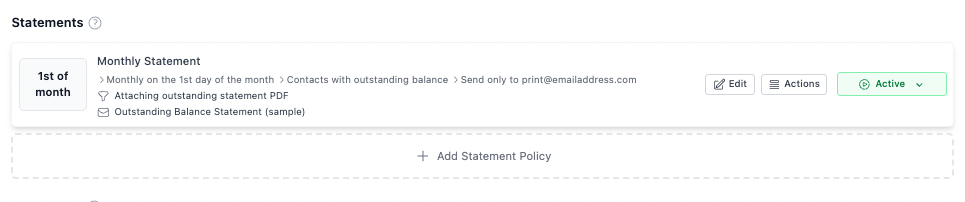
A Statement Policy in Paidnice controls:
- Which customers it applies to (all customers, a group, a tag, or a filter)
- When it runs (e.g. the 1st of every month at 12:00 PM)
- What statement type to send (outstanding, activity, or a custom range)
- What template and branding to use
- Where it gets delivered
That last point is where the post-by-mail workflow lives.
The override destination email (the key setting)
Inside any Statement Policy in Paidnice, under More Options & Filters, there's a field called Override Destination Email. When you set this, the statement PDF is emailed to that address instead of the customer's email address in Xero, even if the customer has no email on file.
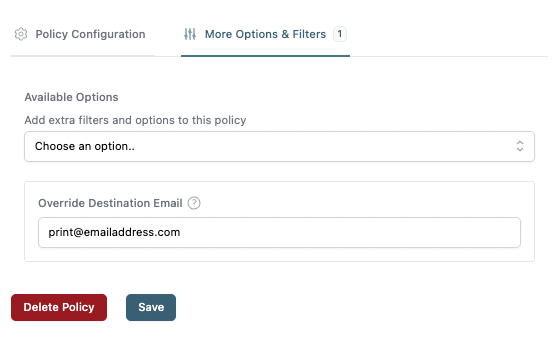
This one field is what enables the post-by-mail automation. You point it at:
- Your office printer's email address if your printer accepts email-to-print (most modern Xerox, HP, and Canon multifunction devices do). The PDF arrives, the printer prints it, someone on your team stuffs and posts envelopes once a month.
- A third-party print-and-mail service like Stannp, Docsaway, or PostGrid. These services accept statements by email, print them, put them in envelopes, and post them for you. Some will also handle return addresses, window envelopes, and bulk postage discounts. You never touch paper.
Because the override is set at the policy level, you can run two policies side by side: one emails statements to customers who have email addresses, and another posts statements (via the print-and-mail route) to customers who don't, or who you've tagged as "post only." The same setting is documented in our help center article how to send customer statements by post.
How to set it up in Paidnice
Here's the short version, assuming you already have Paidnice connected to your Xero organisation:
- Create a customer group or tag for your post-by-mail recipients. Inside Paidnice, tag the customers who should receive printed statements. This is typically "no email on file" or "mail only."
- Create a new Statement Policy. Choose the schedule (monthly is most common), the statement type (outstanding is the default), and the template.
- Scope the policy to your post-by-mail group. Under the policy filters, restrict it to the tag or group you just created.
- Open the More Options & Filters tab. Set Override Destination Email to your printer's email address or your print-and-mail provider's ingestion address.
- Save the policy. Paidnice will now generate and deliver statements to that destination on the schedule you set, with no manual steps.
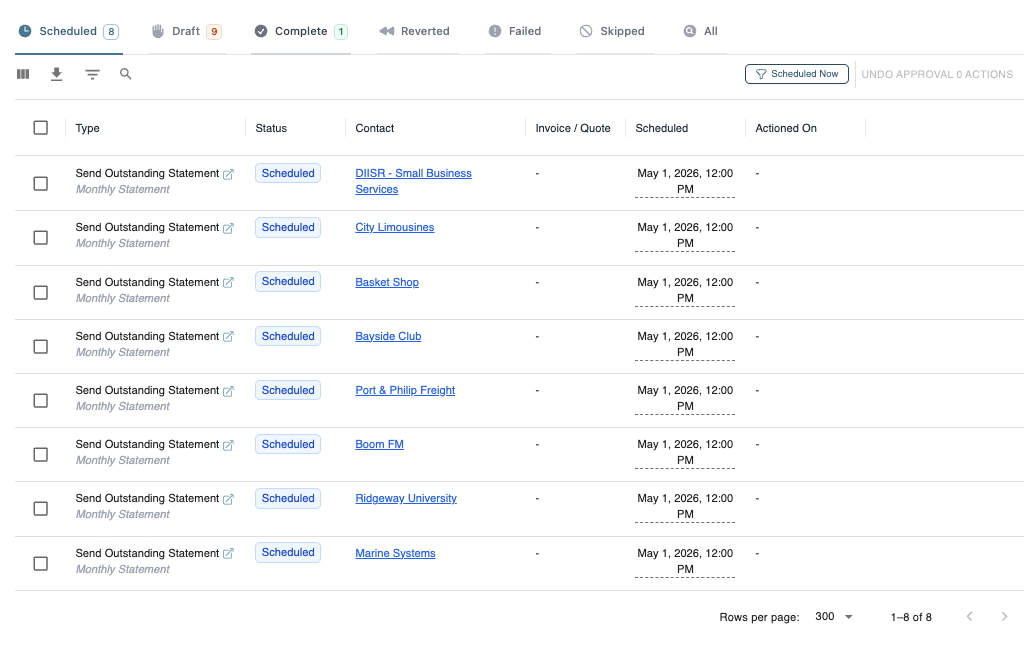
Once it's live, you'll see each run appear in your Paidnice action queue, scheduled, then complete, exactly like any other automated action. You can pause, reschedule, or override individual sends from there.
Can reminders and late fee notices go by post too?
Yes. The override destination email is one piece of a broader pattern in Paidnice: you can run the same logic for reminders, late fee notifications, and overdue letters. If you have a customer segment that needs everything by post (rare, but it happens in some industries), you can set up the full sequence, friendly reminder 3 days before due, due-date reminder, 7-day overdue letter, final demand, all routed through your print-and-mail provider, all automated.
Getting started
If you're already on Paidnice, the override destination email field is in every Statement Policy under More Options & Filters, so you can turn this on today. If you're not, Paidnice connects to Xero in about two minutes and the statement policy is one of the first things most new customers set up. Signing up is free and needs no credit card.
The goal isn't just to send statements. It's to stop thinking about sending statements.
About the editorial team
Denym started Paidnice in 2022 after customers paying late left his own business short on payroll. He has led it to $1 billion collected on time across more than 1 million invoices, and writes about credit control, late fees and getting paid on Xero and QuickBooks.
 App of the Year