

Here's how to make sure your statements always land on a real working day.
Use Paidnice's Monthly (Weekdays) statement schedule. Pick the day of the month you want to send (e.g. the 1st). If that day falls on a Saturday or Sunday, the statement automatically shifts to the next weekday. No manual rescheduling, no half-month-late statements.
Xero's customer statement workflow has three weak points.
For accountants and controllers running statements as part of a monthly close routine, this is the kind of small, repeated friction that adds up to several hours a month. And it's the kind of thing a customer will quietly notice when their statement turns up at an awkward time.
Paidnice statements are policy-driven: you set the rules once, and they run on schedule against whichever group of customers you've scoped them to. Setting up a first-weekday-of-the-month policy takes about three minutes.
Under "When should this statement be sent?" you'll see three options:
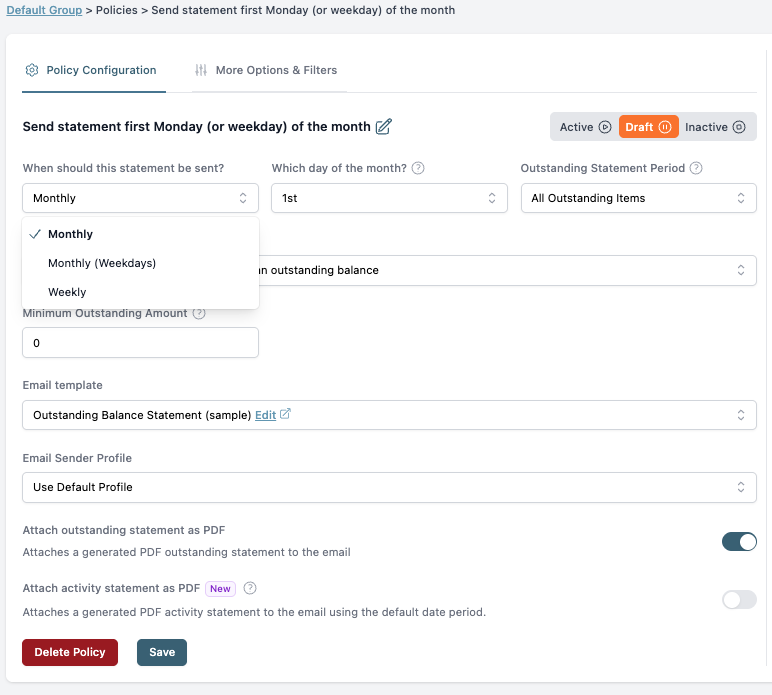
Pick Monthly (Weekdays). Then choose the day of the month: 1st, 15th, 25th, whatever fits your close cadence.
A few extra controls that Xero doesn't give you natively:
Two attachment options run side by side:
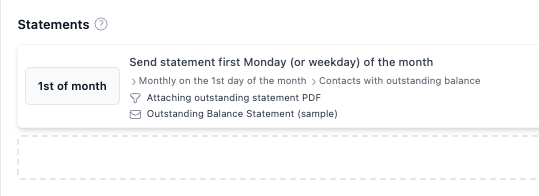
Save the policy and you're done. The next time the 1st of the month rolls around, your statements run on the first weekday after that. Automatically, every month, with no human in the loop.
Statements are one of the highest-leverage habits in a working credit control routine. They prompt the conversation that leads to payment without anyone having to follow up. But statements that land on weekends or holidays don't prompt anything. They sit unread in inboxes.
Paidnice customers cut their average wait for payment in half within 30 days, and report that 90% of their previous manual follow-up disappears once their statement and reminder cadences are running on policy. Getting statement timing right is part of how that compounds. (Paidnice was named 2025 Xero Global App of the Year and AU Small Business App of the Year.)
A first-weekday statement run works best alongside a weekday-only reminder ladder. Statements set the context, reminders close the loop.
What if the 1st falls on a public holiday?
Monthly (Weekdays) handles weekends automatically. If you also want to skip specific public holidays, scope the statement policy to a specific group and pause it manually for that month, or set the day later in the cycle (5th, 7th) so a weekend skip plus an obvious holiday usually clears it.
Can I send statements to only customers above a certain balance?
Yes. Use the Minimum Outstanding Amount field on the policy. Anyone below the threshold won't get a statement that month.
Does Paidnice replace Xero's statement function entirely?
It runs alongside it, but most teams stop sending statements from Xero manually once Paidnice is set up. The Paidnice statements look more polished, attach activity history, and apply your branding.
Can I send statements weekly to a slow-paying group and monthly to everyone else?
Yes. Statement schedules are per-policy, and policies can be scoped to specific customer groups. A monthly all-customers policy plus a weekly slow-payer policy is a very common setup.
Does this work with QuickBooks?
Yes. Paidnice supports both Xero and QuickBooks, and Monthly (Weekdays) statement policies work the same on both.
Setting up a first-weekday statement policy takes about three minutes. Pick Monthly (Weekdays), choose the day, scope the audience, save.
Paidnice has a free trial and a one-click install on the Xero App Store. You don't need to migrate anything. Paidnice reads your existing Xero data and starts closing the gap between invoice and payment from the next reminder onwards.
Install Paidnice from the Xero App Store →
Paidnice is accounts receivable automation that enforces your payment terms, trusted by thousands of businesses on Xero and QuickBooks. Credit control and debtor management, run for you.
Try it Now - It's FreeNo card required.




Optimize your cash flow with our suite of financial tools designed for AR professionals. Calculate DSO, aging analysis, late fees, and more.