



Summary
Xero can text a customer once, manually, with the SMS invoicing feature it launched in 2025 for the UK, US, Australia and New Zealand. Its automatic invoice reminders are still email only, so Xero cannot run an SMS reminder sequence triggered by days overdue. A connected app such as Paidnice adds that sequence, from US$0.10 per message.
- What Xero's SMS does: One SMS per approved invoice, sent manually from the invoice screen, capped at 30 messages in 24 hours, with standardised wording and only to a mobile number in your own country.
- What it does not do: No trigger by days overdue, no sequence, no custom wording, and no escalation from email to text; Xero said on 17 June 2026 that SMS reminders are not in its current roadmap.
- Setup with Paidnice: Connecting Xero, checking mobile numbers and adding an SMS step to a reminder sequence takes under 15 minutes.
Does Xero send text reminders on its own?
Xero's invoice reminders are switched on per organisation. You set how many days before or after the due date each of up to five reminders goes out, and Xero emails the customer a copy of the invoice with a payment link. There is no SMS channel in the reminders settings, no mobile field that triggers a text, and no way to escalate from email to SMS when a customer ignores the emails.
The SMS Xero does send is a different feature. Send an invoice via SMS is a button on an approved invoice: you pick the contact's mobile number and Xero texts a standardised message with a link to the online invoice. It needs Stripe connected as the payment provider, sends one SMS per invoice at a time, is capped at 30 messages in 24 hours, cannot be customised, only reaches numbers in your own country, and the link expires after seven days.
Paidnice sits on top of your Xero account, reads the same invoices, contacts and due dates Xero already holds, and adds the SMS reminder sequence Xero leaves out.
Free: Payment reminder email templatesCopy the reminder emails for before, on and after the due date.What is an SMS payment reminder (and what is it not)?
An SMS payment reminder is a text message sent to a customer's mobile phone before or after an invoice's due date to prompt payment, usually with a link to pay. See the definition of an SMS payment reminder.
- An SMS payment reminder is not Xero's Send via SMS button. That button sends one standardised text for one invoice when a person clicks it. A reminder goes out on a schedule, such as days after the due date.
- An SMS payment reminder is not an email reminder. It is the same invoice reminder on a different channel. Xero's automatic reminders use email only.
- An SMS payment reminder is not dunning. Dunning is the planned sequence of messages. A text is one step in it.
This matters because Xero can text an invoice once but cannot run the reminder. The sections below show where an app adds it.
Xero's native SMS sends an invoice once; it still cannot run a reminder sequence
The SMS reminders idea on Xero's product ideas board holds 76 votes at Accepted. Xero's reply of 17 June 2026 confirms that sending invoices via SMS is live in Australia, New Zealand, the UK and the US, and in the same reply says reminders by SMS are not on the current roadmap.
| Capability | Xero SMS invoicing | SMS step in a Paidnice reminder sequence |
|---|---|---|
| Trigger | A person clicks Send via SMS on one invoice | Days before or after the due date, set per customer group |
| Wording | Standardised, cannot be edited | Your template, merge fields, up to 320 characters |
| Volume | One SMS per invoice at a time, 30 per 24 hours | Every invoice that meets the trigger, inside your monthly SMS cap |
| Destinations | Mobile numbers in your own country | Any valid mobile worldwide, with dedicated routes for the US, UK, Australia and New Zealand |
| Payment provider | Stripe must be connected | Stripe, Pinch or a custom payment link |
| Sequence and escalation | None | Email, SMS, task and escalation in one ladder |
| Markets | UK, US, Australia, New Zealand | All Paidnice markets |
What Xero gives an app is the data: the invoice, the due date, the amount and the contact's mobile number. Paidnice reads those fields, sends the text on the day you set, and logs the send, the delivery status and any reply against the invoice. The SMS step sits inside the same reminder sequence as the emails, so it fires on a day-overdue trigger with your wording, per customer group. That is the part a manual send from the invoice screen cannot do.
How to set up SMS reminders from your Xero invoices
The steps below use Paidnice, but the shape is the same for any AR tool that supports text: connect the ledger, make sure numbers are on file, then decide where in the sequence the text belongs.
- Connect Xero to PaidniceAuthorize the Xero connection so Paidnice can read your invoices, contacts, and due dates. Nothing sends yet.about 2 minutes
- Add mobile numbers to your contactsSMS needs a valid mobile number on the Xero contact. Paidnice flags the contacts that are missing one so you can fill the gaps.
- Build the reminder sequence, email firstSet the email reminders that do most of the work: a friendly note before the due date, then a follow-up once an invoice slips overdue.
- Add an SMS step where email stops landingDrop a text into the sequence at the point email goes quiet, for example 7 days overdue, or as the last nudge before an account escalates.
- Write the message with merge fieldsKeep it short. Name the invoice number and amount, add your business name, and include an opt-out. Merge fields pull the customer and invoice details from Xero.
- Preview in Safe Mode, then go liveSafe Mode shows you exactly what would send, to whom, before a single text goes out. Check the queue, then switch it on.
Email stays the backbone because it is included in every plan and it works. The SMS step is for the invoices email alone does not move. Paidnice routes by contact group, so a VIP customer gets the gentle email track while a repeat late payer gets the fuller ladder with a text near the end.
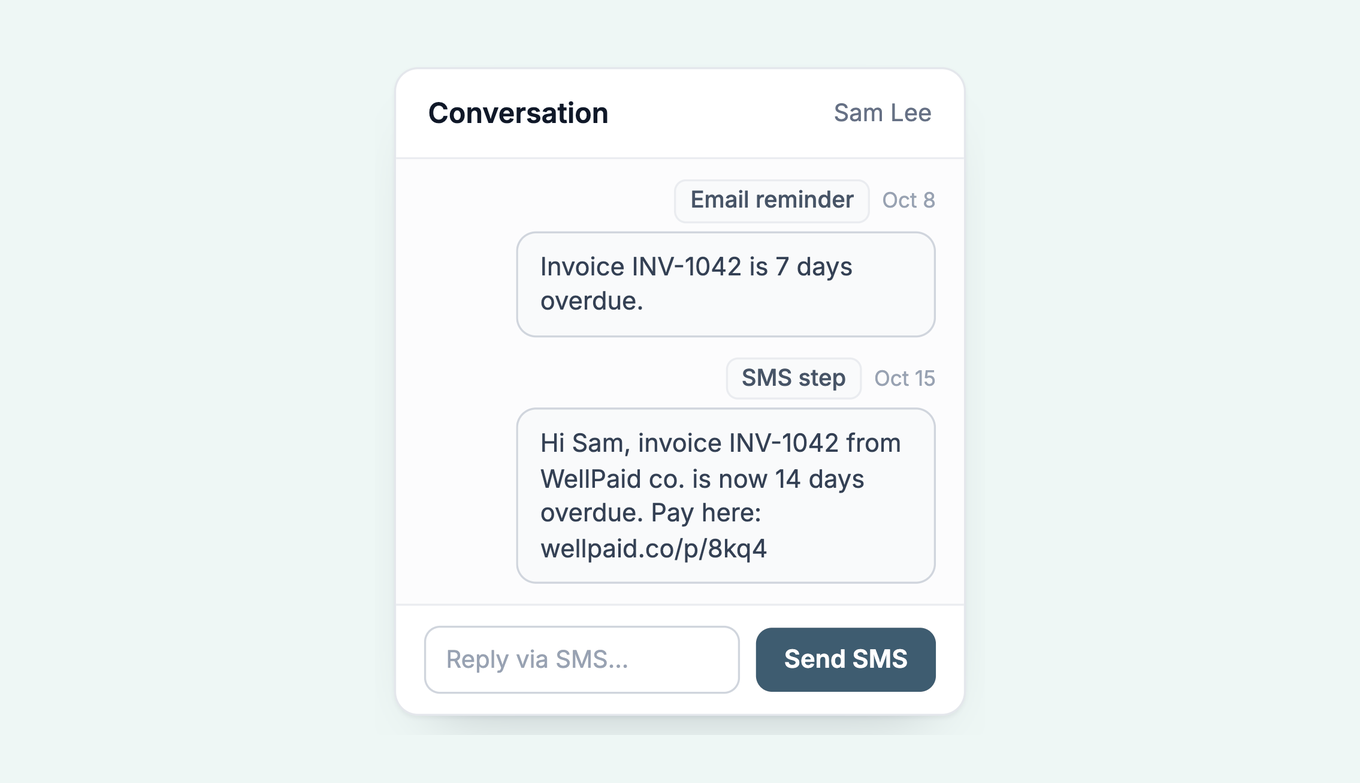
How to send invoice SMS from Xero
The native route: approve the invoice so it is Awaiting Payment, open it, choose the SMS option, confirm the mobile number pulled from the contact, and send. The customer gets a standardised text with a link to the online invoice that stays live for seven days. Repeat for each invoice, up to 30 texts a day.
The reminder route is the six steps above: connect, check numbers, build the email ladder, add the SMS step, write it with merge fields, preview in Safe Mode.
Each text is metered. Paidnice charges US$0.10, £0.05, AU$0.15 or NZ$0.15 per message on top of the plan. Email reminders stay included, so the SMS spend lands only on the invoices you choose to text.
When to use SMS instead of email
Most customers still pay off an email. Texting everyone on every invoice costs more, reads as pushy, and trains good customers to dread hearing from you.
Three places a text earns its US$0.10:
Repeat late payers. The customers who let every email sit for three weeks tend to answer a text the same day. Route them into a group that gets the fuller sequence, with an SMS near the point they usually stall.
Time-critical nudges. A payment due before a service pauses, a card that is about to expire on an auto-pay plan, a final notice before an account escalates. These are the moments a phone buzz beats an unread inbox.
The last rung before escalation. A short, factual text that states the invoice, the amount, and the next step reads as serious without being a threat. It fits naturally as the step before you move an account up the escalation ladder.
For everything else, let email carry it. Our guide to combining email and SMS reminders walks through the placement in more detail, and the SMS reminder templates give you wording you can lift for each rung.
Can customers reply to an SMS payment reminder?
Replies are matched to the customer and the conversation, and your team can be notified when one arrives. If the reply gives a payment date, note it on the invoice. If it disputes the invoice, pass it to a person. What to do when a customer replies to a payment reminder covers each type of reply.
Paidnice also sends reminders on WhatsApp, and customers can reply there too. Their reply lands in Paidnice too. See WhatsApp payment reminders or the WhatsApp payment reminder message templates.
SMS compliance basics for payment reminders
Texting a customer is more regulated than emailing them, and the rules vary by country. In the United States the main references are the FCC's rules under the Telephone Consumer Protection Act (TCPA) and the CTIA messaging principles that carriers enforce. Treat what follows as a starting checklist and confirm the current rules with a qualified source.
The through-line is the same in most jurisdictions: a business relationship and a mobile number the customer gave you, your business name in the message, a clear way to stop, and sends inside sensible hours in the customer's local time. Paidnice blocks sending to a contact who has opted out through the portal, screens each message before it goes, and in the US sends from its own registered numbers, so the customer registers nothing with US carriers. The judgment call about consent stays with you. Paidnice is a reminders tool, not an agency that pursues overdue accounts; it sends the messages you configure, from your business, on your terms.
What SMS payment reminders cost
SMS is billed per message because each text costs real money to deliver, and rates vary by currency and destination. Essentials is US$69 per month and covers 150 invoices, 600 emails, and 2 team members, with no per-seat fees. Email reminders come with every plan, so the SMS spend only stacks on top when you actually send a text.
Because email is included and SMS is metered, the cheapest setup is also the one that works: email as the backbone, SMS as the targeted nudge. The full breakdown is on the SMS payment reminders page.
See how Paidnice works with Xero
Frequently asked questions
Does Xero have native SMS invoicing?
Yes, since 2025, in the UK, US, Australia and New Zealand. It sends one SMS per invoice, manually, with standardised wording, capped at 30 a day, and needs Stripe connected. It does not run an automated reminder sequence by days overdue, which is what a connected app such as Paidnice adds.
Can Xero send SMS payment reminders?
Not automatically. Xero can text a single invoice manually, but its invoice reminders are email only. To send SMS reminders on a schedule from Xero data, connect an AR app such as Paidnice, which sends SMS from US$0.10 per message.
Can Xero send text reminders for overdue invoices?
Not on its own. Xero's manual SMS sends an invoice once and is not triggered by days overdue. A connected app reads your Xero invoices and sends the text when an invoice hits the trigger you set.
How do I text customers about overdue invoices from Xero?
Connect Paidnice to your Xero organisation, add a mobile number to each contact, build a reminder sequence, and add an SMS step at the point where email stops working. Setup takes under 15 minutes.
Should I use SMS or email for payment reminders?
Use email for most reminders and SMS for repeat late payers and time-critical nudges. Most invoices are paid off an email, so SMS works best as a targeted escalation rather than the default channel.
How much do SMS payment reminders cost with Paidnice?
SMS starts at US$0.10 per message, on top of a plan from US$69 per month for Essentials. Email reminders are included in every plan.
Paidnice features in this article
About the editorial team
Ashley is a co-founder and lead developer of Paidnice and has built accounting software for more than 10 years. He builds the ledger connections that put reminders, late fees and payments into Xero, QuickBooks and ERPs such as NetSuite and Business Central. Before Paidnice he co-founded A2X, ecommerce accounting software for Xero and QuickBooks.
 App of the Year