



Summary
Xero has no customer payment portal: customers get one pay-now link per invoice, or an online statement only when you send one. A connected app such as Paidnice adds a real portal on top of Xero, showing every open invoice, a running balance, and part-payments, payment plans and autopay through Stripe.
- The native gap: Xero's online invoice emails are per-invoice, and its online statement arrives only when you send it; there is no area a customer can open at any time to see every invoice, paid and unpaid, together.
- Setup time: Connecting Xero, a payment method and branding runs in under 15 minutes, with no change to how invoices are raised.
- What is extra: With Stripe connected, the portal adds part-payments, payment plans and autopay on plan instalments, none of which Xero offers natively.
Does Xero have a customer portal?
This is the gap most people hit. When you send an invoice from Xero, the customer receives an email with a link to a single, view-only invoice page. If a payment service like Stripe is connected, that page shows a pay-now button. It works well for one invoice at a time.
The problem starts at invoice number two. Send four invoices and your customer has four separate emails, four separate links, and four separate payments to make. There is no single door they can walk through to see the whole account. Xero was built as accounting software for you, the business. It was never built as a self-serve payments front-end for your customers.
The read: if you send a few invoices a month and customers pay them one by one, Xero's native emails and online-payment links are genuinely fine. You do not need anything more. The portal starts to matter once customers carry several open invoices at a time, or when they keep emailing to ask "what do I actually owe you right now?"
Free: Payment reminder email templatesCopy the reminder emails for before, on and after the due date.What is a customer payment portal (and what is it not)?
A customer payment portal is a web page where a customer sees every open invoice they owe a business and can pay one or several of them online. See the definition of a customer payment portal.
- A portal is not an online invoice link. Each Xero online invoice is its own page for one invoice, with a pay-now button when a payment service such as Stripe is connected.
- A portal is not a statement. A Xero customer statement is a snapshot that you generate and send. A portal is open to the customer at any time.
- A portal is not a payment gateway. A payment gateway such as Stripe takes the card or bank payment. The portal is the page the customer pays from.
In Xero a portal comes from a connected app, because Xero has none built in. It matters most when a customer has several open invoices at once.
Can customers see all their invoices in one place in Xero?
Your customer's accounts-payable person often wants exactly that: a list of what is outstanding, what is already paid, and a total to reconcile against their own records. In Xero, the closest native tool is a customer statement, which you generate and email as a PDF. It is a snapshot, sent by you, on your schedule. The customer cannot open it up whenever they like or watch it update as invoices get paid.
A connected portal closes that gap. Your customer opens one link, sees every open invoice with due dates, sees a running balance, and can download a statement themselves. No email to you, no waiting. That is the difference between a document you push out and a page they can pull whenever they need it.
How to give your Xero customers a payment portal
Here is the exact path using the Paidnice Xero customer payment portal. The same shape applies to any portal app, but these are the real steps.
Connect Xero
Authorize the app against your Xero organisation. Your contacts and invoices sync across, so the portal already knows who owes what.
Connect a payment method
Link Stripe (or another supported provider) so customers can pay from the portal. This is what turns a view-only page into a pay-from-here page.
Brand the portal
Add your logo and colors so the page reads as yours, not a third party's. Customers should feel like they never left your business.
Set the rules
Decide what customers can do: pay in full, part-pay, self-serve a statement, start a payment plan, promise a date or query an invoice. Route different contact groups to different options.
Share the link
Every reminder and statement carries the customer's portal link automatically. There is nothing for the customer to install and no password to remember.
That is the whole job. No migration, no rebuild of your Xero setup, and no change to how you raise invoices. Paidnice sits on top of Xero and reads from it. See the Xero integration for the exact sync details.
What your customers see
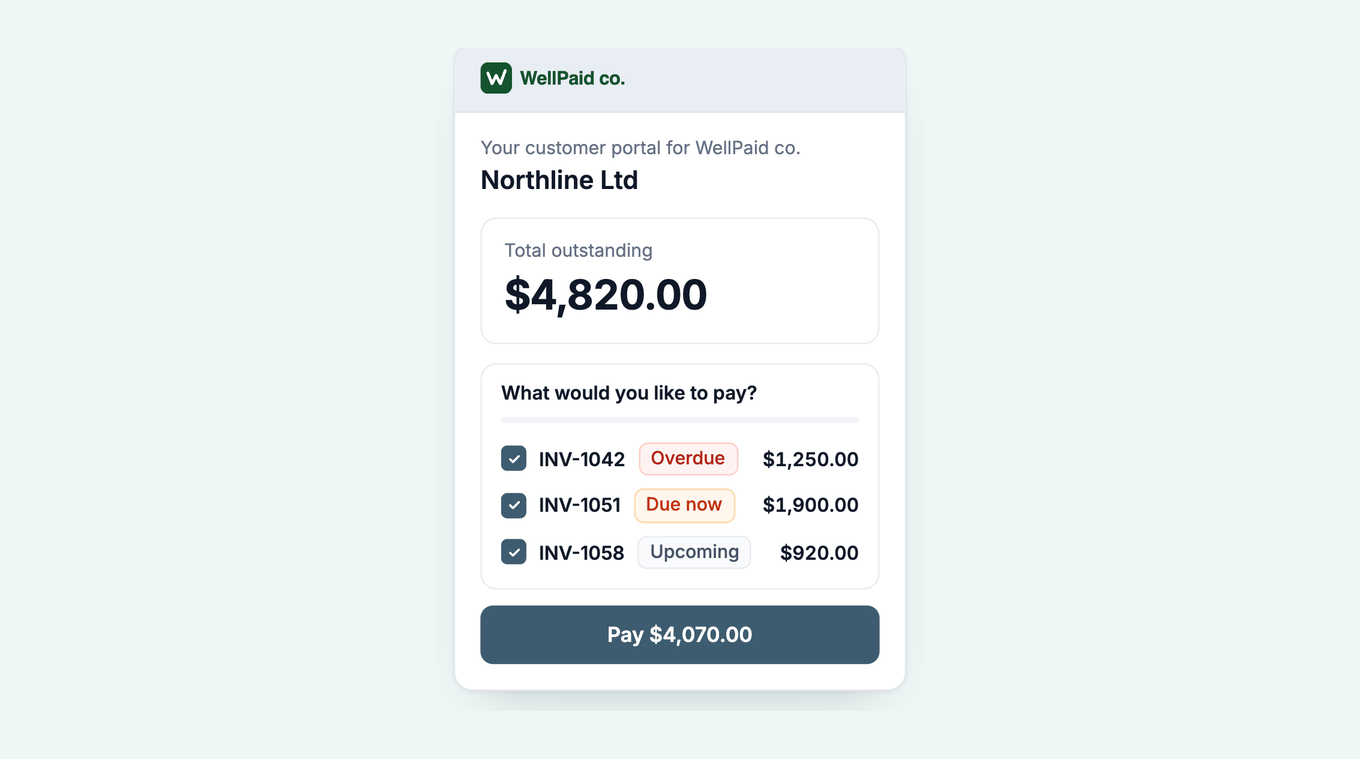
This is the part that changes the conversation. Instead of hunting through their inbox for the right link, your customer opens one page and everything they owe you is on it. Here is the shape of it.
In native Xero, a customer can pay several invoices together only from a statement you send, with Stripe connected. In the portal they can do it any time: tick several invoices and pay them in one transaction, start a payment plan without emailing you first, and download their own statement. The page reads as your business, pulls its numbers straight from Xero, and updates the moment an invoice is paid.
Part-payments, payment plans, and autopay through Stripe
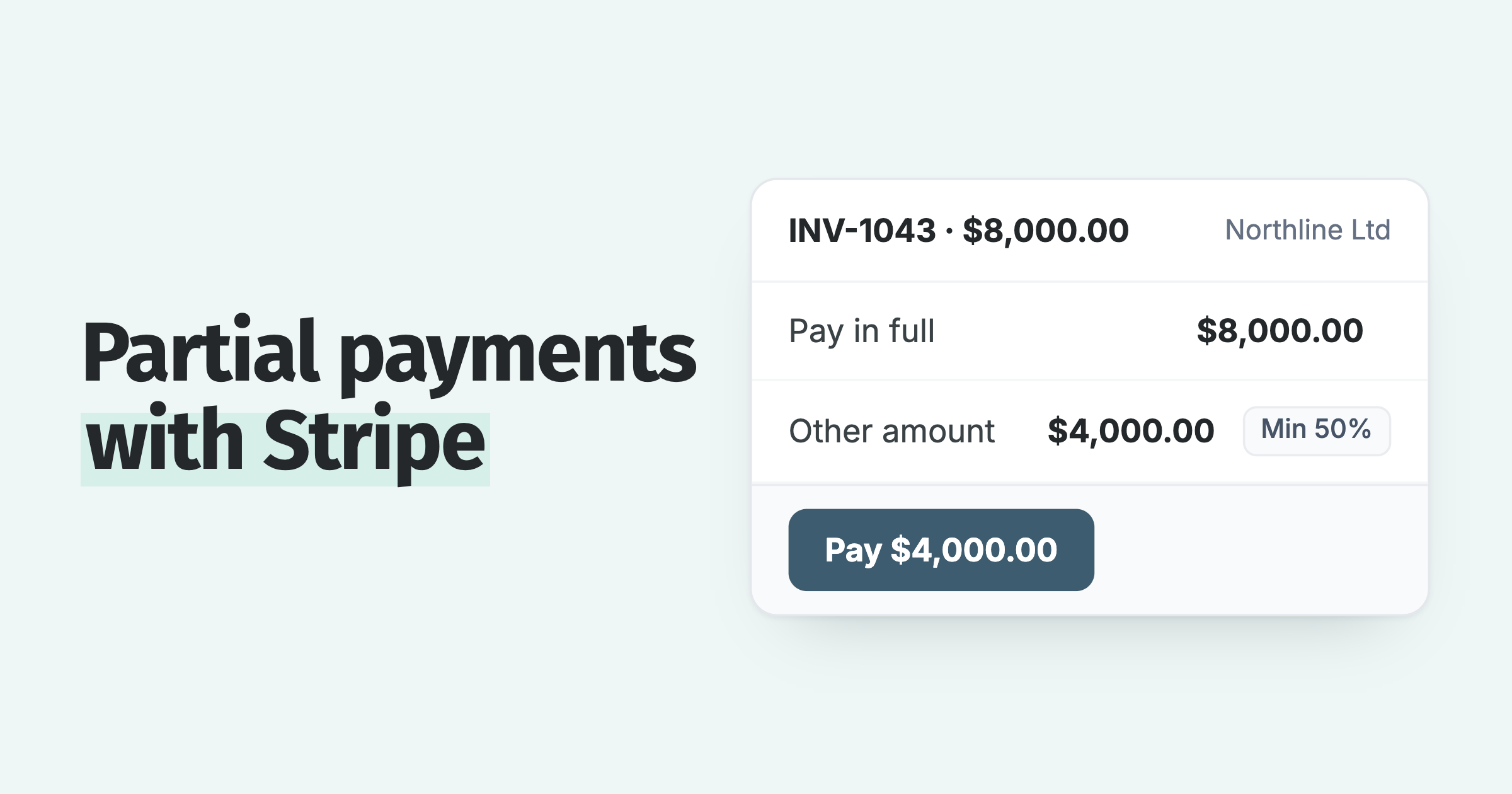
Native Xero expects an invoice to be paid in full, in one go. Real customers do not always work that way. Some want to pay half now and half in two weeks. Some are fine to pay, they just need it spread across a few dates. When the only options are "pay it all" or "ignore the email," a lot of them pick the second one.
With Stripe connected through Paidnice, the portal offers the middle ground:
- Part-payments. A customer can pay some of the balance now and come back for the rest, with the invoice updating in Xero as they go.
- Payment plans. Offer a schedule up front so a large invoice becomes a few smaller, dated payments. See how payment plans work.
- Autopay. On an invoice with a payment plan, the portal shows Enable Autopay. The customer saves a card or bank debit once and each instalment is charged on its date. No link to click, no reminder to act on.
Autopay runs through a Stripe-hosted setup flow. Stripe creates the setup intent and handles the mandate for a bank debit, and Paidnice stores only a reference, so card and bank details never reach Paidnice or Xero. A Payment methods area lets the customer add, remove and default a saved method. Which options are available depends on your payment provider: part-payments, plans and autopay all need Stripe connected.
What can a customer do in the portal if they cannot pay today?
Under the pay button the invoice page shows "Other options", and two of them give a customer a way to answer without emailing you:
- Promise to pay. The customer picks a date. It becomes the invoice's expected payment date and is synced to Xero. Policies set to "Skip when payment promised" wait until that date, so reminders and late fees can wait too. When you want the date in writing, use a promise to pay agreement template. If the date and the grace period pass unpaid, the invoice owner can get a Broken Payment Promise email; here is what to do when a customer promised to pay and didn't.
- Query this invoice. The customer flags the invoice with a reason, such as not received or a quality problem. Policies set to "Skip while a query is open" hold reminders and late fees on that invoice until it is resolved, and your team sees the reason and can set the next step. How to handle a disputed invoice covers what to do next.
Both are portal settings you switch on. The customer needs no login, only the secure link, unless you turn on Secure Portal Mode, which adds an email check.
So what should you actually do?
That is the test. A portal is not a fix for a slow-paying customer on its own. What it does is remove the friction between "I want to pay you" and "it is done," which is where a surprising amount of overdue balance actually sits. The customer payment portal is one piece of that. Reminders that carry the link, late fees that apply on your terms, and statements that go out on time are the rest of it. Close the gap between invoice and payment, and most of the chasing takes care of itself.
Frequently asked questions
Does Xero have a customer portal?
No. Xero sends online invoices that each carry their own pay-now link, but it has no portal where a customer signs in and sees every invoice they owe you in one place. A connected app such as Paidnice adds that portal on top of Xero.
Can customers pay multiple Xero invoices at once?
Only from a statement you send. With Stripe connected, Xero's online statement lets a customer pay several open invoices together, but only when you send one. Xero has no portal where a customer can do it on their own. A connected portal lets a customer select several open invoices and pay them in a single transaction at any time.
Does Xero have a customer statement portal?
No. Xero can generate a customer statement that you email as a PDF, but there is no self-serve area where a customer pulls their own statement on demand. A portal app lets the customer download an up-to-date statement whenever they need it.
Does Xero support autopay?
Not on its own. With Stripe connected through Paidnice, a customer on a payment plan can enable autopay from the portal, save a card or bank debit once through a Stripe-hosted setup flow, and have each instalment charged on its date. Paidnice stores only a reference to the saved method.
How do I set up a payment portal for my Xero customers?
Connect Xero to a portal app, connect a payment method such as Stripe, brand the portal, set what customers can do, and share each customer's portal link. With Paidnice the whole setup runs in under 15 minutes and needs no migration.
Paidnice features in this article
About the editorial team
Ashley is a co-founder and lead developer of Paidnice and has built accounting software for more than 10 years. He builds the ledger connections that put reminders, late fees and payments into Xero, QuickBooks and ERPs such as NetSuite and Business Central. Before Paidnice he co-founded A2X, ecommerce accounting software for Xero and QuickBooks.
Denym started Paidnice in 2022 after customers paying late left his own business short on payroll. He has led it to $1 billion collected on time across more than 1 million invoices, and writes about credit control, late fees and getting paid on Xero and QuickBooks.
 App of the Year