



Summary
Xero attaches a file to an invoice email only when you tick the box on that send, and never on an automated reminder. To make your own generated invoice PDF go out on every reminder, statement link and portal download, connect an app such as Paidnice that swaps it in for the Xero PDF everywhere Xero would send one.
- Xero's own limit: The request to include attached files by default holds 542 votes and Xero marked it 'Not in pipeline' on 29 July 2025; the request for the PDF on reminders holds 99 votes with no response from Xero.
- The fix: The attachment needs 'Include with online invoice' ticked, a filename prefix set once in Paidnice, and a chosen fallback for invoices with no matching file.
- Setup time: About five minutes in Paidnice under Settings, General, Advanced, Invoice PDF, with each file under 5MB and 10MB in total per send.
Who needs to send their own invoice PDF from Xero
Anyone whose invoice is created outside Xero. The invoice syncs in as a ledger record, and Xero rebuilds the document from the line items with its own branding theme.
The customer received the original with the first send. Every follow-up from Xero carries the rebuilt version.
Trades, construction and field services
- Builders and construction firms. Progress claims and variations are raised in a construction or estimating system, with the contract number, the claim period and retention on the document.
- Electricians, plumbers and HVAC contractors. The job management app creates the invoice on site, often with the job photos, the site address and the customer's signature on it.
- Roofers and landscapers. The quote and the invoice come from the same job system, so the invoice matches the quote the customer accepted line for line.
- Commercial cleaning and pool service companies. Recurring service invoices list the visits, the sites and the service schedule for the period.
- Engineering firms. Project systems invoice against milestones and purchase orders, and the client's project manager approves that exact document.
Professional services
- Law firms. The practice management system produces the bill with time entries, disbursements and the matter reference. Clients and their insurers often need that itemised bill to approve payment.
- Accounting firms. Engagement and practice software issues the fee invoice with the engagement terms and the work covered for the period.
- Agencies. Job and project systems create the invoice from the job, with the estimate, the timesheet totals and the client's PO. Users on Xero's ideas board who integrate systems like these ask for the PDF on reminders.
- Recruitment agencies. Timesheet and placement systems invoice per candidate and per week. The client's AP team matches each line to an approved timesheet.
- Managed service providers (MSPs) on a PSA. The PSA produces the invoice the client receives first. The billing layer and the collections layer are different tools, and the join between them is this PDF.
Wholesale, distribution and hire
- Wholesalers and distributors on an ERP. The ERP invoice carries the PO number, packing and freight references. If this is you, keep your ERP's invoice PDF on every Xero reminder covers the ERP side in detail.
- Food and beverage distributors. Delivery-based invoices list products, batch or delivery references and the proof of delivery the customer checks against.
- Equipment hire companies. The rental system invoices by asset, hire period and site, including damage or fuel charges the customer must see itemised.
Property and facilities
- Property managers. Property management software raises rent, service charge and recharge invoices with the unit and the lease reference.
- Homeowners associations (HOAs). Association software issues assessment invoices per owner and per unit.
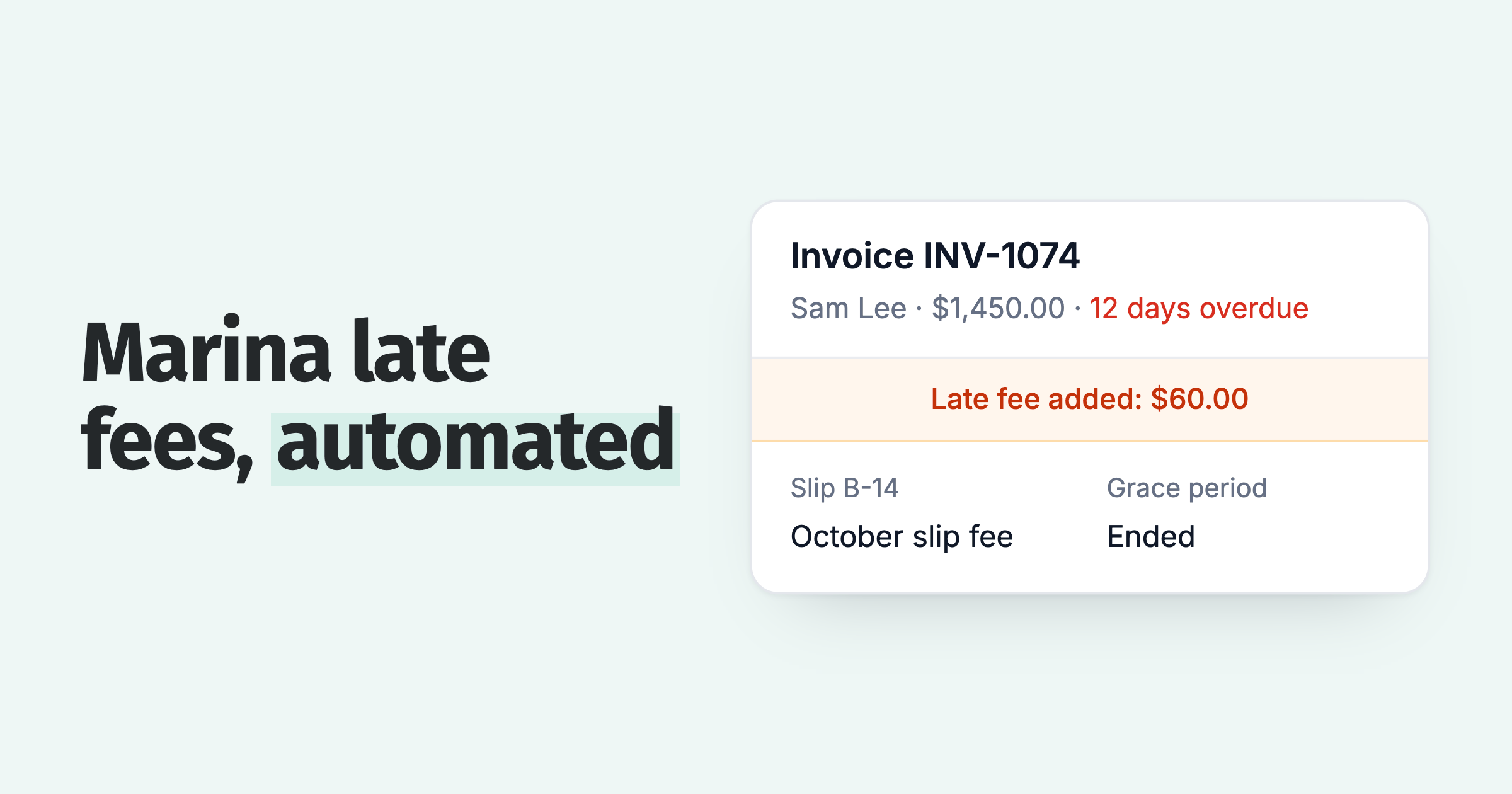
- Self-storage operators and marinas. The facility system invoices by unit, berth or slip and by billing period, which is the reference the customer looks for.
In every case the system that made the invoice can put its PDF on the Xero invoice, through a setting in its accounting connection, its vendor's support team or your IT team, or Zapier or Make. The steps are below.
Customers want the original for three reasons. The purchase order (PO) number and references are on it. Their accounts payable (AP) team knows its layout. Their security policy can block links in emails but allow PDF attachments, which is the point the reminder request on Xero's ideas board makes. Commenters there include suppliers to enterprise and government customers who need the PDF attached.
What Xero does with an invoice attachment today
Xero has two separate options for an attached file: one on the invoice for the online invoice, and one on each email send.
On the invoice, each attached file has an Include with online invoice option, which makes the file visible on the online invoice page. When you email the invoice, the send window has an Attach file(s) to invoice email checkbox to attach the files to that email.
On 29 July 2025, Xero community manager Kelly Munro confirmed on the ideas board that Xero remembers the last selection for the session. It resets in incognito mode or after a browser refresh. Xero has no plans to change the send window in the near term.
The Include with online invoice option matters again later. Paidnice only picks up a Xero attachment that has it ticked.
Xero invoice reminders never carry the attachment
A Xero invoice reminder carries a link to the online invoice. It never carries your attached file or the invoice PDF as a file.
Whatever you attached to the invoice, the reminder email does not include it. A customer whose security policy blocks links has nothing to open.
| What you want | Manual send from Xero | Xero invoice reminder | Xero online invoice |
|---|---|---|---|
| Xero's own PDF attached | Yes | No, a link only | Viewed on the page |
| Your attached file sent as an extra | Yes, when the box is ticked | No | Yes, when marked Include with online invoice |
| Your attached file sent instead of the Xero PDF | No | No | No |
| Works without a tick on each invoice | No | Not applicable | No |
The two requests Xero has not built
Xero users have asked for attachments by default (542 votes) and for the PDF on reminders (99 votes). Xero has built neither.
Xero marked the first "Not in pipeline". The second has no response from Xero.
| Request | Posted | Votes | Status | Xero's last word |
|---|---|---|---|---|
| Sales Invoice: include files attached to an invoice when sending | 14 December 2022 | 542 | Not in pipeline | 29 July 2025. No plans to change how the send window works in the near term. Suggests adding standard files to the invoice template. |
| Invoice reminder: auto include PDF of invoice | 22 March 2023 | 99 | Submitted | No response from Xero. |
The template suggestion works for a static terms document. It does nothing for the invoice PDF itself, which is different on every invoice.
Xero's ideas board updates live, so open the linked threads for the current count before quoting it.
Step 1: get your PDF onto the Xero invoice
The file must sit on the Xero invoice record with Include with online invoice ticked. There are four ways to put it there.
Through a setting in your system's accounting connection
Your ERP, PSA or job system can put its invoice PDF on the Xero invoice. Look in its Xero connection settings for an option to send the invoice document or attachments.
Through your vendor's support or your IT team
If there is no setting, ask the vendor's support team or your IT team one exact question: can the sync attach our generated invoice PDF to the Xero invoice, marked Include with online invoice?
Through Zapier or Make
The Xero API accepts an attachment on a sales invoice, with a flag that marks it for the online invoice:
Zapier's Xero app has an Upload Attachment action that takes a resource and a file, with a limit of 10 attachments per resource. Make can also push a file onto a Xero invoice. Trigger either one from the event that creates the invoice.
By hand
Open the invoice in Xero, click Attach files, upload the PDF and tick Include with online invoice. This suits a handful of invoices a month. For more, use one of the routes above.
Whichever route you use, decide the filename once. Every generated invoice PDF should carry the same recognisable text, such as INV- or the name of the system that made it. A consistent name lets an app pick the right file with no one checking it. Set it when you first set up the integration.
Step 2: make that file the invoice PDF everywhere it goes
Paidnice uses the Xero attachment whose filename contains your prefix in place of the Xero PDF, on every email, statement link and portal download.
With one setting in Paidnice, the matching file replaces the Xero PDF on reminders, one-off sends, late fee and discount emails, statement links and portal downloads. Setup takes about five minutes.
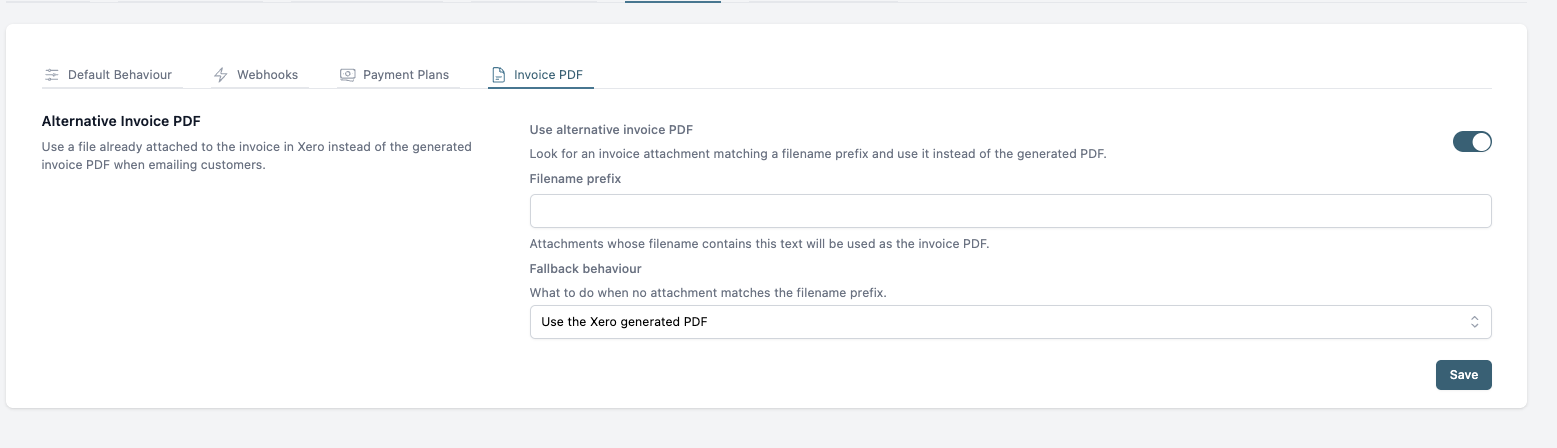
- Open Settings, then General, then Advanced, and select the Invoice PDF tab.
- Switch on Use alternative invoice PDF.
- Enter the filename prefix. This is the text in every generated file's name. Matching is case-sensitive and spaces count, so copy it exactly. If two files match, Paidnice uses the first match.
- Choose a fallback for invoices with no matching file: use the Xero generated PDF, send with no PDF attached, or do not send and report an error.
- Save.
| Fallback | What happens | Use it when |
|---|---|---|
| Use the Xero generated PDF | Xero's PDF goes out for that invoice. | Only some invoices carry an attached file. |
| Send with no PDF attached | The email goes out with no invoice file. | The portal page is enough for your customers. |
| Don't send, report an error | Nothing is sent, and Paidnice emails you the error so you can see which invoices are missing their file. | Customers must never receive the Xero template. |
Only the invoice PDF is swapped. Your email templates stay as they are.
The full setup, the matching rules and troubleshooting are in the help centre: Alternative Invoice PDF.
What the customer receives: only your invoice, in email and portal
With a fallback of no PDF or don't send, every email, statement link and portal download shows your own invoice. The Xero-generated invoice is hidden from the customer.
Each reminder arrives with the PDF the customer received first, so the PO number and your layout are on it. When they download the invoice from the portal or follow a statement link, they get the same document.
For MSPs this closes the last gap in the MSP credit control process. The PSA keeps owning the invoice document, Xero keeps the ledger, and the reminders, late fees and statements run from the ledger with the PSA's document attached.
Frequently asked questions
Short answers on Xero reminders, attachment defaults, the Include with online invoice option, matching and errors.
Can Xero invoice reminders include the invoice PDF?
No. Xero reminders carry a link to the online invoice. Attaching the PDF to a reminder has been an open request since 22 March 2023, with 99 votes and no response from Xero.
Can I make Xero attach files by default when emailing invoices?
Not with a setting. Xero remembers the last selection for the session. Xero marked the 542-vote request for a default "Not in pipeline" on 29 July 2025 and suggested adding standard files to the invoice template instead.
How do I attach a file to an invoice in Xero?
Open the invoice and upload the file as an attachment. Tick Include with online invoice to show it on the online invoice page. Integrations and automations can do the same through the Xero API.
Does Include with online invoice need to be ticked?
Yes. Paidnice only matches a Xero attachment that has Include with online invoice ticked. The API flag IncludeOnline=true sets this option.
What happens if no file matches?
Your fallback decides. Paidnice sends the Xero PDF, sends with no PDF attached, or does not send and reports an error, depending on the option you chose.
Where do I see errors?
With the don't send fallback, Paidnice emails you the error for each invoice that has no matching file, so you can attach the PDF and let the next send go out.
Does the file have to be a PDF?
Use a PDF. Paidnice sends the matched file as the invoice, so give your customer and their AP team the format they expect. Keep each file under 5MB and the attachments on one send under 10MB in total.
What if two attachments match the prefix?
Paidnice uses the first match. Keep one generated invoice file per Xero invoice, and give supporting documents a different naming pattern.
Can the reminders come from our own email domain?
Yes. On the Pro plan, reminders send from your own domain, with the alternative PDF attached.
Send the invoice your customer already approved
Attach the generated PDF to the Xero invoice with a consistent name, switch on Alternative Invoice PDF, and every follow-up carries the right document.
Connect Xero to Paidnice, no credit card required, or book a demo and we will set it up with you.
About the editorial team
Denym started Paidnice in 2022 after customers paying late left his own business short on payroll. He has led it to $1 billion collected on time across more than 1 million invoices, and writes about credit control, late fees and getting paid on Xero and QuickBooks.
 App of the Year