We're excited to announce a powerful new feature in Paidnice that gives you even more control over your automated collections process: Sender Profiles.
Making Automation Feel Personal
One of the most common questions we hear from customers is: "How can I make my automated reminders feel less robotic and more like our actual internal escalation process?"
In traditional collections, when an invoice goes overdue, the matter naturally escalates up the chain. A friendly reminder from the accounts department becomes a more urgent note from the finance manager, and eventually, the CEO or business owner might step in for significantly overdue accounts.
Until now, automated systems couldn't replicate this natural progression. Every email came from the same address with the same signature, no matter how overdue the invoice became.
What Are Sender Profiles?
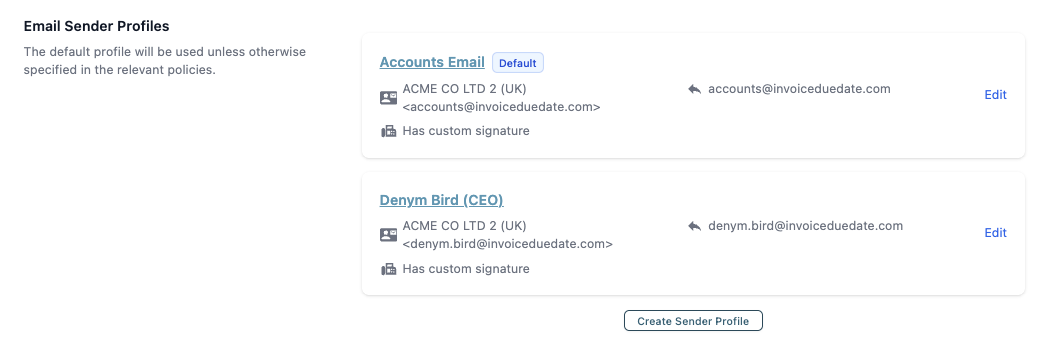
Sender Profiles enable you to create multiple email identities within Paidnice, each with its own email address and custom signature. You can then assign different sender profiles to different stages of your collections process, creating an authentic escalation path that mirrors how your team would handle collections manually.
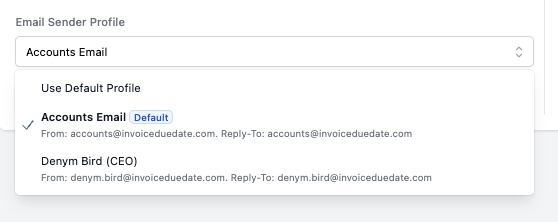
For example:
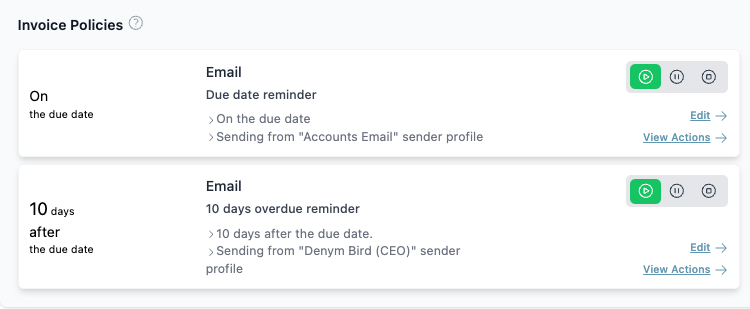
- Day 0 (Due Date): Friendly reminder from the Accounts Dept. [email protected]
- Day 10 (Overdue): More urgent notice from the Finance Manager [email protected]
- Day 30 (Significantly Overdue): Direct communication from your CEO or Director eg [email protected]
To your customers, it appears that their overdue invoice has been escalated internally and is now receiving direct attention from senior management—because it has been, automatically.
How Sender Profiles Work
Sender Profiles can be applied to any automated email action in Paidnice, including:
- Email Reminders (due date, overdue, and custom reminder policies)
- Late Fee Notifications
- Automated Customer Statements
- Early Payment Discount Reminders
Each profile includes:
- A display name (e.g., "Accounts Department" or "John Smith, CEO").
- An email address.
- A custom email signature.
When Paidnice sends an automated email using a specific sender profile, the email appears to come from that person or department, complete with their signature and reply-to address.
Learn more about how Sender Profiles work, and how to set them up on our help center.
Setting Up Sender Profiles
Getting started with Sender Profiles is straightforward:
Step 1: Create Your Sender Profiles
- Navigate to Settings > Email Settings in your Paidnice dashboard
- Scroll to the Email Sender Profiles section
- Click Create Sender Profile
- Enter the profile details:
- Profile Name: A descriptive name for internal reference (e.g., "Accounts Email" or "CEO - Denym Bird")
- Display Name: How the sender will appear in emails (e.g., "Accounts Department @ Your Company")
- Email Address: The sending email address (must be from your verified domain)
- Custom Signature: Create a personalized signature for this sender
- Save your profile
Pro Tip: Your first profile is automatically set as the default and will be used unless you specify otherwise in your policies.
Step 2: Assign Profiles to Your Policies
Once you've created your sender profiles, you can assign them to specific policy actions:
- Go to Settings > Invoice Policies (or Statement Policies, Late Fee Policies, etc.)
- Select the policy action you want to configure
- When setting up an email action, you'll see a "Sending from" dropdown
- Select the appropriate sender profile for that stage of your collections process
Getting Started
Sender Profiles are available now to all Paidnice customers at no additional cost. To set up your first sender profile:
- Log in to your Paidnice dashboard
- Navigate to Settings > Email Settings
- Scroll to Email Sender Profiles
- Click Create Sender Profile
We recommend starting with just two profiles (a default accounts profile and one escalated profile) and expanding from there as you refine your collections process.
Questions?
Our support team is here to help you get the most out of Sender Profiles. Whether you need help with strategy, technical setup, or best practices for your specific industry, we're just an email away.
Visit our Help Center or email us at [email protected].

Stop chasing invoices.
Start getting paid.
Paidnice is accounts receivable automation that enforces your payment terms, trusted by thousands of businesses on Xero and QuickBooks. Credit control and debtor management, run for you.
Try it Now - It's FreeNo card required.