It's removed 99% of the chasing!Mantas S.
AI accounts receivable for Xero and QuickBooks. Paidnice reads each customer reply, logs promised payment dates and drafts the response, which waits for your approval.
Reminders get answers. Paidnice reads each one, finds what the customer needs and prepares the next step for your approval.
Payment dates and PO numbers each get their own next step. Your team sees the replies Paidnice handled today and the actions that wait for approval.
Paidnice shows what it read from the reply and the answer it drafted. You approve it before it sends.
Paidnice spots when a customer needs a PO, drafts the email to the right person and adds the PO to the invoice in Xero or QuickBooks when it arrives. You approve the resend.
Give Paidnice a short brief and AI writes each reminder from the customer’s own account: other open invoices, recent payments, a late fee to come or a payment plan they can use. Run the policy as a draft and each one waits for your approval.
Tell the Paidnice Assistant what you want, such as a late fee for slow payers. It asks what it needs and proposes the change, and nothing changes until you apply it.
Each customer page opens with a short AI summary: how they pay against your average and what is overdue, next to their credit score.
Paidnice does the reading and the drafting. Every AI-drafted reply waits for a person on your team to approve it.
| When this happens | Paidnice does this | You do this |
|---|---|---|
| A customer replies with a payment date | Logs the date against the invoice and drafts a reply | Approve the reply |
| Accounts payable asks for a PO, or a buyer’s system emails one | Drafts the email to the right person, reads the PO when it arrives, adds it to the invoice and drafts the resend | Approve the email and the resend. Odd PO formats come to you for review |
| A reminder is due on a policy that uses AI | Writes the email from the customer’s account and your brief, as a draft when the policy is set to Draft | Approve the draft |
| You switch on Safe Mode | Prepares every action for review and sends nothing to customers | Review and release |
| You describe a policy to the Assistant | Finds similar policies, asks what it needs and proposes the change | Apply it, or not |
| A mobile number is not valid | Suggests the correct format and says why | Approve the fix, which updates your ledger |
| Setup: you connect Xero or QuickBooks | Prepares draft collection policies for each customer group | Approve the policies before anything runs |
It’s the debt collection system I’ve been looking for, for the last 15 years.

Paidnice has everything your business needs to run a best-in-class receivables process, from the first reminder to the money landing in your account.
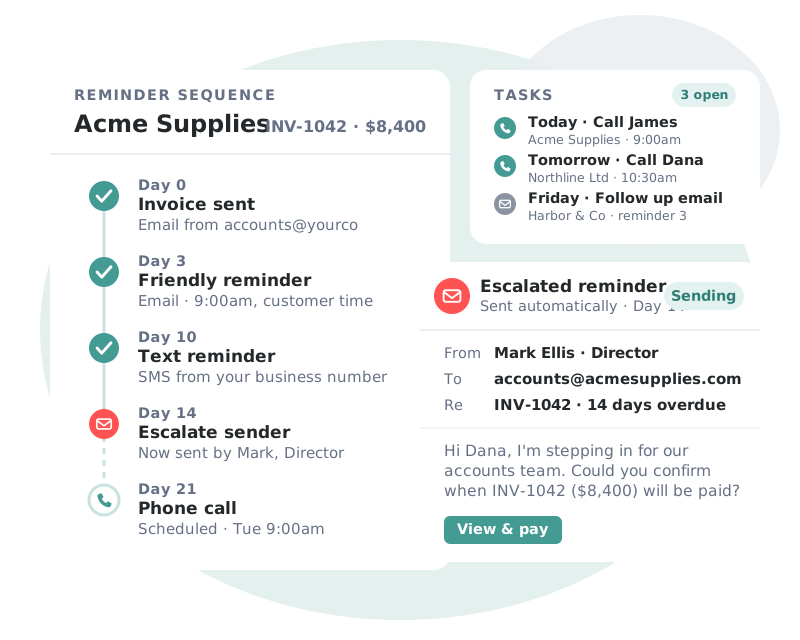
Sequences that adapt to each customer’s payment behavior, so every invoice gets the right nudge at the right moment.
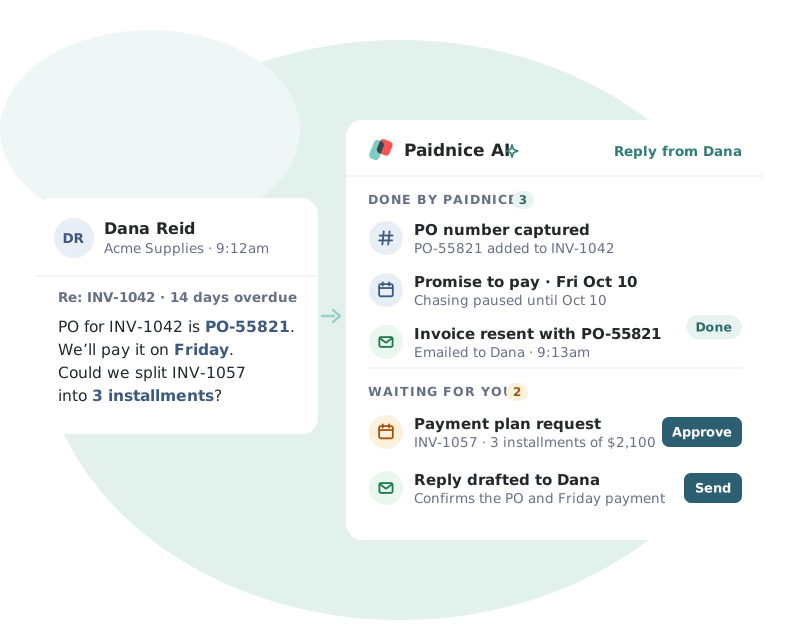
Paidnice AI reads each customer reply and turns it into the next step, so nothing gets lost in your inbox.
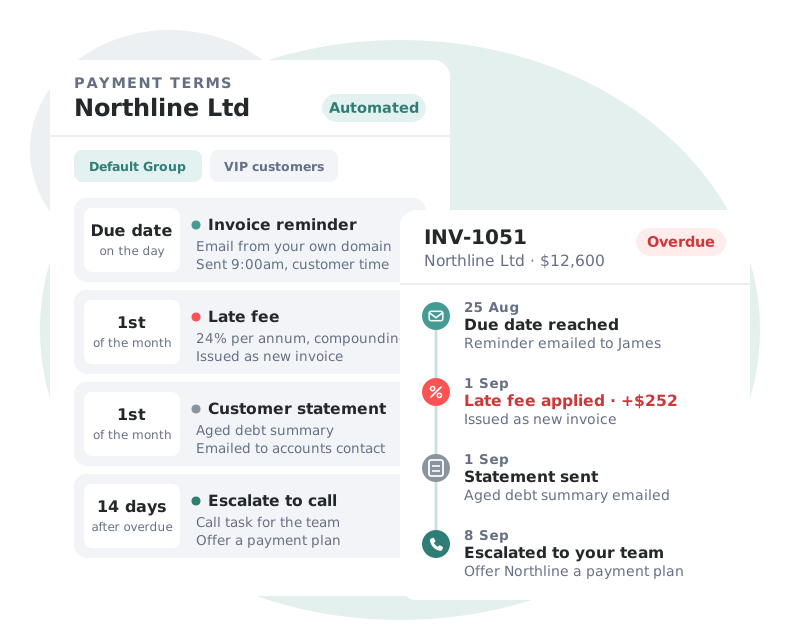
Your policies enforce themselves. Incentives and penalties are applied on schedule and written straight back to your ledger.
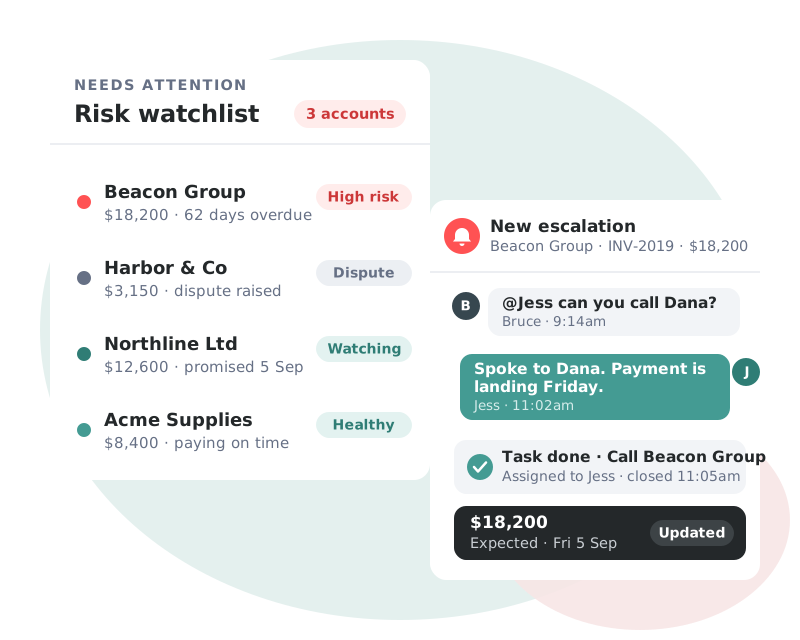
Real-time visibility of your AR health, with the accounts that need attention surfaced before they become a problem.
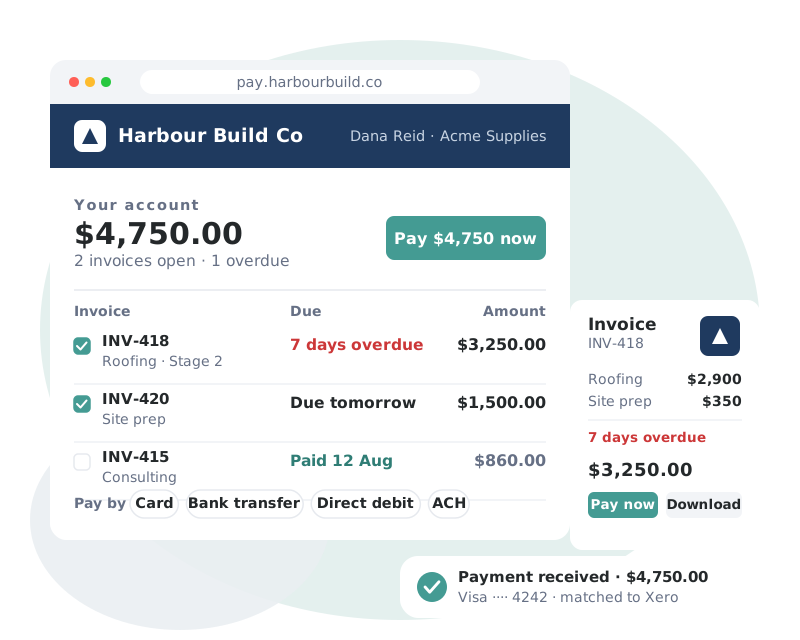
A branded, self-service portal that removes every excuse between your customer and the Pay button.
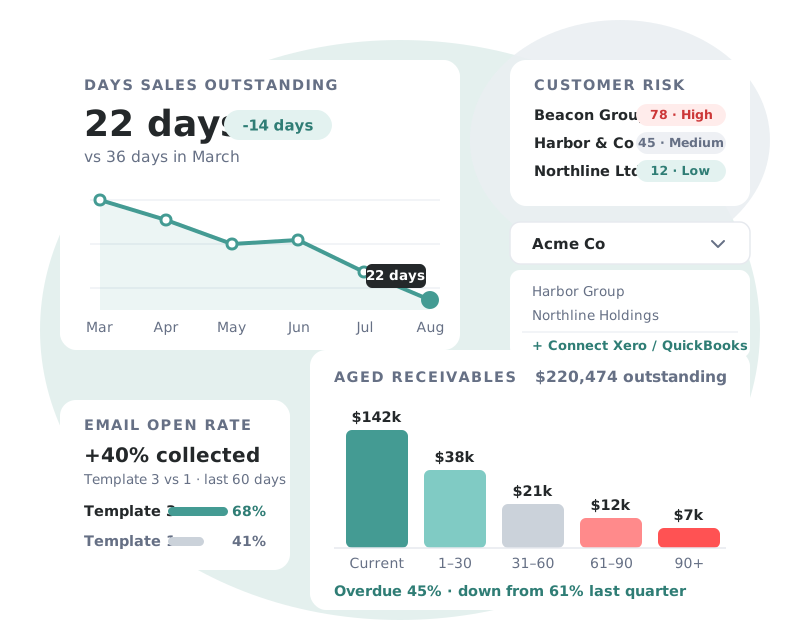
Complete visibility of receivables performance, across every entity you manage.
 Bookkeeping & AccountingNew Zealand
Customer story
“For the cost of the subscription versus money in your bank, it’s definitely a no-brainer.”
 Haley ReynersFounder, My Two Cents

Replies to reminders, statements and late fee notices come back into the customer’s conversation in Paidnice, and Paidnice can read them.
Integrations
Paidnice connects to your ledger, payment providers, CRM and team chat, so every invoice is chased, paid and recorded without manual data entry.
See all integrations →AI accounts receivable software reads what customers send back about their invoices and prepares the next step. Paidnice reads each reply, logs payment dates, adds missing PO numbers and drafts the response for your approval.
No. Every reply the AI drafts waits until a person on your team approves it. Paidnice logs the payment dates and PO numbers it reads on the invoice, and anything that looks wrong goes to a person for review. Your reminder, statement and late fee policies run automatically or as drafts, as you choose.
Xero and QuickBooks Online. Paidnice reads the invoices and contacts from your ledger and writes PO numbers back to the invoice.
No. Paidnice reads the PO number from emails, such as procurement notifications or the reply from the person it asked. Portal uploads are coming soon. Name the portals your customers use when you book a call, and they shape what we build first.
Smart rules can format PO numbers automatically, such as a buyer’s own format. Anything that does not look right goes to a person for review before it is used. Read about PO numbers on invoices.
Yes. Give a policy a short brief and AI writes each email from the customer’s account, such as other open invoices, recent payments and any late fee to come. Run the policy as a draft, as Paidnice recommends, and each email waits for your approval.
Yes. The Paidnice Assistant sets up late fees, statements and reminders from a plain description. It asks before it acts, and nothing changes until you apply it. You can also talk to a person on our team.
No. Paidnice reads the routine replies and drafts the responses, and a person on your team approves each one. Your team spends its time on the accounts that need a conversation.
Book a call with the founders to learn more about how Paidnice can help you take the pain away from getting paid.
Great hands on experience. Ashley helped us through everything.
 Janet X.
 App Marketplace★★★★★160+
I’ve contacted support a few times, and Denym has always replied with really detailed and thoughtful explanations, even taking the time to jump on a video call to help.
 Jon M.App Marketplace★★★★★160+
So happy with the service provided by Ashley at Paidnice. The best service I have had from anyone in years.
 Anna H.App Marketplace★★★★★160+
Very simple to set up and the few questions we had were quickly and expertly dealt with by Denym. It has already made a huge difference to our debtor days and has massively helped.
 Jenny M.App Marketplace★★★★★160+
Connect Xero or QuickBooks and Paidnice prepares draft policies for you. Nothing sends until you approve it.




 Replies handled today