


Debtor management software in Australia automates invoice reminders, tracks accounts receivable and recovers overdue payments from the invoices already in your Xero, MYOB or QuickBooks Online ledger. The right tool depends on your size and ledger.
Debtor management is the process: the credit policy, the ageing report and the person who chases. Debtor management software is the buying decision that follows.
This guide names the tools, matches each to a size and a ledger, and separates the ones that apply the fees and terms you already agreed from the ones that only send better emails. For the category as a whole, see our debtor management software page.
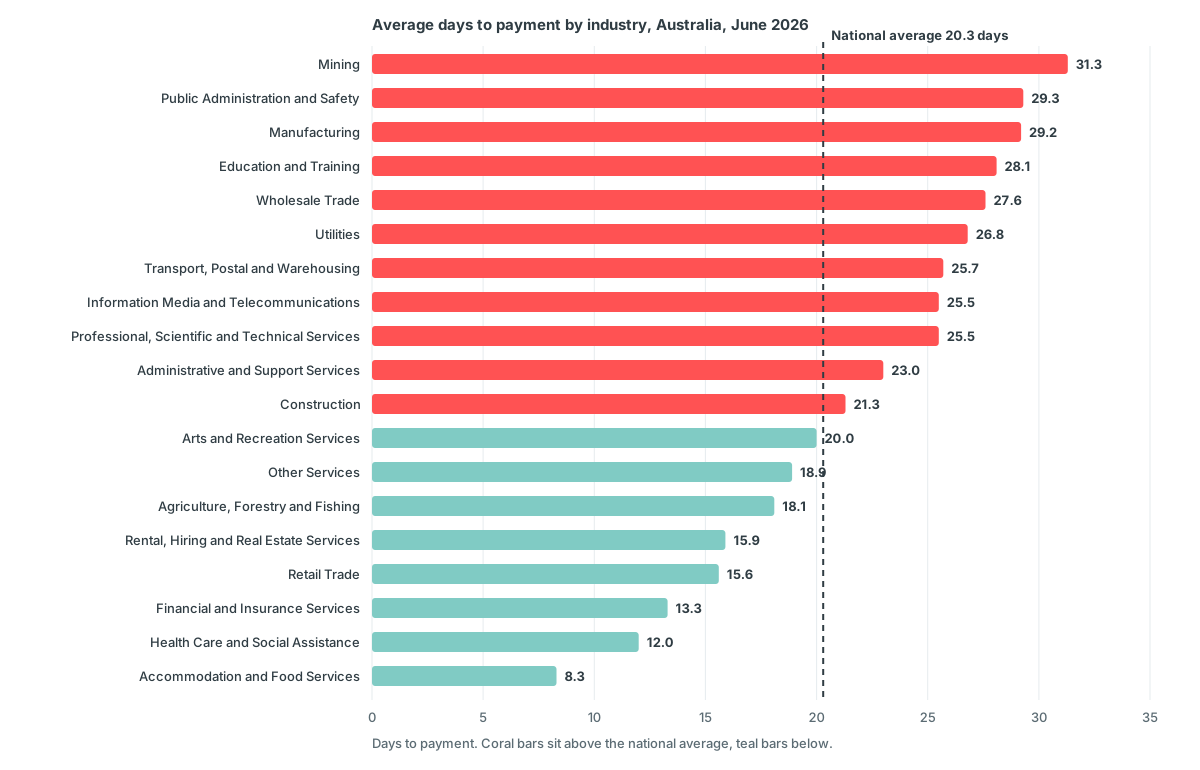
The national average hides the spread. In June 2026 an Australian small business waited 20.3 days on average to be paid, 4.3 days past terms, according to Xero Small Business Insights. Mining waited 31.3 days and accommodation and food services 8.3, so the same tool has a very different job in each.
At 4.3 days late on every invoice, the gap comes straight out of your cash flow. We track the monthly series on our Australian accounts receivable statistics page.
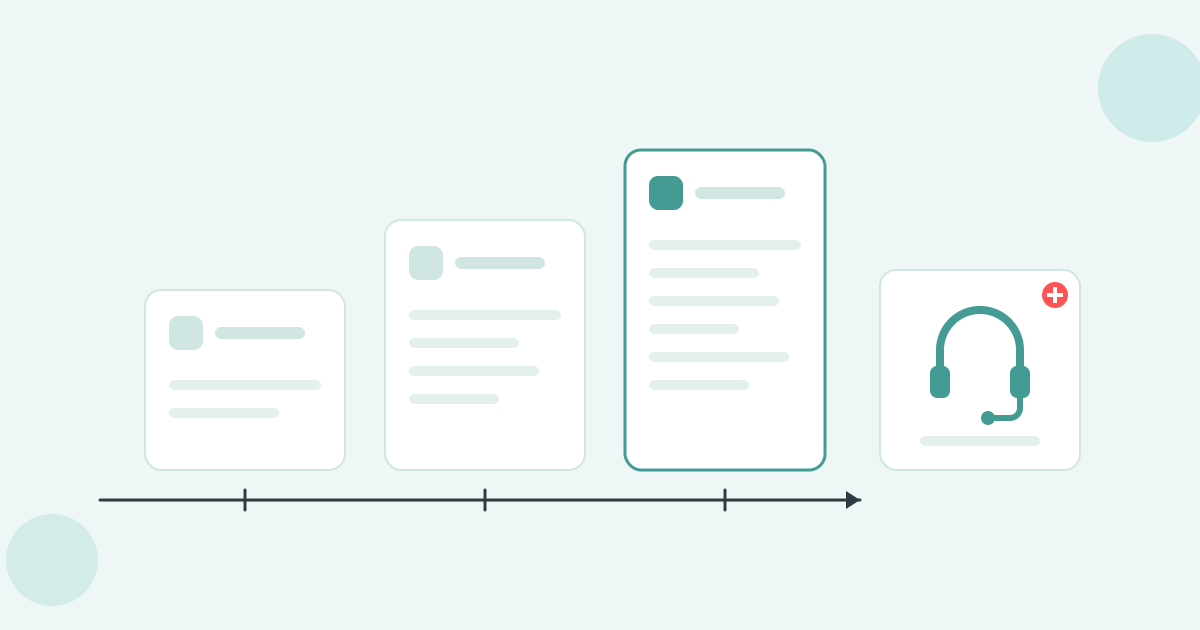
Xero's own tools cover the first stretch: reminders on one schedule and a statement you send by hand. Automated reminders and a scheduled statement run are a complete use case on their own; the question is when the by-hand parts stop holding.
Each of the four does one job, and each stops in the same place.
What none of them do: charge a fee or interest, escalate to a named person, pause on a disputed invoice, or take payment on a plan. Xero's own setup guide points readers at the Xero App Store once they need more than that.
Two signs you have hit the ceiling: the overdue list stops shrinking between runs, and someone is chasing by hand after the fifth reminder. At that point an app costs less than the hours it replaces. See how Paidnice runs debtor management for Xero.
Debtor management software automates the chase from the day an invoice is raised to the day it is paid or escalated. Automated reminders are the base. Four capabilities decide whether the rest works.
Those four make a tool usable. What makes it worth buying is everything the ledger cannot do at all: posting a fee or interest to the ledger, taking payment on an instalment plan, escalating to a named person, pausing on a disputed invoice, and giving the customer a portal to settle in.
The six tools below split along that line: a chasing tool sends better emails, and an automation platform enforces the terms you already agreed. Our debtor management software for Australia page covers the enforcement side.
The six tools below are not competing for the same job. Start here rather than with the list, because the right answer is decided by your size, your ledger and what your real bottleneck is.
| If this is you | Start with |
|---|---|
| Larger business past £4m turnover, happy to sign a longer contract, and you need credit checks as well as chasing |  |
| You want people to make the calls for you, and a one-click handoff to a collection agency |  |
| Real invoice volume on Xero or QuickBooks Online, and you want reminders, statements, fees and escalation in one plan |  |
| Wholesaler or distributor with MYOB or an ERP in the stack |  |
| Accounting or legal practice on MYOB AE, MYOB AO or GreatSoft |  |
| Sole operator or very small business sending under 50 invoices a month |  |
Debtrak also appears in Australian searches for this category. Target: government, banking, insurance and collection agencies. Integration: enterprise banking and government systems, with no Xero, MYOB or QuickBooks connector. Key feature: a collections workflow engine. It is enterprise collections software rather than a debtor management app, so it is not in the six below.
Each tool is placed against the job it genuinely does best, rather than scored out of ten. An A$700k builder and a A$40m distributor are buying different products, so a single winner would be wrong for most readers.
Prices are as at September 2026 and taken from each vendor's own published materials. Where a vendor publishes nothing, the line reads "Not published". Prices change; verify before you buy.
If you are a larger business and credit checks matter as much as chasing
The most established suite here, founded in 2014, and the one to pick if vetting customers matters as much as chasing them. UK built and UK priced, with tiers set for businesses well past the typical Australian small business.
The limitation. It is the oldest product on this list and it shows in how little bends. The late fee rule is global. Statements go monthly on a fixed day, with recipients and senders you cannot change. Payment plan chasing follows the invoice due date rather than the instalment dates, which their own documentation tells you to work around by hand.
Pricing on company revenue in pounds is the other thing to model carefully. A low-volume, high-value Australian business can land on the AUD 1,199 tier for a handful of invoices a month.
Best for: larger businesses that want credit data and chasing in one product and can absorb a rigid configuration.
If you want people making the calls, and a handoff to collections
The former Debtor Daddy, acquired by CreditorWatch in 2022 and rebranded in 2023. Reminder workflows by email, SMS and call, with a New Zealand based team of AR specialists who will phone your debtors for you.
The limitation. No late fees, no interest, and the Xero sync runs once a day, so a payment this morning can still draw a reminder this afternoon. Review activity has been thin since the rebrand, and the vendor does not publish a price.
Best for: owners who want the phone work outsourced and a straight path into a collection agency when a debt turns.
If you send real invoice volume on Xero and want the whole process in one plan
Paidnice is debtor management software for Australia that automates invoice reminders by email and SMS, scheduled statements, late fees and interest on your terms, payment plans, a customer payment portal and escalation, in one plan, from the invoices already in your Xero organisation or QuickBooks Online.


The limitation. No credit checks. There is no bureau data, no risk score and no monitoring feed, so vetting new accounts has to happen somewhere else. Native support is Xero and QuickBooks Online; MYOB and other ledgers are a Custom-plan conversation.
Paidnice is built for two ledgers, not eight. That is why the Xero integration goes deeper than a sync. A MYOB AccountRight or Pronto business starts with a Custom plan conversation rather than a self-serve signup.
Best for: Xero businesses pushing real invoice and statement volume that want reminders, statements, fees and escalation running from the ledger in one plan.
If you are a wholesaler or distributor with MYOB or an ERP
Long established in the Australian mid-market, owned by Sidetrade since 2025, and strongest where the ledger is MYOB AccountRight, MYOB Exo or an ERP rather than Xero alone.
The limitation. An annual commitment plus a setup fee is a real barrier for a business that wants to try before it buys, SMS is charged as an extra, and no late fee or interest automation appears anywhere in the help documentation.
Best for: distributors with an ERP in the stack and a large debtor book who want credit scoring and collections referral in the same product.
If you run an accounting or legal practice
A practice product: accountants and law firms on both sides of the Tasman are the buyers, and it carries practice management integrations the generalist tools lack, plus fee finance in the same suite.
The limitation. Email is the only reminder channel described, and there is no visible statement schedule, fee automation or escalation workflow. It is a practice product, and a trade or services business would be buying modules it never uses.
Best for: firms on MYOB AE, MYOB AO or GreatSoft that want debtor follow-up and fee finance from one vendor.
If you are a sole operator sending a few dozen invoices a month
A new Australian self-serve tool, founded in Sydney in 2026, with published tiered pricing, a five-stage reminder sequence and late fee automation for very small businesses on Xero or QuickBooks Online.
The limitation. It is brand new. There is no app store listing and no review to read, no statements on a schedule, no handoff to a collection agency, and it is not clear whether the late fee is a ledger invoice or a figure on a dashboard.
Best for: a very small business that wants a cheap reminder sequence and is comfortable being an early customer.
Who each tool is built for, what it plugs into, the one thing it leads on, whether it can post a charge back into your ledger, and what it costs. The ledger column is the one to read first: it separates a tool that sends better emails from a platform that enforces your terms.
| Tool | Target | Integration | Key feature | Posts fees to the ledger | Entry cost |
|---|---|---|---|---|---|
| Chaser | Businesses past £4m turnover | Xero, QuickBooks, Sage, NetSuite, Dynamics, SAP | Credit checks and monitoring beside chasing | Xero only, one global rule | AUD 399/mo |
| CreditorWatch Collect | AU businesses wanting calls made for them | Xero, MYOB, QuickBooks | AR specialists and one-click collections handoff | No | Not published |
| Paidnice | Small and medium businesses on Xero or QuickBooks Online | Xero and QuickBooks Online | Reminders, statements, fees and escalation from the invoices already on the ledger | Yes | A$99/mo |
| ezyCollect | AU and NZ wholesalers and distributors | Xero, MYOB, QuickBooks, NetSuite, SAP B1, Pronto | Credit insights and collections referral across ERPs | No | Last published A$275/mo plus setup, confirm with the vendor |
| FeeSynergy Collect | Accounting and legal firms | Xero, MYOB AE and AO, GreatSoft | Practice integrations and fee finance | Not published | Not published |
| Wren | Sole operators and very small businesses | Xero and QuickBooks Online | Five-stage reminders with automatic late fees | Not published | A$29/mo |
Row order follows the list above and is not a ranking. A cell reads "Not published" where the vendor documents nothing either way, rather than where a capability is known to be absent.
A fee that sits on a dashboard is a number your customer never sees. A fee posted to Xero as an invoice enters their accounts payable, their aged payables and their payment run, and that is where the leverage comes from.
No statutory rate. Australia has no statutory right to interest on an overdue business invoice. A late fee or interest charge stands on the terms of trade your customer agreed to before you supplied, and the amount should reflect the cost of the delay rather than punish. A tool cannot invent the right to charge; it can only apply what your terms already say.
Unfair contract terms. Since 9 November 2023, an unfair term in a standard form contract with a small business is a contravention with penalties, under reforms administered by ASIC. A late fee clause that is one-sided, or out of proportion to your actual loss, is exactly the kind of term the regime targets. Write it even-handed, disclose it up front, and keep the rate defensible.
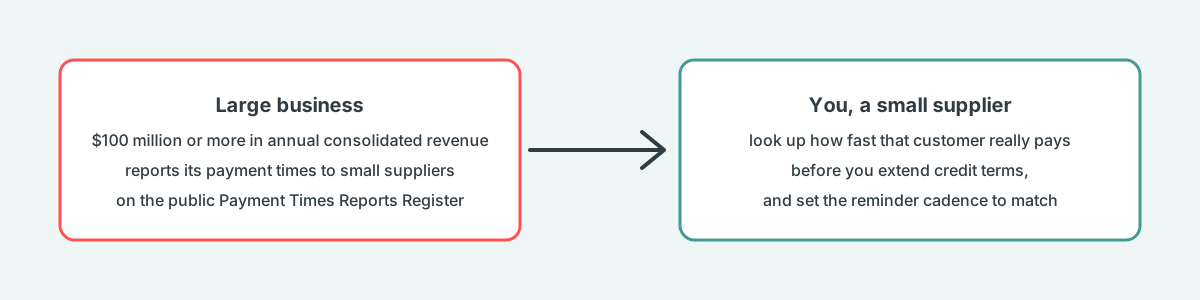
The Payment Times Reporting Scheme. Large businesses with annual consolidated revenue of $100 million or more must report how quickly they pay small suppliers, under reforms that commenced on 7 September 2024, per the Payment Times Reporting Regulator. Your small business does not report. Before you extend terms to a big customer, look them up on the public register and see how they really pay.
For the detail on what you can charge, how to word the clause and how to apply it in Xero, read late fees in Australia. This page does not repeat it.
Whichever tool you pick, the setup runs in the same three phases. Get the first one right and the other two take an afternoon.
The audit phase is where most rollouts go wrong. If your ageing report shows 40 percent of the balance in the 90-plus bucket, a reminder sequence is not the first job. Statements and escalation on those accounts come first, and the reminders protect the invoices that are still current.
Most shortlists collapse once you answer two questions: how big is the ledger, and what is the actual problem. Five common situations and where they land.
| Your situation | What to look at |
|---|---|
| Under A$500k, fewer than 25 invoices a month | Automated reminders and a scheduled monthly statement run. That alone is a full use case, and fees can come later. |
| Real invoice volume on Xero, statements going out weekly or monthly | Look for scheduled statements, fees and plans in the base product rather than as paid add-ons. |
| Extending trade credit to accounts you cannot vet | Credit data. This is the one job the cheaper tools genuinely do not do. |
| MYOB AccountRight, Exo or an ERP in the stack | Integration depth first. Confirm the sync is two-way and how often it runs before you look at any other feature. |
| Nobody has time to make the calls | A human calling layer or a straight handoff to a collection agency, priced on recovery. |
Sector matters too. A mining supplier waiting 31 days on average is chasing a slow payer who will pay; a statement schedule and a fee clause do the work. A hospitality supplier at eight days has a different problem, usually one or two accounts, and escalation rules matter more than cadence.
Feature grids look identical across this category because every vendor writes to the same checklist. Six questions separate them in a demo, and none of them appear on a pricing page.
The question that changes the most demos is the second one. Ask the vendor to raise a late fee during the call and then show you that fee sitting in Xero as an approved invoice against the customer. Only a fee posted to the ledger reaches your customer's payment run, so ask to see it there rather than on a dashboard.
Most of this decision comes down to two questions: how much of the process you want automated, and what your ledger looks like. If you have read this far and still cannot tell, ask us.
We would rather point you at the right tool than sell you the wrong one. Three of the six above do things Paidnice does not, and we will tell you when one of them is the better answer.
What is debtor management?
Debtor management is the process of making sure customers who owe you money pay on time: setting terms, invoicing correctly, reminding before and after the due date, applying the fees your terms allow, and escalating when an account turns. Debtor management software automates that process from the invoices already in your ledger.
What is the most used accounting software in Australia?
Xero, MYOB and QuickBooks Online are the three ledgers Australian small businesses run, and Xero is the one every tool on this page connects to. If you are on MYOB, ezyCollect, CreditorWatch Collect and FeeSynergy Collect connect natively, and Paidnice supports MYOB on a Custom plan only.
Is debtor management software the same as a CRM for debt collection?
No. A debt collection CRM is built for an agency working purchased or referred debts, with dialler queues and legal case tracking. Debtor management software is for the business that raised the invoice, and it works from your own ledger to get paid before an agency is needed.
Can I charge late fees on an overdue invoice in Australia?
You can, provided the customer accepted terms of trade that state the fee before you supplied. There is no statutory rate, so the fee or interest rests on the contract and should reflect the cost of the delay. The detail, including how to apply it in Xero, is in late fees in Australia.
Does the Payment Times Reporting Scheme apply to my business?
Only if your annual consolidated revenue is $100 million or more. A small business does not report. The scheme is useful to you as a reader: the public register shows how quickly each large reporting business pays its small suppliers, so you can check a big customer before you extend terms.
Is there a free trial?
Paidnice has a free action period rather than a timed trial. Signing up is free, there is no card, and the first 20 actions are free with no time limit. An action is anything Paidnice performs: an email sent, an SMS sent, an escalation created or a late charge generated.
Paidnice is accounts receivable automation that enforces your payment terms, trusted by thousands of businesses on Xero and QuickBooks. Credit control and debtor management, run for you.
Try it Now - It's FreeNo card required.


Optimize your cash flow with our suite of financial tools designed for AR professionals. Calculate DSO, aging analysis, late fees, and more.