
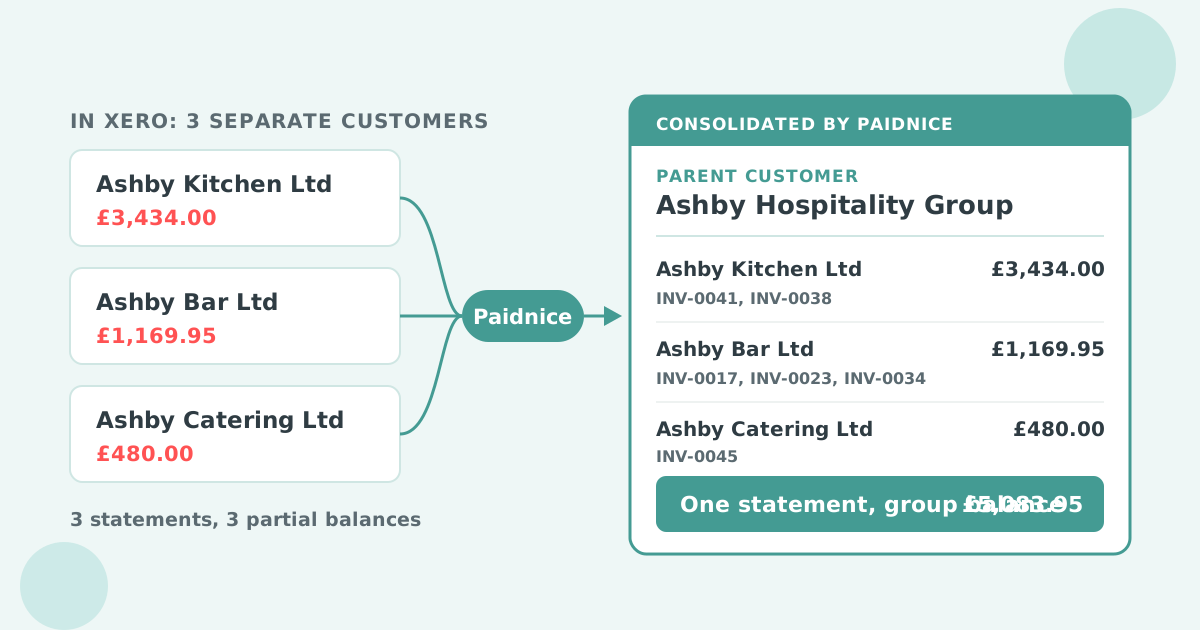

Xero cannot make one customer the parent of another. Every company you invoice is a standalone contact with its own reminders and its own statement, so the one person who pays for a whole group gets chased separately for each company. Paidnice adds a parent customer above your Xero contacts: pick the companies, set their parent, and the parent receives one statement grouped by company, one portal view and one payment for the group. Xero is not changed.
Xero chases each company separately because it has no parent and sub-customer structure. Every legal entity you invoice is its own contact, and Xero's reminders and statements run one contact at a time.
That is correct for invoicing. A hospitality group might run its kitchen, its bar and its catering arm as three limited companies, each with its own company number, address and purchase order process. You invoice each one separately.
Payment is different. One accounts payable person at head office often settles the invoices for all three. From their side, your follow-up arrives as three reminder streams and three statements, each showing a fraction of what the group owes. Nobody sees the full balance in one place, including you.
Xero cannot send one reminder to a parent company because its reminders work at invoice level, tied to the contact that holds the invoice. Xero's invoice reminders run on one schedule for the whole organisation, and each reminder goes to the contact on that invoice.
QuickBooks Online is different here: it supports sub-customers natively, and Paidnice carries that structure across when you connect a QuickBooks company. The gap is a Xero one.
The manual workaround is to build the group's statement yourself. Run the outstanding invoices or a statement for each company, export them, combine them into one email or one PDF, and send it to the person who pays.
It works for one month. It breaks when payments arrive mid-way through the run, when one company gets a credit note, or when the person who knew which contacts belonged together goes on leave. A duplicate "umbrella" contact with the invoices copied across is worse, because it double-counts the receivable in your ledger.
Paidnice adds a parent layer above your Xero customers without changing them. You choose which customers are children, choose their parent, and Paidnice rolls the children's invoices up to that parent for statements, the portal and payments. Each invoice stays on the company it was raised against in Xero.
The parent does not need open invoices of its own. A holding company that is never invoiced directly can still be the parent, and its statement shows everything its children owe.
Four things change once companies share a parent. The underlying Xero data stays exactly as it was.
| Invoice | Due | Outstanding |
|---|---|---|
| Ashby Kitchen Ltd | £3,434.00 | |
| INV-0041 | 22 Sep | £3,200.00 |
| INV-0038 | 21 Sep | £234.00 |
| Ashby Bar Ltd | £1,169.95 | |
| INV-0017 | 10 Aug | £250.00 |
| INV-0023 | 9 Sep | £269.95 |
| INV-0034 | 18 Sep | £650.00 |
| Ashby Catering Ltd | £480.00 | |
| INV-0045 | 30 Sep | £480.00 |
| Group balance | £5,083.95 | |
Set the parent link and the "Only apply to parent customers" filter at the same time. If you set only the link, head office gets the group statement and each company still gets its own statement on the same day, which looks like two people chasing the same money.
A food wholesaler supplies the three Ashby companies above. Each company orders separately, so the wholesaler's order system creates three Xero contacts and raises invoices against each one. That stays as it is.
Before grouping, the Ashby finance manager received a statement from each company record, each with a partial balance, and had to add them up to know what the group owed. After grouping, they get one statement with a subtotal per company and one total. They pay from the portal in one transaction, and each invoice in Xero is marked paid against the right company.
The same pattern fits an accounting or law firm whose client is one person with several entities: a trading company, a family trust and a property company, all invoiced separately and all paid by the same person. Make the client the parent and send one statement to them, not one to each entity.
Parent customers help any business where one person pays for several companies you invoice separately.
The two terms describe opposite problems, and it helps to know which one you have before you set anything up.
Several Xero customers, one payer. The companies stay separate in Xero and the parent receives one statement, one portal view and one payment for the group.
Typical fit: a holding company and its subsidiaries, a franchise group, a client with several entities.
One Xero customer, several people to chase. Different departments or sites sit on one contact and each needs its own reminders.
Typical fit: a university, council or large company with a separate payer per department. See reminders for different departments.
In Paidnice the parent-child link covers the roll-up case, and the child customers are what other software calls sub-customers. If your problem is the split case, contact routing on a single customer is the fix, not a parent.
Parent customers group customer records inside one Xero organisation. They do not merge two Xero organisations or produce group financial statements. If your own business runs several Xero organisations, see credit control across multiple Xero companies.
The launch walkthrough, with the demo video, is in parent-child customers and consolidated statements in Xero. The reminder side of the same problem is covered in one Xero reminder for a contact across multiple companies. To set the statement run itself, start with automatic customer statements in Xero, and for the interest side see statement interest.
Can you create a parent customer in Xero?
No. Xero has no parent and sub-customer structure, so every company you invoice is its own contact. A parent has to be added by a connected app such as Paidnice.
Can Xero send one statement to a group of customers?
No. Xero generates statements per contact. Without a connected app, combining a group's invoices into one statement is a manual export.
Does grouping customers in Paidnice change anything in Xero?
No. Invoices, payments and contacts stay on the company they belong to in Xero. Only the statements, portal, payments and interest that Paidnice sends change.
Does the parent need its own invoices?
No. A holding company that is never invoiced can still be the parent. Its statement shows the open invoices of all its children.
Will each company still get its own statement?
Only if you want it to. Select "Only apply to parent customers" on the statement policy and child customers are skipped.
Does it work with QuickBooks Online?
Yes. QuickBooks Online has sub-customers built in, and Paidnice mirrors that structure for statements and the portal. The parent setting in Paidnice is what adds the same structure for Xero.
Which Paidnice plan includes parent customers?
Every plan, starting with Essentials at £49 or US$69 a month for up to 150 invoices. Paidnice is priced by invoice volume, and your first 20 actions are free with no credit card.
Paidnice is accounts receivable automation that enforces your payment terms, trusted by thousands of businesses on Xero and QuickBooks. Credit control and debtor management, run for you.
Try it Now - It's FreeNo card required.




![An image featuring a vintage red rotary dial telephone on the right side, with the handset lifted off and angled to suggest it's ready for use. The background is a solid teal color. On the left side, there's white text that reads "8 Call Scripts For Payment & Collection Reminders" and below in brackets "[FREE CALL SCRIPTS]". The overall design suggests a promotional or informational graphic related to telephone communication strategies in financial contexts.](/assets/wf/67c598f1ee8aa243f89da1b6_8_Effective_Call_Scripts_For_Payment_-_Collection_Reminders.avif)
Optimize your cash flow with our suite of financial tools designed for AR professionals. Calculate DSO, aging analysis, late fees, and more.