



Summary
Xero cannot send invoice reminders to one department at a customer, or only to the person who received the invoice. Every reminder goes to the primary person on the Xero contact plus anyone with "Include in emails" ticked, whichever department raised the order and whoever was on the invoice's To line.
- The cause: Xero reads the contact record when a reminder fires, never the recipients you chose when you sent the invoice.
- Xero's position: The request to send reminders to a different address has 84 votes on Xero's product ideas board and still sits at Submitted, posted 12 May 2022.
- The fix: Give each department its own Xero contact, then put a parent record over them in Paidnice to keep one statement for the company.
Is a department reminder problem the same as a wrong-recipient problem?
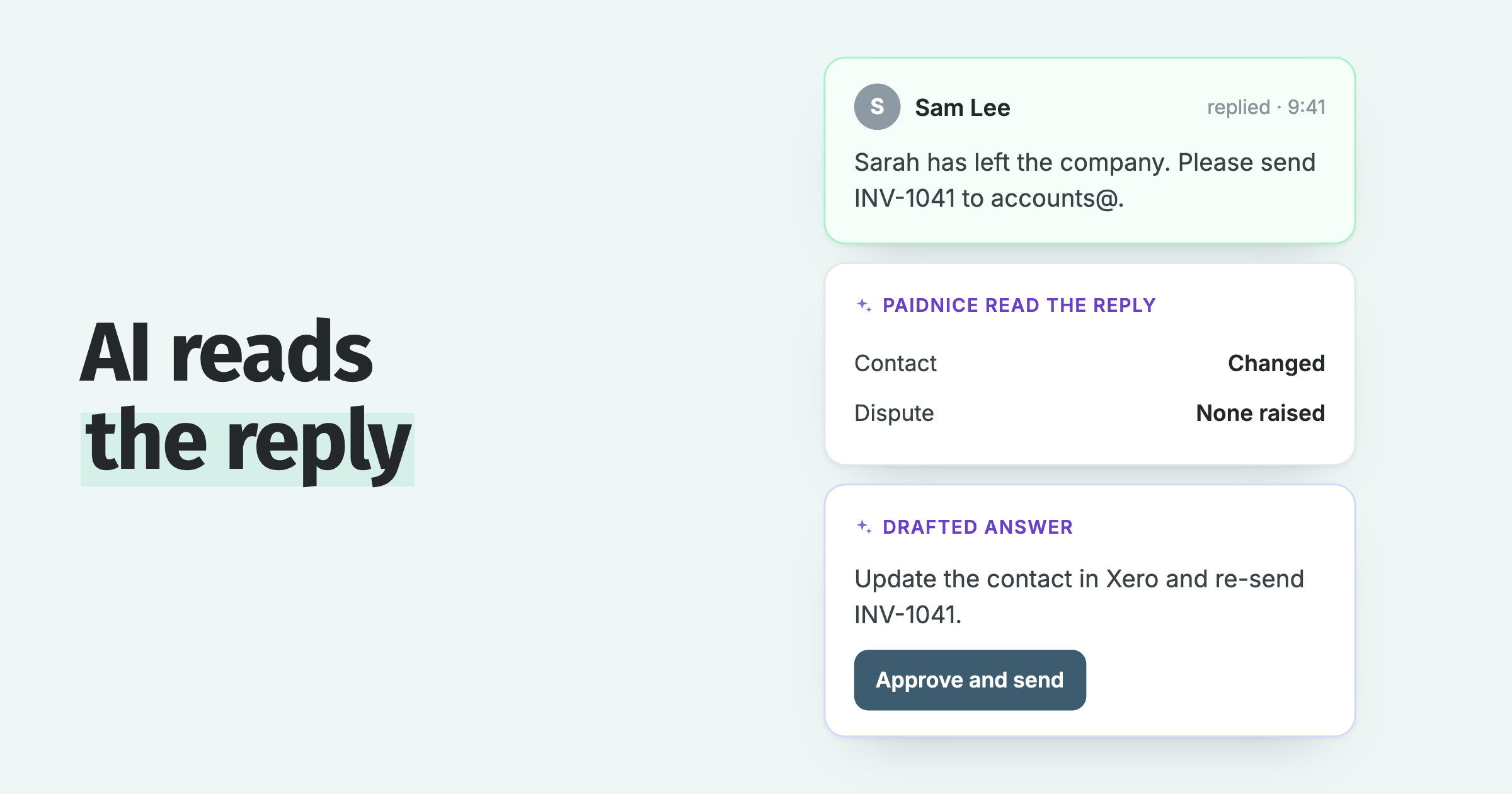
Yes. A reminder that reaches the wrong department has the same root cause as a reminder that reaches a former employee or a colleague ticked once for a single invoice: Xero sends every reminder to the primary person on the contact plus anyone with "Include in emails" ticked, never to the people on the invoice's To line. The general case, with the steps to fix it on the contact record, is in why do Xero invoice reminders go to the wrong person?. The department case is different in one way: the customer has several real recipients, and one contact record cannot serve them all.
Before Paidnice I ran Paintvine, and the list of reasons its invoices went unpaid was short and specific: "Wrong PO number. Dispute on a line item. Payment approver on leave. Invoice went to the wrong email." Every one of those sits inside the department that placed the order. Copying more people on the reminder does not reach the one person who can clear it.
Why does Xero chase every department instead of just one?
Xero builds the reminder recipient list from the customer's contact record when the reminder fires, so a reminder for Marketing's invoice also reaches Operations and Finance if they have "Include in emails" ticked.
The setup that causes it is a sensible one. A customer has three departments, so it has one Xero contact, with the budget holder of each department added as a person on it. Xero allows up to five people on each contact in addition to the primary contact, and you tick "Include in emails" on each so they are included when you email that contact.
Then Marketing's invoice goes overdue. The reminder fires and Xero sends it to the primary person, to Marketing, to Operations and to Finance.
The invoice itself does not change that. You choose who receives an invoice on the day you send it, so Marketing's invoice can go to Marketing alone. The reminder a week later reads the contact record instead, and the contact record says everyone.
Where do replies to a department's reminder land?
Replies to every Xero reminder land at one address for the whole organisation, by default the login email of the user who first turned reminders on, so Marketing's reply cannot reach Marketing's account manager. The setting, its limits and the fix are in can you change the reply-to address on Xero invoice reminders?. In Paidnice, Reply-To is set on each sender profile, so each department's reminders can send replies to a different address.
Where the request stands with Xero
The request to point Xero reminders at a different email address holds 84 votes on Xero's product ideas board and still sits at "Submitted", with no reply from Xero since it was posted on 12 May 2022.
| Request on Xero's product ideas board | Votes | Status | Posted |
|---|---|---|---|
| Invoice reminders - Ability to change invoice reminder to different email address | 84 | Submitted | 12 May 2022 |
| Invoice Reminders: Ability to select that reminders only go to original recipient/s | 9 | Submitted | 26 Oct 2022 |
The larger thread absorbed the merged idea "Option to change who reminders are sent to". A commenter describes the workaround in use today: leave the address on the contact, switch reminders off, and keep a note to send them by hand. One comment on the thread, dated 15 February 2023, states the case directly: "We sell to different departments in a company".
The two are separate ideas, counted separately, and neither has moved past "Submitted" or offers a date to plan around.
Two ways round it inside Xero, and the price of each
You can give each department its own Xero contact, or keep one contact and change the "Include in emails" ticks before each send. The first routes reminders correctly and splits your view of the customer. The second depends on someone remembering.
One Xero contact per department
- Reminders reach the right budget holder: yes
- One statement for the company: no, one per record
- One overdue total on the aged report: no, one line per record
- One credit limit for the company: no, one per record
One contact, edit "Include in emails" before each send
- Reminders reach the right budget holder: only while the ticks are right
- The ticks stay as last set, so the next department's invoice goes to the wrong people
- One statement, one total, one limit: yes
- Where it usually ends: reminders off, sent by hand
The first workaround is correct where it matters. Each department record carries its own primary person and "Include in emails" list, so Marketing's reminders reach Marketing. The cost is the roll-up: the statement, the credit limit and the line on the Aged Receivables report all belong to one contact record.
Part of that is recoverable inside Xero. The Aged Receivables Summary can group by Contact Group, so a group named after the company gives you a subtotal on the report. It cannot give you one statement or one credit limit.
The second workaround keeps one record and edits it before each send. You tick Marketing and untick everyone else, and the ticks stay that way until somebody changes them, so Operations' invoice next week goes out under Marketing's settings. The version on Xero's ideas board, reminders off and sent by hand, is where this usually ends up.
Everything below hangs off the contact record, which is why splitting the contact splits all of it and editing the record fixes one send at a time.
| What decides it | Where it lives in Xero |
|---|---|
| Who receives an invoice email | Chosen when you send that invoice |
| Who receives every reminder | The contact record: primary person plus "Include in emails" |
| Reminder timing and wording | Organisation settings, up to five reminders, applied to every invoice marked as sent |
| Switching reminders off | Per contact, or per invoice |
| The statement | One per contact record |
| The overdue balance on the Aged Receivables report | One line per contact record, with a subtotal available by Contact Group |
| The credit limit, banner and invoice block | One per contact record |
A department with its own budget holder, purchase orders and approval is a separate debtor in everything except the company name. A Xero contact per department is the accurate model, and the lost roll-up is a reporting problem that can be added on top.
How Paidnice keeps one customer over department-level contacts
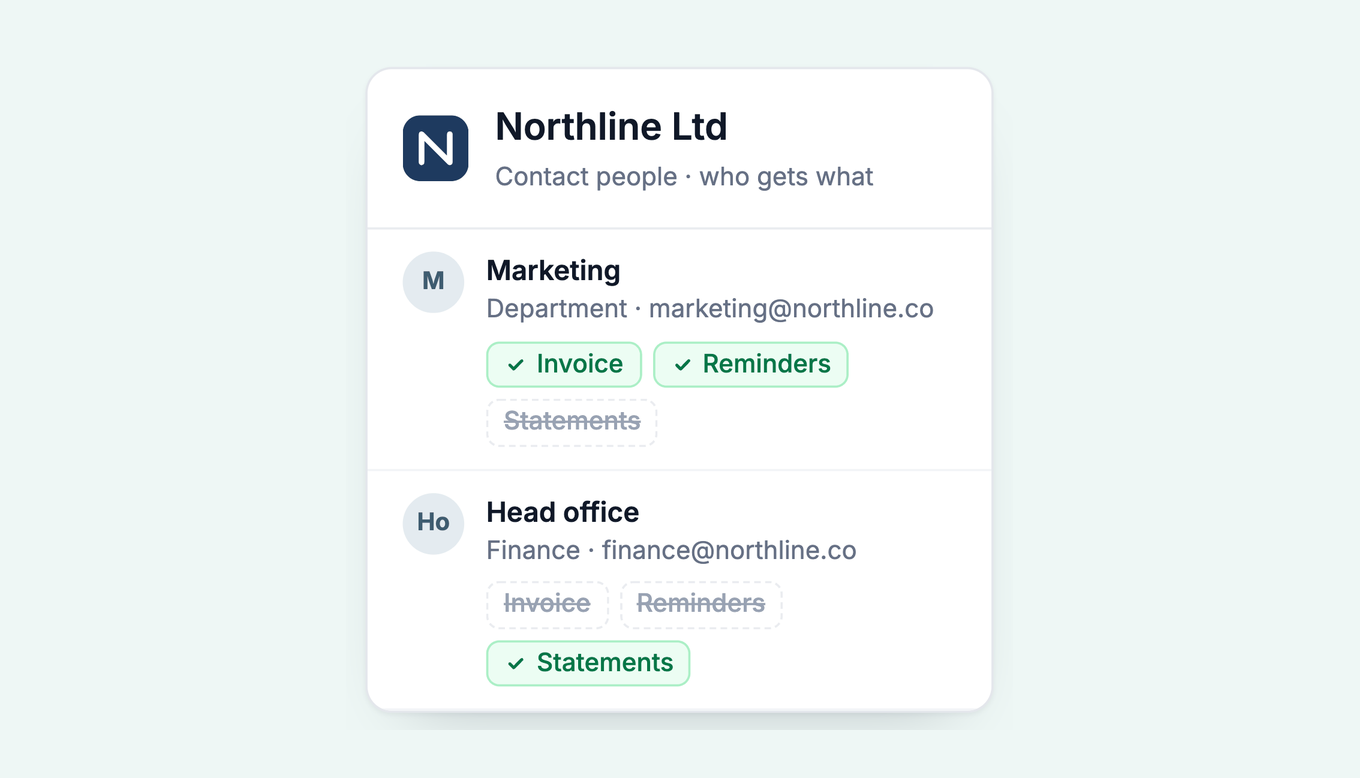
Paidnice puts a parent record over your department contacts. Each department keeps its own people and its own reminders, and head office receives one consolidated statement covering every department's open invoices. Nothing changes in Xero.
It is the same parent and child hierarchy that solves one finance manager paying for several Xero customer records, run the other way round: several people each need their own reminder, with one statement above them. Parent and child records are on every Paidnice plan.
- Keep one Xero contact per department, each with its own primary person and its own "Include in emails" people. If you have been running one contact for the company, this is the moment to split it.
- Connect Xero to Paidnice. The contacts, invoices, payments and credit notes come across, and your Xero contact list is not changed or duplicated.
- Set the parent. Open head office in Paidnice and make it the parent, so each department record becomes a child. The hierarchy lives in Paidnice only.
- Set the statement policy to parent customers only. A record with a parent above it is skipped, so head office gets one consolidated statement and the departments do not each get their own.
- Leave the reminder policies on the children. Each department's people keep receiving reminders on their own invoices, sent from your own domain, and only the statement rolls up.
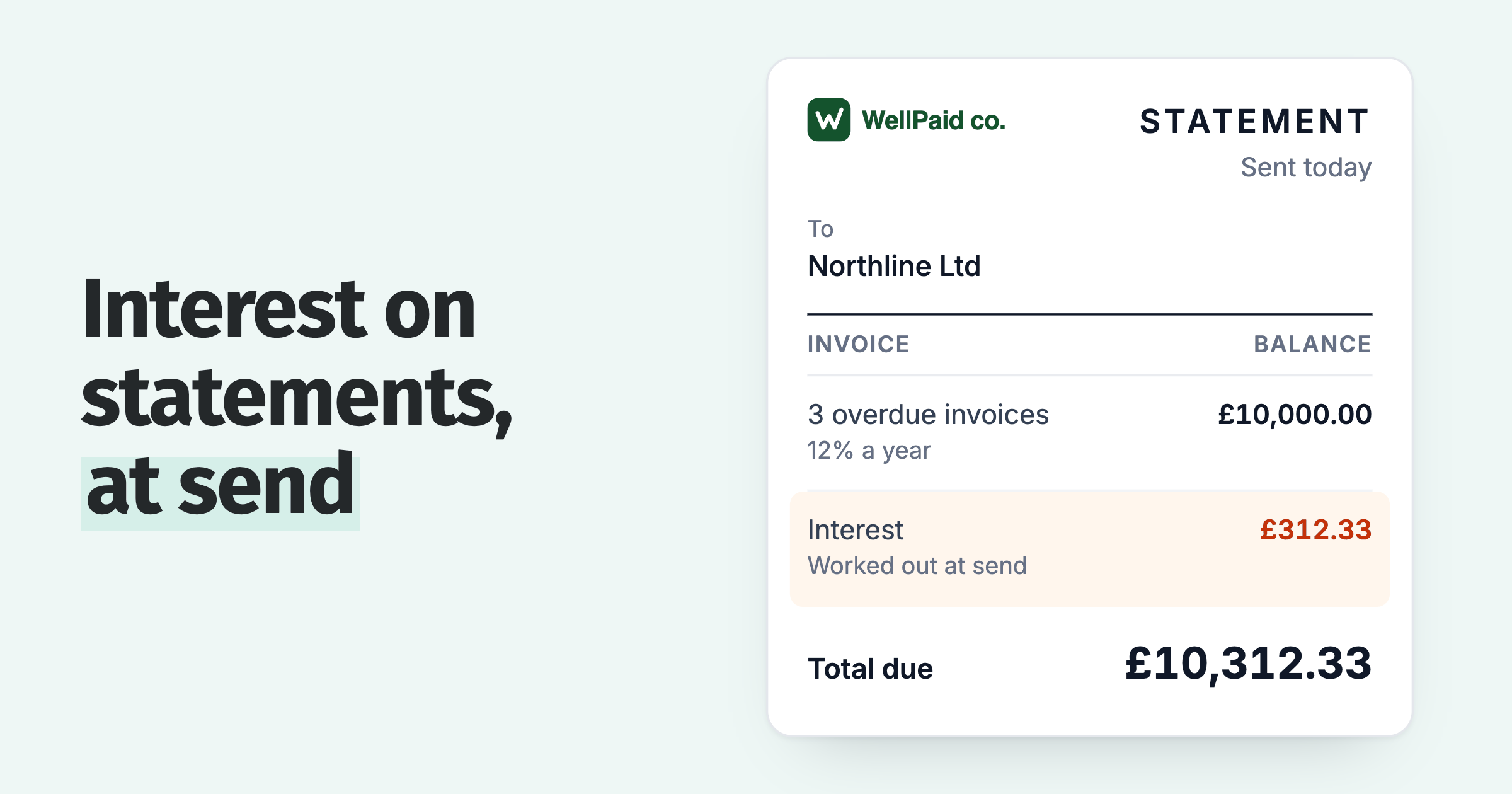
The parent statement always includes every open invoice from its children, so head office sees one document and one total.
Each department still has its own contact page in Paidnice, with summary cards for its outstanding and overdue balance, unpaid invoice count, oldest overdue age and average days to pay. The Aged Receivables by Contact report lists each department on its own line with its ageing buckets.
Each department also carries its own credit score from 0 to 100, which moves as its behaviour changes, so the slow department shows up as itself rather than as the company.
Set the parent-only filter on the statement policy before the first statement goes out. Without it, each department receives a statement as well as head office, and four documents describe one balance.
How Paidnice gives each department its own reminder sequence
Paidnice attaches reminder policies to groups, so a group per department type runs its own timing, wording and sender. Contacts join a group by search or filter, and a policy can filter further by Contact Tag or Xero Group Name.
Paidnice's email and SMS reminders start from a Default Group that holds everyone. You create groups on top of it and attach policies to each, for reminders, statements, late fees and escalations, each with its own timing and wording. A group with no policy is a whitelist, which is the right home for a department that pays by direct debit. Setup is in the Paidnice help centre.
Department types are the natural split. A site office usually wants the reminder with the budget holder at seven days, in plain wording, while a finance department often wants the statement alone. Each is a group with its own policy, and with auto-assign on, a contact moved into a Xero group joins the matching Paidnice group on the next sync.
The sender changes per group as well. On the Pro plan Paidnice sends from your own domain, and once the domain is verified any address on it works without further setup. One department's sequence can come from accounts@ while another's comes from a named credit controller, with Reply-To deciding where the answer lands. The pattern is in sender profiles.
The test we give people is one question: who can approve this invoice? If the answer changes by department, the department is the contact and the group holds its reminder rules. If it is always the same accounts payable inbox, one contact with several people on it is the right setup.
Paidnice is free to sign up, with the first 20 actions free and no credit card needed. Essentials is £49 a month for 150 invoices and two team members, and Pro has unlimited users.
Other ways to split your reminders
Department is one of five ways to split Xero reminders. The others are contact group, customer location, overdue balance and one payer behind several Xero customer records, with the overview in different Xero invoice reminders for different customers. To chase before an invoice falls due, see sending a Xero invoice reminder before the due date.
If the split view is the part that worries you, the reporting side is covered in credit control reporting in Xero, and handing the overdue picture to colleagues outside finance is covered in how a team tracks overdue Xero invoices together.
The weekly spreadsheet habit is in keeping a Xero debtors report current without rebuilding it in Excel, and a customer whose balance keeps rising is in growing overdue balances in Xero.
Common questions
Can one Xero customer be invoiced department by department?
Yes. Create a Xero contact per department, each with its own primary person, or keep one contact and choose the recipients when you email each invoice. Only the first option makes reminders reach the right department.
Can a Xero contact have more than one email address?
Yes. A contact has a primary person and up to five additional people, each with an email address. Anyone with "Include in emails" ticked receives every reminder Xero sends for that contact.
How do I add a contact to a group in Xero?
Go to Contacts, then All contacts, tick the contacts you want and choose Add to group. New groups are created from the left panel with New Group. Groups filter and bulk-edit contacts; they do not change reminders.
How do I change invoice reminders in Xero?
In the Sales menu select Invoices, then click Invoice Reminders. Edit any of the up to five reminders there and click Save. The change applies to every invoice marked as sent across the organisation.
How do I switch reminders off for a single Xero contact?
Turn them off for the whole organisation in the Invoice Reminders screen, for one contact on the contact record, or for a single invoice from the Awaiting Payment tab.
Does a Xero reminder go to whoever received the invoice?
Not necessarily. Reminders go to the primary person on the contact and anyone with "Include in emails" ticked, whoever was on the invoice's To line. There is no per-invoice recipient setting. Replies go to one address for the organisation, covered in changing the reply-to address on Xero invoice reminders.
About the editorial team
Denym started Paidnice in 2022 after customers paying late left his own business short on payroll. He has led it to $1 billion collected on time across more than 1 million invoices, and writes about credit control, late fees and getting paid on Xero and QuickBooks.
 App of the Year