
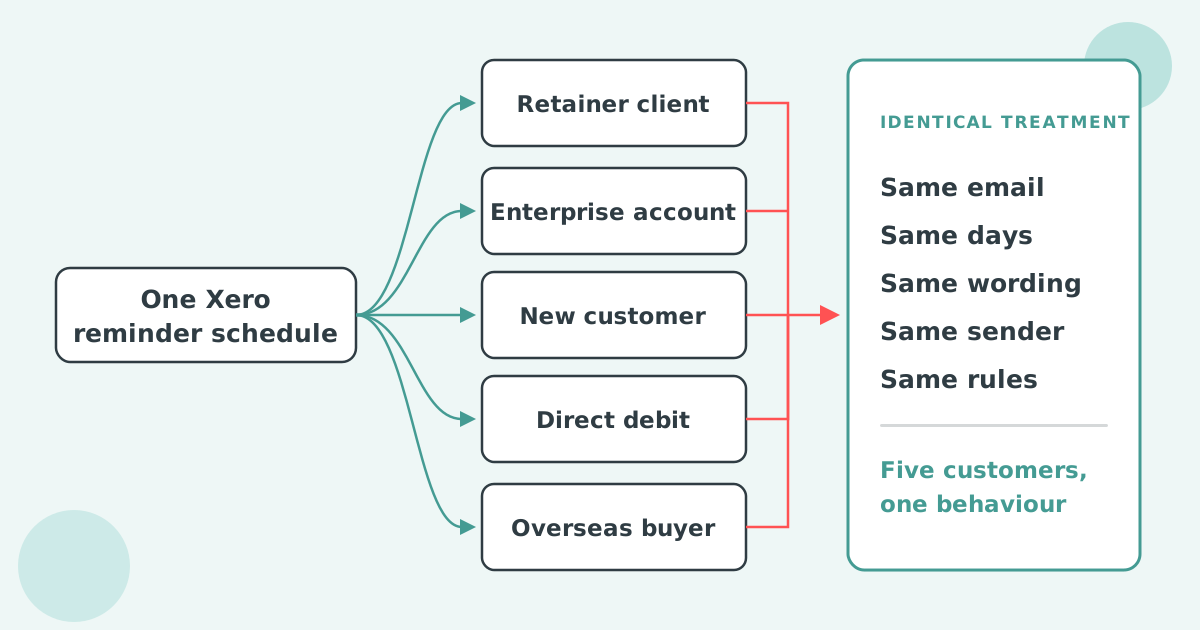

Yes, you can change the reply-to address on Xero invoice reminders. By default every reply goes to the login email of the user who first turned reminders on. In the Sales menu open Invoices, click Invoice Reminders, and pick a different address under Send replies to. One address covers the whole organisation.
Replies to Xero invoice reminders go to the login email of the user who first turned invoice reminders on for the Xero organisation, whoever set up the reminder and whichever customer it went to.
Xero's setup article puts it in one line: any customer replies go to the login email of the person that first turns reminders on, and you can edit this address. Nothing about the invoice, the customer or the user who edited the reminder wording changes that. The address is set once, when the feature is switched on, and stays until someone changes it.
That is why a "can we have a copy of the invoice" reply from a customer can land with a director who enabled reminders during setup two years ago, or with the bookkeeper who did the Xero migration and has since moved on, while the credit controller who chases the account never sees it.
You change the reply-to address on Xero invoice reminders from the Invoice Reminders screen under Sales, using the Send replies to field. The change applies to every reminder in the organisation at once.
If the address you want is not in the list, invite that mailbox as a Xero user first. A shared inbox such as accounts@ has to be a user before it can be the reply-to.
Xero cannot send reminder replies to a different address per customer, per department, per invoice or per team member, and cannot use an address that is not a Xero user. One reply-to covers every reminder the organisation sends.
That leaves three gaps. A business with two credit controllers who split the ledger cannot route each controller's replies back to them. A company that invoices several departments at one customer cannot send Marketing's replies to the account manager for Marketing. And a mailbox that nobody logs into Xero with, such as a ticketing address, cannot be chosen at all.
Xero's product ideas board holds a live request on exactly this. "Invoice reminder - Reply to Email Default to Logged In User" asks Xero to set the reply-to to whichever user sends the reminder rather than the subscriber. It was posted on 17 April 2026, holds 3 votes and sits at Gaining Support. Xero replied on 11 June 2026 that it will continue to monitor feedback from the community and gauge the demand. The older and larger thread, "Ability to change invoice reminder to different email address", posted 12 May 2022 with 84 votes, is about who receives the reminder rather than where replies go, and is covered in why Xero invoice reminders go to the wrong person.
A related request, "Invoice reminders - Option to send copy to self", asks Xero to copy each reminder to the sender. It was posted on 12 January 2023, holds 62 votes and shows Under review, with Xero's last reply on 17 April 2025 saying research into the future of invoice reminders had begun. Until then, the only record of what a customer was sent is the reminder history on the invoice.
When the user who turned reminders on has left, set Send replies to on a monitored shared inbox that is a Xero user, such as accounts@ or ar@, rather than the next person's personal login.
A personal address moves the same problem to the next leaver. A shared inbox that the whole finance team reads survives holidays and resignations, and it keeps the customer's reply in the place where the person who can act on it will find it. Give the inbox its own Xero login, then select it under Send replies to.
The same choice matters when reminders are on for several customers with different account managers. With one address for the organisation, the shared inbox is the only setting that reaches everyone. The split by customer that the account managers want is in sending Xero invoice reminders to different departments at one customer.
Paidnice sets the Reply-To on each sender profile, and each reminder, statement, late fee and early payment discount policy picks its own sender profile. One organisation can send replies to as many addresses as it has policies.
A sender profile holds a From Name, From Email, Reply-To and BCC. You can create as many as you need, set one as the default, and override the profile on a one-off manual send. The pattern most teams use is a ladder: accounts@ on the due date, a named credit controller at 7 to 14 days, then a director at 21 days and on late fees, each with replies returning to the person whose name is on the email.
On the Pro plan Paidnice invoice reminders for Xero send from your own domain. You verify the domain once, and after that any address on it works as a From or Reply-To without further setup or an extra mailbox licence. The BCC field takes any address, including a CRM logging address, so a copy of every reminder lands in your CRM or the team inbox without a Xero user behind it. Sign-up is free, the first 20 actions are free and no card is needed.
Does changing the reply-to change who the reminder comes from?
No. Send replies to only decides where a customer's reply lands. The From address and sender name on Xero reminders are set by Xero's email service, and you cannot change them from the Invoice Reminders screen.
Can Xero send reminder replies to two people?
No. Send replies to holds one address. To reach two people, use a shared inbox or a distribution group that is set up as a Xero user and forwards to both.
Can I get a copy of every reminder Xero sends?
Not today. The request "Invoice reminders - Option to send copy to self" holds 62 votes and is Under review on Xero's product ideas board. The sent date and status of each reminder are on the invoice's reminder history.
Does the reply-to address need to be a Xero user?
Yes. The Send replies to list only offers the email addresses of users on the Xero organisation, so invite the mailbox as a user before you can select it.
Paidnice is accounts receivable automation that enforces your payment terms, trusted by thousands of businesses on Xero and QuickBooks. Credit control and debtor management, run for you.
Try it Now - It's FreeNo card required.


Optimize your cash flow with our suite of financial tools designed for AR professionals. Calculate DSO, aging analysis, late fees, and more.