
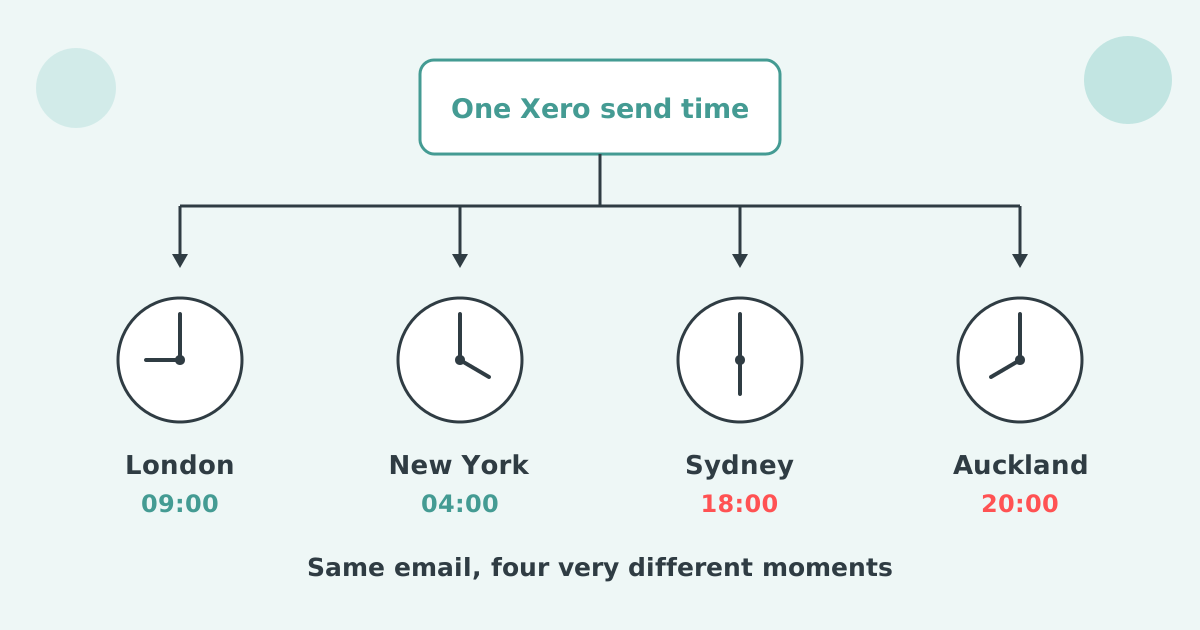

No. Xero has no region filter and no second reminder schedule, so every customer gets the same reminder wording and send time regardless of country. The only native lever is switching reminders off for specific customers and following up by hand. Statutory rules on what a reminder can claim still vary by region, even though Xero's wording does not.
Xero holds one reminder schedule at organisation level. You can have up to five reminders in it, and Xero sets three of them up for you when you first turn the feature on. Every reminder fires against every invoice marked as sent.
Each reminder goes to the primary person on the contact plus anyone with "Include in emails" selected. The only balance control is a checkbox, Don't send reminders for amounts owing on an invoice under, and Xero applies that setting to all reminders. Xero's own setup article tells readers to search the Xero App Store for apps that allow more advanced invoice reminder options.
No. Xero's reminders are configured once, for the organisation, under Sales and Invoices, and nothing in those settings reads the country, the state, the postcode or the currency on the contact. You choose how many days before or after the due date each of your five reminders goes, and you write the wording. That is the entire set of controls.
The result for a business selling into several markets is one email, on one clock, in one voice, to every customer everywhere. Xero has no way to express "for some of them", so there is nothing to tune.
A Xero reminder goes to the primary person on the contact record plus anyone with "Include in emails" selected, never to the address you used when you emailed the invoice. Xero states this plainly in its setup article.
For a single-site customer that is fine. For a group with a buyer in Manchester, a project lead in Dublin and an accounts payable team in Krakow, the invoice goes to the person who ordered the work and the reminder goes to whoever happens to sit on the contact record. The follow-up lands somewhere the original conversation never happened.
This is why the request to point reminders at a different address is the highest-voted item in this corner of Xero's ideas board. It was posted on 12 May 2022, holds 84 votes, and still carries the status "Submitted" with no official response.
The original poster describes needing invoices to go to one address and reminders to another. Duplicate invoices entering the customer's system stop the payment going through.
One Xero send time is wrong for most regions because a payment run is a scheduled event inside the customer's week, and a reminder that lands after it waits until the next one. Landing before the run is worth more than the wording of the email.
None of that is exotic. It is the ordinary consequence of one send time applied to a customer list spread across the planet.
Yes. A reminder that mentions interest or costs is making a legal claim, and the claim you can make depends on where the customer is: statutory in the UK, contractual only in Australia, New Zealand, the United States and Canada. A single Xero schedule cannot handle that, because the wording is fixed for everyone.
| Market | What a reminder may state |
|---|---|
| United Kingdom | Statutory interest of 8% a year over the Bank of England base rate under the Late Payment of Commercial Debts (Interest) Act 1998, plus fixed compensation of £40, £70 or £100 per invoice by debt size, and reasonable recovery costs above that. No contract clause required. |
| Australia | No statutory business-to-business interest. Anything you charge must be in the agreed terms and proportionate, and unfair terms in standard form contracts with small business customers carry penalties. |
| New Zealand | No statutory interest. Contractual only, and it must be in terms the customer accepted. |
| United States | Contractual only. Around 1.5% a month is the de facto market standard, state caps vary, and the fee has to be in the signed agreement before the work started. |
| Canada | Contractual, and the Interest Act caps the rate at 5% a year unless the contract states the annual equivalent, so "1.5% a month (18% a year)" rather than "1.5% a month". |
The UK rate moves. The Bank of England base rate has been 3.75% since 17 June 2026, so the UK statutory rate is 11.75% for the half-year from 1 July 2026. Under the Late Payment order the base rate in force on 30 June or 31 December applies for the following six months, so a UK reminder template that quotes a fixed percentage goes stale twice a year.
A single reminder template that quotes UK statutory interest to an Australian customer is claiming a right you do not have. One that says nothing at all is leaving your strongest lever in the drawer in the market where the law is on your side.
Late fee wording is a contract and compliance question, not a formatting one. Check your terms for each market you sell into, and never state a UK rate above Bank of England base plus 8% a year.
The only workaround inside Xero is to tune the single schedule to the region you invoice most and switch reminders off for the contacts everywhere else. Those customers move to a manual list.
It is defensible when one market is ninety per cent of your ledger. It fails the moment two markets matter, because you now have automation for one and a spreadsheet for the other, maintained by whoever remembers.
Paidnice reads the address already on the Xero contact and puts each region into its own policy, with its own timing, wording, sender and recipients. Xero keeps the contacts and the invoices exactly as they are.
Late fee and interest policies use the same country filter. For UK customers the Bank of England base rate toggle applies base plus your percentage, and you choose whether to lock the base rate for each six-month period as the Late Payment order sets it, or follow the base rate as it changes, so a rate move never leaves stale figures in your templates. Reminders send from your own domain on Pro plans, which matters most for the markets where your brand is least known.
Paidnice holds the send time on the policy, and every group holds its own policies, so each region sends at the hour that suits it. The Australian group can go out on a Sydney morning while the UK group goes out on a London morning, from the same account, on the same day.
The control applies to the whole family of scheduled sends, not just reminders. A statement policy, a late fee policy and a reminder sequence each carry their own timing, so you can set the hour independently for each thing a region receives.
| Group | Reminders | Monthly statement |
|---|---|---|
| United Kingdom | Due date, then 7, 14 and 21 days, sent mid-morning | Sent on the first working day, mid-morning |
| Australia and New Zealand | Due date, then 7 and 14 days, sent on a local morning | Sent on the first working day, local morning |
| United States and Canada | Due date, then 10 and 20 days, sent on a local morning | Sent mid-month, local morning |
Sending on a local clock is what turns a reminder into something a person can act on before the payment run closes. It also removes the awkward pattern where an overseas customer receives correspondence timestamped in the middle of their night.
The setting that moves the needle least dramatically and most reliably is the send time. Moving an Australian or New Zealand sequence from a UK morning to a local morning does nothing clever. It just means the email is read on the day it arrives instead of the day after.
Paidnice supports customers in the UK, Australia, New Zealand, the United States, Canada and South Africa, with local pricing in each currency rather than converted figures. It starts at £49 a month for 150 invoices.
Region is one axis. The others worth splitting on are contact group, overdue balance and one payer sitting behind several Xero customer records. The overview is in different Xero invoice reminders for different customers.
Can Xero send different invoice reminders by country or region?
No. Xero has no location filter on reminders. One organisation-level schedule applies to every invoice marked as sent, wherever the customer is based.
Can I change the time of day Xero sends reminders?
Not per customer or per region. Reminders are timed in days relative to the invoice due date, with no per-contact time zone, so every market receives the send on the same clock. In Paidnice the send time sits on the policy, and each group holds its own policies, so every region can send at its own local hour.
Can I send a Xero reminder to a different email address than the invoice?
Not natively. Reminders go to the primary person on the contact plus anyone with "Include in emails" selected. The request to change this holds 84 votes and remains open.
Should the reminder wording change by country?
Yes, where it mentions interest or costs. UK statutory interest applies without a contract clause, while Australia, New Zealand, the United States and Canada rely on what your agreed terms say.
What about customers invoiced in a different currency?
Xero handles multi-currency invoicing, but reminders still run on the one schedule. Currency is another field a connected app can segment on, alongside the country on the address.
How do I set up invoice reminders in Xero?
In the Sales menu, select Invoices, click Invoice Reminders: Off, tick "Email customers when an invoice is", then click Save. The schedule you build there is the only one your organisation gets, wherever your customers are.
Paidnice is accounts receivable automation that enforces your payment terms, trusted by thousands of businesses on Xero and QuickBooks. Credit control and debtor management, run for you.
Try it Now - It's FreeNo card required.

Optimize your cash flow with our suite of financial tools designed for AR professionals. Calculate DSO, aging analysis, late fees, and more.