
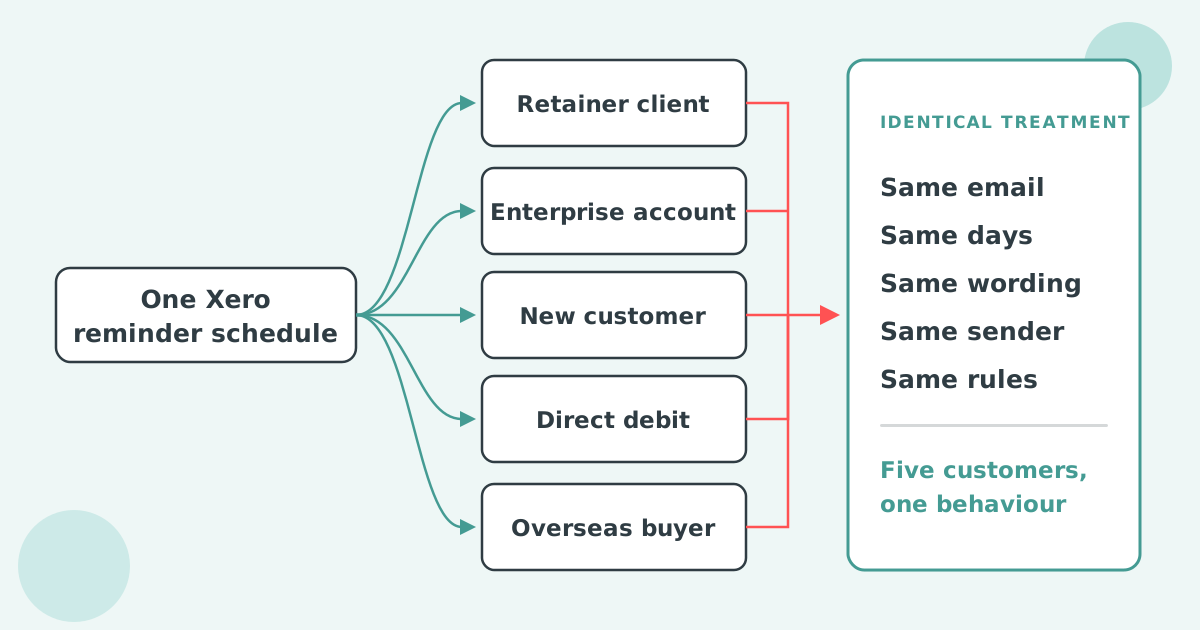

Xero cannot send sterner invoice reminders to your most overdue customers only. Its five reminders run on one organisation-wide schedule with one set of wording, sent from one address, so a firmer message reaches every customer at the same day overdue. The only lever is to make the later reminders in that shared schedule firmer for everyone.
No. Xero's invoice reminders use one schedule and one set of templates for the whole organisation, so the wording on reminder five is the same for a customer 60 days late on £12,000 as for one 60 days late on £150. There is no rule that reads a customer's balance, their days overdue or their payment history and picks a firmer message.
Tone in Xero moves with the invoice's age only, because you wrote a firmer template for a later reminder. Xero's one balance setting, a floor that silences small invoices, is covered in how to tier Xero invoice reminders by overdue balance.
Xero lets you change three things on each reminder: the days before or after the due date it sends, the subject line and the message body. You can hold up to five, and the same five apply to every customer with reminders switched on.
The Xero invoice reminders settings also give you one organisation-wide floor, the "Don't send reminders for amounts owing on an invoice under" checkbox, and two off switches: one per contact, on the contact record, and one per invoice, from the Awaiting Payment tab. Reminders go from Xero's own sending address, replies go to the one Xero user address set for your organisation, and the same sender is used for all five.
Two requests on Xero's product ideas board show where the gaps sit. Invoice reminder templates to apply to specific customers was posted on 2 April 2025, holds 34 votes at "Gaining support", and on 14 September 2026 Xero's community manager replied that a new getting-paid agent under JAX may bring messaging control later. CC/BCC on invoice reminders, posted in November 2015, holds 109 votes, and Xero's July 2024 reply said the new CC/BCC feature "won't apply to Invoice Reminder emails".
The fix inside Xero is to write the five reminders as an escalating sequence, polite at the start and firm at the end, and accept that every customer moves through it at the same pace.
The wording on the firm reminders should stay short, factual and courteous. Two lines that do the job:
"Invoice INV-0412 for £3,840 is now 14 days past its due date. Please pay by Friday 10 October, or reply with a date we can expect it, so we can keep your account on normal terms."
"Invoice INV-0412 for £3,840 is 28 days overdue and no payment date has been agreed. Under our terms, interest at 12% a year now applies from the due date. Please settle by Friday 24 October to avoid the account being placed on hold."
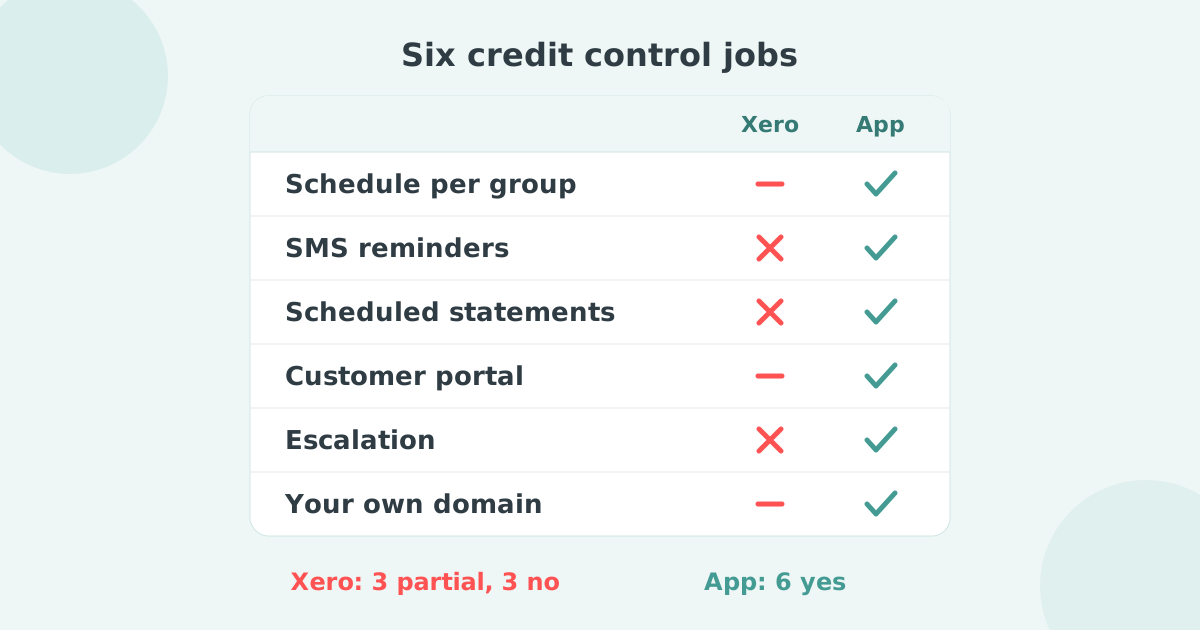
Xero cannot change the sender, copy a manager, shorten the gaps, switch channel or add interest for one customer while the rest stay on the standard sequence.
| What a serious overdue account needs | Available in Xero? |
|---|---|
| Firmer wording as the balance ages | Yes, but for every customer at the same day overdue |
| A firmer sequence for large balances only | No |
| A sixth or later reminder | No, five is the cap |
| Send from a credit controller or director instead of accounts | No |
| Copy an account manager on the reminder | No |
| Follow email with a text message or a call task | No |
| Add interest or a late fee at a set point | No |
| Act on the customer's total overdue balance | No |
Paidnice reads each Xero customer's total overdue balance and days overdue, places the customer in a group, and gives each group its own reminder wording, timing and sender. A customer sits in one group at a time, and moving the customer moves the policy.
The BCC field on the sender profile is where the copied manager goes, invisible to the customer. Escalation workflows and SMS reminders are included on the Essentials plan; sending from your own domain is on the Pro plan and above. Sign-up is free with no card.
Can Xero send different reminders to different customers?
Not from the reminder settings. Xero has one schedule and one set of templates for the organisation. The only per-customer control is switching reminders off on the contact record. The routes around that are in different Xero invoice reminders for different customers.
Can I change who a Xero invoice reminder is sent from?
No. Reminders use Xero's sending address, replies go to the one Xero user address set for your organisation, and the same sender applies to all five. The request to point reminders at a different address has been open on Xero's ideas board since 2022.
How many invoice reminders can Xero send?
Five per organisation. Xero creates three when you turn the feature on, and you can add two more, each with its own days setting, subject and message.
How stern should a final reminder be?
Factual, not angry. Name the invoice, the amount, the days overdue, the consequence your terms already allow, and a date.
Paidnice is accounts receivable automation that enforces your payment terms, trusted by thousands of businesses on Xero and QuickBooks. Credit control and debtor management, run for you.
Try it Now - It's FreeNo card required.

Optimize your cash flow with our suite of financial tools designed for AR professionals. Calculate DSO, aging analysis, late fees, and more.