



Summary
No. Xero tracking categories cannot drive invoice reminders: they feed reports only, and reminders, statements and late fees never read them, because Xero applies one reminder schedule to every invoice regardless of tag. Xero allows four tracking categories with two active at a time. The bridge is to mirror the segment in contact groups, which connected apps can read.
- The block: A tracking option on an invoice changes how Xero's reports group it and nothing about how Xero chases it.
- The limit: Xero allows four tracking categories with two active at once, and the request to raise that holds 252 votes at status In discovery.
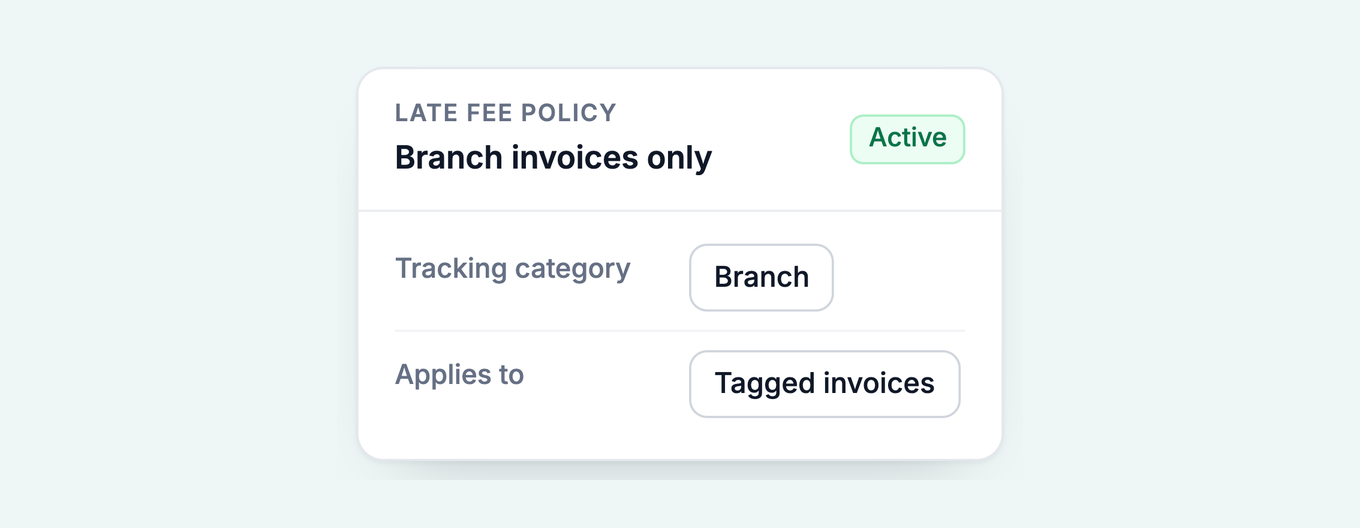
- The bridge: Mirror the segment in a Xero contact group so Paidnice can run a reminder sequence per segment; a Paidnice late fee policy can also filter by tracking category directly.
How do Xero's invoice reminders treat a tracked invoice?
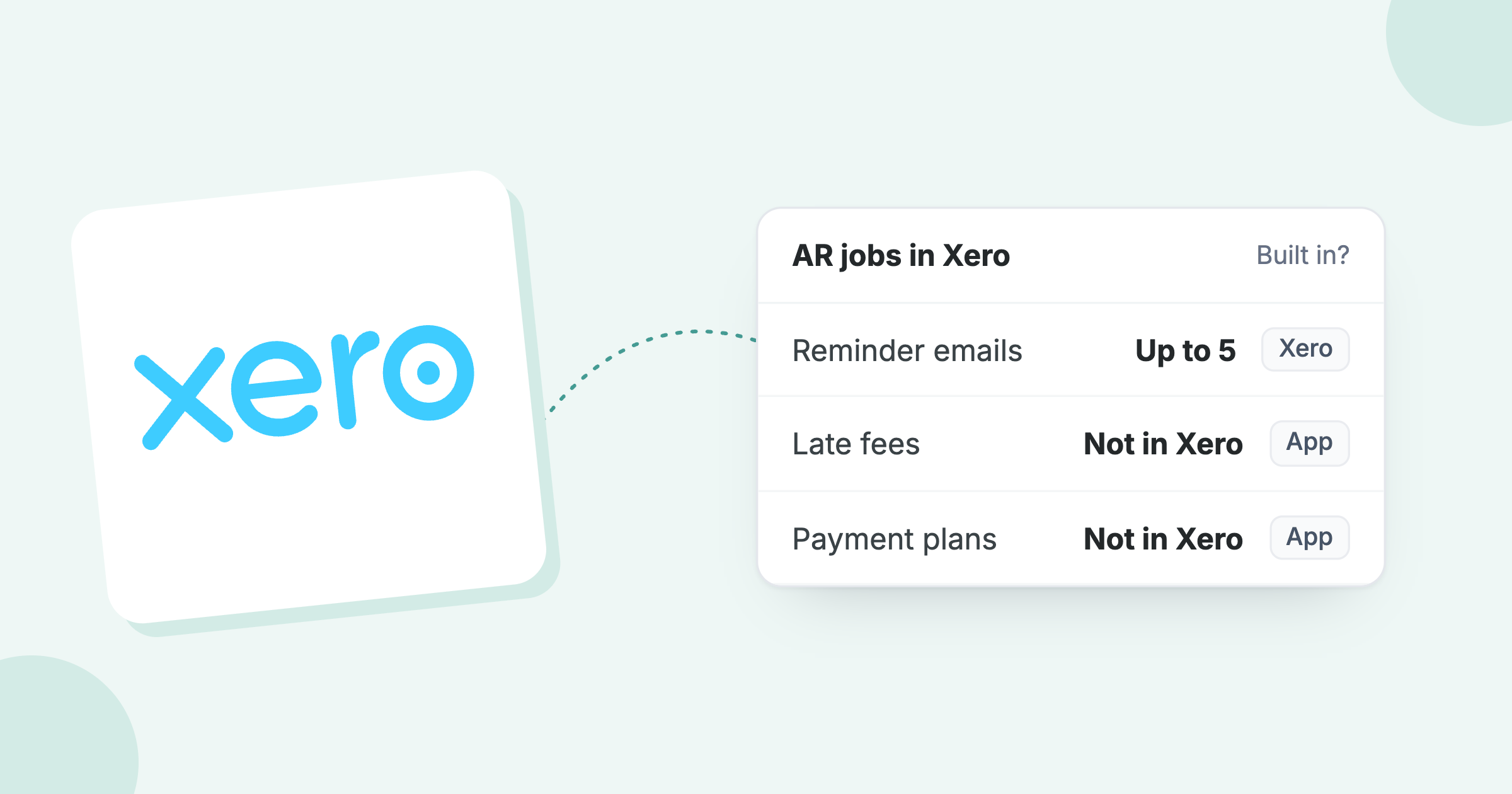
Xero's invoice reminders treat a tracked invoice exactly like an untracked one. Xero holds one reminder schedule at organisation level, with up to five reminders and three set up by default, and every reminder fires against every invoice marked as sent.
- Tracking categoryPartner / Branch / Arm
- Grouped reportsWorks in Xero
- Invoice remindersNever reads the tag
- Collection workflowsVia groups + Paidnice
Each reminder goes to the contact's people with "Include in emails" selected. The only balance control is a checkbox, Don't send reminders for amounts owing on an invoice under, and Xero applies that setting to all reminders. Xero's own setup article tells readers to search the Xero App Store for apps that allow more advanced invoice reminder options.
Free: Late payment interest calculatorWork out the interest or fee on an overdue invoice.Nowhere in that evaluation does the tracking option appear. The category lives on the invoice line for reporting; the reminder engine reads due dates and amounts. They do not meet.
What can a tracking category trigger in Xero?
A Xero tracking category can group the Aged Receivables report, slice the Tracking Summary report and prefill new invoices from a contact's sales defaults. It cannot trigger a reminder, a statement, a late fee or an alert.
The two-category ceiling makes this worse than it looks. Xero allows four tracking categories in total with two active at a time, and the request to raise that holds 252 votes at "In discovery" on Xero's product ideas board, with Xero's latest reply dated 1 September 2026 committing to nothing.
How do you mirror a tracking category where automation can read it?
Mirror the tracking segment as a Xero contact group, one group per segment that should chase differently, and keep the tracking category for reporting. Contact groups and tags sit on the contact, connected apps read them, and they have no two-slot ceiling.
If department and location already hold both category slots, the segment you want to chase differently has no home in tracking at all. The split is still right; only its home changes.
- Keep the tracking category for reporting. The grouped Aged Receivables view stays exactly as it is. Setting that up is its own job.
- Create one Xero contact group per segment that should chase differently: a group per partner, per branch, or per arm of the business.
- Put each customer in exactly one group. A contact can sit in several groups, which suits reporting and breaks automation. One group per customer for chasing; tags for everything else.
- Point a connected app at the groups. The app runs a sequence per group while Xero keeps the ledger and the reports.
How does Paidnice run a collection workflow per segment?
In Paidnice, groups are the organising unit: every policy, whether a reminder sequence, a statement schedule, a late fee or an escalation, belongs to a group, so different segments run different rules at the same time. Auto-assign maps a Xero contact group to its Paidnice group on sync, so membership is maintained once, in Xero, and the behaviour follows.
Each segment's policies carry their own days, wording, sender profile and copied recipients. A partner's book can open with a soft nudge at three days overdue from that partner's address, while the trade arm runs a firmer sequence with a monthly statement. Escalations email the instruction to the segment's owner when an account crosses a day threshold, breaches a credit limit or grows its total balance. Paidnice runs debtor management for Xero from the invoices already in your ledger.
Paidnice connects to Xero in a few minutes, imports your contact groups with the contacts, and starts at £49 a month for 150 invoices, with unlimited users on Pro.
Can a Xero tracking category filter a late fee policy?
Not in Xero, which has no automatic late fees. In Paidnice, yes: a late fee or interest policy can filter by tracking category or class directly, so a fee can apply to one segment's invoices only, without any contact group setup.
The tracking filter sits alongside country, invoice reference, minimum fee amount, branding theme, contact tags and Xero group name. Reminders and statements still need the contact-group mirror above, because those policies attach to groups.
Run the two halves together: a contact group per segment for reminders and statements, and the tracking filter on the late fee policy so the fee follows the invoice tag rather than the contact.
Other ways to split your reminders
Tracking category is one axis. The same problem appears split by contact group, by customer location and region, and by overdue balance. The overview of every axis is in different Xero invoice reminders for different customers.
Common questions
Can Xero send different invoice reminders based on tracking category?
No. Reminders are an organisation-level schedule applied to every invoice marked as sent, and the reminder engine never reads tracking options. Per-segment sequences need a connected app reading groups or tags.
How many tracking categories can Xero have?
Four in total, of which two can be active at any time. Xero also recommends no more than 100 options per category so reports load quickly.
What are tracking categories in Xero and how do they work?
They are labels assigned to transactions so reports can slice by part of the business. You create a category with options, assign options on transactions or via a contact's sales defaults, and group reports by the category.
How do I change tracking categories in Xero?
Edit the category or its options under Accounting settings, Tracking categories. To move existing transactions between options in bulk, use Find and recode, which needs the adviser role.
Can a late fee apply to only one tracking category?
Not in Xero, which has no automatic late fees at all. In Paidnice, a late fee or interest policy can filter by tracking category or class, so a fee can apply to one segment's invoices only.
Do contact groups control Xero invoice reminders instead?
No, groups do not drive reminders either. The difference is that connected apps read groups, so a group per segment becomes a per-segment sequence one integration later.
About the editorial team
Denym started Paidnice in 2022 after customers paying late left his own business short on payroll. He has led it to $1 billion collected on time across more than 1 million invoices, and writes about credit control, late fees and getting paid on Xero and QuickBooks.
 App of the Year