
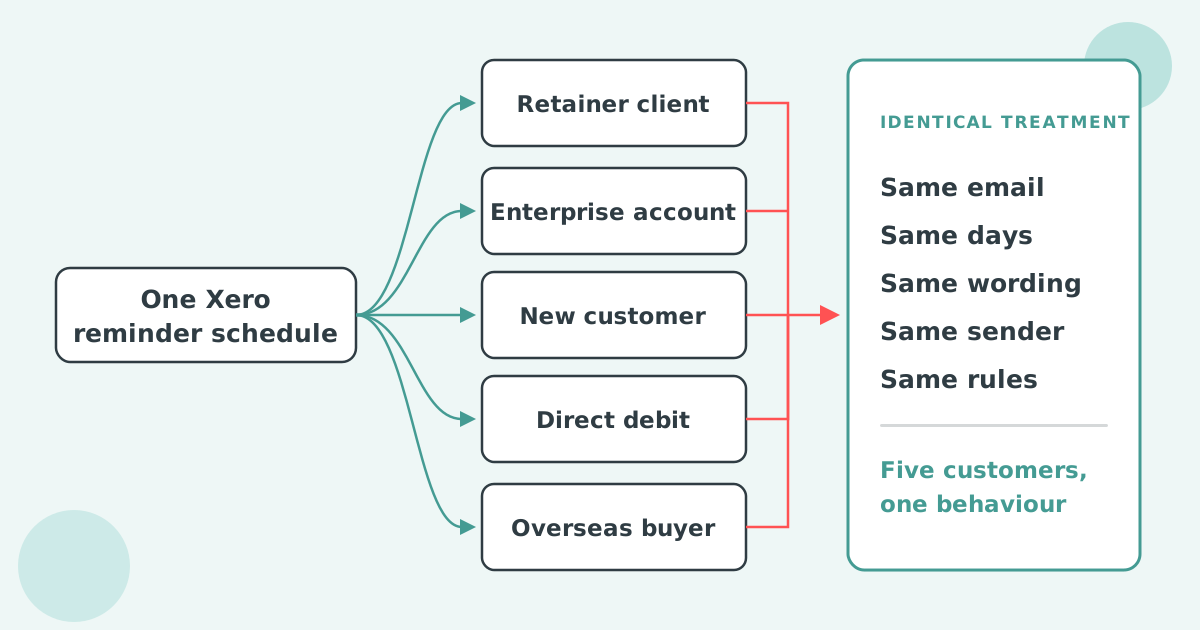

No. Xero holds one invoice reminder schedule per organisation, applied to every invoice marked as sent. You cannot give one customer a different sequence or wording. The only per-customer controls are an on/off switch and one shared minimum-balance cutoff, so a genuinely different reminder needs a connected app.
Xero's invoice reminders are one schedule, owned by the organisation, applied to every invoice with a status of sent. Xero's own documentation is explicit: "You can have up to five reminders in your organisation", and three are configured for you when you first turn the feature on.
Turning them on takes four steps.
Each reminder is timed against the invoice, not the customer. You choose due in or overdue by, then a number of days. Setting the number to zero sends the reminder on the due date itself. Reminders go to the primary person on the contact plus anyone with "Include in emails" selected, not to the person you actually sent the invoice to.
Routing exists because segments behave differently. Xero Small Business Insights shows the industry spread.
| Industry | Time to be paid |
|---|---|
| Mining | 31.3 days |
| Public Administration and Safety | 29.3 days |
| Manufacturing | 29.2 days |
| All industries | 20.3 days |
| Health Care and Social Assistance | 12.0 days |
| Accommodation and Food Services | 8.3 days |
Source: Xero Small Business Insights, June 2026. See the full data on the Paidnice accounts receivable statistics dashboard.
One schedule across that range is either too soft or too hard for most of the ledger.
Xero gives you three settings that change reminder behaviour: an amount floor, an off switch per contact or invoice, and a reply-to address. None of them creates a second sequence, and two of them apply to the whole organisation at once.
An amount floor. Under the reminder settings there is a checkbox labelled Don't send reminders for amounts owing on an invoice under, followed by an amount field. It is the only balance-aware control Xero has, and Xero notes that the setting applies to all reminders, not to a chosen group.
An off switch per contact or invoice. You can stop reminders going to a particular customer, or for a specific invoice, for example one that is part paid or already under discussion. This is the only genuinely per-customer control in the product.
A reply-to address. Replies go to the login email of whoever first turned reminders on, and that address can be edited. The sending address stays with Xero.
Reminders only go out on invoices marked as sent, and only to contacts that have an email address on the record. A quiet reminder schedule is very often a batch of approved-but-never-sent invoices rather than a broken setting.
One Xero reminder schedule cannot read anything about the customer before it sends: not the contact group, the country, the overdue balance, the branding theme or the person who actually received the invoice. The gap is not about timing.
The recipient rule is the one that surprises people most. Xero states that "reminders are sent to the primary person in the contact in Xero and any additional people who have the Include in emails option selected in the contact record". If you emailed the invoice to a project manager, the reminder still goes to whoever sits on the contact record. If your question is whether those people should get one shared email or separate ones, see should Xero invoice reminders go to all contacts in one email, or separate emails.
Requests for per-customer Xero invoice reminders have been open on Xero's product ideas board since May 2022. Four separate threads cover the same ground, and Xero has now answered three of them.
| Idea on Xero's product ideas board | Votes | Status | Posted |
|---|---|---|---|
| Ability to change invoice reminder to a different email address | 84 | Submitted | 12 May 2022 |
| Set up invoice reminders for a contact group | 42 | Accepted | 30 Aug 2022 |
| Increase the number of reminders that can be set up | 41 | In development | 10 May 2022 |
| Set invoice reminders by invoice branding template | 30 | Submitted | 20 Sep 2023 |
The most direct answer came on 14 September 2026, when Xero community manager Kelly Munro told the contact-group thread that Xero does not "have plans for this", and pointed instead to the JAX agent Xero is building, which "will create a personalised plan for each customer you turn it on for" but works per customer rather than per group. On 31 August 2026 the request to raise the five-reminder cap moved to "In development". On 10 June 2025, on the branding template thread, Xero said current work on invoice branding "doesn't stretch to adding invoice reminders at the branding theme level for the time being".
Xero's setup article ends by suggesting you "search the Xero App Store for apps that allow more advanced invoice reminder options". Connecting an app is the supported route, not a hack around a missing feature.
Four splits earn their keep: contact group, customer location, overdue balance, and who actually pays. Each one reads a field your Xero data already holds, and each one changes what you would do when an invoice goes past due.
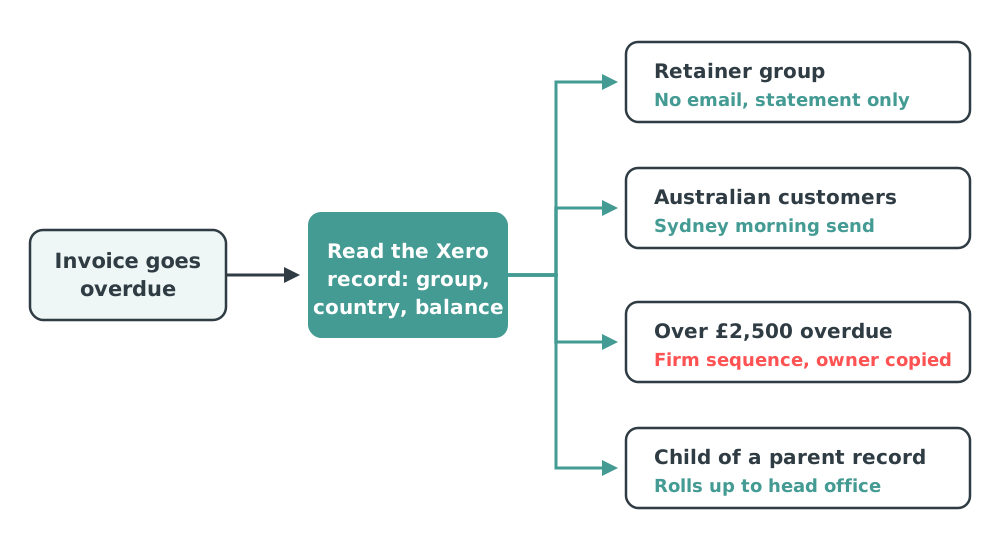
By contact group. Retainer clients on direct debit should probably get nothing. New accounts in their first year should get a firmer sequence that starts on the due date. See reminders by contact group for what a Xero group does and does not control.
By location. A reminder timed for a London morning lands at six in the evening in Sydney, and a territory owner in one country should not be sending in another's name. See reminders by customer location or region.
By overdue balance. A customer £12,400 down deserves a different response to one sitting at £85, and Xero's amount floor only handles the small end. See reminders by overdue balance.
By who actually pays. When one finance manager sits behind four Xero customer records, four reminders arrive in one inbox on the same morning. See one contact across several Xero customer records.
Paidnice connects to Xero, reads the contact and invoice data already there, and runs a separate reminder policy for each group of customers. Xero stays the ledger. Nothing is re-keyed and no contact is duplicated.
Send time sits on the policy rather than on the organisation, so each group can go out at the hour that suits it. Statements follow the same rule.
Reminders send from your own domain on Pro plans, which matters more than most teams expect: a reminder from your finance address gets read, and one from a software vendor's address gets filtered. SMS is available where email has stopped working, and every send can be copied into your CRM.
The most common first policy we see is not a clever one. It is a single exclusion group for customers on direct debit or a payment plan, so the automated sequence stops embarrassing the accounts team. Segmentation usually starts by removing people from a sequence, not adding them.
Across customer accounts, the pattern that follows is consistent: customers cut their average wait for payment in half within thirty days. Paidnice starts at £49 a month for 150 invoices, with no per-seat fees.
Xero's built-in reminders are enough when you sell one thing, on one set of terms, to customers who all look alike. One schedule is then the correct amount of machinery: turn the five reminders on, write them properly, set the amount floor, and spend your time elsewhere.
The point where it stops working is usually recognisable. You have customers who must never be emailed automatically, an account manager who wants copying on the big ones, and a spreadsheet tracking who is exempt. That spreadsheet is doing segmentation by hand, which is the work a connected app takes over.
Can Xero send different invoice reminders to different customers?
No. There is a single schedule, it belongs to the organisation, and it fires against every invoice with a status of sent. Excluding a contact is the only per-customer control Xero offers.
How do I change invoice reminders in Xero?
Go to the Sales menu, select Invoices, click Invoice Reminders, then edit any of the existing reminders or click Add reminder. You can hold five in total, and each one is timed as due in or overdue by a number of days.
How do I stop Xero from sending reminders to one customer?
Open the contact record and turn reminders off for that contact, or turn them off on an individual invoice. Xero supports this for cases such as a part-paid invoice or one you have already discussed.
Can I set an invoice amount limit for Xero reminders?
Yes, one. The checkbox is "Don't send reminders for amounts owing on an invoice under", and the amount you enter applies to every reminder in the organisation. There is no upper threshold and no per-group version.
Why are my Xero invoice reminders not sending?
The three usual causes are invoices that are approved but never marked as sent, contacts with no email address on the record, and reminders switched off at contact level. Reminder status and history are visible on each invoice in the Awaiting Payment tab.
Does adding an app mean leaving Xero?
No. A connected app reads your Xero data and sends on top of it. Your contacts, invoices and payments stay in Xero, and the ledger remains the source of truth.
Paidnice is accounts receivable automation that enforces your payment terms, trusted by thousands of businesses on Xero and QuickBooks. Credit control and debtor management, run for you.
Try it Now - It's FreeNo card required.

Optimize your cash flow with our suite of financial tools designed for AR professionals. Calculate DSO, aging analysis, late fees, and more.