



Summary
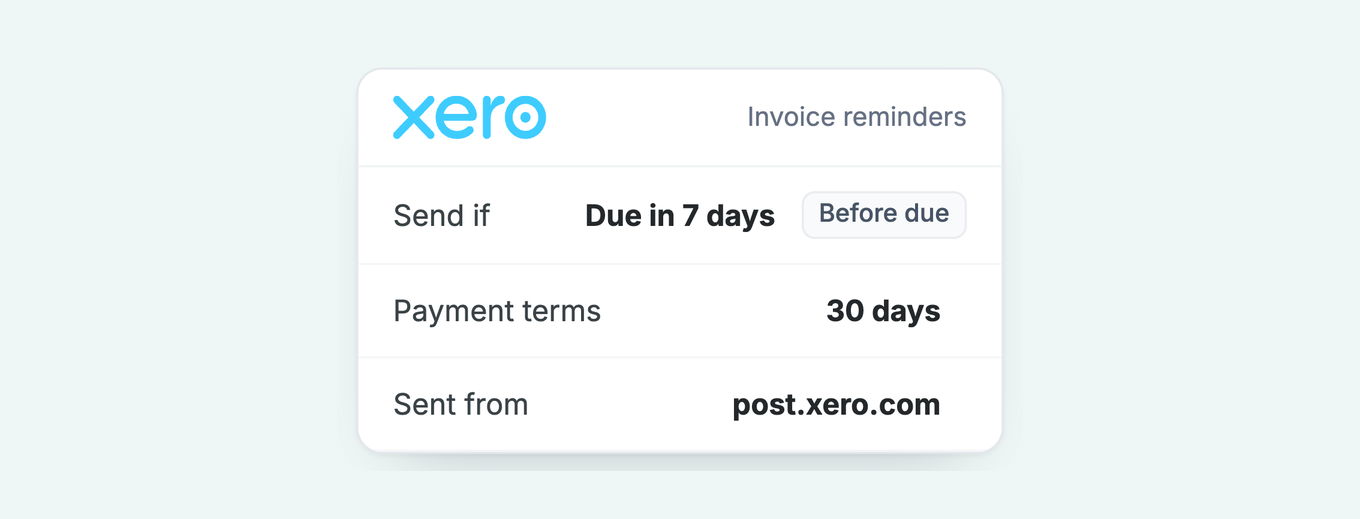
Yes, Xero can send an invoice reminder before the due date. In Invoice Reminders, add a reminder and set 'Send if an invoice is' to 'due in' your chosen number of days. The pre-due stage joins the same five-reminder schedule and sends for every invoice marked as sent, with 0 days meaning the due date itself.
- The setup: Sales, then Invoices, then Invoice Reminders, then Add reminder, set to 'due in' 5 to 7 days for 30-day terms.
- The limit: All five stages share one sender ([email protected]), one recipient rule and one minimum-amount threshold, so a pre-due reminder cannot go to a different contact or from your own domain.
- Best fit: A pre-due nudge pays off most on invoices with an approval step in the way: purchase orders, annual renewals, high values and 30-day or longer terms.
Can Xero send an invoice reminder before the due date?
Xero can send an invoice reminder before the due date: any of the five stages in the organisation's reminder schedule can be set to "due in" a number of days instead of "overdue by". Xero sets three stages up for you when you first turn the feature on, all after the due date, and every stage fires against every invoice marked as sent.
Each stage can sit before or after the due date. Xero's setup article puts it plainly: before the due date, from "Send if an invoice is" select "due in"; after the due date, select "overdue by". Replies go to the login email of the person who first turned reminders on, though that address can be edited.
How to add the pre-due stage in Xero
Adding a pre-due stage in Xero means adding one more reminder to the Invoice Reminders screen and setting it to "due in" rather than "overdue by". The whole job takes six steps.
- In the Sales menu, select Invoices, then click Invoice Reminders.
- Tick Email customers when an invoice is if it is clear, then click Add reminder.
- Set the new stage to due in and enter the days of notice, commonly 5 to 7.
- Edit the template. The default wording suits an overdue chase, not a heads-up, so soften it and insert placeholders for the invoice number, amount and due date.
- Optionally tick Don't send reminders for amounts owing on an invoice under and set an amount, remembering it applies to every stage.
- Save. The stage sends for invoices marked as sent, alongside your overdue reminders.
Which invoices should get a reminder before the due date?
A pre-due reminder earns its place on any invoice where something has to happen on the customer's side before payment can leave: a purchase order, a sign-off, a budget approval or a bank transfer. The common cases:
| Situation | Why the nudge works |
|---|---|
| Customers who pay against a purchase order | An invoice without a matching PO misses the payment run. A week's notice gets the PO confirmed while there is still time. |
| Annual renewals and subscriptions | The customer committed a year ago. The nudge arrives before budget approval becomes an emergency. |
| High-value invoices | Sign-off sits above your day-to-day contact and takes days. Starting that clock before the due date keeps the invoice on schedule. |
| 30-day or longer terms | A month is long enough for an invoice to be filed and forgotten. The reminder resurfaces it while it is still easy to action. |
| Bank-transfer payers | A transfer needs the customer to log in and act. A dated prompt converts intention into a payment before the deadline. |
Skip the pre-due stage for small invoices, for customers who already pay early, and on 7-day terms, where the nudge lands almost on top of the invoice itself and reads as pressure.
What should a pre-due invoice reminder say?
A pre-due invoice reminder should name the invoice number, the amount and the due date, attach the invoice, and ask for anything the customer needs to add before paying, such as a purchase order number. The tone is a courtesy, not a chase. Nothing is late and the email should not imply otherwise.
Subject: Invoice INV-2041 is due on 24 September
Hi Priya,
A quick note that invoice INV-2041 for £3,180 falls due on 24 September. If a purchase order number should appear on it, reply with the number and we will add it before the due date.
The invoice and payment details are attached. Any questions, just reply.
The PO sentence is the one that moves money. If the invoice needs a reference to clear the customer's approval process, the pre-due email is the last cheap moment to ask for it. More templates across the whole sequence are in our reminder email templates library.
What can't a Xero pre-due reminder do?
A Xero pre-due reminder cannot send from your own email address, reach a different contact from the overdue chasers, run a different schedule for different customers, or pick a send time. It also shares the minimum-amount checkbox with every other stage, so a pre-due threshold cannot differ from the overdue one.
The sender is the sharpest edge. Reminders come from Xero's own address, [email protected]. The request to send as your company domain holds 469 votes at "In discovery" on Xero's product ideas board, and Xero's reply of 12 March 2026 says the product team are "actively exploring" it with no timeframe. Corporate spam filters are the reason that thread exists, and the same delivery problem hits the invoice email itself.
Recipients are the other edge. Every stage goes to the contact's people with "Include in emails" ticked. A PO request aimed at procurement cannot travel separately from the chasers aimed at accounts payable, and the department-routing problem has no Xero-side fix either.
For the full picture of what Xero's reminder schedule does and doesn't cover, see Xero invoice reminders: how they work, and where they stop.
How does Paidnice send a reminder before the due date?
In Paidnice, a pre-due reminder is an email policy with its trigger set before the due date, sitting in the same sequence as your overdue stages. A common arc is a heads-up three days before due, a note on the due date, then chasers at three and seven days overdue, each with its own template.
The policy carries the controls Xero's stage lacks. It sends from your own domain through a sender profile, with the From name, address and Reply-To you choose. It can fire at 9am on weekdays only, apply its own minimum amount, and exclude contacts by tag, so reliable payers never see it.
Because policies belong to groups, the PO-dependent corporate book can run a pre-due stage the rest of your customers skip.
Attach the invoice PDF and a calendar invite for the due date to the pre-due email. The invite sits in the payer's calendar on the day the money should move, which is a better memory aid than any second email.
Paidnice connects to Xero in a few minutes, signing up is free with no credit card, and the Essentials plan starts at £49 a month for 150 invoices. The same sequence carries quote follow-ups and statements, so the whole conversation with a customer runs from one place.
Common questions
Can I send a payment reminder email before the due date?
Yes. In Xero, add a reminder stage set to "due in" and choose how much notice to give. Zero days sends on the due date itself. The stage counts toward the five-reminder limit.
How do I stop Xero from sending reminders?
Turn them off for the organisation on the Invoice Reminders screen, for one contact on the contact record, or for a single invoice from the Awaiting Payment tab.
Can I manually send an invoice reminder in Xero?
Yes, open the invoice and email it again with your own covering message. Automated stages carry on independently unless you switch them off for that invoice.
How many days before the due date should a reminder go?
Five to seven days suits 30-day terms, and long enough for a PO or sign-off to complete. On 7-day terms, skip the pre-due stage; the invoice email is recent enough.
Will a pre-due reminder annoy customers?
Framed as a heads-up with the invoice attached, it reads as service rather than pressure, and it removes the awkwardness of the first overdue chase. Exclude customers who consistently pay early.
About the editorial team
Denym started Paidnice in 2022 after customers paying late left his own business short on payroll. He has led it to $1 billion collected on time across more than 1 million invoices, and writes about credit control, late fees and getting paid on Xero and QuickBooks.
 App of the Year