

It's Saturday morning. Your customer is making coffee. Their phone buzzes. Another invoice reminder.
They didn't ask for one at the weekend. They probably can't pay it until Monday anyway. And now your "friendly nudge" reads like it's interrupting them on their day off.
This is the part of Xero invoice reminders most finance teams quietly hate: the built-in reminder schedule treats Saturday and Sunday like any other day, and you can't choose what time of day the email goes out. Reminders fire whenever Xero's queue picks them up. Sometimes 6am, sometimes 11pm, sometimes mid-dinner.
Here's the workaround.
You can't skip weekends or set a send time inside Xero's native reminders. To do that, you either turn each reminder off manually every Friday (no thanks), or you use Paidnice for Xero, which adds a Weekdays schedule option and an Action Time setting on every reminder policy.
Set the schedule to Weekdays instead of Days, set the action time to 09:00, and your reminders will only ever land in business hours, Monday to Friday, in your company timezone.
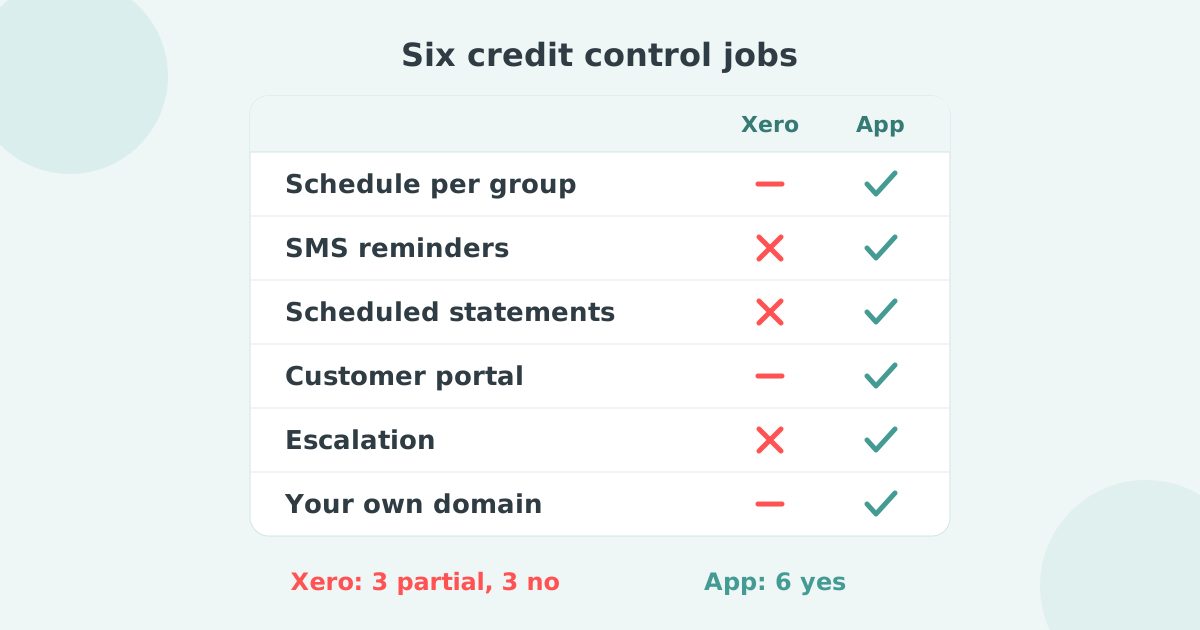
Xero's invoice reminder feature was built as a simple, bolt-on courtesy: "remind me X days before or after the due date." It works, but it has three structural gaps.
For a sole trader sending five invoices a month, that's workable. For a business running a real accounts receivable (AR) process across hundreds of customers, the noise costs you goodwill, and quietly trains your customers to treat reminder emails as background hum instead of action items.
Paidnice sits on top of your existing Xero account. You don't migrate invoices, customers, or branding. Paidnice reads the data already in Xero and replaces the reminder layer with something more deliberate.
Two settings do the heavy lifting.
When you create or edit a reminder policy, you'll see a dropdown that controls how the schedule counts time:
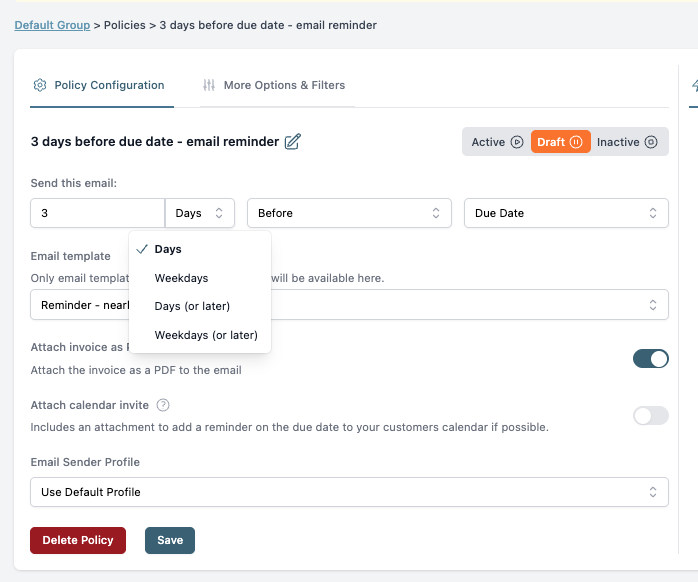
A "3 weekdays before the due date" reminder for an invoice due on a Tuesday fires the previous Thursday, not the previous Saturday. A "5 weekdays after the due date" reminder for an invoice that became overdue on a Wednesday fires the following Wednesday, never the weekend in between.
One dropdown change, and weekend reminders are gone.
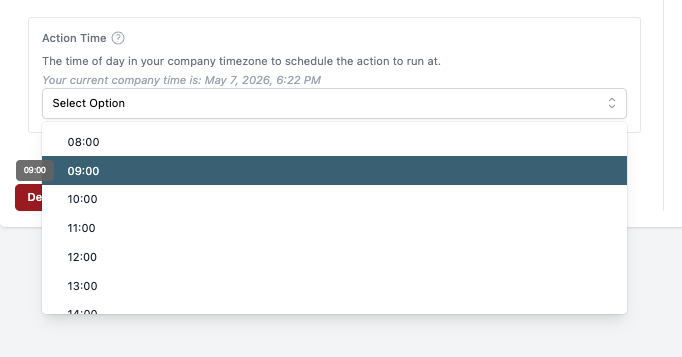
Inside the More Options & Filters tab on any policy, add the Action Time option. You'll get an hourly dropdown (08:00, 09:00, 10:00, on through the working day) and the reminder will fire at that hour in your company timezone.
A few patterns we see Paidnice customers use:
Once those two settings are in place, your customers stop getting payment reminders at 6am on a Saturday. They get a calm, professional message during business hours, on a working day, in your accountant's normal rhythm.
Weekend reminders aren't only an etiquette problem. They're a deliverability and relationship problem.
Paidnice customers cut their average wait for payment in half within 30 days, and report a 70% drop in invoices that go more than 30 days overdue. The schedule change is one small piece of that, but it sets the tone for everything else in the reminder ladder. (Paidnice was named 2025 Xero Global App of the Year and AU Small Business App of the Year.)
Once you've fixed the weekend problem, the same policy settings let you tune the rest of the AR workflow without writing custom rules.
If you're weighing alternatives, our Chaser alternative page walks through the differences in detail, and our AR automation overview covers the full feature set.
Can I stop Xero from sending invoice reminders on weekends without using Paidnice?
Not natively. Your only options inside Xero are to turn the reminder off manually before each weekend, or to set the reminder for a wider window (for example, "7 days before" instead of "3 days before") and accept that some reminders will still land on Saturday or Sunday.
Does Paidnice replace Xero's reminders, or run alongside them?
It replaces them. We recommend switching Xero's built-in reminders off once you've moved your policies into Paidnice. Otherwise customers can get two emails for the same invoice.
What timezone do the reminders use?
Your company timezone, set in Paidnice. If your business is in Melbourne, 09:00 means 09:00 AEST/AEDT, not 09:00 in your customer's timezone. Most teams want it that way; the reminder reads as "from us, during our hours."
Can I have different send times for different customers?
Yes. Each reminder policy has its own Action Time, and policies can be scoped to specific customer groups, tags, or invoice references.
Does this work with QuickBooks too?
Yes. Paidnice supports both Xero and QuickBooks, and the Weekdays plus Action Time settings work the same way on both.
Setting up weekday-only reminders takes about five minutes inside Paidnice. The policy editor is the one shown in the screenshots above: pick Weekdays, add Action Time, save.
Paidnice has a free trial and a one-click install on the Xero App Store. You don't need to migrate anything. Paidnice reads your existing Xero data and starts closing the gap between invoice and payment from the next reminder onwards.
Install Paidnice from the Xero App Store →
Paidnice is accounts receivable automation that enforces your payment terms, trusted by thousands of businesses on Xero and QuickBooks. Credit control and debtor management, run for you.
Try it Now - It's FreeNo card required.



Optimize your cash flow with our suite of financial tools designed for AR professionals. Calculate DSO, aging analysis, late fees, and more.