



Summary
QuickBooks Online emails an estimate and tracks whether it is pending, accepted, rejected or expired, but it never follows up on a quote that goes quiet. Chasing a cold estimate means resending it manually, or connecting an app such as Paidnice that sends timed reminders automatically until the quote is accepted, declined or expires.
- The gap: QuickBooks Online's automatic reminder feature is built for unpaid invoices only; it does not touch estimates or quotes.
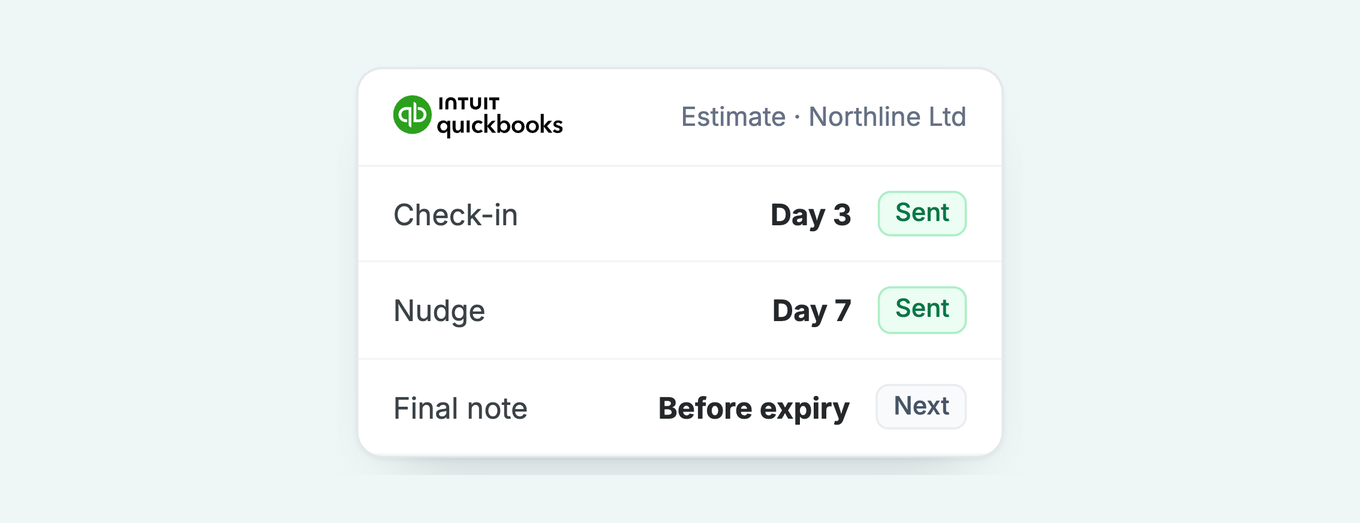
- The rhythm: Two or three light touches beat five: a soft check-in 3 to 4 days after sending, a nudge at 7 to 10 days, and a final note 1 to 2 days before expiry.
- The status trap: An estimate does not always flip to expired on its expiration date, so the pending pile grows unless someone reviews it.
- The fix: Paidnice reads estimate status from QuickBooks Online and sends follow-ups on the schedule you set, stopping the moment a quote is accepted, declined or expires.
Can QuickBooks Online remind customers about an estimate?
Here is what QuickBooks Online actually does with an estimate. You build it, you email it, and the customer can approve or decline it from the emailed copy. The status moves on its own from pending to accepted, rejected, or closed once it converts to an invoice. You can also set an expiration date, the deadline you have given the customer to say yes.
What it will not do is chase. If an estimate sits at pending for two weeks with no reply, QuickBooks stays silent. Intuit's own guidance is blunt about it: the recommended workaround is to resend the estimate manually and mark it as a follow-up in the subject line, or reach for a third-party app from the Intuit App Store. The automatic reminder feature in QuickBooks Online is built for invoices, scheduled before or after a due date, and it does not touch estimates. Custom workflows in QuickBooks Online Advanced follow the same rule: they remind on invoices and tasks, not on quotes.
One caveat worth knowing before you rely on the status field. An estimate does not always flip itself to expired on the expiration date. In practice many QuickBooks users end up marking estimates rejected or expired manually, so the pending pile grows quietly unless someone tends it.
Free: Payment reminder email templatesCopy the reminder emails for before, on and after the due date.Why does the unaccepted quote matter more than it looks?
Think about where finance teams spend their automation budget. Reminders on overdue invoices. Late fees. Statements. Escalation ladders. All of it kicks in after the work is agreed and the invoice exists. That is the right instinct, and it works: Paidnice customers see half as many late invoices in the first 30 days once those invoice workflows are running.
But every one of those invoices started life as a quote someone said yes to. The quotes that got no reply never enter the machine at all. They do not show up in your aging report, because there is nothing owed yet. They do not trigger a reminder, because QuickBooks does not chase estimates. They just sit at pending until they expire, and the revenue evaporates without ever being counted as lost.
That is the reframe. Estimate follow-up belongs at the front of your receivables process, not filed under sales as an afterthought. A quote you sent and never followed up on is not a maybe, it is a coin flip you declined to call. The cheapest cash you will collect all quarter is the quote you already sent that just needed one more email.
What does good estimate follow-up look like?
You can overdo this. Chasing a cold quote too hard reads as desperate, and desperation is a discount signal. It can cost you the job you were trying to win. Two well-timed nudges beat five anxious ones, and some quotes are a no that the customer has not gotten around to saying. Let those go.
A sequence that respects both the customer and your own time looks like this. A gentle check-in a few days after you send, when the quote is still fresh. A second nudge around a week to ten days in, framed as an offer to answer questions rather than a demand for a decision. A final, low-key note as the expiration date approaches, closing the loop cleanly. Three touches, spread out, each one easy to reply to and easy to ignore without friction. After that, you have your answer, even if the answer is silence.
Route it by who the customer is. A repeat client who always says yes needs one soft reminder. A brand-new prospect on a large quote can take the full short sequence. The point is a system that follows up every time without you remembering to, and knows when to stop.
Copy-paste estimate follow-up email templates
These are written to send to your own customer. They get slightly firmer as the quote ages, but none of them threaten or pressure. Copy one, paste it into QuickBooks or Paidnice, and adjust the voice to sound like you.
Subject: Following up on your estimate [#1234]

Hi [First name],

Just checking in on the estimate I sent over on [date] for
[brief description of the work]. I want to make sure it landed
and that everything in it makes sense.

Happy to walk through any line or adjust the scope if that helps.
Whenever you are ready, you can approve it straight from the
emailed copy.

Thanks,
[Your name]
Subject: Any questions on estimate [#1234]?

Hi [First name],

Circling back on the estimate for [brief description]. No pressure
at all, I know these decisions take time.

If anything is holding it up, price, timing, or scope, tell me and
I will see what I can do. If the timing is not right, that is
completely fine too, just let me know either way so I can plan.

Best,
[Your name]
Subject: Estimate [#1234] expires on [date]

Hi [First name],

A quick heads-up that the estimate I sent for [brief description]
is set to expire on [date]. After that the pricing may change, so
I wanted to give you the chance to lock it in.

If you would like to go ahead, you can approve it from the emailed
copy. If now is not the right time, no problem, just reply and I
will close it off on my end.

Thanks for considering it,
[Your name]
Timing assumes a two to three week estimate window. Compress the gaps for a short-dated quote.
To set up QuickBooks Online's own reminders, see Can QuickBooks Online chase overdue invoices automatically?.
How to automate estimate reminders on QuickBooks with Paidnice
QuickBooks does not chase estimates, so this is the gap Paidnice closes. The estimate reminders feature works on top of your existing QuickBooks Online data, so there is nothing to migrate and nothing to rekey. Here is the setup, start to finish.
- Connect QuickBooks OnlineAuthorize Paidnice from the integrations screen. It reads your estimates and their statuses directly, so your pending quotes are visible from day one.
- Turn on estimate remindersEnable the quote and estimate reminder workflow. This is separate from your invoice reminders, so following up on quotes never gets tangled with chasing overdue invoices.
- Set the schedulePick your send days, for example day 3, day 8, and one to two days before the expiration date. Two or three touches is the sweet spot.
- Add your templatesPaste the three templates above and swap in merge fields for the customer name, estimate number, and expiration date. Send by email, or add SMS from US$0.10 per message for a lighter touch.
- Route by customer groupPut loyal, always-say-yes clients in a group that gets a single soft nudge. Send new prospects on larger quotes the full short sequence.
- Set the stop ruleReminders end automatically when the estimate is accepted, rejected, or expires, so no customer ever gets chased on a quote they already answered.
- Go liveSwitch it on. From here every pending estimate gets followed up on time, without you remembering to.
Once a quote is accepted and becomes an invoice, the rest of your escalation ladder takes over: reminders, late fees, and statements do the collecting from there. Estimate follow-up is simply the first rung. If you want the reasoning behind the timing, we go deeper in how to send quote reminders before they expire, and the QuickBooks integration page covers what else Paidnice reads and writes back to your account.
See how estimate reminders work →
Frequently asked questions
Can QuickBooks Online automatically follow up on an estimate?
No. QuickBooks Online can email an estimate and update its status when a customer approves or declines online, but it does not send automatic follow-up reminders on an estimate that goes unanswered. Its automatic reminders are built for unpaid invoices, not estimates. To follow up a quote you resend it manually or use a third-party app such as Paidnice.
How do I send an estimate follow-up email in QuickBooks?
Manually, you open the estimate, resend it, and note in the subject line that it is a follow-up. There is no scheduling built in, so you have to remember each one. To automate it, connect QuickBooks Online to Paidnice, turn on estimate reminders, and set a schedule so every pending quote is followed up without manual work.
How many times should I chase an unaccepted quote?
Two or three times is usually enough. A soft check-in a few days after sending, a helpful nudge around a week later, and a final note before the estimate expires. Chasing a cold quote too hard reads as desperate and can cost you the job, so two well-timed nudges beat five anxious ones.
Does an estimate expire automatically in QuickBooks Online?
You can set an expiration date on an estimate, but the status does not always flip to expired on its own. In practice many users mark estimates rejected or expired manually, so pending quotes can pile up unless someone reviews them. An app that tracks estimate status can stop reminders automatically once a quote is accepted, rejected, or past its expiration date.
Does Paidnice work with QuickBooks Online for estimate reminders?
Yes. Paidnice connects natively to QuickBooks Online, reads your estimates and their statuses, and sends automatic follow-up reminders on the ones still pending. You set the schedule and templates, and reminders stop the moment a quote is accepted, rejected, or expires. Plans start at US$69 per month.
Paidnice features in this article
About the editorial team
Ashley is a co-founder and lead developer of Paidnice and has built accounting software for more than 10 years. He builds the ledger connections that put reminders, late fees and payments into Xero, QuickBooks and ERPs such as NetSuite and Business Central. Before Paidnice he co-founded A2X, ecommerce accounting software for Xero and QuickBooks.
Denym started Paidnice in 2022 after customers paying late left his own business short on payroll. He has led it to $1 billion collected on time across more than 1 million invoices, and writes about credit control, late fees and getting paid on Xero and QuickBooks.
 App of the Year