



Summary
QuickBooks Online can attach a file to an invoice email, but the invoice PDF it sends is the one QuickBooks generates from its own template, and Intuit states that statements cannot carry PDF attachments. Paidnice reads the file you attach to the QuickBooks invoice and sends it in place of the QuickBooks PDF on every reminder and statement.
- The setting: Tick PDF attached under Account and settings, Sales, Online delivery to put the QuickBooks PDF on invoice emails.
- The gap: Intuit's attachments help article does not cover reminders, and states that statements cannot carry PDF attachments.
- The fix: Paidnice's Invoice PDF setting matches a filename prefix, such as INV-, and swaps your own PDF in on every send, with a fallback you choose for invoices with no matching file.
What does QuickBooks Online do with invoice attachments?
QuickBooks Online lets you attach files to an invoice and can attach the invoice PDF to the email. Both are settings you control, and the QuickBooks PDF stays the invoice document.
Open or create an invoice and use the Attachments section at the bottom left. Drag a file in or click to upload it. Intuit's attachments help article lists PDF, JPEG, PNG, DOC, XLSX, CSV, TIFF, GIF and XML as supported types.
For the invoice PDF itself, go to the Gear icon, then Account and settings, Sales, and click the pencil on Online delivery. Tick PDF attached and save. Invoice emails then carry the PDF that QuickBooks generates from its own template.
If a customer's AP portal needs the invoice and its supporting files as one document, see sending multiple attachments as one PDF to an AP portal. If the portal wants the invoice entered in it, see how to automate invoice uploads to customer portals.
| Where the invoice goes | What Intuit documents | What Paidnice sends |
|---|---|---|
| Invoice email | The QuickBooks PDF, with PDF attached ticked. Files in Attachments can go with the email. | Your matched file as the invoice PDF |
| Reminder | Not covered in the attachments help article | Your matched file on every reminder |
| Statement | No PDF attachments on statements | A statement link that serves your matched file |
| Portal download | Not covered in the attachments help article | Your matched file |
Do QuickBooks invoice reminders include the PDF?
Intuit's attachments help article covers invoices and states that statements cannot carry PDF attachments. It does not describe what QuickBooks Online reminders carry.
If you rely on QuickBooks reminders, send one to your own address first. Look at whether it carries a file, a link or both, and which PDF the link opens. QuickBooks Online sends up to three automatic reminders per invoice, all by email, within 90 days either side of the due date.
Paidnice reminders carry the file that matches your prefix. When no file matches, your fallback decides what goes out.
Why does the PDF attached checkbox stop working?
QuickBooks users report invoice emails going out without the PDF while the PDF attached setting is on, and Intuit's threads point to the invoice layout and the Online delivery setting.
A QuickBooks Community thread from 11 April 2024 reports that sending or resending an invoice stopped attaching the .pdf to the email. A thread from 5 October 2023 asks how to email supporting attachments with an invoice in the new invoice layout.
When the file drops off, check the setting again, check whether you are on the newer or older invoice layout, and send a test to yourself.
How do you put your own PDF on a QuickBooks invoice?
Your own PDF reaches a QuickBooks Online invoice through your billing system's accounting connection, through an automation that calls the QuickBooks API, or manually in the Attachments section. Everything downstream depends on the file sitting on the invoice record.
Through your billing system
Your ERP, PSA or job system can put its invoice PDF on the QuickBooks invoice. Look first for a setting in its accounting connection, such as an option to send attachments or the invoice document. If you cannot find one, ask the vendor's support team or your IT team: can the sync attach our generated invoice PDF to the QuickBooks invoice?
Through an automation
The QuickBooks Online API stores files as an Attachable. Each link to a transaction sits in AttachableRef, and its IncludeOnSend flag controls whether the file goes with the emailed transaction.
Extract of the Attachable request, showing only the link to the invoice:
An automation in Zapier or Make can put the file on the invoice when your system creates it, with no one touching each invoice.
Manually
Open the invoice, drag the PDF into Attachments, and save. This works for a handful of invoices a month. Above that, use one of the routes above.
Whichever route you use, decide the filename once. Every generated invoice PDF should carry the same recognizable text, such as INV- or the name of the system that made it. A consistent name lets an app pick the right file without a person looking at it.
How do you turn on Alternative Invoice PDF in Paidnice?
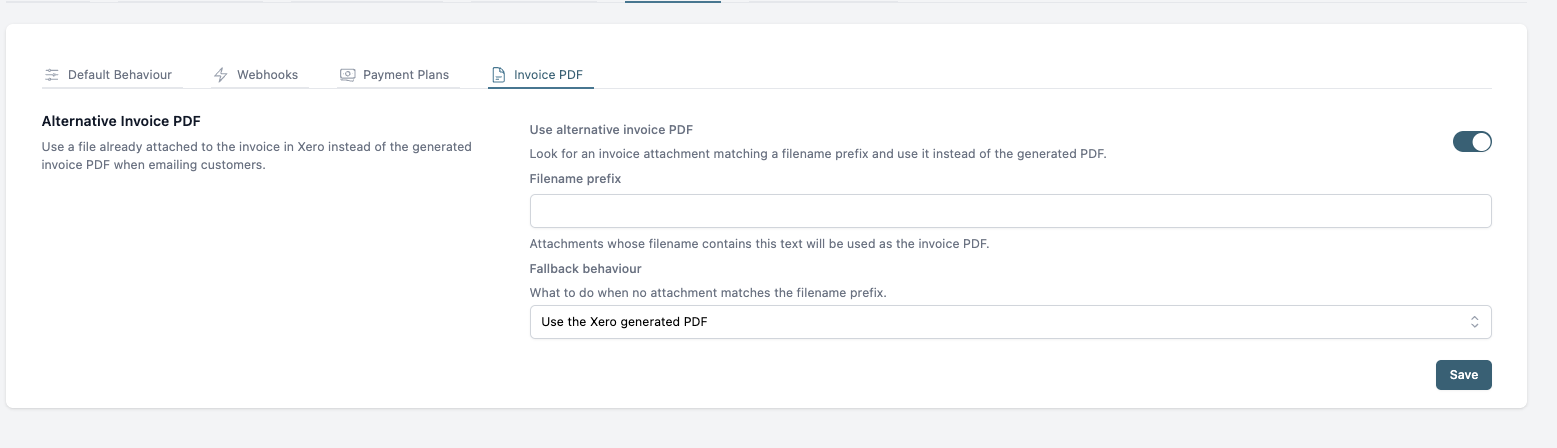
The Alternative Invoice PDF setting sits under Settings, General, Advanced, Invoice PDF in Paidnice. Switch it on, enter a filename prefix, and Paidnice uses the file whose name contains that prefix in place of the QuickBooks PDF. Setup takes about five minutes.
- Open Settings, then General, then Advanced, and select the Invoice PDF tab.
- Switch on Use alternative invoice PDF.
- Enter the filename prefix. Matching is case-sensitive and spaces count, so copy it exactly. If two files match, Paidnice uses the first.
- Choose a fallback for invoices with no matching file: use the QuickBooks generated PDF, send with no PDF attached, or do not send and report an error.
- Save.
| Fallback | What happens | Use it when |
|---|---|---|
| use the QuickBooks generated PDF | The QuickBooks PDF goes out for that invoice. | Only some invoices carry an attached file. |
| send with no PDF attached | The email goes out with the portal link and no invoice file. | The portal page is enough for your customers. |
| do not send and report an error | Nothing is sent, and the error is emailed to you so you can fix the missing file. | Customers must never receive the QuickBooks template. |
What does the customer receive?
When a file matches the prefix, the customer receives your invoice PDF on every reminder, statement link and portal download. With the no PDF or no send fallback, the QuickBooks template invoice never reaches them.
Many billing system connectors send invoice data, and QuickBooks rebuilds the document with its own template. Paidnice keeps your system's PDF as the document of record. The reminder on day seven carries the same PDF the customer approved on day one, with the references, lines and layout your system put on it.
Finance teams tell us the customer should see one invoice from the first send to the final payment. That is why statement links and portal downloads use the matched file as well as reminders.
Frequently asked questions
Most missing QuickBooks invoice PDFs trace back to the Online delivery setting. In Paidnice, an invoice with no matching file follows the fallback you choose.
Why is QuickBooks not attaching PDF files to my emails?
Check that PDF attached is ticked under Account and settings, Sales, Online delivery, and save again. Users have reported the file dropping off with the setting on, in threads dated 5 October 2023 and 11 April 2024. Send a test invoice to yourself after any layout change.
Can I attach a PDF to a QuickBooks statement?
Not in QuickBooks. Intuit states that you cannot add PDF attachments to statements sent to customers. Paidnice statement links serve your matched invoice PDF.
What happens if no file matches the prefix?
Paidnice follows your fallback: the QuickBooks PDF, no PDF, or no send. With no send, the error is emailed to you.
Does the file have to be a PDF?
Use a PDF. The matched file goes out as the invoice, and a PDF is what customers and their AP teams expect.
My customer's AP portal wants one PDF with all attachments. Is this the same?
Combining several attachments into one file is a separate task. See combining QuickBooks invoice attachments for AP portals. For what customers see when they pay, read about the QuickBooks customer payment portal.
How do you send the invoice your customer already approved?
Attach your PDF to the QuickBooks invoice with a consistent filename, switch on Alternative Invoice PDF in Paidnice, and every reminder, statement link and portal download carries the document your customer approved.
Connect QuickBooks Online to Paidnice, no credit card required, or book a demo to see it set up.
Paidnice features in this article
About the editorial team
Denym started Paidnice in 2022 after customers paying late left his own business short on payroll. He has led it to $1 billion collected on time across more than 1 million invoices, and writes about credit control, late fees and getting paid on Xero and QuickBooks.
Ashley is a co-founder and lead developer of Paidnice and has built accounting software for more than 10 years. He builds the ledger connections that put reminders, late fees and payments into Xero, QuickBooks and ERPs such as NetSuite and Business Central. Before Paidnice he co-founded A2X, ecommerce accounting software for Xero and QuickBooks.
 App of the Year