



Summary
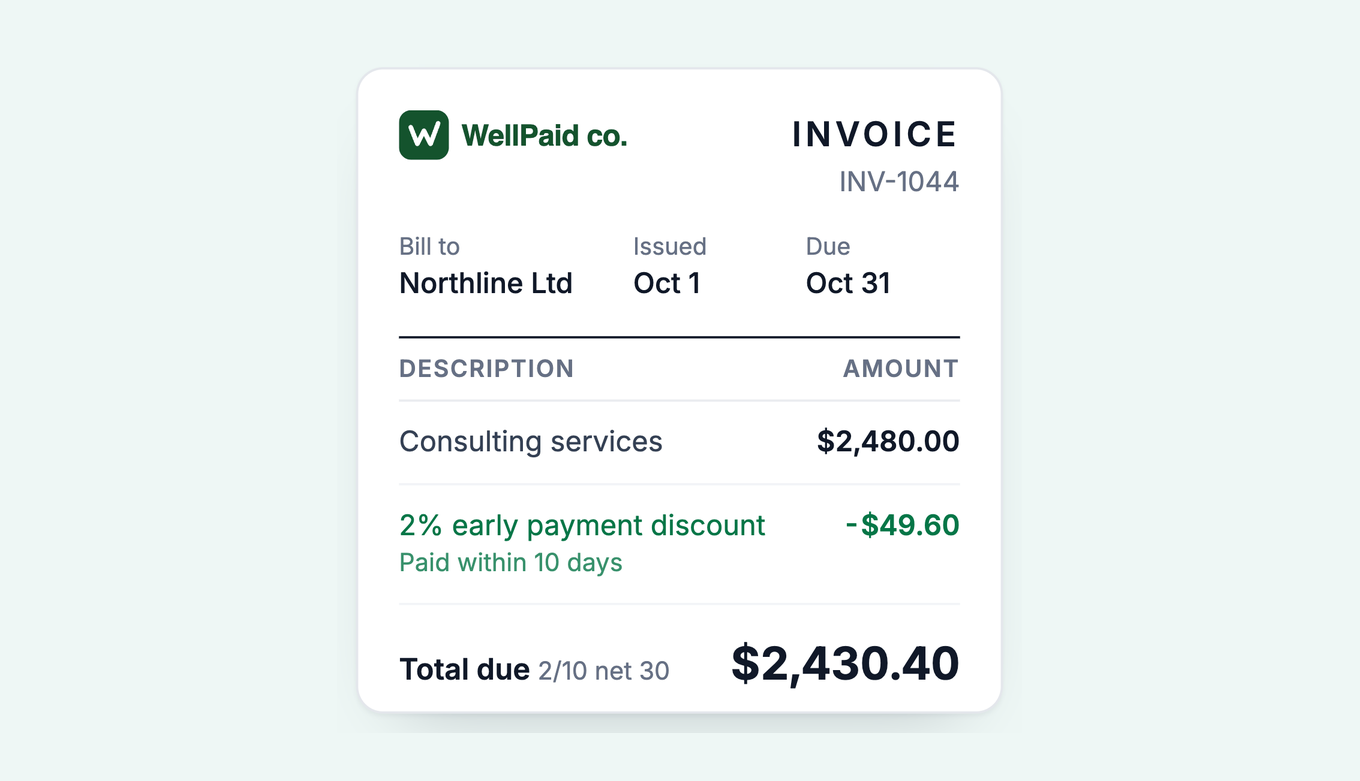
QuickBooks Online records an early payment discount manually: you turn on Discount under Account and settings, Sales, then enter the percentage on the invoice or apply it when you receive payment. It does not apply a time-based discount such as 2/10 net 30 on its own. Paidnice applies your prompt payment discount rule automatically, to the customers you choose.
- The gap: QuickBooks Online shows payment terms on an invoice, but someone has to apply the discount through the Discount field or a credit memo when the customer pays early.
- The cost: 2/10 net 30 works out at roughly 37% a year in annualized cost, so price it before you switch it on.
- The fix: Paidnice applies the rule automatically on QuickBooks Online and targets it by contact group, so the discount is not a blanket margin giveaway.
Can QuickBooks Online apply early payment discounts automatically?
QuickBooks Online is good at the parts either side of the discount. It can hold a payment term against a customer, print that term on the invoice, and record a discount once you tell it one happened. Intuit's help article on adding a discount describes the Discount field as a flat amount or a percentage you type in when you fill out the invoice. What QuickBooks Online will not do is the middle bit: notice that a customer paid inside the discount window, calculate the 2%, and take it off the amount owed without you touching anything.
So an early payment discount in QuickBooks Online is a manual step, not an automatic rule. It gets missed when you have hundreds, which is usually when the discount was supposed to be pulling cash forward for you.
Free: Early payment discount calculatorSee what a 2/10 net 30 discount really costs you a year.How do you set up 2/10 net 30 in QuickBooks Online?
"2/10 net 30" is shorthand for a deal: take 2% off if you pay within 10 days, otherwise the full amount is due in 30. If the term is new to you, we keep a plain-English definition here: what 2/10 net 30 means.
The setup in QuickBooks Online runs like this:
- Turn on discounts: Settings, then Account and settings, Sales, edit Sales form content and switch on Discount. Without this the Discount field does not appear on invoices.
- Go to Settings, then All lists, then Terms, and create a new Standard term with the net due at 30 days. Name it something a customer will understand on the invoice, such as "2% 10 Net 30." QuickBooks Online uses the 30 days to calculate the due date and to flag the invoice as overdue after day 30.
- Assign the term to the customer, or pick it on the individual invoice.
- When the customer pays inside 10 days, open Receive payment for that invoice and apply the 2% using the discount field, or raise a credit memo coded to a discount income account. Either way the invoice closes as fully paid and the discount is recorded as a reduction in income.
QuickBooks Online updates its interface often, and the term fields differ from QuickBooks Desktop, which can store a discount percentage inside the term itself. Check the exact labels in your account before you rely on any one field.
The important part is step four. QuickBooks Online will not do it for you. Someone has to notice the early payment and apply the discount, every time, or the offer quietly does nothing.
Is an early payment discount better than a late fee?
Before you turn a discount on, it is worth being clear about what each lever does, and who pays for it.
Offer a discount to reward early payers and add a late fee for late ones. When a business starts charging late fees, about 3 more invoices in every 100 get paid on time, compared with similar businesses that do not charge them.
A prompt payment discount is a carrot you hand to everyone. Most of your customers already pay on time. Offer them 2% and a good number will happily take it, on invoices they were going to settle anyway. A late fee is the opposite. It costs you nothing when invoices are paid on time, and it lands only on the customers who are slow.
| Early payment discount | Late fee | |
|---|---|---|
| Who it affects | Every customer who pays early, including the ones who would have paid on time | Only the customers who pay late |
| What it costs you | Margin on every discounted invoice | Nothing when invoices are paid on time |
| What it changes | Pulls cash forward by a few days or weeks | Deters chronic late payment, and recovers some cost of waiting |
| How it feels to the customer | A reward | A consequence |
| Annualized cost to you (2/10 net 30) | Roughly 37% a year | 0% to you, the cost falls on the late payer |
| Best when | You genuinely need the cash sooner and your margins can absorb it | A small group of slow payers is the real problem |
That annualized number is the one to sit with. Paying 2% to be paid 20 days sooner (day 10 instead of day 30) works out near 37% a year: 2% of the invoice, given up 18.25 times a year (365 divided by 20 days), before compounding. It can still be the right call if your alternative is an overdraft, invoice factoring, or missing a supplier's own early payment discount, all of which might cost more. But if you are comfortable on cash and just want fewer overdue invoices, you are better off with a late fee and a firm reminder sequence than with a discount that pays your punctual customers to keep being punctual.
In practice: for a lot of businesses, an early payment discount is margin given away to customers who would have paid on time anyway. Run the numbers before you switch it on. Our early payment discount calculator prices the exact offer you are considering, so you can see the annualized cost against your terms before you commit.
For the wider background on how these discounts work and where they help, see what is an early payment discount.
What mistakes cost you money when you offer early payment discounts in QuickBooks Online?
Three mistakes turn a 2% discount into lost margin. The examples use a $10,000 invoice on 2/10 net 30.
Switching on 2/10 net 30 without pricing it. The discount is $200 ($10,000 × 0.02), so the customer pays $9,800 on day 10 instead of day 30. The annualized cost is ($200 ÷ $9,800) × (365 ÷ 20 days) = 0.0204 × 18.25 = 37.2%.
If your overdraft costs 12% a year (an assumed rate), 20 days of funding $9,800 costs $64 ($9,800 × 0.12 × 20 ÷ 365), so you give up $200 to save $64. Fix: compare 37% with what your cheapest alternative funding costs before you switch it on.
Recording the discount on a payment that missed the window. QuickBooks Online does not check the payment date, so the 2% goes in whenever someone types it. A customer who pays on day 25 and takes the discount saves $200 on a payment only 5 days early: ($200 ÷ $9,800) × (365 ÷ 5 days) = 149% annualized.
Fix: check the payment date against the 10-day window before you use the Discount field.
Offering the discount to every customer. If customers who bill $500,000 a year all take 2%, that is $10,000 a year ($500,000 × 0.02). Customers who already pay on time tend to keep doing so: after an on-time payment, a customer pays the next invoice on time about 8 times in 10.
Fix: offer the discount by contact group, to the customers you want to reward.
Source: our analysis of invoice data from over 1,000 Paidnice customers. See warning signs of a late payer.
How do you automate early payment discounts on QuickBooks Online?
If you decide a discount is worth it, the goal is to make it automatic and targeted, not manual and blanket. That is the whole point of moving it off a spreadsheet. Here is how it goes together:
- Connect QuickBooks Online to Paidnice. It is an OAuth connection, and most teams are live in under 15 minutes with no migration.
- Create a prompt payment discount rule. Set a fixed amount or a percentage, how recent an invoice must be to qualify (anchored to the issue date, default 2 days), and when the discount comes off (anchored to the issue or due date). The discount posts to its own account with its own tax rate, and line items can be excluded so chosen revenue is never discounted. More on the feature: prompt payment discounts in Paidnice.
- Choose who gets the offer. Use contact groups to offer the discount to the customers you actually want to reward, rather than every customer on your ledger. This is where a discount stops being pure margin loss.
- Let Paidnice communicate it. The offer, the amount, and the deadline appear in the reminders and on the payment portal, so the customer sees the saving and the date it expires without you drafting a thing.
- Pay early, discount applies. Pay late, the ladder takes over. When a customer settles inside the window, the discount stands. When they miss it, the discount line comes off, the invoice returns to its original total, and your late fee and reminder sequence can pick up from there.
A new discount policy applies to new invoices only, and editing an invoice after a discount applies does not recalculate it. Confirm the discount and payment settings in your own Paidnice account when you set the rule up.
That last step is the reason we build both levers into the same product.
See how prompt payment discounts work
Frequently asked questions
Can QuickBooks Online apply an early payment discount automatically?
No. QuickBooks Online can show payment terms on an invoice and let you record a discount manually when you receive payment, but it does not watch the payment date and apply a time-based discount like 2/10 net 30 on its own. An app such as Paidnice applies the discount rule for you.
How do I set up 2/10 net 30 in QuickBooks Online?
Create a payment term under Settings, name it something like "2% 10 Net 30," and set the net due at 30 days. The term shows the offer on the invoice, but you still record the 2% discount manually when the customer pays inside 10 days, using the discount field on the payment or a credit memo.
How do I record an early payment discount when a customer pays early?
Open Receive payment for the invoice, enter the amount received, and apply the difference using the discount field or a credit memo coded to a discount account. This keeps the invoice fully paid and records the discount as a reduction in income.
Is an early payment discount better than a late fee?
It depends on your problem. A discount rewards every customer who pays early, including the ones who would have paid on time anyway, so it costs you margin. A late fee only costs the customers who pay late. If a few slow payers are the issue, a late fee is usually the cheaper lever.
How much does a 2/10 net 30 discount cost my business?
Offering 2% to be paid 20 days sooner works out to roughly 37% a year in annualized cost. That can still be worth it if you need the cash and your alternative funding costs more, but run the numbers before you switch it on.
Can Paidnice apply early payment discounts on QuickBooks Online automatically?
Yes. Paidnice connects to QuickBooks Online, applies your prompt payment discount rule automatically, and shows the offer and deadline in reminders and the customer payment portal. You choose which customers are offered the discount, so you are not giving away margin to everyone.
Paidnice features in this article
About the editorial team
Ashley is a co-founder and lead developer of Paidnice and has built accounting software for more than 10 years. He builds the ledger connections that put reminders, late fees and payments into Xero, QuickBooks and ERPs such as NetSuite and Business Central. Before Paidnice he co-founded A2X, ecommerce accounting software for Xero and QuickBooks.
 App of the Year