



Summary
Xero limits invoice reminders to five per organisation. Three are set up by default when you turn reminders on, and you can edit them, delete them or add more up to five, each sent a set number of days before or after the due date. After an invoice's last reminder, Xero sends nothing further and alerts nobody in your business.
- The cap: Xero Central states you can have up to five reminders in your organisation, on one schedule shared by every customer.
- The stop: After the fifth reminder nothing else happens: no escalation, no fee, no statement and no alert to your team.
- The demand: The request to raise the five-reminder limit holds 41 votes on Xero's product ideas board.
This guide covers how to turn them on, what every setting does, what users say about them, and the point where the native feature runs out. It is written for the office manager who owns the debtors list and wants to know what Xero already does before paying for anything else.
What is an invoice reminder (and what is it not)?
An invoice reminder is a message sent to a customer before or after an invoice's due date to prompt payment, usually by email or SMS. It is about one invoice and asks for the money. Xero sends its reminders by email. See the definition of an invoice reminder.
- A reminder is not dunning. A reminder is one message. Dunning is the planned sequence that escalates from a first nudge to a final notice.
- A reminder is not a statement. A statement lists every open invoice for a customer. A reminder covers one invoice.
- A reminder is not a late fee. A reminder adds nothing to the balance. Xero does not add a fee or interest when a reminder is ignored.
This matters because Xero's reminders are a fixed schedule. After the last one, Xero sends nothing more and tells nobody in your business. Details: the five-reminder limit.
How Xero invoice payment reminders work
Xero invoice reminders are switched on under Sales, then Invoices, then Invoice Reminders. Xero then emails each unpaid invoice's contact on the days you set, before or after the due date, using the template you edited. That is the whole mechanism.
Xero's reminders are a setting inside the sales ledger, so there is nothing to install. Once switched on, every invoice that meets three conditions is picked up automatically: the invoice has been marked as sent, the contact has an email address on file, and the amount owing is above the minimum-amount threshold.
How to set up invoice reminders in Xero
- In Xero, go to Sales, then Invoices.
- Click Invoice Reminders. The toggle starts at Off.
- Tick Email customers when an invoice is to turn reminders on. Three reminders are enabled by default, at 7, 14 and 21 days after the due date.
- Edit each reminder's day count and choose before or after the due date. Add a fourth and fifth if you need them. Five is the ceiling.
- Open each template and edit the subject line and body.
- Set the minimum amount. Invoices owing less than this figure never receive a reminder. Leave it at 0 to include everything.
- Save. Reminders start on the next qualifying day for every sent, unpaid invoice in the organisation.
The schedule belongs to the organisation, so a firm running three Xero organisations sets it three times. Xero records the reminder history on each invoice, so you can check what went out and when.
Every setting, and what it controls
| Setting | Where it lives | What it does |
|---|---|---|
| Reminders on/off | Sales, Invoices, Invoice Reminders | Master switch for the whole organisation |
| Reminder 1 to 5 | Same screen | Days before or after due date; three enabled by default, five maximum |
| Email template | Each reminder | Subject and body for that reminder |
| Minimum amount | Same screen | Skips any invoice owing less than the figure; one threshold for all reminders |
| Off for a contact | Contact record | Stops every reminder to that one customer |
| Off for an invoice | Invoice | Stops reminders for that one invoice, for example while it is disputed |
Notice what is missing from that table. There is no row for contact groups, no row for a second schedule, no row for SMS, no row for statements, and no row for fees. Every one of those is an open request on Xero's own product ideas board, covered below.
Is there a limit on Xero invoice reminders?
Yes. Xero invoice reminders are capped at five per organisation, and the same five apply to every customer. Xero Central says "You can have up to five reminders in your organisation."
- Three by default. Turning reminders on gives you three, at 7, 14 and 21 days after the due date. You can edit or delete any of them.
- Before or after the due date. Add more until you reach five, each set a number of days before or after the due date.
- A silent stop. Once an invoice's fifth reminder has gone, Xero sends nothing more and tells nobody in your business. The invoice stays open until a person notices it.
Five is the cap. The request to increase the number of reminders holds 41 votes. What Xero JAX does with overdue invoices covers what it offers today.
Check that your reminder limit allows 4 follow-ups. When you chase an overdue invoice, it usually takes 2 to 3 follow-ups to get it paid. 6 in 10 are paid by the second follow-up and 8 in 10 by the fourth. About 1 in 10 is still unpaid 180 days after the due date.
Xero automatic payment reminders on invoices
Xero sends a reminder automatically when an invoice is marked as sent, is still unpaid, has a contact email on file, and reaches a day in your schedule. Pay or void the invoice and the reminders stop on their own.
Automatic means the schedule runs without anyone opening Xero. The three qualifying conditions matter because each one is a common reason a reminder never went out:
- Marked as sent. An invoice emailed from another system and synced into Xero as approved but not sent will be skipped. Mark it as sent, or reminders never trigger.
- Email on the contact. A contact created from a bank feed or a job system often has no email address. Xero cannot remind an address it does not hold.
- Above the threshold. A minimum amount set to £50 silently excludes every smaller invoice. Check the figure if a reminder seems to have vanished.
Pre-due reminders are supported: set a reminder for a number of days before the due date and Xero sends a courtesy note ahead of time. Practitioners often call this the highest-value setting in the feature, because it catches the invoice that was never received before it is late.
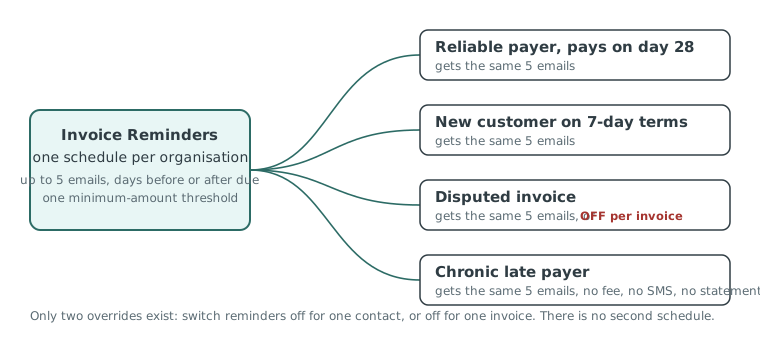
Automatic does not mean escalating, which is what a dunning sequence adds. Reminder five reads the same as reminder one with a different day count, and after it fires nothing else happens. There is no handover to a person, no fee, no statement, and no SMS.
Xero invoice reminders reviews: pros and cons
Users rate Xero reminders well for the price, which is nothing, and for how fast they switch on. The consistent complaint, on Reddit and on Xero's own ideas board, is that one schedule applies to every customer with no way to vary it.
| Pros | Cons |
|---|---|
| Included in every Xero plan, no add-on cost | One schedule for the whole organisation, no per-group variation |
| Five minutes to switch on, editable templates | Email only; SMS reminders are "not in our current roadmap" (Xero, 17 June 2026) |
| Pre-due and overdue reminders both supported | No automatic statements; the request has 1,175 votes and sits "In discovery" |
| Minimum-amount threshold keeps small invoices quiet | No late fee or interest; the request has 1,117 votes since 2012 |
| Off switch per contact and per invoice | No escalation after the fifth email, no task, no handover |
| Reminder history visible on each invoice | Only fires on invoices marked as sent with an email on the contact |
The pattern in the reviews is that nobody dislikes the feature. The r/xero threads the search engines keep citing are titled "Payment reminders for certain customers" and "anyone else finding reminders too limited". The reviewers like what it does and want it to do one more thing.
Practitioners in the UK and Australia report the same experience. Xero's Small Business Insights for the June 2026 quarter put average days late at 8.3 in the UK and 6.0 in Australia, so the average invoice is settled within days of the first overdue reminder. The trouble starts with the customers who are not average.
Insight from the Paidnice team
We see the same setup on almost every new Xero organisation we connect: reminders on, three defaults untouched, minimum amount at zero. It is the right starting point. The businesses that come to us still want reminders. What they have outgrown is one schedule for everyone.
Xero invoice reminder limitations: what the native feature can't do
Xero's invoice reminders have five structural limitations: one schedule for every customer, email only, no automatic statements, no late fee or interest, and no escalation after the last reminder.
They are good enough while every customer can be followed up the same way, and stop being enough at the second customer group: different terms, a key account, or a chronic late payer. The limitation that matters most: Xero invoice reminders apply one schedule to every customer in the organisation. You can switch reminders off for a contact or an invoice, but you cannot give a contact group, a payment term, or a region its own sequence. Xero's own product ideas board is the evidence. Each request below is open, answered officially, and unshipped.
| Request on productideas.xero.com | Votes | Status | Latest Xero response |
|---|---|---|---|
| Add interest to late invoices | 1,117 | Accepted | "Early days", no committed plans (7 July 2025). Open since 29 March 2012. |
| Auto-email statements to customers | 1,175 | In discovery | "Still some discovery going on" (5 August 2026). Open since 13 November 2015. |
| SMS reminders for invoices | 76 | Accepted | "Not in our current roadmap" (17 June 2026) |
Xero's own reply on the interest thread lists the workarounds: a note on the invoice template, a manual fee, or an app from the Xero App Store.
Four signs you have reached the ceiling
- You are switching reminders off manually. Every contact-level off switch marks a customer who needed a different schedule.
- Someone sends statements on the first of the month. The job exists because Xero has no schedule for it.
- Reminder five has fired and the invoice is still open. Nothing happens next unless a person notices.
- Your terms say interest applies and it never has. A fee that is never charged is a term that is never enforced.
If none of those apply, stay on native reminders. They cost nothing and they work.
Verdict for the office manager
Native reminders are enough when you have one payment term, customers who mostly pay on time, and nobody following up manually after the fifth email.
Native reminders are not enough when you have a second customer group, a statement run done manually, or terms that promise a late fee you have never charged.
Where Xero reminders stop, and where Paidnice picks up
Everything past Xero's fifth reminder email lives in the Xero App Store: a schedule per customer group, SMS, scheduled statements, late fees and interest, and escalation to a person. The apps differ mainly in who they are built for.
Each gap has its own guide on this site, so the detail is one click away:
- A different schedule per customer. The most common first step. See different Xero invoice reminders for different customers and reminders by contact group.
- SMS. Xero can send the invoice itself by SMS in AU, NZ, UK and US, but not a reminder. See SMS payment reminders for Xero.
- Scheduled statements. The 1,175-vote request. See automatic customer statements in Xero.
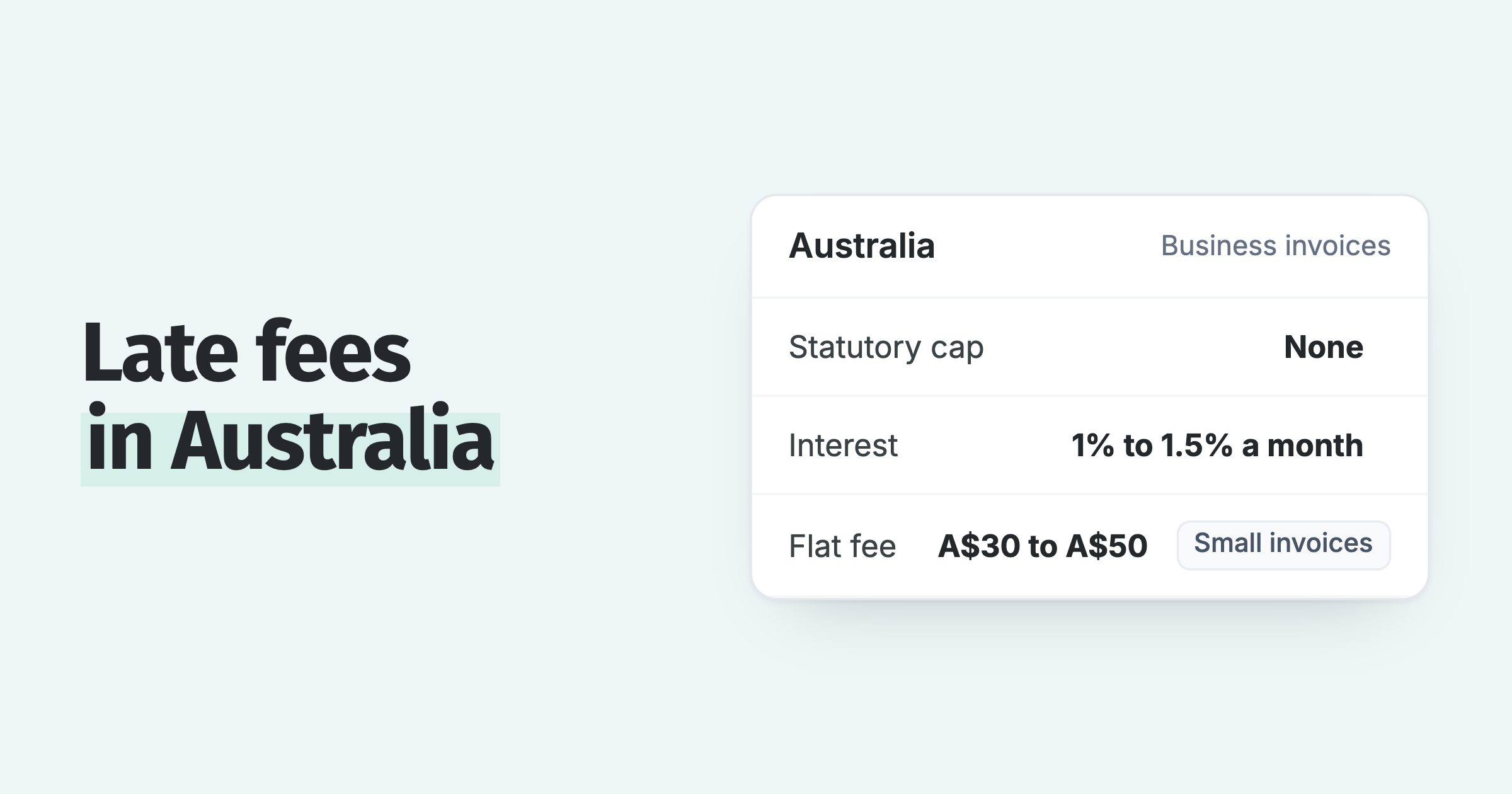
- Late fees and interest. The 2012 request. See adding late payment fees in Xero, with the statutory rates for the UK and Australia.
- Better templates. Before adding software, the five native templates can be rewritten. See email templates for invoice payment reminders.
- The invoice PDF. A Xero reminder carries a link, never the invoice file. If your invoice comes from an ERP, here is how to attach the right PDF anyway.
- Sales visibility. Reminders live in Xero and the customer's inbox, so get those reminders into your CRM too.
| Job | Xero native | App Store add-on (Paidnice as the example) |
|---|---|---|
| Reminder schedule | One per organisation, 5 emails | One per customer group |
| Channel | Email and SMS | |
| Statements | Manual send | Scheduled, with interest recalculated at send |
| Late fee or interest | None | Posted to the Xero ledger as an invoice line or interest charge |
| After the last reminder | Nothing | Escalation task to a named person |
| Sending address | Xero's | Your own domain (Pro plan) |
Which guide do you need?
Two questions. The answer is either "stay on native reminders" or the one guide on this site that covers your gap.
Question 1
Do all your customers get the same chase: same terms, same emails, same follow-up?
Question 2
Which gap hurts first?
Xero's own reminders are enough. Switch them on, set the minimum amount, and rewrite the five templates so they read like you. See email templates for invoice payment reminders.
Xero has one schedule per organisation and no per-group sequence. The guide: different Xero invoice reminders for different customers, and the setup detail in reminders by contact group.
Xero can send the invoice by SMS in AU, NZ, UK and US, but not a reminder, and SMS reminders are not on the current roadmap. The guide: SMS payment reminders for Xero.
Statements are a manual send in Xero; the scheduled version is a 1,175-vote request still in discovery. The guide: automatic customer statements in Xero.
Xero adds no fee or interest when a reminder is ignored; the request has been open since 2012. The guide: adding late payment fees in Xero, with statutory rates for the UK and Australia.
Which app depends on the business. Chaser is the established tool for larger businesses, with email, SMS, and credit checks; its entry tier covers turnover up to £4m and starts at £199 a month. Paidnice is built for the business that wants the four jobs above in one plan on Xero:
- A reminder schedule per contact group, with email and SMS.
- Statements on a schedule, with interest recalculated at the moment they send.
- Late fees and interest posted to the Xero ledger, so the charge sits in the customer's payables.
- Escalation to a named person when the last reminder has fired.
Essentials is £49 a month in the UK and AUD 99 in Australia, and customers see half as many late invoices in the first 30 days. Six tools are compared in credit control software for Xero.
Whichever you pick, leave Xero's native reminders switched on until the app is running, then turn them off so the customer does not hear from both. Practitioners report double-sending as the common first-week mistake with any add-on.
Common questions
The five questions office managers ask most about Xero reminders, each answered in one paragraph from the settings and ideas-board facts above.
How many invoice reminders can Xero send?
Up to five per organisation, three of them on by default. The detail is in the limit section above.
Can Xero send reminders to some customers and not others?
Only by switching reminders off for individual contacts or invoices. There is no per-group schedule, and no way to run two different sequences in one organisation.
Does Xero send reminders by SMS?
No. Xero can send the invoice itself by SMS in Australia, New Zealand, the UK, and the US. Automated SMS reminders are an accepted product idea that Xero said on 17 June 2026 is not on the current roadmap.
Why did a reminder not go out?
Almost always one of three things: the invoice was never marked as sent, the contact has no email address, or the amount owing is under the minimum-amount threshold.
Does Xero add a late fee when a reminder is ignored?
No. Interest on late invoices has been an open request since 29 March 2012 with 1,117 votes. Xero's suggested workarounds are a note on the invoice, a manual fee, or an app.
Paidnice features in this article
About the editorial team
Denym started Paidnice in 2022 after customers paying late left his own business short on payroll. He has led it to $1 billion collected on time across more than 1 million invoices, and writes about credit control, late fees and getting paid on Xero and QuickBooks.
Ashley is a co-founder and lead developer of Paidnice and has built accounting software for more than 10 years. He builds the ledger connections that put reminders, late fees and payments into Xero, QuickBooks and ERPs such as NetSuite and Business Central. Before Paidnice he co-founded A2X, ecommerce accounting software for Xero and QuickBooks.
 App of the Year