


Summary
You can take card payments on a Xero invoice through Stripe and have the fee recorded for you. With Xero's own Stripe connection, Xero creates a spend money transaction for the fee. With Paidnice, each payment writes the invoice payment, the Stripe fee and any processing fee to Xero, all referenced with the Stripe charge ID.
- In Xero: Stripe says Xero creates a spend money transaction for the Stripe fee and marks the invoice as paid when the customer pays.
- With Paidnice: Paidnice records the payment against the invoice, a spend money transaction for the fee and a receive money transaction for any processing fee.
- Before the Pay button shows: The Pay button stays hidden until you choose a bank account and a fees account under Payment Providers.
A customer opens your reminder email and wants to pay the invoice by card, now. If there is no button, they put it off until their next payment run. If you send a link from Stripe yourself, the money arrives, the invoice in Xero still shows as unpaid, and the fee is missing from your accounts.
Here is how Xero records Stripe fees with its own connection, what Paidnice records in Xero when a customer pays by card, and how to set it up.
Free: Payment reminder email templatesCopy the reminder emails for before, on and after the due date.Does Xero record Stripe fees automatically?
Yes, when Stripe is connected to Xero as a payment service. Stripe says that when a customer pays, Xero creates a spend money transaction for the Stripe fee and marks the invoice as paid.
That description comes from Stripe’s support page on setting up your Xero account with Stripe. The same page says you can absorb the fee or add a surcharge for the customer.
The page also gives three limits:
- Your Stripe account and your Xero organisation must be set to the same country, and you cannot change this after you submit the setup.
- A payment service that shows “(pending authentication)” is not finished, and invoices may not request payment until it is.
- Stripe subscriptions cannot be managed through Xero invoicing.
That connection covers payments on Xero’s own invoices. The rest of this post covers payments made from Paidnice reminders, statements and the customer portal, which go through your own Stripe account connected to Paidnice.
What does Paidnice record in Xero for a card payment?
Paidnice writes up to three entries to Xero for each Stripe payment: the payment against the invoice, the Stripe fee and any processing fee. Each one carries the Stripe charge ID.
Take invoice INV-1042 for $1,000.00, with a Stripe fee of $29.30. These figures are an example, not Stripe’s rate. Your fee depends on your own Stripe pricing.
| Entry in Xero | What it holds | Reference |
|---|---|---|
| Payment against the invoice | The full amount paid ($1,000.00 on INV-1042), dated the payment day, into the bank account for the settlement currency | The Stripe charge ID |
| Spend money transaction | The Stripe fee ($29.30), coded to your Stripe Fees Expense Account | “Transaction fees for {charge id}” |
| Receive money transaction | The processing fee, only if you charge one | “Surcharge for {charge id}” |
The two bank transactions use the contact “Stripe [Paidnice]”. In Xero they are tax inclusive and carry the note “Received through Stripe [Paidnice]”.
After these entries, the account holds $970.70 for this payment, which is the amount Stripe pays out. Paidnice does not record the payout itself. The post on a Stripe bank feed in Xero shows how the payout reconciles.
The Payments page in Paidnice lists every Stripe payment made through Paidnice, with the Stripe fee and the surcharge for each one. You can search by contact, invoice number or Stripe ID, and View Receipt opens the Stripe receipt.
How do you set up card payments on Xero invoices with Paidnice?
You connect your Stripe account under Payment Providers, then choose the Xero accounts for the money and for the fee. The Pay button appears only after those accounts are chosen.
- Open Payment Providers. In Paidnice, go to Settings, General, Payment Providers.
- Connect Stripe. Use the Stripe connect button and sign in to your Stripe account. Payments go to that account, and Paidnice does not hold the money.
- Choose the Bank Account For Stripe Revenue. There is one selector for each currency in your Stripe balance. Paidnice offers only the Xero bank accounts in that currency.
- Choose the Stripe Fees Expense Account. This is where the Stripe fee for each payment is recorded.
- Choose the Fee Revenue Account. You need this only if you turn on a processing fee.
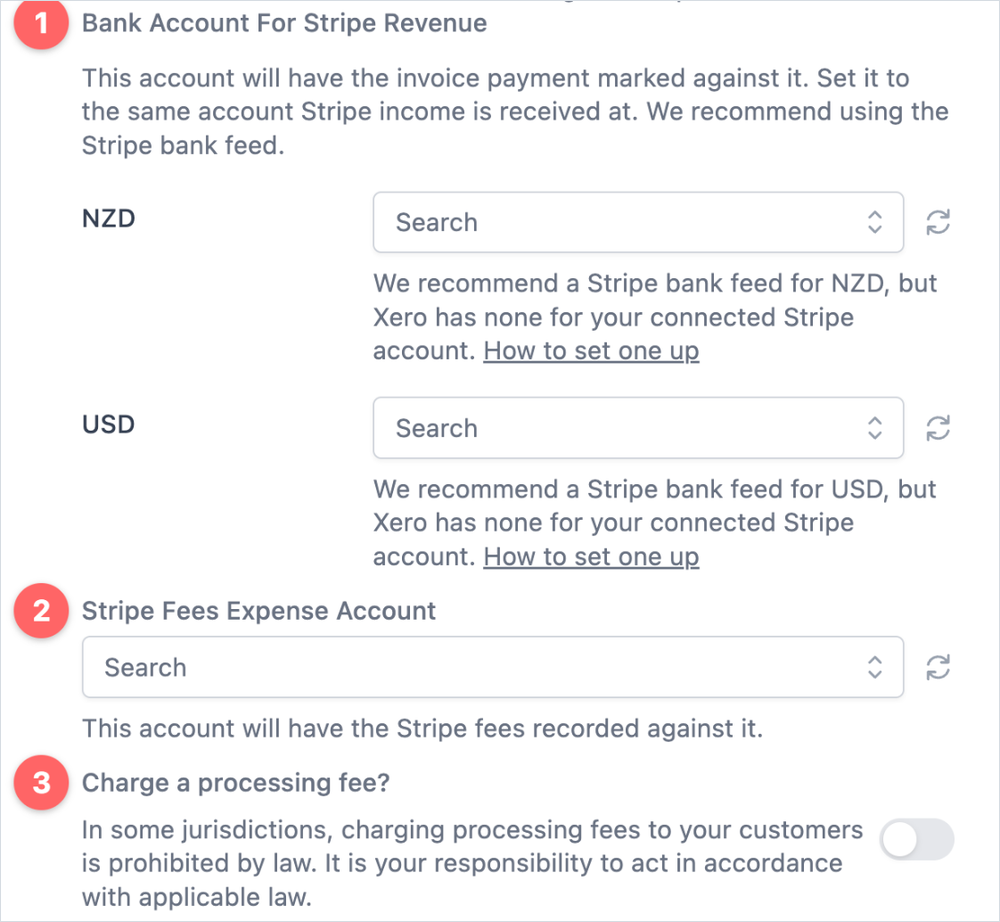
Pick one provider. Paidnice warns you if more than one is on, and Stripe takes priority in the portal. The help article on how payments work lists every setting on this page.
💡 Paidnice insight
We hide the Pay button until the bank account and the fees account are set. A payment that Paidnice cannot record leaves money in Stripe and an invoice that still looks unpaid in Xero. That takes longer to fix than a missing button.
Where does the customer see the Pay button?
The customer sees the Pay button in three places: on the invoice page in the portal, on the customer portal, and as Pay Now in reminder and statement emails.
On the invoice page, the buttons are Pay by card and Pay by ACH or Pay by Direct Debit. The payment methods follow your Stripe account. Cards are always offered. A bank debit is offered when it is enabled in Stripe for the invoice currency, for example ACH for USD, BECS for AUD, BACS for GBP and SEPA for EUR.
On the customer portal, a customer can tick several invoices in one currency and pay them together. A processing fee shows as a separate line, Card Processing Fee or Payment Processing Fee.
Pay by card shows only on an approved, unpaid invoice. If you are deciding which method to offer first, see our comparison of card or direct debit for B2B invoices.
Can you pass the card fee on to the customer?
Yes. Charge a processing fee? is off by default. When you turn it on, the customer pays a percentage of the amount plus a flat amount on top of the invoice.
The card rate has two fields, Fee Percentage (Card) and Fee Flat Rate Amount (Card). Bank debits have their own rate, Fee Percentage (Direct Debit) and Fee Flat Rate (Direct Debit). Set both direct debit fields to 0 to charge nothing extra on bank debits.
The helper text on the setting warns that passing fees on is prohibited in some jurisdictions. Paidnice does not apply a country rule for you, so check your local rule before you turn it on.
In Xero, the processing fee is income. Paidnice records it as the receive money transaction “Surcharge for {charge id}”, coded to your Fee Revenue Account.
What does Paidnice not do?
Paidnice records the payments made through Paidnice and nothing else from Stripe. It does not hold money, write refunds back or record payouts.
- It does not hold your money. Stripe payments go to your own Stripe account.
- It does not write refunds back. A refund you make in Stripe is not recorded in Xero by Paidnice.
- It does not record other Stripe charges. A payment made in Stripe directly, or through another provider, is not listed on the Payments page.
- It does not record payouts. You reconcile each payout in Xero as a transfer.
- It does not record a bank debit before it clears, by default. Bank debits take a few days and show Processing until then.
If Stripe takes the payment and Xero refuses the entry, the row shows Paid & Sync Failed. The post on a payment that failed to sync covers each cause. For the wider picture, see the Stripe integration page.
Frequently asked questions
Which Xero account should Stripe payments go into?
Any Xero bank account in the settlement currency works. Paidnice looks for a Stripe bank feed that belongs to your connected Stripe account and suggests it under the selector, because each feed line then has a matching entry.
Can I find a Stripe fee in Xero by its charge ID?
Yes. The fee is a spend money transaction named “Transaction fees for {charge id}”, and the invoice payment is referenced with the same charge ID. Search for the ID in Xero or on the Payments page in Paidnice.
Can a customer pay part of an invoice by card?
Yes, if you turn on Allow partial payments?. Turning it on sets Minimum Payment Amount to 50%, and you can change it from 0.1% to 100%. Partial payments work on a single invoice. Several invoices paid together are always paid in full.
Does Paidnice record Stripe refunds in Xero?
No. Refunds made in Stripe are not written back. Record the refund in Xero yourself.
Why is there no Pay by card button on my invoice?
Check three things. Stripe setup must be complete, with the bank account and the fees account chosen. The invoice must be approved and unpaid. If more than one provider is on, Stripe overrides the others once it is fully set up.
Can customers pay by bank debit and not by card?
Yes, when the method is enabled in your Stripe account for the invoice currency. If Pay by ACH or Pay by Direct Debit is missing, enable the method in Stripe under Payment methods.
Paidnice features in this article
About the editorial team
Jack is a co-founder of Paidnice and has built accounting software for more than 10 years. He builds the product that sends reminders, adds late fees and takes payments for businesses on Xero, QuickBooks and ERPs such as NetSuite and Business Central.
Ashley is a co-founder and lead developer of Paidnice and has built accounting software for more than 10 years. He builds the ledger connections that put reminders, late fees and payments into Xero, QuickBooks and ERPs such as NetSuite and Business Central. Before Paidnice he co-founded A2X, ecommerce accounting software for Xero and QuickBooks.
 App of the Year