


Summary
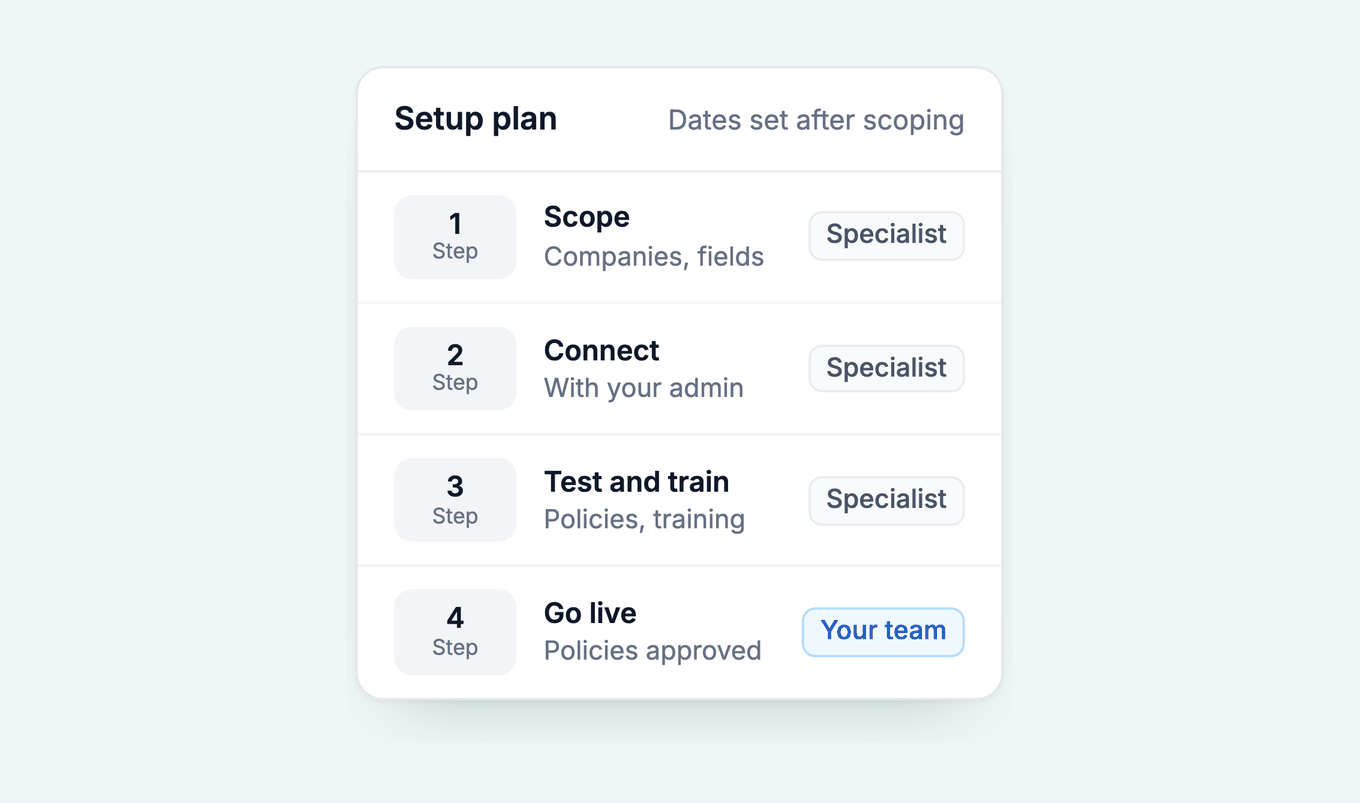
Most external AR tools quote days to a few weeks on Business Central. Setting up Paidnice on Business Central is a scoped project. It follows the Microsoft Entra pattern Microsoft documents, and an implementation specialist handles setup and plans the steps and dates with you. The steps are scope, connect, test and train, then go live.
- Who does it: Paidnice's implementation specialist handles setup, and your finance team signs off the rules before anything runs.
- What moves the time: Companies and currencies, custom fields, customer groups, and how locked down your Microsoft Entra tenant is.
- Typical for any external tool: An app registered in Microsoft Entra with admin consent, once for the tenant, then a Microsoft Entra applications entry and permission sets in production and each sandbox, with a named owner for the credential's expiry date.
Paidnice connects to your ERP on the Custom plan. Book a demo on your own data, and a specialist sets up the connection.
Your Business Central partner set up your tenant, and the Microsoft Entra admin centre is theirs. You want a credit control tool for your debtors, and the first question from IT is who has to approve the connection. This page shows who does what.
It covers accounts receivable and collections automation on Business Central: steps, owners, the admin side, sandbox testing, and delays.
Free: Payment reminder email templatesCopy the reminder emails for before, on and after the due date.How long does an AR tool take to set up on Business Central?
For an external AR tool on Business Central, vendor pages and AI answers put a standard connection at days to a few weeks, with multi-company, custom-field and payment setups at the long end; the connect step itself takes hours, and scoping, data checks, template tests and sign-off take the rest.
Setting up Paidnice on Business Central is a scoped project: an implementation specialist plans the steps and dates with you after the demo.
Vendor pages quote figures from under an hour to several weeks for tools like this. The short figures describe the connect step alone. The long ones include scoping, data checks, template tests and sign-off, which is where the time goes.
A 30-minute figure sometimes quoted for plug-in apps does not describe a Paidnice ERP connection. On Xero and QuickBooks Online, Paidnice setup is under 15 minutes; Business Central is a connector project with an implementation specialist.
One more split matters. The Assisted Setup wizards for Dynamics 365 Sales and Dataverse, and the developer guides for the API, are different jobs from connecting an AR tool, and the steps below are about connecting an AR tool.
Dates set after scoping
After go-live, Paidnice rechecks the remaining amount on open invoices at each sync, so a payment applied in Business Central stops the chase at the next sync.
Late fees and interest post back as sales invoices in Business Central, left unposted for your team to post or posted, as you choose at implementation.
What does an external tool need from a Business Central admin?
For a typical external tool that connects through the API, a Business Central admin or partner registers an app in Microsoft Entra, grants admin consent, registers it on the Microsoft Entra applications page in Business Central, and assigns permission sets.
Paidnice follows that pattern: the specialist walks your admin through the Entra app registration, the Microsoft Entra applications entry in each environment you connect, and a permission set limited to the records Paidnice reads and writes.
The table below is the pattern Microsoft documents for service-to-service access. It describes what any external tool asks for, so you can check a vendor's request against it. Paidnice uses these steps.
| Step | Where | Who | Per environment? |
|---|---|---|---|
| Register the app and add a client secret | Microsoft Entra admin centre | Entra admin | No, once per tenant |
| Add the Dynamics 365 Business Central application permission API.ReadWrite.All and grant admin consent | Microsoft Entra admin centre | Entra admin | No, once per tenant |
| Create an entry with the Client ID and a description that names the vendor, State = Enabled | Business Central, Microsoft Entra applications page | BC admin or partner | Yes |
| Assign permission sets. Microsoft's service-to-service guide says SUPER cannot be assigned to an application. Microsoft's D365 AUTOMATION set covers automation API objects, not receivables data, so ask the vendor for the object list | Business Central, same page | BC admin or partner | Yes |
| Check the connector's entry in any sandbox copied from production. Microsoft's environment copy page lists what a copy disables (job queue tasks, webhooks, service connections); Microsoft Entra applications entries are not on that list, so disable the entry unless you want the sandbox connected | Business Central, Microsoft Entra applications page in the sandbox | BC admin or partner | Yes |
| Record who owns the client secret's expiry date | Your IT calendar | Named person | No, one secret per app |
Source: Microsoft's guide to service-to-service authentication for Business Central.
Some guides quote a delegated permission name for apps that act as a signed-in user; an unattended tool uses the API.ReadWrite.All application permission in Microsoft's service-to-service guide.
Two details matter for a finance team. The Entra admin and the Business Central admin are often different people, so the connect step may need two approvals. A client secret also has a chosen duration, so ask any vendor how credentials are renewed and who owns the date. Our guide to security and Entra permissions lists the questions.
Can we test it in a sandbox first?
For a typical external tool, a sandbox test reuses the tenant's Entra app registration and consent, but needs its own Microsoft Entra applications entry and permission sets, because that part of the setup is data inside each environment. Budget Business Central admin time for the sandbox and for production, not for one.
A sandbox copied from production keeps that entry unless someone disables it. Microsoft's environment copy page lists what a copy switches off, and Microsoft Entra applications entries are not on the list, so check it before test data reaches a live connector.
Microsoft opens a preview sandbox about one month before each major release, in March and September. That is for testing the release itself, and it is removed 30 days after general availability, so it is not a place to leave a connection running.
For Paidnice, the connection is built and tested in your sandbox first, under its own Microsoft Entra applications entry, with balances tied to the Aged Accounts Receivable report, and connected to production after you sign off.
In a sandbox copied from production, the specialist disables the Paidnice entry unless you want that sandbox connected. Ask for the test plan at the demo.
What slows setup down?
Setup slows when the Entra tenant is locked down, when companies or currencies multiply, or when custom fields on customers and invoices need mapping.
- A locked-down tenant. Admin consent needs an Entra admin, and in many firms that is the partner or an IT contact, not the finance team. Book them for the connect step early.
- Many companies. Business Central allows up to 300 companies per environment, each with its own reminder terms. Every company in scope adds mapping. See collections across companies.
- Custom fields. PO numbers, account managers and payment terms stored in custom fields need naming before scoping starts.
- Release timing. Business Central ships two major releases a year, in April and October, with a five-month update period. Avoid putting the connect step in the same week your partner is scheduling the update.
Any tool's first sync of a large customer list is paced by Microsoft's limits. Business Central allows 6,000 OData requests per five-minute window per user, so a large customer list takes longer to load than a small one.
Do we need our Business Central partner?
It depends on your tenant. A partner is most likely to be needed when your tenant is locked down or customisations touch customers and invoices. For Paidnice, the implementation specialist runs the setup and tells you in the scope step whether anything on your side needs the partner.
If your own IT cannot grant admin consent in Entra, ask the partner for that one step.
For what Business Central does on its own, see what Business Central reminders do natively. To compare tools, see credit control software for Business Central. To see how Paidnice runs on your ledger, read about Paidnice for Business Central.
Common questions
How long does it take to connect Paidnice to Business Central?
It is a scoped project that an implementation specialist plans with you after the demo. It follows the pattern Microsoft documents: an Entra app registration with client credentials, a Microsoft Entra applications entry per environment, and a permission set limited to the records Paidnice reads and writes.
Does my Business Central admin need to be involved?
A typical external tool needs an Entra app approved by an admin, and your partner can do that. For Paidnice, the same Entra app registration, Microsoft Entra applications entry and permission set are needed, and the implementation specialist walks your admin through each one.
Does it work on Business Central Essentials?
Reminders, finance charges and statements ship with Essentials. The Dynamics 365 Licensing Guide (October 2026, Multiplexing section) says any user who inputs, queries or views Business Central data through another tool needs a Business Central licence; pooled connections use application access in Business Central. Ask your Microsoft partner how that applies to your users.
Can I test in a sandbox first?
For a typical external tool, yes. The Entra app registration and consent serve the whole tenant; the sandbox needs its own Microsoft Entra applications entry and permission sets, and a copy of production keeps the production entry until you disable it. Agree the test plan with the implementation specialist in the scope step.
What happens when a client secret expires?
With any external tool that uses a client secret, the connection stops when the secret lapses, so ask the vendor how credentials are renewed and who owns the date.
Is the Business Central connection on every plan?
Business Central runs on the Custom plan, which is quoted for your setup: the ERP connection, your invoice volume and support. There are no plan limits, and it is never priced by your revenue. See pricing.
Is the Paidnice connection safe for a Business Central tenant?
Ask the same questions you would ask any vendor: which permission set it needs, where credentials are stored, and how it handles each Business Central release. The implementation specialist answers each one in the scope step, and our guide to connecting AR software to Business Central safely has the full list.
Paidnice features in this article
About the editorial team
Jack is a co-founder of Paidnice and has built accounting software for more than 10 years. He builds the product that sends reminders, adds late fees and takes payments for businesses on Xero, QuickBooks and ERPs such as NetSuite and Business Central.
Ashley is a co-founder and lead developer of Paidnice and has built accounting software for more than 10 years. He builds the ledger connections that put reminders, late fees and payments into Xero, QuickBooks and ERPs such as NetSuite and Business Central. Before Paidnice he co-founded A2X, ecommerce accounting software for Xero and QuickBooks.
 App of the Year