



Summary
A team tracks overdue invoices in Xero by pairing the Aged Receivables report with a connected app that puts a named owner on each account. Xero has no owner column, no shared activity log and no internal alert when an invoice goes overdue. It charges no per-user fee, so a Viewer seat costs nothing.
- The gap: Xero shows what is overdue, but not who is chasing it or what the customer last said.
- The native fix: A free Viewer seat and a shared export of the report, which goes stale the moment it is saved.
- The team fix: Paidnice assigns invoices and escalations to a named person, with notes that sync back to the invoice in Xero.
What does Xero's Aged Receivables report show?
Xero's Aged Receivables Summary report shows the amount each customer owes and how long it has been outstanding, and the Detail report lists it invoice by invoice.
You can set the number and length of the ageing periods, age by due date or invoice date, add columns such as Credit Limit, group by Contact Group or tracking category, save the layout as a custom report and export it to PDF, Excel or Google Sheets. Grouping the report by contact group changes nothing about how Xero chases each group, which Xero reminders by contact group covers.
Xero does not email a report on a schedule, compare a customer's balance with an earlier date, show days-to-pay on a contact record, or alert anyone inside the business when an account goes overdue or crosses a threshold. The request for automatic report emailing holds 780 votes on Xero's product ideas board and sits at "In discovery", with Xero's latest reply dated 25 May 2026.
Every one of those views belongs to whoever is logged in. The report has no owner column and no place to record a promise to pay, so the first question for a team is who gets a Xero login. The wider set of reports is in credit control reporting in Xero.
Free: Payment reminder email templatesCopy the reminder emails for before, on and after the due date.Which Xero user roles can see overdue invoices?
Xero names administrator, standard + reports, sales and purchases, sales and viewer as the roles that can open the Aged Receivables Summary report, and its plans carry no per-user licence fee. A seat for a colleague costs nothing extra.
Xero's user roles article lists Administrator, Standard, Employee, Viewer and four Sales and purchases variants. The Aged Receivables Summary article states: "You need the administrator, standard + reports, sales and purchases, sales or viewer user role to access this report."
| Xero role | Aged Receivables Summary | Business Snapshot |
|---|---|---|
| Administrator | Yes | Yes |
| Standard, with Reports | Yes | Yes |
| Sales; Sales and purchases | Yes | Not listed |
| Draft sales and purchases; Purchases | Not listed | Not listed |
| Employee | Not listed | Not listed |
| Viewer | Yes | Yes |
"Not listed" means the role is absent from Xero's access line for that screen, which is different from a confirmed no. The Business Snapshot article names "administrator, standard + reports or viewer" for its dashboard.
Xero describes the Viewer role as able to "view most areas of Xero, but can't create or edit transactions, or run new reports". Read with the report's access line, a Viewer can open the saved receivables report and the snapshot, and sees most of the organisation while doing it.
Why does native Xero fall short for a team?
Native Xero has no owner column, no shared activity log and no alert when an invoice goes overdue, so a team chasing the same ledger has to build that layer itself.
A Viewer seat costs nothing, and it opens most of Xero to whoever holds it rather than the receivables alone.
| What a team needs to share | Available on a Xero Viewer seat? |
|---|---|
| Each customer's overdue total and how long it has been outstanding | Yes, on the Aged Receivables Summary |
| Each overdue invoice with its due date | Yes, on the Aged Receivables Detail |
| Whether the customer opened the online invoice | Yes, the Detail report's Invoice Seen column |
| Who owns the account | No |
| Notes and follow-up history on the report | No |
| An invoice assigned to a colleague | No |
| A notification when an invoice goes overdue or is paid | No |
| Average days to pay on the contact record | No, organisation-wide only, on the Business Snapshot |
| Receivables only, without the rest of the organisation | No |
Each gap has a thread on Xero's product ideas board. Scheduled reports sit at "In discovery", which means Xero is researching them.
| Request on Xero's product ideas board | Votes | Status | Posted | Latest Xero reply |
|---|---|---|---|---|
| Show invoice and contact notes on aged reports | 49 | Submitted | 19 Aug 2014 | None |
| Assigned staff tab on invoices (Xero Practice Manager) | 5 | Gaining support | 26 Feb 2026 | 27 May 2026 |
| Alert when an invoice has been paid | 204 | Submitted | 4 Sep 2013 | None recorded |
| Days overdue on the contact record | 91 | Submitted | 15 Aug 2023 | 9 Oct 2023 |
| Automatic generation and emailing of reports | 780 | In discovery | 29 Jan 2014 | 25 May 2026 |
The notes thread was posted against the payables report, and comments through November 2025 ask for the receivables side: "I need this more for Aged Receivables. One report to show the full picture." The assignment thread is a Xero Practice Manager request, and Xero's reply of 27 May 2026 says the team "can see the value in having a clearer way to show ownership during invoicing".
A Viewer seat is the right answer for one person, such as a director who wants to look at the list once a week. It stops being the answer once two people follow up the same customer, because Xero has nowhere to record who said what.
How do you build a free overdue invoice tracker for a team?
A shared spreadsheet can hold a team's overdue view, built from Xero's Aged Receivables Detail report plus four columns typed by hand: owner, last contact, promise date and next action.
Header row to paste:
Customer, Overdue total, Oldest invoice, Owner, Last contact, Promise date, Next action
| Customer | Overdue total | Oldest invoice | Owner | Last contact | Promise date | Next action |
|---|---|---|---|---|---|---|
| Kestrel Fabrication | £3,260 | INV-2041, due 17 Jul | Priya | 28 Aug, phone | 5 Sep | Call on 8 Sep if unpaid |
| Halden Foods | £7,410 | INV-1988, due 30 Jun | Priya | 2 Sep, phone | None given | Stop credit review, 9 Sep |
- Run the Aged Receivables Detail report, aged by due date, with the Due Date and Invoice Seen columns showing.
- Export it to Excel or Google Sheets. A Google Sheets export needs a Google account.
- Add the four columns you type by hand: owner, last contact, promise date and next action.
- Share the sheet and agree who re-runs the report, and on which day.
The sheet goes stale the moment it is saved. A payment that lands at 9am is not on it, and every refresh means re-running the report and re-pasting the figures around the four columns you typed. That upkeep is the subject of keeping a Xero debtors report current without rebuilding it in Excel each week.
What are the four ways to share overdue invoices with a team?
A Xero Viewer seat, a shared spreadsheet, a CRM board and a credit control layer on Xero can each put the overdue list in front of a team. They differ on who sees what, whether the figures stay in sync with the ledger and whether anyone owns each account.
The last column is Paidnice; the other three are categories.
| Xero Viewer seat | Shared spreadsheet | CRM board | Credit control layer on Xero | |
|---|---|---|---|---|
| Who sees what | Most areas of Xero, receivables included | Whatever was pasted in at the last refresh | The accounts and deals the CRM holds | Receivables only |
| Cost per seat | None | None | Depends on the CRM's plan | None: two users on Essentials, unlimited on Pro |
| Reads the live ledger | Yes, it is Xero | No, stale from the moment it is saved | Only through an integration | Yes, it reads the Xero ledger |
| Owner per account | No | Typed in | Yes, the record owner | Invoices and escalations assigned to a named user |
| Follow-up history | No | Typed in | Logged as activities in the CRM | Notes and call outcomes, synced to the invoice in Xero |
| Internal alerts | No | No | Depends on the CRM | Assignment and Mention notifications, escalation tasks, webhooks into team chat |
A CRM board suits a sales team that already lives in it. The balance on its cards is only as current as the last sync, and its notes stay in the CRM unless something copies them back to the ledger.
If you are weighing dedicated tools for a team rather than a Xero set-up, the guide to choosing credit control software for a finance team scores four of them on ownership, send history and approvals.
How does Paidnice give a team one overdue view?
Paidnice assigns overdue invoices and escalations to a named person, with notes that sync back to Xero, so a colleague picking up an account sees who already chased it and what was said. Each colleague gets a login separate from Xero, with no per-seat fee (two users on Essentials, unlimited on Pro).
Assign an invoice or an escalation and the colleague gets an Assignment notification; @mention someone in a note and they get a Mention notification. A colleague who only ever opens Xero still sees the note and call outcome on the invoice. The notes and assignment release has the detail.
Everyone who logs in sees the same receivables. Each contact page shows outstanding and overdue balance, oldest overdue age and average days to pay, and invoices sit in board-style ageing buckets with days overdue, expected payment date and portal views. The full list of metrics is on the accounts receivable reporting page.
Escalations turn the overdue list into tasks with owners. A policy fires at a set number of days overdue, filtered by Minimum and Maximum Due Amount per invoice and by a due-date window, or when a customer's total balance passes a figure you set or a credit limit, and creates a Phone Call, Stop Credit or Template Legal Letter task. The instructions are emailed to a designated address and listed on the Escalations page.
Setting up a Xero alert when an invoice goes overdue has its own guide, and amount thresholds are in growing overdue balances in Xero. Reminders that reach the wrong department at one customer are covered in Xero invoice reminders for different departments.
The Emails report lists every message sent with its latest delivery status, delivered or bounced. Every sender profile has a BCC field, so each send can be copied into a shared inbox or CRM the moment it goes out. The opt-in Weekly Report emails each user a summary of the organisation's receivables.
On Pro, webhooks fire on every completed or failed action and when an escalation completes or is cancelled, so alerts land in Slack, Microsoft Teams, Discord, Telegram or WhatsApp through an incoming webhook that Paidnice sets up.
Paidnice has no read-only role today: every user you invite can see and act on the receivables, so invite the people who should be able to act.
- Connect Xero. Contacts, invoices, payments and credit notes sync across.
- Invite the team. Each person gets their own Paidnice login and needs no Xero seat, per the Paidnice help centre.
- Set an escalation policy: the days overdue, the Minimum Due Amount, the task type and the address the instructions go to.
- Assign and mention. Assign the escalation or invoice to its owner, and @mention colleagues in notes, which sync to the invoice in Xero.
- Turn on the Weekly Report for each user, and on Pro add a webhook into Slack or Teams for completed and failed actions.
The person who most needs the overdue view is often the one who raised the invoice: an account manager can get a wrong PO number corrected in one call, and finance usually cannot. Assign the escalation to them, and their note lands on the invoice in Xero for everyone else.
Paidnice is free to sign up, with the first 20 actions free and no credit card. Essentials is £49 or US$69 a month with two users, and Pro starts at £74 or US$99 a month with unlimited users, on the pricing page. Across Paidnice customers, 8 in 10 invoices are paid within the first 60 days of using Paidnice.
What does an account manager need to see before a call?
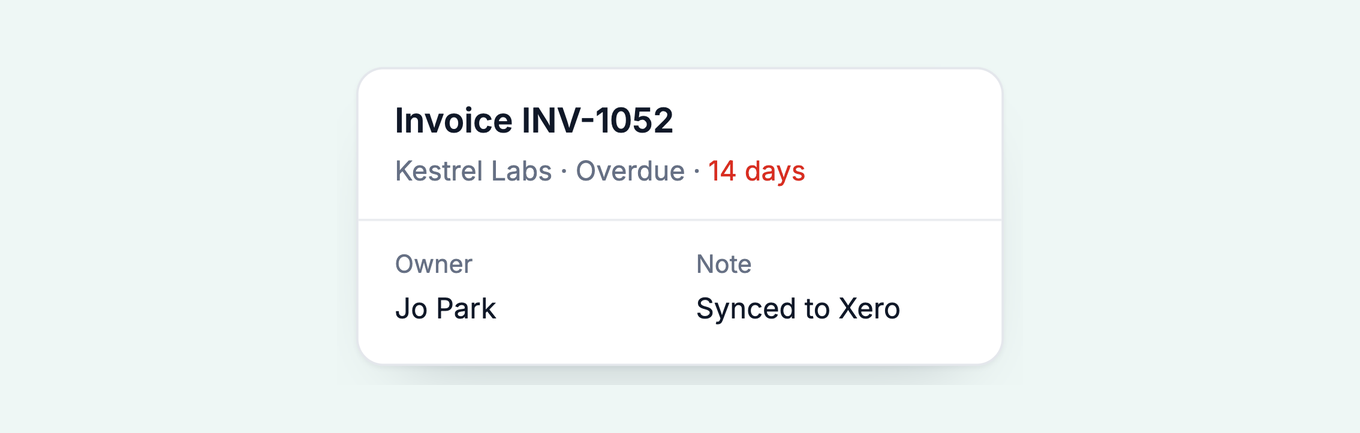
Before a call, an account manager needs the overdue balance, the oldest overdue invoice, the delivery status of the last reminder, the owner and the last note, and nothing from the rest of the ledger.
Xero gives an account manager one cue of its own when raising an invoice: hovering on the contact shows what the customer owes and the overdue part of it, and in new invoicing a banner appears once the contact reaches their credit limit.
The contact page in Paidnice is the pre-call view: overdue balance, oldest overdue age, average days to pay, each reminder's delivery status, the owner and the notes. Paidnice runs debtor management for Xero from the invoices already in your ledger.
Common questions
How to follow up an overdue invoice?
Send a reminder on the due date, a firmer one at 7 and 14 days, then phone. Apply a late fee if your terms allow it, since an invoice that costs money to ignore moves up the payment run, and log each contact on the invoice.
Does Xero automatically send overdue invoices?
Xero sends invoice reminders automatically once they are turned on: up to five per organisation, to the primary person plus anyone with "Include in emails" selected, for every invoice marked as sent. Nobody inside your business is notified.
How to keep track of paid and unpaid invoices?
In Xero, run the Receivable Invoice Summary report in its "Approved, sent and paid" format for the period, and the Aged Receivables Summary for what is still open by customer. A connected app adds days overdue and expected payment date per invoice.
How to generate a report in Xero?
Open the report in Xero, set the date, ageing periods and columns, then click Save as custom to keep the layout, or Export to send it out as PDF, Microsoft Excel or Google Sheets.
How do I export a list of invoices from Xero?
Run the Receivable Invoice Summary or Aged Receivables Detail report and export it to PDF, Microsoft Excel or Google Sheets. Reports don't export to CSV. Contacts do, but the contact CSV carries no balance field.
Can a colleague see overdue invoices if they have no Xero login?
Not inside Xero: every user needs a login and a role, although Xero charges no per-user fee. Otherwise export the report and share it, or give them a login to a connected app such as Paidnice, which is separate from Xero.
About the editorial team
Denym started Paidnice in 2022 after customers paying late left his own business short on payroll. He has led it to $1 billion collected on time across more than 1 million invoices, and writes about credit control, late fees and getting paid on Xero and QuickBooks.


 App of the Year