



Summary
Run Business Central collections by setting up reminder terms and Reminder Automation in each company, then add a group view outside Business Central, because reminders and statements never join two companies. One customer in three companies is three records, three ledgers and three reminders.
- Per company: Reminder terms, levels and Reminder Automation are set up and run in each company, and one environment holds up to 300 companies.
- Per currency: Fees are set per currency on each reminder level, and the Customer Statement report prints in the customer's currency.
- Group view: Consolidation in Business Central works on the general ledger, not on receivables, so a group overdue list needs reporting or a tool outside Business Central.
- Paidnice: One login across entities, each entity chasing in its own name, currency and time zone, with group reporting and users limited to the entities they are given.
Paidnice connects to your ERP on the Custom plan. Book a demo on your own data, and a specialist sets up the connection.
A customer pays your US company on time and ignores the UK one. In Business Central they are two customer records in two companies, so each company chases on its own, and nobody sees both. Business Central is built that way, so no setting changes it.
Here is what stays inside each company, what happens when one customer sits in several, how currencies land on reminders and statements, and how to run collections for the group from one place.
How do Business Central companies handle reminders?
Each Business Central company has its own reminder terms, finance charge terms and customers, and one environment holds up to 300 companies. Above 300, Microsoft's operational limits page says some environment operations are blocked.
Reminder terms and their levels are company data. So are the texts, the Report Selection for reminders and the email account that sends them. A group with four companies sets them up four times.
Reminder Automation runs the same way. Its Create, Issue and Send actions sit on a job queue entry inside one company, so each company needs its own automation and its own job queue entry. A run in company A scans only company A's customer ledger entries. Our guide to Reminder Automation covers the levels and the cadence.
Finance charge terms work the same way, which matters when one company bills in GBP and another in USD. Each company holds the rate and the period it needs. For the UK company, see UK late payment interest in Business Central.
Free: Payment reminder email templatesCopy the reminder emails for before, on and after the due date.What happens when one customer exists in several companies?
A customer in three companies is three customer records with three ledgers, so each company sends its own reminder, and Microsoft documents no combined reminder or statement across companies.
Nothing in Business Central links the three records as one payer. Intercompany posting creates the matching purchase in the partner company; it is a posting feature, not a view of what the customer owes the group.
Consolidation does not help either. Business Central consolidation is financial: it rolls general ledger balances into a consolidation company, including across environments since the 2023 release wave 2. It has no receivables view, no customer list and no reminders.
Partner tools such as Clever Credit and Zetadocs list batch delivery or credit worklists for Business Central. We have not evaluated them, so check each for a true cross-company view.
Master Data Management syncs master data such as customers and general ledger accounts between companies; the reminder runs and the issued reminders stay in the company that created them.
Business Central alone
With Paidnice
Team split by entity. Alerts and approvals.
One case on the Dynamics 365 community forum shows how separate the companies are in practice. Batch create in Reminder Automation worked for every customer in company A. In company B, the same setup created reminders for only some customers, and the thread closed without an answer.
The usual causes are customers with no reminder terms code in that company, or a missing Issue step.
How do currencies show on reminders and statements?
Fees are set per currency on each reminder level, and the Customer Statement report prints in the customer's currency.
On Reminder Terms, open a level and choose Currencies to set an Additional Fee for each currency you invoice in. If a customer's currency has no row, Business Central converts the local currency fee. Interest comes from the Finance Charge Terms code on the customer, so a USD customer and a GBP customer can carry different rates.
Statements need no extra setup for currency. The Customer Statement report prints in each customer's currency, with the statement date and aging date set to the last date of the period. The payment links post covers how a customer pays a statement in that currency.
Two limits sit alongside this. Credit Limit (LCY) on the Customer Card is local currency only, so a limit for a USD customer in a GBP company is held in GBP; see credit limit in local currency. And the reminder's language follows the customer's Language Code, with a company-level default for documents since Business Central 28.0.
Document language per company
Business Central 28.0 added a default language for documents at company level. A Dutch company can default its reminders to Dutch while the UK company stays in English, with the customer's own Language Code still winning where it is set.
What does an external collections tool have to handle?
An external tool reads each company separately, because the company is part of every API URL, so the same customer in two companies arrives as two records.
Every call to the standard API includes the company: /api/v2.0/companies({id})/customers, .../salesInvoices, .../customerPaymentJournals. A tool that covers four companies loops four times, and it holds one customer list per company. Nothing in the API says that Northwind in company A is Northwind in company B.
The limits apply per user, and a service principal counts as a user: 6,000 OData requests in a 5-minute window and 5 concurrent requests. Webhook subscriptions expire after 3 days and need a renew. One Entra app registration and one admin consent serve the tenant; the Microsoft Entra applications entry and its permission sets are set up in each environment.
How does Paidnice run collections across entities?
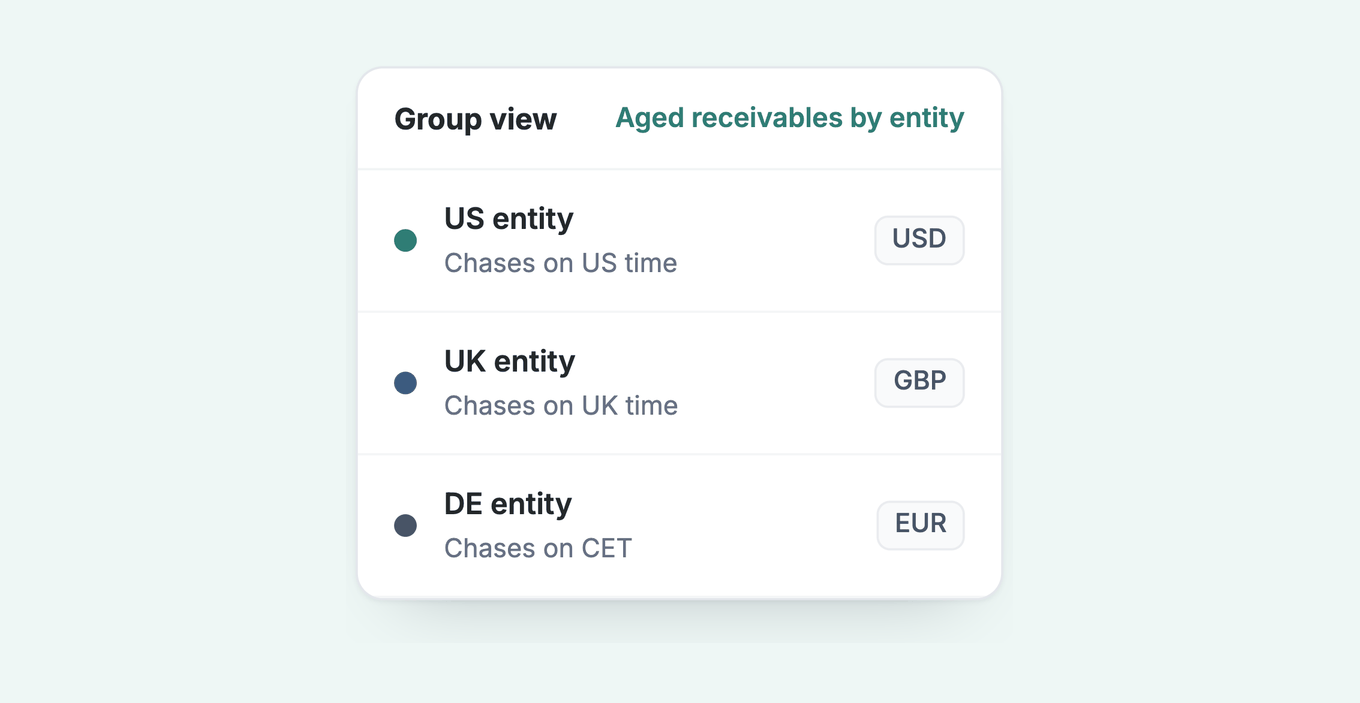
Paidnice runs every entity from one login, with each entity chasing in its own name, currency and time zone, and one group report across them.
Other tools listed for Business Central include Versapay, HighRadius and Billtrust; we have not evaluated them. Whichever tool you shortlist, check whether it chases in each entity's own name, currency and time zone, whether one login covers every entity, and whether its price is set by invoice volume or by revenue.
Each entity chases in its own name, currency and time zone, so the UK customer hears from the UK company and the US customer from the US company. The group sees all of it in one place.
- One login. A credit controller works every entity without switching companies in Business Central.
- Team split by entity. A user can be limited to the entities they are given, and sees only those. Assignee-only access narrows it further, to the customers or customer groups assigned to them.
- Group reporting. The Aged Receivables by Contact report covers every entity and every currency, with ageing buckets and overdue totals, and exports.
- Alerts and approvals. A new user's sends can go to an approver's list before they reach a customer.
Multi-entity is an add-on priced per entity; the price is on the pricing page.
Paidnice follows the pattern Microsoft documents for Business Central: a Microsoft Entra app registration signed in with client credentials, an entry on the Microsoft Entra applications page in each environment you connect, and a permission set limited to the records Paidnice reads and writes, all set up in your tenant. Each company is chased in its own name and currency.
An implementation specialist handles setup. The connection is on the Custom plan, quoted for your setup.
Details are on the Dynamics 365 Business Central integration page, and our guide to credit control software for Business Central compares the options for a single company.
Who should get another reminder
One thing the group view changes is the decision about who gets another email. When a run creates more reminders than there are levels, Business Central repeats the highest level for that customer, in every company. Paidnice data says that is the wrong move for a customer with a stack of overdue invoices.
Look at the overdue count before sending another email. For a payer with no other overdue invoice, a reminder is followed by about 26 more invoices in every 100 paid within 7 days, in Paidnice data. For a payer with 4 or more overdue invoices, it is only 1 to 4 more in every 100. The comparison is with invoices from the same businesses at the same days overdue.
For that customer, the next step is a person: a call, a payment plan or an escalation to the account owner. In Paidnice, that is an escalation task assigned to a named person. The full set of jobs on the multi-entity page applies on Business Central through the Custom plan.
Common questions
Can Business Central send reminders for several companies at once?
Not in one run. Reminders run inside each company, so set up reminder terms and Reminder Automation in every company, each with its own job queue entry.
How many companies can one Business Central environment hold?
Up to 300. Above that, Microsoft says some environment operations are blocked.
Does consolidation help with collections?
It does not. Business Central consolidation is financial, on the general ledger. It is not a receivables view and holds no customer list.
Can a customer in two companies get one statement?
Microsoft documents no combined statement across companies. Each company's Customer Statement report covers that company's ledger only.
How do reminder fees work in other currencies?
Set an Additional Fee per currency on each reminder level, under Currencies. Without one, Business Central converts the local currency fee.
Does Paidnice handle several Business Central companies?
Paidnice runs multi-entity groups from one login, with each entity chasing in its own name, currency and time zone, on the Custom plan. A user can be limited to the entities they are given.
Why do my reminders send for some customers but not others in one company?
The common causes are customers with no reminder terms code and a missing Issue step in Reminder Automation. The Business Central reminders guide covers both.
Paidnice features in this article
About the editorial team
Ashley is a co-founder and lead developer of Paidnice and has built accounting software for more than 10 years. He builds the ledger connections that put reminders, late fees and payments into Xero, QuickBooks and ERPs such as NetSuite and Business Central. Before Paidnice he co-founded A2X, ecommerce accounting software for Xero and QuickBooks.
 App of the Year