


Summary
You can put a PayPal pay link on Business Central invoices with no extra software. Stripe links and a customer portal need an extension or an AR tool, and among Microsoft's own payment services, payments post back on their own only for one PayPal setup; extensions post back on their own terms, so check each one.
- Native link: PayPal Payments Standard is the one live first-party payment service. WorldPay Payments Standard is deprecated and Microsoft Pay was retired in 2020.
- Portal: Microsoft documents no native customer portal for Business Central. AppSource apps, partner builds and AR tools add one.
- Posting back: Of Microsoft's payment services, only a PayPal Business Merchant account on PayPal Commerce Platform with Register payments automatically switched on posts payments back; payment extensions handle posting their own way.
- Paidnice: Paidnice puts a Pay now link in every reminder email, SMS reminder and statement, with a portal that shows invoice history, promise to pay and Query this invoice. Runs on Business Central through the Custom plan.
Paidnice connects to your ERP on the Custom plan. Book a demo on your own data, and a specialist sets up the connection.
You send a Business Central invoice and a customer asks how to pay it. Microsoft's payment services give you a PayPal link on the email. They give you no Stripe link and no portal.
This guide covers which payment services Microsoft lists as live, deprecated or retired, how the link reaches the customer, what a portal needs, when payments post back on their own, and where the pay link belongs once an invoice is overdue.
Free: Payment reminder email templatesCopy the reminder emails for before, on and after the due date.Which payment services work in Business Central?
Business Central's only live first-party payment service is PayPal Payments Standard. WorldPay Payments Standard is deprecated and Microsoft Pay was retired in 2020.
- Search for Payment Services, choose New and pick PayPal Payments Standard.
- Open Setup on the service and enable it.
- Open a sales invoice and check the Payment Service field, then send a test invoice to yourself.
Microsoft's payment services page lists the steps. Microsoft charges no monthly or setup fee for the PayPal extension; PayPal's own fees apply.
The same page marks WorldPay Payments Standard as obsolete from the 2023 release wave 2, "active for the next three major releases" before removal, with no removal version stated. Microsoft Pay was switched off after 8 February 2020. Stripe appears nowhere on the page.
| Option | Status | Link on the invoice | Payments post back | Portal | Cost or fee |
|---|---|---|---|---|---|
 PayPal Payments Standard PayPal Payments Standard | Live, first-party | Yes, in the email body and the PDF | Only a Business Merchant account on PayPal Commerce Platform, with Register payments automatically on | No | No Microsoft fee; PayPal fees |
 WorldPay Payments Standard WorldPay Payments Standard | Deprecated | Do not set up | n/a | No | n/a |
| Microsoft Pay | Retired 8 Feb 2020 | n/a | n/a | No | n/a |
 Stripe Stripe | Not first-party | Through an extension (Continia names one; vendor claim) | Depends on the extension | No | Stripe fees |
| AppSource or partner portal | Third party | Yes | Vendor-specific | Yes | Quoted; ECOSIRE lists "from $299 USD", indicative, built to order |
 Paidnice portal Paidnice portal | AR tool, Custom plan on Business Central | Pay now in every reminder, SMS and statement | A payment applied in Business Central stops the chase at the next sync | Yes | Quoted for your setup |
Microsoft rows: the payment services and PayPal Payments Standard pages on Microsoft Learn.
To create a PayPal payment link, enable PayPal Payments Standard, enter your PayPal account email in its setup, and tick it as the default.
How does the payment link appear on an invoice?
After you enable a payment service, Business Central adds a link to the sales documents you send by email, and you can remove it before posting, for example when a customer pays cash.
Open the invoice under Sales Invoices and look for the Payment Service field. It appears only once a service is enabled. Microsoft's PayPal page says the link sits in the email body and in the attached PDF, added automatically or by the user.
Two problems are reported on the Dynamics Community forum: the link opens from the email but shows as plain text in some PDF viewers, and a payment method with a balancing account hides the Payment Service field. Point customers to the email button, and use a payment method with no balancing account on invoices you want paid online.
Can customers pay a Business Central invoice by Stripe or card?
Stripe is not a Microsoft payment service, so a Stripe or card link on a Business Central invoice comes from a third-party extension or an AR tool.
Microsoft's payment services page lists no Stripe item, and the forum thread "Stripe/PayPal and Business Central" reaches the same answer. The 28.0 release notes, dated 1 April 2026, announce no card service either.
Continia says its Document Output product embeds payment links to gateways such as Stripe and PayPal through the payment services framework; that is Continia's claim, on its own docs. ECOSIRE builds a Stripe or PayPal link as a custom extension, built to order. Both need a partner, a quote and a project.
Payment extensions that advertise a card or ACH pay link on Business Central documents include EBizCharge, PayTrace (Trace AR), Versapay, Paystand and Collect 365 with PayFabric; each states its own posting and fees.
Can customers pay online from a Business Central invoice?
Microsoft documents no native customer portal for Business Central. The 28.0 release notes list no customer self-service item, so portals come from AppSource apps, partners or Power Pages.
A customer portal is a page where the customer sees every open invoice, pays one or several, and downloads a statement. The options on Business Central are:
- Partner portals. Branded pages that read open documents over the Business Central API. One partner, ECOSIRE, lists a click-to-pay portal "from $299 USD", indicative and built to order.
- Power Pages. Possible, but Microsoft documents no ready AR portal on Power Pages, so it is a build. A Microsoft licensing thread on external portal users is unresolved.
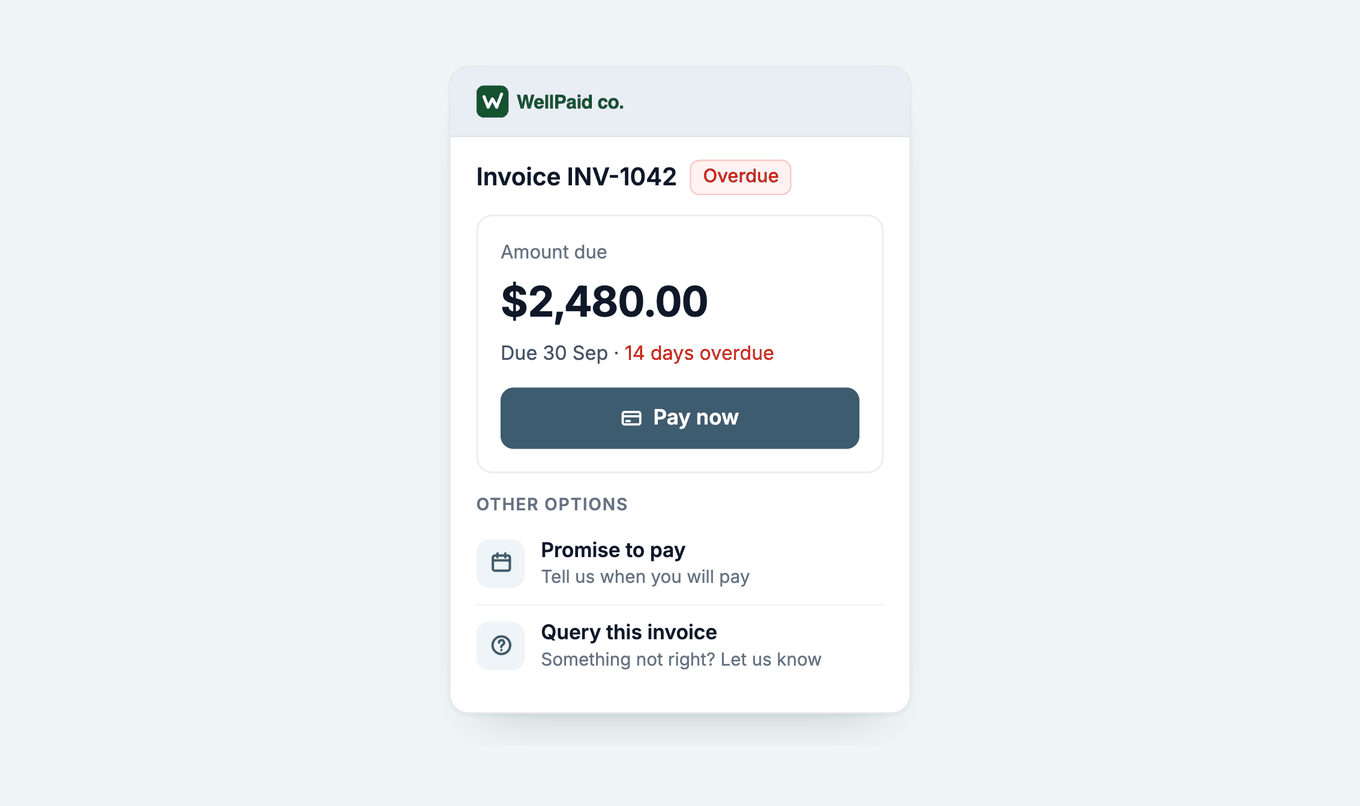
- An AR tool. Paidnice's customer payment portal opens from a link in any reminder or statement, with no login. It shows the full invoice history, Pay now, promise to pay, a payment plan when eligible, and "Query this invoice", under your logo and brand colour.
Secure Portal Mode adds an email check before the customer sees anything. The portal and payment plans work on ERP connections, including Business Central.
Do payments post back to Business Central on their own?
For Microsoft's own payment services, payments post back automatically only for a Business Merchant account on PayPal Commerce Platform, with the Register payments automatically toggle on in Payment Registration Setup, per Microsoft's PayPal Payments Standard page.
With that setting on, Microsoft says Business Central "posts the entries and closes the document". The mechanism is PayPal's Instant Payment Notification, a webhook into Business Central, and a forum thread on setting up the IPN notification shows how hard the notify URL is to find. Two conditions catch teams out:
- The journal batch named in Payment Registration Setup cannot have record-level restrictions or require manual approval, and every user must be able to access it.
- A personal PayPal account, or a Business account outside PayPal Commerce Platform, posts nothing. You register the cash through bank reconciliation, Payment Registration or a cash receipt journal.
One community blog warns against PayPal as a balancing account: the invoice posts as paid before PayPal confirms the money. Paidnice rechecks the remaining amount on open invoices at each sync, so a payment applied in Business Central stops the chase at the next sync.
Ask at the demo how a portal payment posts for your setup: as a customer payment journal line applied to the invoice, into which balancing account, and how the processing fee is recorded.
What about SEPA direct debit in Business Central?
Business Central's SEPA direct debit works only for euro sales invoices, and you reject failed collections manually.
The flow is: payment method and mandate on the customer, a Direct Debit Collection entry, an XML export to your bank, then post the receipts once the bank confirms. Microsoft's SEPA direct debit page covers each step.
The global version supports the SEPA format only. Microsoft documents no BACS or ACH collection in it; other formats depend on your country version or a data exchange definition.
How does Paidnice put the pay link in every reminder?
Paidnice puts a Pay now link in every reminder email, SMS reminder, statement and portal page, because the day a reminder lands is the day a late payer is most likely to pay.
Reminder day is payment day. Overdue invoices are paid about 3 times as often on the day a reminder is sent as comparable overdue invoices with no reminder (about 12 in 100 against about 4 in 100), in Paidnice data. Businesses chose which invoices to remind, so this is a strong short-term pattern, not a controlled test.
A link on the invoice email is seen once, at send. The late payer is reading a reminder weeks later, and Microsoft's PayPal page describes the link on sales documents, not on Business Central reminders.
The email button can carry the amount due, so the customer sees what to pay before the portal opens.
The Business Central integration runs on the Custom plan. Paidnice follows the integration pattern Microsoft documents for Business Central: a Microsoft Entra app registration signed in with client credentials, an entry on the Microsoft Entra applications page in each environment you connect, and a permission set limited to the records Paidnice reads and writes, all set up in your tenant.
An implementation specialist handles setup. Custom is quoted for your setup: the ERP connection, your invoice volume and support. Book a demo with one overdue invoice, or read the guide to credit control software for Business Central first.
Business Central payment links and portal: common questions
Can I add a payment link to Business Central invoices?
Yes. Enable a payment service under Payment Services and the link appears on the sales documents you email. PayPal Payments Standard is the live first-party option.
Does Business Central support Stripe?
Not as a Microsoft payment service. Stripe links on Business Central invoices come from a third-party extension or an AR tool.
Is WorldPay still available in Business Central?
Not for new setups. Microsoft marks WorldPay Payments Standard as deprecated from the 2023 release wave 2 and plans to remove it. Do not set it up on a new company.
Does Business Central have a customer portal?
Not a native one. Microsoft documents no customer portal, so partner apps, a Power Pages build or an AR tool provide it. Paidnice's portal runs on Business Central through the Custom plan.
Why was my PayPal payment not applied in Business Central?
Automatic posting works only with a Business Merchant account on PayPal Commerce Platform and the Register payments automatically toggle on Payment Registration Setup. Otherwise register the payment through bank reconciliation, Payment Registration or a cash receipt journal.
Can customers pay a Business Central invoice by direct debit?
SEPA direct debit works for euro invoices. Microsoft documents no BACS or ACH collection in the global version.
Paidnice features in this article
About the editorial team
Jack is a co-founder of Paidnice and has built accounting software for more than 10 years. He builds the product that sends reminders, adds late fees and takes payments for businesses on Xero, QuickBooks and ERPs such as NetSuite and Business Central.
Ashley is a co-founder and lead developer of Paidnice and has built accounting software for more than 10 years. He builds the ledger connections that put reminders, late fees and payments into Xero, QuickBooks and ERPs such as NetSuite and Business Central. Before Paidnice he co-founded A2X, ecommerce accounting software for Xero and QuickBooks.
 App of the Year