



Summary
To make a collection call, open the account first, name the invoice, the amount and the days overdue, ask for payment, and agree on a date and amount before you hang up. Then log the call on the customer's record the same day, so the next person sees what was said.
- Prepare: Have the open invoices, the reminders already sent, and any promise or query in front of you before you dial.
- Get a date: A call ends with a specific amount and a specific date, repeated back to the customer and confirmed in writing.
- In Paidnice: On the Pro plan and above, you call the customer from Paidnice, and Paidnice records the call, writes a transcript, and saves both to the customer's timeline.
Three reminders went out and the invoice is still open. A phone call is the next step. Here is how to make one that ends with a payment date.
How do you make a collection call?
Open the customer's account, call the person who pays, name the invoice, the amount and the days overdue, ask for payment, and agree on an amount and a date before you hang up.
- Prepare. Pull up the open invoices, the reminders already sent, and any promise or query on the account.
- Open. Say your name, your company and why you are calling, and confirm you are speaking to the person who pays.
- State the account. Give the invoice number, the amount, the due date and how many days overdue it is.
- Ask. Ask plainly when the invoice will be paid, then stop and listen.
- Agree. Settle on a specific amount and a specific date, and repeat both back to the customer.
- Log it. Record what was said on the customer's account the same day, and send a short email that confirms the date.
The last step is the one teams skip. A promise that lives only in one person's memory is gone when that person is on leave.
Free: Payment reminder email templatesCopy the reminder emails for before, on and after the due date.What should you have in front of you before a collection call?
Have every open invoice for that customer, the dates of the reminders already sent, and any promise to pay, query or payment plan on the account, so the customer never has to tell you something you already know.
Check three things before you dial:
- The balance. All open invoices, not only the one that triggered the call. A customer who pays one invoice and leaves two open has not fixed the problem.
- The history. Which reminders went out, and whether the customer replied. If they already promised a date, the call starts from that promise. See what to do when a promised date passes.
- Any query. If the customer has said the invoice is wrong, the call is about the fix, not the payment. How to handle a disputed invoice covers that conversation.
What do you say on a collection call?
Say who you are and why you are calling in the first sentence, give the invoice details, then ask one direct question about when payment will be made.
A plain opener works: "Hi Sam, this is Mark from Northline. I'm calling about invoice INV-1042 for $2,480.00, which was due on September 15 and is now 21 days overdue. When can we expect payment?"
Keep the tone polite and firm. Many late business payments come from a process problem on the customer's side: a missing PO number, an invoice sent to the wrong person, or an approver on leave. Ask about the cause before you push on the date. For the full conversation, including what to say when the customer cannot pay all of it, use the collection call scripts.
The "mini-Miranda" disclosure in many collection scripts comes from the Fair Debt Collection Practices Act, which covers third-party debt collectors. A business that calls its own customers about its own invoices is generally not a debt collector under that law. Stay polite and accurate, and call at reasonable hours.
What should you write down after a collection call?
Write down who you spoke to, when, what they said about the invoice, and the amount and date they agreed to, on the customer's record and on the same day. A call log template gives you the columns and the fixed outcomes.
Notes written after the call are short and often late. The detail that matters, such as "pay half on the 10th, the rest after their client pays them", is the detail that falls out. A recording and a transcript keep the whole conversation, so the next person who calls starts from what the customer actually said.
Then hold reminders only on the invoice the promise covers, and check the bank on the date. If you agreed on installments, set up a payment plan so each payment has its own date.
When should you call instead of sending another reminder?
Call when written reminders have not worked: after two or three reminders with no reply, after a broken promise, or when a large invoice passes a set number of days overdue.
A call is one step on a ladder that goes reminder, call, credit hold, formal letter. The invoice escalation ladder sets out when each step applies. Decide the trigger once, and calls happen on time instead of when someone remembers.
In Paidnice, an escalation of the type "Escalate to call" raises a task a set number of days after the due date, assigns it to a person (for example the invoice or contact owner), and includes your call script with the customer's details merged in.
How do you make collection calls from Paidnice?
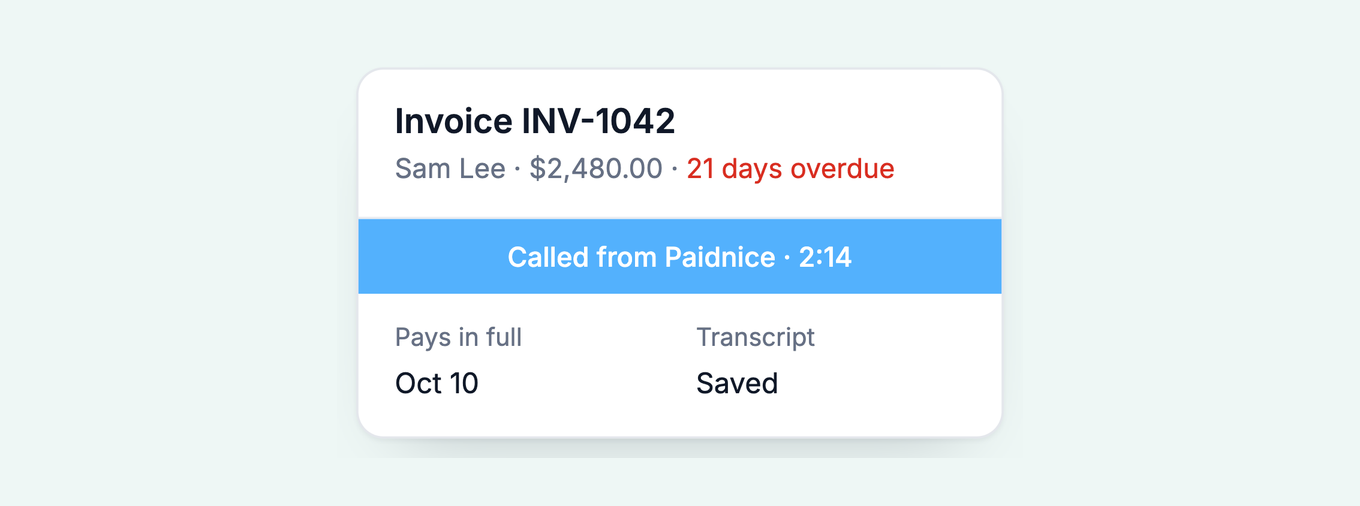
Press Call on the customer's page in Paidnice and pick the number. Paidnice records the call, writes a transcript, and saves both to the customer's timeline when you press Record activity.
The "Escalate to call" task arrives with the script, the owner calls from the same screen, and the call and its transcript sit next to the invoices, reminders and promises on that customer. Each call also gets a short summary, which goes to Xero or QuickBooks as a note on the invoice or the contact. See every detail on the in-app calling page.
When the customer names a payment date on the call, Paidnice creates a task from the transcript to update the expected payment date, and waits for your approval.
Calling from Paidnice is on the Pro plan and above. See pricing for what each plan includes.
Paidnice shows a notice before each call: "This call is recorded for the transcript. Let the customer know if your region requires it." Recording rules differ by state and country, and some require every person on the call to agree.
Questions about collection calls
Call the person who pays, end with a date and an amount, and log the call the same day.
How do I call a customer from Paidnice?
Press Call on the customer's page and pick the person and number. You can talk from your browser, or Paidnice rings your own phone first and then connects you to the customer. Either way, Paidnice records the call and writes the transcript.
Where does the call transcript go?
After the call, Record activity saves the call and its transcript to the customer's timeline in Paidnice. The transcript reads as a two-sided conversation with timestamps.
Which Paidnice plans include calling?
The Pro plan and the Custom plan. It is not on Essentials. See pricing.
How many reminders should I send before I call?
Two or three with no reply is a common trigger, or sooner for a large invoice or a broken promise. Set the trigger as an escalation so the call task arrives on time.
What if the customer says the invoice is wrong?
Stop asking for payment on that invoice, find out what is wrong, and agree on the fix. Record the query so reminders on that invoice pause until it is resolved.
About the editorial team
Denym started Paidnice in 2022 after customers paying late left his own business short on payroll. He has led it to $1 billion collected on time across more than 1 million invoices, and writes about credit control, late fees and getting paid on Xero and QuickBooks.
 App of the Year