



Summary
To send a revised invoice, correct the original if it is unpaid, or void it and issue a new one if it is paid or already in the customer's books. Then email the customer the new version with the original invoice number, what changed, the new total and the due date, and make sure the next reminder quotes the new amount.
- Edit or reissue: Draft or unpaid: edit it. Part paid, paid or in a closed period: credit note, or void and reissue.
- Tell the customer: Name the original invoice, what changed, the new total and due date, and ask them to disregard the old version.
- Fix the chasing: Old reminders and PDFs still show the old figure. Send the new version and let reminders follow it.
You sent an invoice last week, then found a line billed twice. You fix it in your accounting software, but the reminder that went out yesterday still quotes the old total, and the customer's accounts team has already keyed the first version into their system. Now there are two figures for one job.
Here is how to send a revised invoice that the customer pays at the right amount: when to edit and when to reissue, the steps in Xero and QuickBooks Online, an email you can copy, and how to stop old reminders chasing the old number.
Free: Payment reminder email templatesCopy the reminder emails for before, on and after the due date.Should you edit the invoice or void it and issue a new one?
Edit the invoice if it is unpaid and the customer has not entered it yet. Void it and issue a new one, or raise a credit note, once money has moved or the customer has it in their payables. The status decides:
| Invoice status | What to do | Why |
|---|---|---|
| Draft, not sent | Edit it | Nobody has seen it yet |
| Sent, unpaid | Edit it and resend, or void and reissue if the customer has entered it | One number on both sides avoids a mismatch in their payables |
| Part paid | Credit note for the difference, or remove the payment, edit, then re-apply it | Most fields cannot change while a payment is applied |
| Paid | Credit note or refund if the total fell; a new invoice if it rose | Keeps the paid record intact |
| In a closed or filed period | Credit note in the current period | Avoids changing figures already reported |
A revised invoice can keep its number, with "revised" in the reference, or take a new number that refers to the original. Either works if the customer can match it to the job.
How to revise an invoice in Xero
Xero lets you edit an invoice at any time, with limits once a payment is applied. Xero also says that if you have already sent the invoice, it can be better to void it and create a new one.
- In the Sales menu, select Invoices, then find and open the invoice.
- For an awaiting payment invoice, click the menu icon and select Edit.
- Make your changes, then click the arrow next to Update and select Email to send the updated invoice.
- For a paid or part-paid invoice, remove the payments or credit notes first, edit, click Update, then re-apply them.
On a paid or part-paid invoice, some fields can change without removing the payment: To, due date, invoice number, reference, branding theme, description, account, tracking and project. Anything else, including amounts, needs the payment removed first. Xero does not tell the customer about an edit, so a PDF they already hold stays out of date.
How to revise an invoice in QuickBooks Online
In QuickBooks Online, open the invoice from your sales transactions, change it, save it, and send it to the customer again. Amounts have to be changed on the web: the mobile app can update details such as the reference or memo, but Intuit says updating amounts needs QuickBooks Online on the web.
To replace the invoice instead, void it from the More actions menu on your sales transactions. A voided invoice becomes zero, shows as void and cannot be undone, so create the new invoice before you void the old one, and reference the old number on it.
Revised invoice email template
A revised invoice email should name the original invoice, say what changed in one line, and give the new total and due date. Ask the customer to discard the old version.
Subject: Revised invoice [new number] replaces [original number]

Hi [name],

We have revised invoice [original number] for [job or period]. [One line on what changed, for example: the delivery charge was billed twice and has been removed.]

The revised invoice [new number] is attached.
New total: [amount]
Due date: [date]

Please discard the original and pay the revised amount. Our bank details have not changed. If you have already paid [original number], reply and we will apply the difference.

Thanks,
[Your name]
[Business name]
Send it from the address you used for the original, with the same payment details. A revised invoice from a new address with new bank details is exactly what invoice fraud looks like. Our change of bank details letter covers that case if your details really have changed.
How do you stop old reminders quoting the old amount?
Old reminders quote the old amount because they were sent before the change. The reminders still to come will read the revised invoice, so the fix is to make sure the customer has the new figure before the next reminder lands.
- Send the revised invoice the day you change it, before the next reminder date.
- If the customer queried the invoice, keep reminders paused until the revision is out.
- If you voided and reissued, check the new invoice is marked as sent, or Xero's own reminders will skip it.
- If the due date moved earlier, any reminder whose date is already past may be skipped. Send one manually if needed.
Customers ask us about the statement side too. One saw a higher outstanding balance than expected on a statement after a credit note, and asked why the figures differed. A short line in the revised invoice email about the credit avoids that question.
How Paidnice follows a revised invoice
Paidnice reads the change from Xero or QuickBooks, usually within a minute or two, and rebuilds that customer's pending reminders. Each reminder checks the invoice again just before it sends, and a voided invoice stops being chased.
A reminder can also count from Amount Updated, "the date the invoice's total amount changed", on every plan. It fires again on each new amount change, on the day or a set number of days after, up to 90 days. Use it with a template that says the invoice was revised.
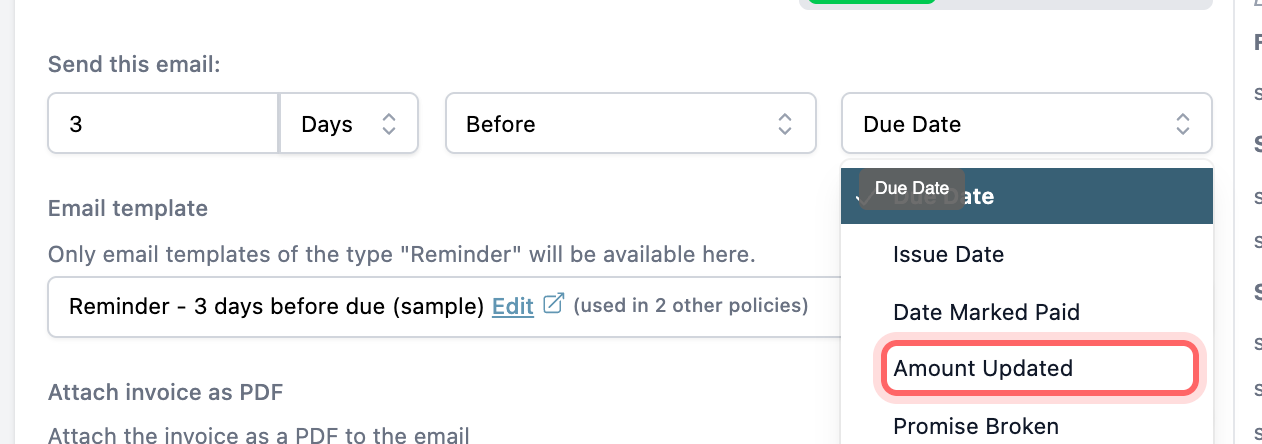
Point that email at the customer payment portal, which reads the live invoice, so the customer pays the revised figure. Set it up alongside your other automated invoice reminders. For what happens field by field, see reminders after you edit an invoice.
💡 Paidnice insight
A revised invoice fails when the customer pays the figure from the first email. Send the new version from the same address, with the same payment details, and before the next reminder goes.
Frequently asked questions
Can I change an invoice after sending it?
Yes, in Xero and QuickBooks Online, with limits once a payment is applied. Resend it after the change, because neither tool tells the customer for you.
Should a revised invoice have a new invoice number?
Either way works if the customer can match it. A new number that refers to the original is clearest when the customer has already entered the first version into their payables.
Is it legal to amend an invoice?
Rules differ by country and tax authority, especially once tax on the invoice has been reported. Check with your accountant or your tax authority before you change an invoice from a filed period.
What if the customer already paid the old amount?
If the new total is lower, issue a credit note and refund or apply the difference. If it is higher, send an invoice for the difference so the paid invoice stays as it is.
How do I know a revised invoice email is genuine?
Check that it comes from the usual address, refers to an invoice you already have, and keeps the same bank details. Call the supplier on a number you already hold if anything looks different.
Paidnice features in this article
About the editorial team
Ashley is a co-founder and lead developer of Paidnice and has built accounting software for more than 10 years. He builds the ledger connections that put reminders, late fees and payments into Xero, QuickBooks and ERPs such as NetSuite and Business Central. Before Paidnice he co-founded A2X, ecommerce accounting software for Xero and QuickBooks.
 App of the Year
