



Summary
You can test payment reminder rules before they go live by checking each rule against real invoices first. Pick an invoice, see whether the rule applies and on which date, keep new rules in Draft so every send waits for approval, and switch one rule to Active only after its drafts look right for a few days.
- Test one invoice: Run the rule against a real invoice and read the result: it applies on a date, or it does not apply and why.
- Hold the sends: Draft holds one rule's sends for approval. Safe Mode holds every automatic send in the account.
- Break it on purpose: Test a paid but unreconciled invoice, a frozen one, a backdated one and a customer in another group.
You have written a reminder sequence and a late fee rule, and the setup screen is one click from Active. Then you think of the customer who paid on Friday and is not reconciled yet, and the old invoice from last year that might get a fee by surprise.
One Paidnice customer kept Safe Mode on and limited interest to a single customer group until the other clients had been told about it.
Here is how to check what a payment reminder rule will do to real invoices, which invoices to test it with, and how to go live without a wrong email reaching a customer.
Free: Payment reminder email templatesCopy the reminder emails for before, on and after the due date.What goes wrong when reminder rules go live untested?
Most mistakes come from the data the rule reads. A reminder rule chases whatever your accounting system shows as unpaid, so these are the usual surprises:
- Paid but not reconciled: the customer paid, nobody matched the payment, and the rule treats the invoice as overdue.
- Old invoices: a new rule finds invoices that went overdue months ago and acts on all of them on the first run.
- The wrong customers: a key account or a direct debit customer sits in the group the rule is attached to.
- Two systems sending: Xero or QuickBooks reminders are still switched on, so customers get both sets.
- Weekend timing: a fee lands on an invoice paid on Friday that nobody reconciles until Monday.
We have seen the double-send case in support. A customer reported reminders their clients did not want, with Safe Mode on. Paidnice had sent nothing: the reminders came from tick boxes in Xero's own reminder settings.
How do you test a reminder rule against one invoice?
Test a reminder rule against one invoice by asking the rule a direct question: does it apply to this invoice, and on which date? A good test answers both and gives the reason when the answer is no.
- Save the rule first, so the test reads the settings you will actually use.
- Pick an invoice you know well, such as one due next week for a customer who always pays.
- Read the result: the date the rule will act, or the reason it will not apply.
- Open the preview of the email or fee it would create, and check the wording, sender, recipient and amount.
- Repeat with the awkward invoices in the next section.
If your tool cannot do this, the fallback is a test customer record with your own email address, but that only proves the email looks right. It does not show which real invoices the rule will catch.
Which invoices should you test with?
Test with the invoices most likely to be chased by mistake. Each one below checks a different part of the rule:
| Test invoice | What it checks | The right result |
|---|---|---|
| Paid last week, not yet reconciled | Whether your books are up to date before go-live | Reconcile first; the rule cannot know about a payment the ledger does not show |
| Overdue since last year | The rule's start date | No action, unless you chose to include old invoices |
| Customer in another group | Which customers the rule covers | Does not apply |
| Customer with a payment promise | The skip-when-promised setting | Held until the promised date |
| Invoice with an open query | The skip-while-disputed setting | Held until the query is resolved |
| Backdated invoice entered today | What happens to send dates already in the past | Not sent late, unless the rule says "or later" |
| Contact with no email address | Who receives it | Fails with a clear reason |
Dates cause most "missing" actions in a test. In one support thread, a customer testing late fees could not see a draft fee for a debt from the previous year. The rule's start date was after that invoice was due, so the rule was working as set.
How do you stop a test from reaching customers?
Stop a test from reaching customers by holding sends at two levels: per rule and for the whole account. They do different jobs, and they are often mixed up.
| Control | Where it applies | What happens |
|---|---|---|
| Draft | One rule | Each action waits for someone to approve it |
| Active | One rule | Actions send on schedule, unless Safe Mode is on |
| Safe Mode | The whole account | Actions are still created, but none run automatically |
Know the exceptions before you rely on them. In Paidnice, Run now on a single action sends straight away even with Safe Mode on, and a one-off send from an invoice also goes. Read the preview before you click either.
Should you send yourself the email first?
Yes. Send yourself a test copy of each template before the rule goes Active. You will catch a wrong merge field, a broken payment link or a sender name your customers will not recognize.
Check it on a phone as well as a desktop. Then check the reply-to address by replying to your own test, so you know where a customer's answer will land. Our guide to customer replies to payment reminders covers what to do once those replies arrive.
How do you go live one rule at a time?
Go live one rule at a time by running each rule in Draft for a few days, approving what looks right, and only then switching it to Active.
- Reconcile recent payments in Xero or QuickBooks.
- Turn off the accounting system's own reminders, so customers do not get two sets.
- Start with reminders and statements. Add late fees once those run cleanly, and check the date each fee will be charged first.
- Check the drafts and any failed actions each day. Each failure should say why.
- Switch the rule to Active when a few days of drafts look right, then repeat for the next rule.
A setup call we ran in September 2026 followed this pattern. The customer limited chasing to the group of customers on credit terms and began with statements and one reminder before the due date.
How Paidnice tests a reminder rule
Every Paidnice policy has a Test & Preview tab next to its Actions list, on every plan. Search for an invoice and pick it, and Paidnice says whether the policy applies and the date it will run, or why it will not. Preview shows the email or the fee line it would create.
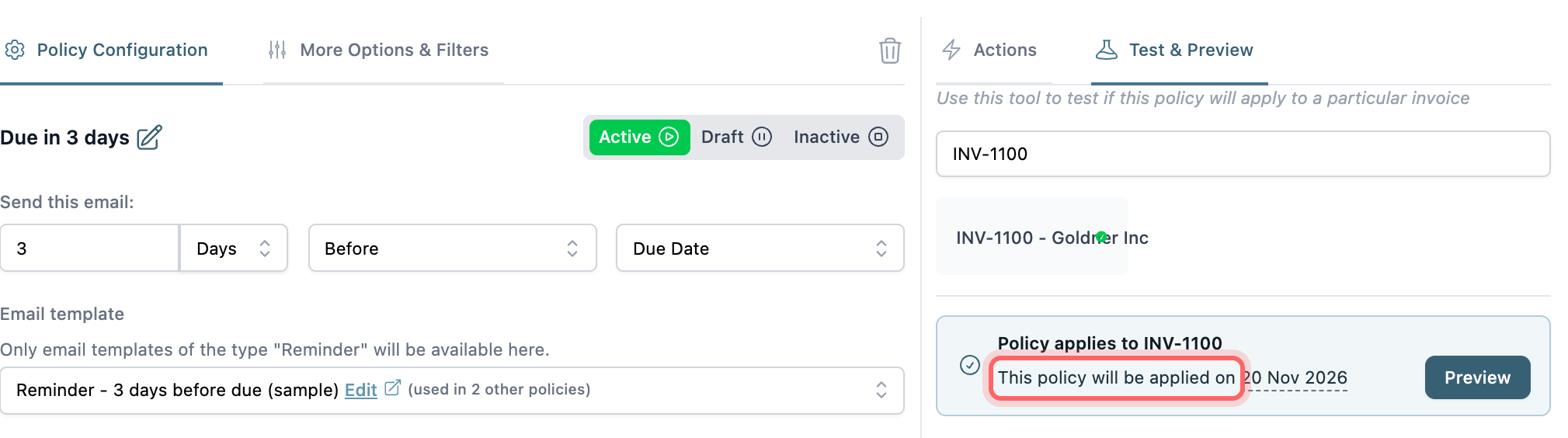
From the invoice side, the Preview Policies tab lists every policy in the customer's group with a tick or a cross and the reason. New organizations start with sample policies in Draft, so nothing goes out until you approve an action or make a policy Active.
You can set up automated email and SMS reminders this way, then add late fees once the reminders run cleanly.
If a result surprises you, ask the Paidnice assistant why an invoice was or was not chased. It checks each policy against the invoice and gives the reason, such as a grace period that has not passed or a frozen invoice.
💡 Paidnice insight
When a test shows nothing for an invoice you expected to be chased, check the dates before the rule: the policy's start date, the grace period, and whether the send date had already passed when the invoice arrived.
Frequently asked questions
Can I test late fees without charging a customer?
Yes. Keep the late fee policy in Draft, run the policy test on a real invoice, and open the preview to see the fee line and amount. In Paidnice, do not click Apply Now in that preview: it charges the fee straight away and ignores Safe Mode and the grace period.
Does Xero have a test mode for invoice reminders?
Xero has no preview of which invoices a reminder will hit. Its Reminders column on awaiting payment invoices shows a status only after Xero has tried to send a reminder, so you learn the result after the fact.
How do I make sure only one group of customers gets a new rule?
Attach the rule to that group only, then test one invoice from inside the group and one from outside it. The outside invoice should come back as "does not apply".
What happens to drafts when I switch a rule to Active?
In Paidnice, the rule's drafts become scheduled the next time actions are recalculated, which happens several times a day. Check the Draft tab first and skip anything you do not want sent.
Why did my test show a different date than I expected?
Usually because of the unit or the anchor. Weekdays skip weekends, a rule can count from the issue date instead of the due date, and emails go at the action time you set, which is midday by default in Paidnice.
Paidnice features in this article
About the editorial team
Ashley is a co-founder and lead developer of Paidnice and has built accounting software for more than 10 years. He builds the ledger connections that put reminders, late fees and payments into Xero, QuickBooks and ERPs such as NetSuite and Business Central. Before Paidnice he co-founded A2X, ecommerce accounting software for Xero and QuickBooks.
 App of the Year
