



Summary
When you edit an invoice, its reminder schedule is worked out again from the new details. A new due date moves every reminder counted from it, a reminder whose date has already passed is usually skipped, and a voided or paid invoice stops being chased. Xero does not tell the customer about an edit, so send the new version yourself or use a reminder that fires when the total changes.
- Due date changed: Reminders counted from the due date move. Ones whose new date is already past are not sent late.
- Total changed: Xero sends no notice. In Paidnice an Amount Updated reminder can go after each change.
- Voided and reissued: The old invoice stops being chased. The new invoice starts its own schedule from its own dates.
You raised an invoice, the customer pushed back on one line, and you knocked the total down. The reminder sequence is already running, and you are not sure whether the next email will go on the old schedule, a new one, or not at all.
Customers who quote first and adjust the amount once the work is done ask us this often: if I edit the invoice, what does the next reminder do?
Here is what an edit does to payment reminders, field by field, in Xero, QuickBooks Online and Paidnice, and how to tell the customer the amount changed.
Free: Payment reminder email templatesCopy the reminder emails for before, on and after the due date.What changes when you edit each field?
What happens depends on which field you edit. Reminders count from a date on the invoice, so date changes move the schedule and amount changes decide whether there is anything left to chase.
| You change | What happens to reminders |
|---|---|
| Due date, later | Reminders counted from the due date move later |
| Due date, earlier | Reminders whose new date has already passed are usually skipped |
| Total, lower or higher | The schedule stays; a reminder triggered by an amount change can fire |
| Total reduced to what was paid | The invoice is paid, so reminders stop |
| Contact or email address | The next reminder goes to the new person |
| Invoice voided and reissued | The old invoice stops; the new one starts its own schedule |
What happens in Xero when you edit an invoice?
Xero lets you edit an invoice at any time, but some fields need payments removed first. It does not notify the customer: the online invoice updates, and a PDF you already sent stays as it was.
Xero's own reminders have two quirks after an edit. The Reminders column only updates when Xero next tries to send, and a reminder date that passes because you changed the due date is not sent later.
Xero lists "you changed the invoice due date and the reminder date has passed" as one of the reasons a scheduled reminder did not go.
What happens in QuickBooks Online?
In QuickBooks Online you edit the invoice on the web and save it. Intuit's mobile help notes that the app can change details such as the reference or memo, but to update amounts you need QuickBooks Online on the web.
If you void instead, the invoice becomes zero and shows as void, and Intuit says a voided transaction cannot be undone. Reminders stop on a voided invoice, so the replacement has to carry its own.
What does the customer see after the edit?
The customer sees the new amount only where the invoice is read live, such as an online invoice link or a payment portal. Anything already in their inbox, including an attached PDF or an earlier reminder, still shows the old figure.
That gap causes short payments. A customer pays the number in the first email, and the invoice stays part-paid. Send the updated invoice the same day you edit it, and say what changed. Our guide on sending a revised invoice has an email you can copy.
How should you time reminders around an edit?
Time reminders around an edit by giving the customer a few days with the new figure before the next chaser. A reminder the morning after a change, without explaining it, reads as if you ignored their question.
- If the customer raised a query, hold reminders until it is resolved, then edit.
- If you moved the due date, check which reminders now fall in the past and decide whether to send one manually.
- If the total went up, send the new invoice first and let the reminders follow.
How Paidnice handles an edited invoice
Paidnice reads the change from Xero or QuickBooks, usually within a minute or two, and recalculates that customer's pending actions.
Reminders counted from a date move with it, a reminder that no longer applies is removed, and each reminder checks the invoice again just before it sends. If the invoice was paid or changed so the policy no longer fits, it fails with "Policy no longer applies".
For amount changes there is a dedicated trigger. A reminder can count from Amount Updated, "the date the invoice's total amount changed", and it fires again on each new amount change. It goes on the day of the change or a set number of days after, up to 90 days.
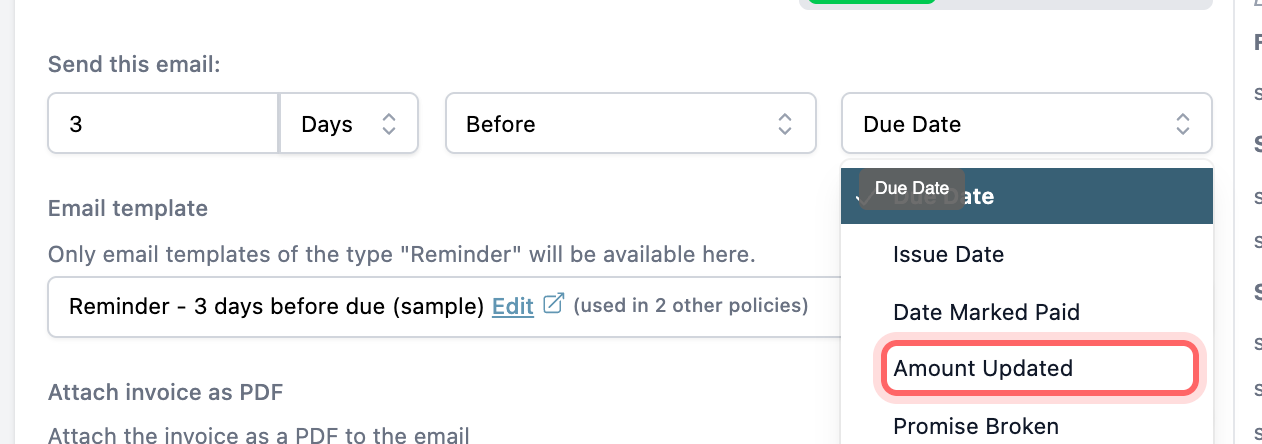
Pair it with a template that says the invoice was updated, and include the portal link, so the customer pays the current figure from the customer payment portal. To check the date before it goes, use the policy's Test & Preview tab on the edited invoice. All of this sits in Paidnice's email and SMS reminders on every plan.
Edits also matter for late fees. Paidnice cannot add a fee line to an invoice that has payments or credits applied, or sits in a locked period. By default it falls back to a separate fee invoice in those two cases.
💡 Paidnice insight
The reminder schedule rebuilds itself after an edit. What does not update is the customer's inbox, so send the new figure on purpose, with a reminder that fires on the amount change.
Frequently asked questions
If I edit an invoice amount, does the reminder schedule restart?
No. Reminders counted from the due date or issue date keep their dates. Only a reminder set to count from the amount change starts from the day you edited it.
Does changing the due date reset the reminders?
It moves every reminder counted from the due date. Any reminder whose new date is already past is skipped, unless your tool is set to send late reminders.
Should I edit the invoice or void it and issue a new one?
Edit it if it is unpaid and the customer has not entered it in their system yet. If it is part paid or already in their payables, a credit note or a void and reissue keeps both sets of records clear.
Will a credit note stop the reminders?
A credit note applied to the invoice lowers the amount due. If it clears the invoice, reminders stop. If it leaves a balance, reminders continue for that balance.
Does Xero tell the customer I changed the invoice?
No. The online invoice shows the change, but Xero sends nothing. Email the updated invoice from Xero, or use a reminder that fires on the amount change.
Paidnice features in this article
About the editorial team
Ashley is a co-founder and lead developer of Paidnice and has built accounting software for more than 10 years. He builds the ledger connections that put reminders, late fees and payments into Xero, QuickBooks and ERPs such as NetSuite and Business Central. Before Paidnice he co-founded A2X, ecommerce accounting software for Xero and QuickBooks.
 App of the Year
