



Summary
Reply to a customer's text about an overdue invoice by text, from the same number that sent the reminder. Name your business, answer the one thing they asked, give a date or a pay link, and keep each reply under 160 characters so it arrives as one message.
- Channel: Answer a text with a text. Move to email or a call only for disputes or anything with detail.
- Length: 160 plain characters fit one SMS. An emoji cuts that to 70.
- What to include: Your business name, the invoice number, and one next step: a date, a link or a call time.
Your text reminder goes out, and the customer texts back: "Can I pay next month?" You want to say yes, with conditions, but the reminder came from a system number and the reply is now sitting somewhere you have to go and find.
Here is how to reply by SMS about an overdue invoice, what to keep out of a text, how long a reply can be, and short templates for the replies customers send most often.
Free: Payment reminder email templatesCopy the reminder emails for before, on and after the due date.How do you reply to a customer by SMS about an overdue invoice?
Reply by text, from the number that sent the reminder, and answer the one question the customer asked. Text works because the customer chose it. Switching to a long email loses that.
- Check the invoice and recent payments before you write. "Paid" replies are often right.
- Start with your business name. Customers see many numbers and may not save yours.
- Answer the question in one sentence.
- Give one next step: a date, a pay link or a time you will call.
- Log what they told you, such as a promised date, on the invoice.
How long can an SMS reply be?
One SMS holds 160 plain characters. Longer texts split into parts of 153 characters each, and one emoji or other special character switches the whole message to a format that holds only 70 characters, according to Twilio's SMS character limit guide.
Every part costs the same as a full text, and some phones show parts out of order. Aim for one part: one fact, one next step, no emoji.
What should you keep out of a text about an unpaid invoice?
Keep anything detailed, sensitive or threatening out of a text. A phone screen is often seen by other people, and a short message loses tone.
- Bank details. Send a pay link to your portal instead. Changed bank details by text look like fraud.
- Full balances across many invoices. Send a statement by email and say so in the text.
- Threats. Collection agency or legal wording belongs in a letter, not a text.
- Dispute details. If the customer says the work or amount is wrong, offer a call or email and stop the reminders on that invoice.
Text only customers who gave you their mobile number for billing, and stop texting a customer who asks you to. Our SMS payment reminder templates cover the reminders themselves; this post covers your answer once the customer replies.
SMS reply templates for overdue invoices
Each template is under 160 characters with the placeholders filled in for a short business name. Replace the brackets, and read it once more before you send.
"Who is this?"
Hi, it's [Name] from [Business]. Our text was about invoice [INV-1042] for [$amount]. You can view and pay it here: [link]
"I already paid"
Thanks for letting us know. Could you send the date and amount, or a remittance? We'll match it to [INV-1042] and stop the reminders.
"Can I pay next month?"
Thanks for replying. We can hold [INV-1042] until [date]. Could you confirm that date? We'll pause reminders until then.
"Can I split it?"
Yes, we can split [INV-1042] into [2] payments of [$amount]. Set it up here: [link]. Reply if you need different dates.
"Can you send me the invoice?"
Of course. Here is [INV-1042] with a pay link: [link]. Should we send future invoices to a different email?
"I'm not the right person"
Thanks, sorry to bother you. Who should we send invoices and reminders to? A name and email is perfect.
"Call me"
Happy to. I'll call you at [time] today. If another time suits better, just reply with it. [Name], [Business]
"This isn't right"
Sorry about that. We've paused reminders on [INV-1042]. What looks wrong? I'll call or email you today to sort it out.
For "paid" replies, check the ledger before you reply. If the payment is there, thank them and close the conversation. If it is not, ask for the date and amount, as in the template above.
What should you do after you reply?
After you reply, record what the customer told you where the next reminder can see it. Otherwise your own reminder schedule texts them again the next day.
- A promised date: log it on the invoice and hold reminders until then.
- A dispute: mark the invoice as queried and pause its reminders.
- A new contact: update the contact so the next reminder goes to the right person.
- A call time: put it in the calendar of the person who will call.
How do you reply by SMS from Paidnice?
Paidnice SMS payment reminders bring customer replies back into the shared inbox, matched to the customer. Open the conversation, pick "Reply by SMS", and send.
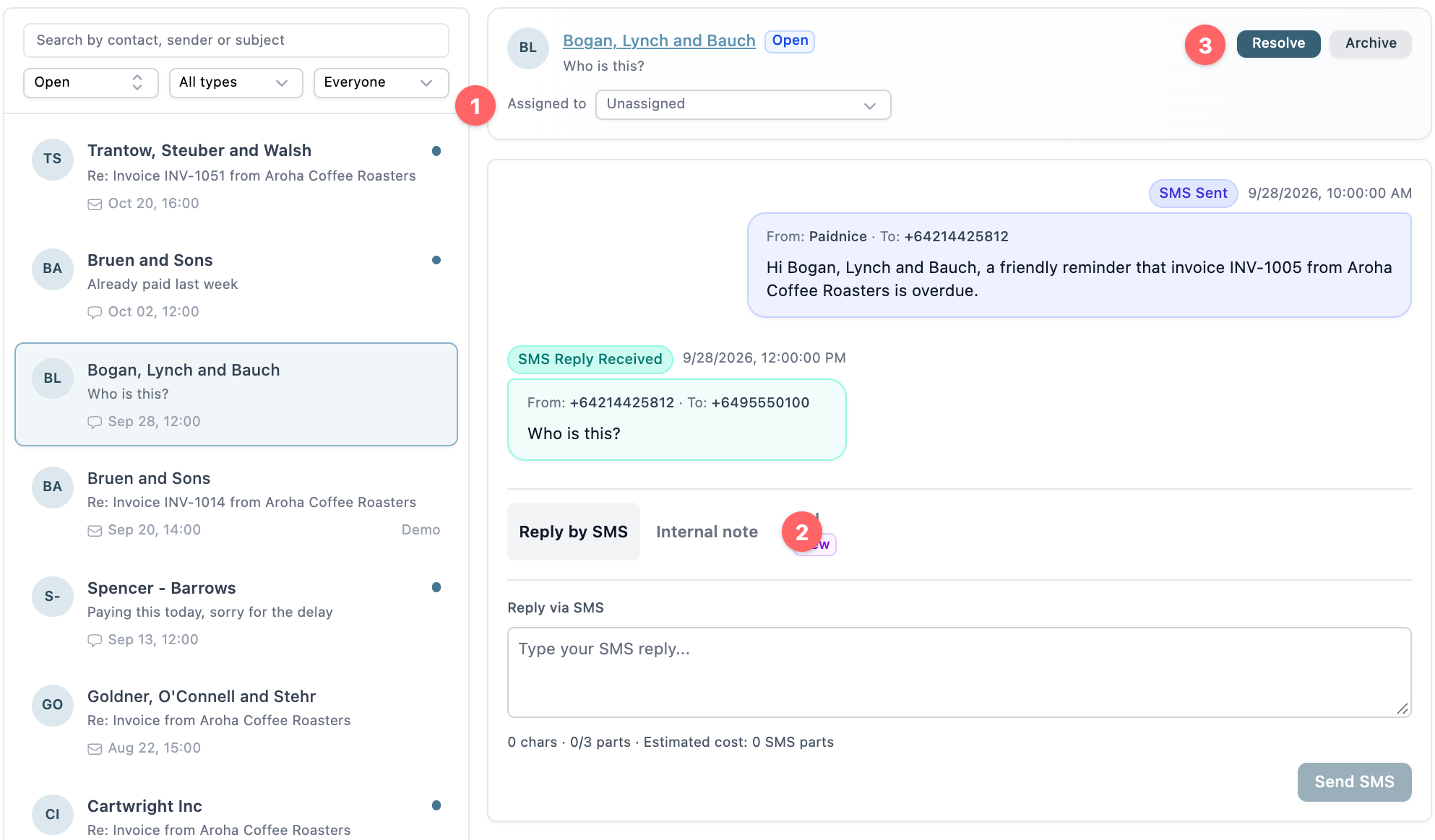
- Assigned to: the person who will answer this customer.
- Internal note: the tab beside "Reply by SMS". Use it to ask a teammate before you answer. The customer does not see it.
- Resolve: close the conversation once the customer has their answer.
Under the reply box, a counter shows characters, parts and the estimated cost in SMS parts, so you can see when a reply will split. A Paidnice text holds up to 320 characters.
SMS sends to any valid mobile number, with dedicated sending routes for the US, UK, Australia and New Zealand. In the US, Paidnice sends from its own registered numbers, so you register nothing with carriers.
💡 Paidnice insight
A customer who texts back is usually asking for one thing: who you are, a link, or a few more days. Answer that one thing in one text, and log the date they give you so the next reminder waits.
Frequently asked questions
Is it OK to reply to an overdue invoice question by text?
Yes, if the customer texted you. Keep it short, polite and specific. Move to email or a call for disputes, payment plans with conditions, or anything with figures across several invoices.
Should I send a payment link by SMS?
Yes, a link to your customer portal or invoice page is the fastest way to get paid from a text. Use a link on your own business domain or a known payment page, so the customer can trust it.
What if the customer replies with a payment date?
Confirm the date by text, log it on the invoice, and pause reminders on that invoice until the date passes. If the date passes without payment, follow up by phone.
What if the customer asks us to stop texting?
Stop texting that number and switch to email for that customer. Note it on the contact so nobody on the team texts them again.
Can someone else on the team see my SMS replies?
In Paidnice, yes. SMS replies sit in the shared inbox with email replies, so anyone with access sees the whole conversation and who it is assigned to.
Paidnice features in this article
About the editorial team
Ashley is a co-founder and lead developer of Paidnice and has built accounting software for more than 10 years. He builds the ledger connections that put reminders, late fees and payments into Xero, QuickBooks and ERPs such as NetSuite and Business Central. Before Paidnice he co-founded A2X, ecommerce accounting software for Xero and QuickBooks.
 App of the Year
