



Summary
Track promises to pay per collector by logging every promise with four facts: the date, the amount, the invoice and who took it. Count a promise as kept when the amount is paid by the date plus a short grace period, and broken when the grace period passes. Each collector's kept rate is kept divided by kept plus broken.
- What to log: Promised date, amount, invoice, the collector who took it, and the channel: call, email, text or the customer portal.
- Kept or broken: Kept means paid by the promised date plus a grace period. Leave open and cancelled promises out of the rate.
- Per collector: Read each collector's kept rate next to the amount they got promised. A big promised total with a low kept rate means dates are accepted too easily.
A customer tells your collector on the phone that they will pay on Friday. The collector types it into a spreadsheet, or into a note in Xero, or nowhere. The following Wednesday, nobody has checked, and the next reminder goes out as if the call never happened.
Here is how to log every promise to pay with an owner, decide when it counts as kept or broken, and see which collector's promises turn into cash.
Free: Payment reminder email templatesCopy the reminder emails for before, on and after the due date.What should you record for each promise to pay?
Record five facts for every promise to pay, at the moment it is made. Without the collector's name, you can see that promises break but not where.
| Field | Why it matters |
|---|---|
| Invoice number | Ties the promise to the money, so a payment can close it |
| Promised date | The day you check for payment |
| Promised amount | Tells you whether a part payment kept the promise |
| Collector who took it | Lets you work out a kept rate per person |
| Channel | Call, email, text or the customer's own portal entry |
Promises come from more places than the phone. Customers name dates in reply to reminder emails, and some put a date into a payment portal. Log all of them the same way, or your kept rate only covers the promises that happened to be typed up.
When does a promise count as kept or broken?
A promise to pay is kept when the promised amount is paid by the promised date plus a short grace period. It is broken when the grace period ends and the money has not arrived. Write these rules down before you start counting, so every collector is measured the same way.
- Grace period: allow a day or two for payments in transit, so a bank transfer sent on the promised date is not marked broken.
- Part payments: decide whether a part payment keeps the promise. A simple rule is to count it as broken and log a new promise for the rest.
- New dates: when a customer moves the date before it passes, cancel the old promise and log a new one. When they move it after it has passed, the first one is broken.
- Open and cancelled promises: leave both out of the rate. An open promise has not had its chance yet.
Customers sometimes formalize a larger promise in writing. If you need one, use a promise to pay agreement template.
How do you work out each collector's kept rate?
Each collector's kept rate is the number of their promises kept, divided by their promises kept plus broken, for promises whose date passed in the period. A collector with 18 kept and 6 broken has a kept rate of 75%.
Read the rate next to the amount each collector got promised:
| Pattern | What it usually means | What to do |
|---|---|---|
| High amount promised, low kept rate | Dates are agreed too easily, or with the wrong person at the customer | Ask who at the customer approves the payment, and confirm the date in writing |
| Low amount promised, high kept rate | Safe calls only, or a light ledger | Check which accounts they are not calling |
| Kept rate falling over several weeks | A customer's cash is tightening, or one large account keeps moving its date | Look at broken promises by customer, not only by collector |
Look at broken promises by customer too. A customer who breaks a second promise is a different problem from a collector whose promises break. See how to follow up a broken promise to pay for the next step with that customer.
Why do promise spreadsheets and ledger fields fall short?
Spreadsheets and ledger fields fall short because nobody is told when a promised date passes. A spreadsheet only works if someone opens it every morning, and it goes stale as soon as the person who took the call is out.
Xero's expected payment date helps, but it holds a date, not a promise with an owner and an amount. In Xero's new invoicing, users report they can only set it from the Awaiting Payment list, not from the invoice itself. A Xero product idea asking for it back on the invoice has 95 votes and is still marked submitted.
We hear the same need from our own customers. One insurance customer kept notes for every account in a large spreadsheet and wanted promised dates in one place for cash flow. Another asked whether admin staff can add payment-date promises to invoices, or only customers can. In Paidnice, staff can record them.
How does Paidnice track promises to pay for each collector?
Paidnice records promises to pay from your team and from customers, closes them against payments from your accounting system, and shows each person's kept rate in Team Activity. It runs on every plan.
- Staff record a promise with a date, amount and notes. It can also set the invoice's expected payment date, which syncs to your accounting system.
- Customers can promise a date from the invoice in the customer payment portal, when you switch that setting on.
- Reminders wait. Policies set to skip when a payment is promised hold off until the promised date.
- A grace period passes before a promise is marked broken. The invoice's owner can get a Broken Payment Promise email, or everyone gets it when the invoice is unassigned.
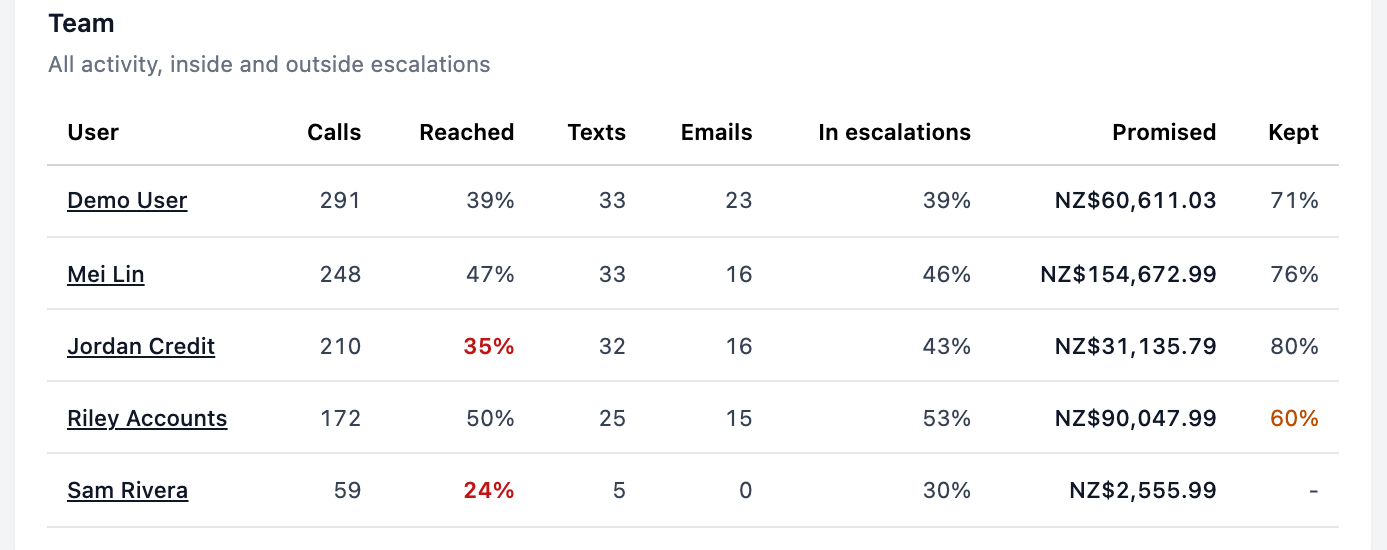
- The team table shows each person's calls, reach rate, texts, emails, amount promised and kept rate. The report keeps a 12-week trend.
Promises kept is worked out as kept divided by kept plus broken, for promises resolved in the window, with open and cancelled promises left out. The same rate appears on the dashboard for the whole business. See Team Activity.
💡 Paidnice insight
On a call placed with click to call (Pro plan and above), the call summary picks out promises, and when the customer names a payment date Paidnice creates a task to update the expected payment date for approval. The collector does not have to type the promise up for it to count.
To measure collectors on more than promises, see how to measure a credit controller's performance.
Frequently asked questions
What is a promise to pay in collections?
A promise to pay is a customer's commitment to pay a set amount by a set date, usually made on a call or in a reply to a reminder. It is not a contract unless it is written up as one.
What is a promise to pay kept rate?
It is the share of resolved promises that were paid on time: promises kept divided by promises kept plus broken. Promises still open, and promises that were cancelled, are not part of the rate.
How long should the grace period be before a promise is broken?
One or two business days covers most bank transfers. Use the same grace period for every collector, or the kept rates will not be comparable.
Should a part payment count as a kept promise?
A simple rule is to count it as broken and log a new promise for the balance. Whatever you choose, write the rule down and apply it to every collector.
Can I track promises to pay in QuickBooks or Xero?
Neither gives a kept rate per collector. Xero has an expected payment date field on invoices, and both let you add notes. To see promises kept and broken by person, you need a spreadsheet you keep up to date, or an app that records promises and matches them to payments.
Paidnice features in this article
About the editorial team
Ashley is a co-founder and lead developer of Paidnice and has built accounting software for more than 10 years. He builds the ledger connections that put reminders, late fees and payments into Xero, QuickBooks and ERPs such as NetSuite and Business Central. Before Paidnice he co-founded A2X, ecommerce accounting software for Xero and QuickBooks.
 App of the Year
