



Summary
You can keep every customer reply to your payment reminders in one place. Point the reply-to of every reminder, statement and text at one inbox your whole team can see, match each reply to the customer and invoice, give it an owner, and mark it resolved when the invoice has its answer.
- Where replies get lost: In the inbox of the person who sent the reminder, on a phone that got the text back, and in auto-replies nobody reads.
- What one place needs: Email and SMS together, each reply tied to an invoice, an owner, and a status of open, resolved or archived.
- What to do with each reply: Answer it the same working day, log any date or PO it gives, and pause reminders only on the invoice it covers.
You sent a batch of reminders, and a customer calls, annoyed that nobody answered the email they sent back saying they had already paid. You find the email in the inbox of the colleague who set up reminders, and that colleague is on leave.
Here is where replies to payment reminders end up, what "one place" needs to hold, how to set it up with the tools you have, and a short daily routine that keeps the list empty.
Free: Payment reminder email templatesCopy the reminder emails for before, on and after the due date.Where do customer replies to payment reminders go?
Customer replies go to the reply-to address on the reminder, which is often one person's inbox. Text replies go back to whatever number sent the text. Nothing collects them unless you set it up.
These are the places we see replies get stuck:
- One person's inbox. Xero sends reminder replies to a single address per organisation, by default the person who turned reminders on. A finance lead told us that before a shared inbox, every reply went to one named AR person, so nobody else could see them.
- A phone. A customer answers a text reminder, and the reply lands on whatever phone or number sent it.
- A label system. One team ran collections from a Gmail shared inbox with labels and stars, and kept a separate task tool beside it to track what was promised.
- Auto-replies. Out-of-office messages, "no PO, no pay" notices from an accounts payable inbox, and requests to format invoices a certain way all come back as replies. They are easy to skip and they often hold the reason an invoice is not paid.
If your Xero reminders still reply to the wrong person, changing the reply-to address in Xero is the first fix.
What does "one place" for replies need to hold?
One place for replies needs every channel, every reply tied to a customer and invoice, an owner, and a status. A shared mailbox gives you the first part. The other three decide whether a reply gets answered.
| Part | Why it matters | What goes wrong without it |
|---|---|---|
| Email and SMS together | Customers answer in the channel you used | Text replies stay on a phone and nobody logs them |
| Matched to customer and invoice | You see the balance and history before you answer | Someone answers "we paid" without checking the ledger |
| An owner | One person answers each reply | Two people answer, or nobody does |
| A status | Open, resolved or archived shows what is left | Old replies hide new ones |
| A link to the reminder schedule | A reply can pause the next reminder on that invoice | The customer who said "paid Friday" gets another reminder |
How do you set up one place for replies?
Set it up by giving every outgoing message the same reply-to, then deciding who reads that inbox and how often.
- Pick one address for replies, such as ar@ or accounts@ on your own domain. Setting up an accounts receivable email address covers the choice.
- Put it in the reply-to of every reminder, statement and late fee notice, and in the footer of your invoices.
- Send text reminders from a system that brings replies back, not from a personal phone.
- Give every person who answers customers access to that inbox.
- Agree who owns which customers, so each reply has one person who answers it. Who should answer reminder replies sets out the options by team size.
- Decide what "done" means: the customer has an answer, and any date, PO or dispute is logged on the invoice.
Some teams keep a copy of every outgoing reminder in the same inbox by adding it as a BCC. One customer set the reply-to to their bookkeeper, added a BCC, then used a mail filter to archive the copies so replies still threaded together.
What is a good daily routine for reminder replies?
A good routine is one pass in the morning and one after lunch, working the open list from oldest to newest until it is empty.
- Read the reply against the invoice. Check the balance and payments before you write back.
- Answer in the customer's channel. Text back a text, email back an email.
- Log what the reply gives you. A payment date, a PO number, a new contact, a dispute.
- Pause only what the reply covers. Hold reminders on that one invoice, not on the whole account.
- Close it. Mark it resolved, or archive an auto-reply that needs nothing.
Our post on what to do when a customer replies to a payment reminder covers what to write back to each common reply.
Which replies are easy to miss but matter?
Auto-replies and short texts are the easiest to miss. They often hold the reason an invoice is late.
- A local government purchase ledger team answered a "due today" reminder with a request for a purchase order number. The reminder had turned into a request for missing information.
- Out-of-office replies tell you the office is closed for a holiday, so a quiet week is not a refusal.
- A customer in a demo listed the replies they expect: "I'm having financial difficulties", "can I pay next month", "can you resend the invoice". Each one needs a different person to act.
How does Paidnice keep replies in one place?
Paidnice puts every customer reply to your reminders, statements and fee notices, by email and SMS, into one shared inbox for accounts receivable called Conversations. Each reply is matched to the customer, and it is on every plan.
The list filters by status (Open), channel (All types) and person (Everyone). A blue dot marks an unread reply, and an envelope or speech icon shows whether it came by email or SMS.
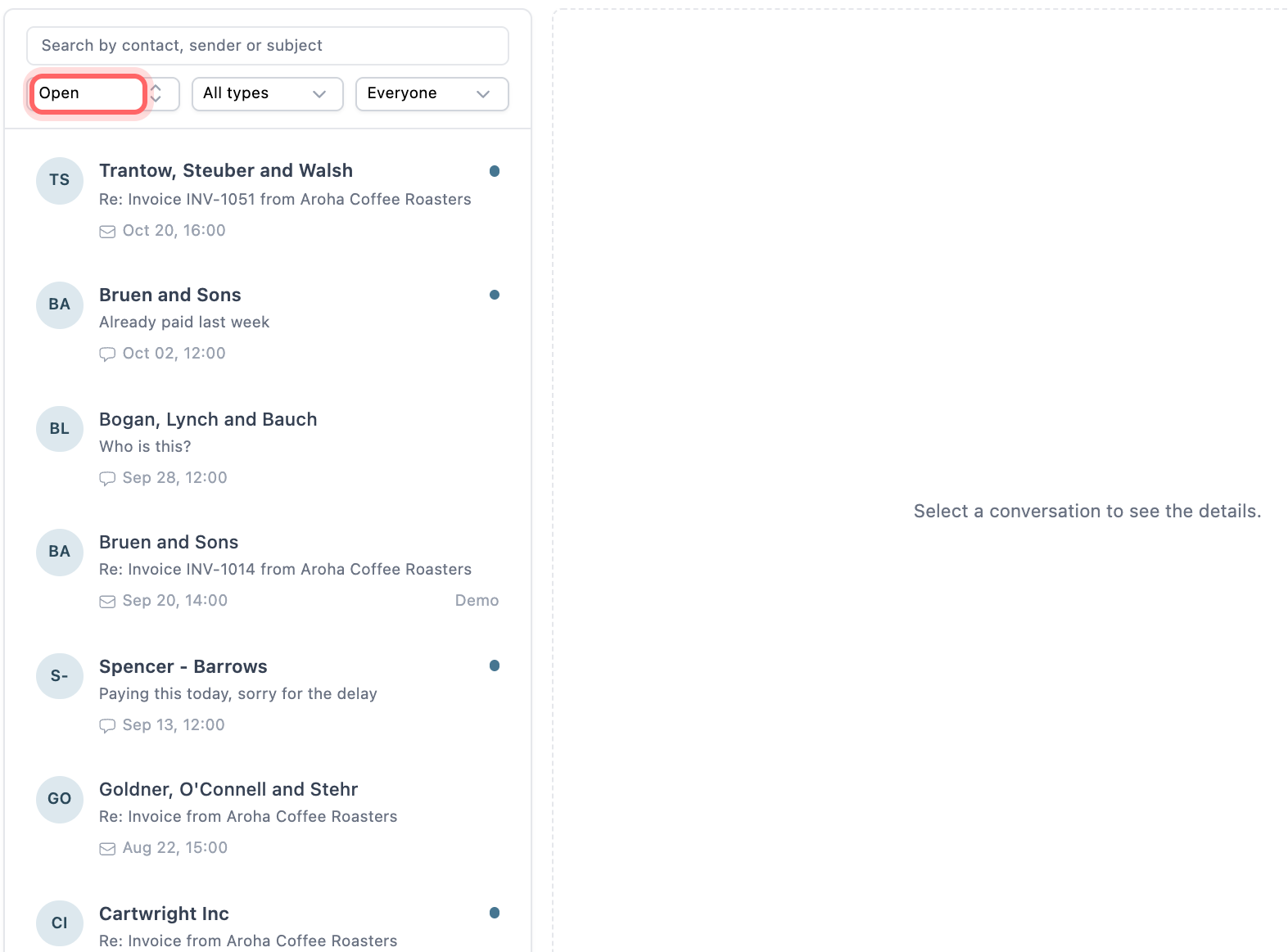
- Assign each conversation to the person who manages the account, and mark it resolved or archive it when it is done.
- Reply by email or SMS from the conversation. Email replies stay in the same thread, so the customer sees the whole history.
- Paidnice reads replies, logs a promised date or a PO number on the invoice, and drafts an answer for a person to approve. See AI in accounts receivable.
- Policies can skip an invoice while a payment is promised or a query is open, so the next email or SMS reminder waits.
💡 Paidnice insight
The replies that sit unanswered longest are the short ones: "who is this?", "paid", an out-of-office. Give them the same open status as a long email, and the list shows what is actually left to do.
Frequently asked questions
Should payment reminder replies go to a person or a shared address?
A shared address. A person's inbox hides replies when they are away. Send replies to one address the whole team can see, then assign each reply to a person.
Can I see SMS and email replies together?
Only if the system that sends your text reminders brings replies back. Texts sent from a personal phone keep their replies on that phone. In Paidnice, SMS and email replies sit in the same Conversations list.
Do I need to answer auto-replies?
No, but read them. An out-of-office gives a return date, and an accounts payable auto-reply may say a PO is required before they pay. Log what it tells you, then archive it.
How fast should we answer a reply to a payment reminder?
The same working day. A customer who replied is ready to talk about the invoice, and a fast answer keeps the payment date they offered.
Should a reply stop all reminders to that customer?
No. Pause reminders on the invoice the reply is about. Other invoices on the account keep their own schedule.
Paidnice features in this article
- Shared inbox Puts every customer reply by email and SMS in one inbox, where your team assigns, notes and answers it.
- Email and SMS reminders Sends reminders by email and SMS on your schedule, each with a link to pay.
- AI reply handling Reads every customer reply and drafts the next step for you to approve.
About the editorial team
Ashley is a co-founder and lead developer of Paidnice and has built accounting software for more than 10 years. He builds the ledger connections that put reminders, late fees and payments into Xero, QuickBooks and ERPs such as NetSuite and Business Central. Before Paidnice he co-founded A2X, ecommerce accounting software for Xero and QuickBooks.
 App of the Year
