



Summary
Keep an Outlook shared mailbox for general accounts email, and use an AR shared inbox for replies to reminders and statements. The mailbox is free and familiar. The AR inbox ties each reply to the customer and invoice, gives it an owner, takes SMS replies and lets reminders wait.
- Outlook shared mailbox does well: No licence up to 50 GB, everyone already uses Outlook, and staff can send as accounts@.
- Where it falls short for AR: No invoice or balance next to the email, no assignee field, no SMS, and sent replies save to each person's own Sent Items by default.
- Run both: Point reminder replies at the AR inbox and copy outgoing reminders to the shared mailbox by BCC.
Your team runs accounts receivable from an accounts@ shared mailbox, with colour categories on the emails and a task list beside it. A customer replies to a statement to say they have paid. A colleague answers, nobody updates the task list or the invoice, and the next reminder goes out anyway.
Here is what an Outlook shared mailbox does well, where it falls short for accounts receivable, how an AR shared inbox differs, and how most teams run both.
What is an Outlook shared mailbox?
An Outlook shared mailbox is a Microsoft 365 mailbox, such as accounts@, that several staff open from their own Outlook. Nobody signs in to it directly. Users with permission can send as the shared address, so customers see one sender.
An AR shared inbox is built for receivables. It holds replies to your reminders, statements and fee notices, tied to the customer and the invoice they are about, with an owner and a status on each one.
What does an Outlook shared mailbox do well?
An Outlook shared mailbox is a good, cheap home for general accounts email. Microsoft's shared mailbox documentation sets out the basics:
- No extra licence. A shared mailbox stores up to 50 GB with no licence of its own. Each person who opens it needs their own licensed Exchange Online mailbox, which your staff already have.
- Familiar. It opens in Outlook on the desktop, the web and the Outlook mobile apps. There is nothing new to learn.
- One sender. Staff can send as accounts@, so customers see the business, not a person.
- Any email. It handles supplier mail, remittances, bank letters and auditor requests, not just reminder replies.
For a sole bookkeeper, or a team that sends few reminders, a shared mailbox may be all you need.
Where does a shared mailbox fall short for accounts receivable?
A shared mailbox falls short on the parts of AR that sit outside email: the invoice, the owner, the SMS reply and the next reminder.
- No invoice next to the email. To answer "we paid on Tuesday", someone opens Xero or QuickBooks in another tab to check.
- No owner field. Teams use colour categories or flags to show who has a message, and it depends on everyone remembering.
- Replies save in the wrong place. By default, a reply sent from a shared mailbox is saved in the sender's own Sent Items, not the shared mailbox's, until an admin changes a setting, says Microsoft's troubleshooting article. Colleagues then cannot see what was said.
- A limit on users. Microsoft says a shared mailbox supports a maximum of 25 users, and that you cannot stop users deleting messages in it.
- Internal only. An outside bookkeeper on a Gmail account cannot be given access.
- No SMS. Text replies to reminders never reach it.
- No link to reminders. A reply saying "paid" does nothing to the reminder schedule. Someone has to pause the invoice in another system.
The workaround we see most is labels or categories in a shared mailbox plus a separate task list beside it. It works, and it means every update is made twice.
Outlook shared mailbox vs AR shared inbox: side by side
| Need | Outlook shared mailbox | Paidnice shared inbox |
|---|---|---|
| Cost | No licence for the mailbox up to 50 GB | Included on every Paidnice plan |
| General accounts email | Yes, any email | Replies to reminders, statements and notices |
| Who answers | Categories or flags, by habit | Assigned to a named person |
| Invoice and balance | In another system | Matched to the customer |
| SMS replies | No | Yes, with email replies |
| Status | Read or unread, folders | Open, resolved, archived, unread counts |
| Team discussion | Forward or chat | Internal notes with mentions |
| Pausing reminders | Manually, elsewhere | Policies can skip promised or queried invoices |
| Users | Up to 25, staff in your organisation | Up to 2 on Essentials, unlimited on Pro |
How do you run an Outlook shared mailbox and an AR inbox together?
Run both by sending reminder replies to the AR inbox and copying outgoing reminders to the shared mailbox. The mailbox keeps a full record, and the AR inbox holds the replies that need an answer.
- Keep accounts@ as your shared mailbox for general mail, supplier remittances and anything not tied to a reminder.
- Send reminders and statements from accounts@ on your own domain, so customers see the same address.
- Leave the reply-to pointing at the AR inbox, so replies to reminders land there with the invoice.
- Add the shared mailbox as a BCC on reminders, so it holds a copy of everything sent. This is the setup our support team suggests to customers who want every outgoing message recorded in their accounts inbox.
- Agree that anything reaching the shared mailbox about an invoice is moved into the AR inbox, or answered there and noted.
Our post on credit control software for Xero, Outlook and Teams covers sending from a Microsoft 365 domain and posting overdue alerts into Teams.
How does the Paidnice shared inbox handle AR replies?
The Paidnice shared inbox, called Conversations, takes every email and SMS reply to your reminders, statements and fee notices. Each one is matched to the customer, with an owner and a status.
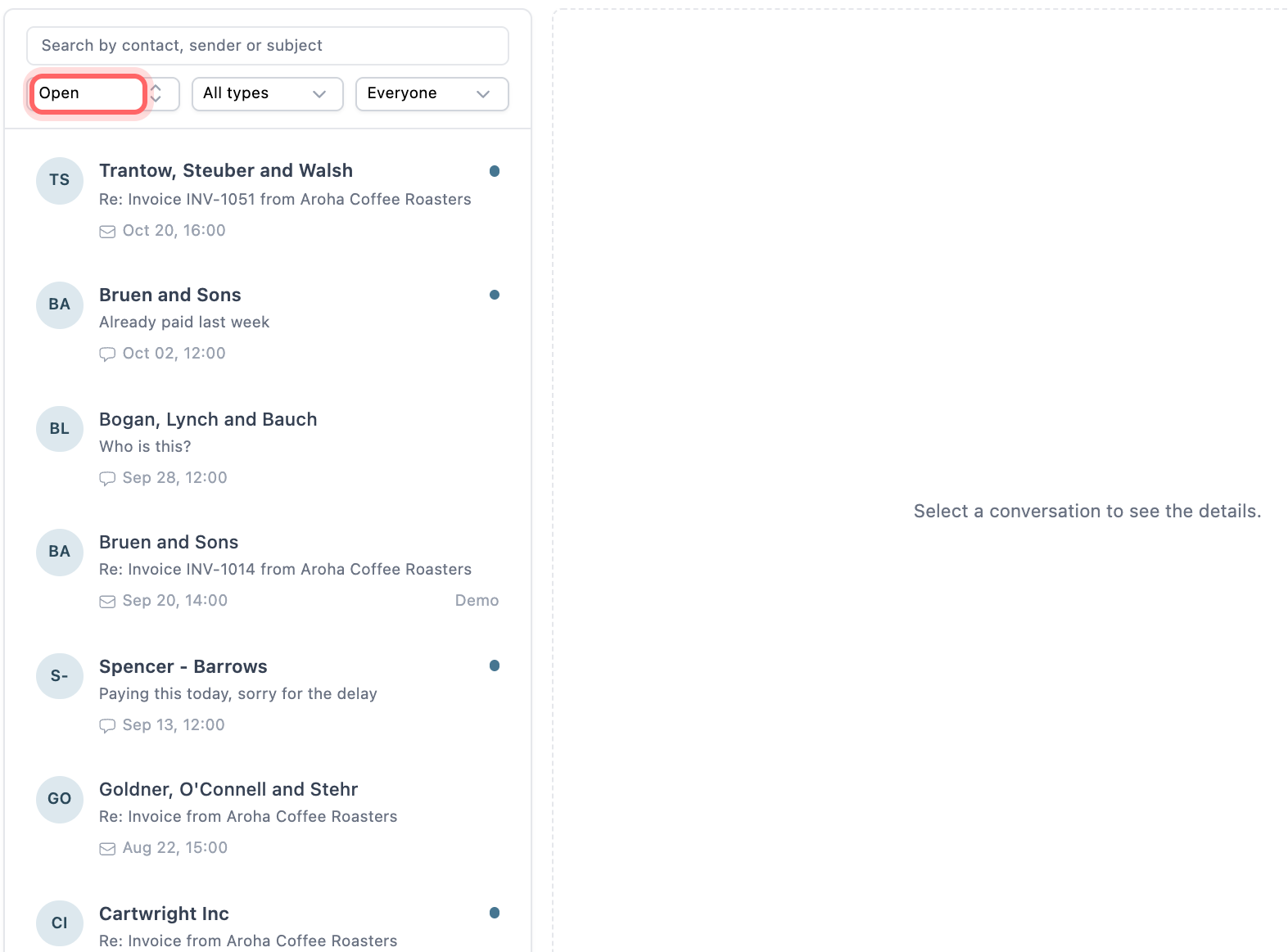
The filters along the top show status, channel and person, so each collector can see only the conversations assigned to them. Paidnice reads replies, logs a promised date or PO number on the invoice, and drafts an answer for a person to approve.
On the Pro plan you can send from your own domain, so reminders come from accounts@ as before. Paidnice can also send through a connected Gmail or Outlook (Microsoft 365) mailbox. Each sender profile has its own reply-to and BCC.
💡 Paidnice insight
Teams rarely need to give up their shared mailbox. The change that helps is moving replies to reminders out of it, because those are the emails that change what happens to an invoice.
Frequently asked questions
Is an Outlook shared mailbox free?
The mailbox needs no licence up to 50 GB. Everyone who opens it needs their own licensed Exchange Online mailbox, and larger mailboxes or archiving need extra licences, according to Microsoft.
Can I use a shared mailbox as the reply-to for payment reminders?
Yes. Set the shared address as the reply-to on your reminders and replies will land there. You lose the link to the invoice and the owner field, so you have to track both yourself.
Why can't my colleague see the reply I sent from the shared mailbox?
By default, Outlook saves it in your own Sent Items. An admin can turn on saving a copy to the shared mailbox's Sent Items for mail sent as the mailbox.
Is a Microsoft 365 group better than a shared mailbox for AR?
Microsoft suggests a group when you need more than 25 users, outside members, or to stop people deleting messages. Neither ties a reply to an invoice or pauses a reminder.
Does Paidnice replace Outlook?
No. Paidnice handles replies to your reminders, statements and notices. Keep Outlook for the rest of your accounts email.
Paidnice features in this article
- Shared inbox Puts every customer reply by email and SMS in one inbox, where your team assigns, notes and answers it.
- Send from your own email Sends every reminder from your Gmail, Outlook or own domain, so replies come to you.
- Email and SMS reminders Sends reminders by email and SMS on your schedule, each with a link to pay.
About the editorial team
Ashley is a co-founder and lead developer of Paidnice and has built accounting software for more than 10 years. He builds the ledger connections that put reminders, late fees and payments into Xero, QuickBooks and ERPs such as NetSuite and Business Central. Before Paidnice he co-founded A2X, ecommerce accounting software for Xero and QuickBooks.
 App of the Year
