



Summary
Credit control reporting in Xero means the Aged Receivables Summary and Detail reports, which show what each customer owes and how long it has been outstanding. They cannot show movement since an earlier date, days to pay per customer, notes or an owner, and they cannot send themselves on a schedule.
- The gap: Xero has no saved comparison against an earlier date, no per-customer days-to-pay figure and no scheduled report email; the request for automatic report emailing holds 787 votes at In discovery on Xero's product ideas board.
- What Paidnice adds: A live dashboard, three report types, a 0 to 100 credit score against every contact, built from its payment history and banded from Excellent to High risk, and an opt-in Weekly Report email.
- Price: Paidnice connects to Xero in minutes from US$69 a month for Essentials, with unlimited users on Pro.
Reporting is one part of credit control for Xero. Paidnice is credit control software for Xero that automates invoice reminders, statements, late fees and interest, payment plans and escalation on every invoice.
What credit control reports does Xero have?
Xero's credit control reports are the Aged Receivables Summary and Detail reports, a credit limit on each contact, and one organisation-wide average time to get paid on the Business Snapshot. No other native report is built for chasing.
Xero's Aged Receivables Summary report shows the amount each customer owes and how long it has been outstanding; the Detail report lists it invoice by invoice. You set the number and length of the ageing periods, age by due date or invoice date, add a Credit Limit column, group by Contact Group or tracking category, save a custom report and export to PDF, Excel or Google Sheets.
Xero does not email a report on a schedule, compare a customer's balance with an earlier date, show days-to-pay on a contact record, or alert anyone inside the business when an account goes overdue or crosses a threshold. The request for automatic report emailing holds 787 votes on Xero's product ideas board and sits at "In discovery", with Xero's latest reply dated 25 May 2026.
| Ask of Xero's Aged Receivables report | In Xero today |
|---|---|
| Group or summarise by Contact Group, Credit Limit or tracking category | Yes |
| Save as a custom report other users can open | Yes, with the Reports permission |
| Export to PDF, Microsoft Excel or Google Sheets | Yes, by hand each time |
| Compare a customer's balance with an earlier date | No. Run it twice and compare |
| Show average days to pay for one customer | No. Organisation-wide only |
| Email itself to the team on a schedule | No. 787 votes, "In discovery" |
| Show notes, the last action or an owner | No. Invoice Seen is the only context column |
What is missing from Xero's credit control reporting?
Xero's Aged Receivables report is missing four things a credit controller needs: direction of travel since an earlier date, payment behaviour per customer, scheduled delivery to the team, and the context of what was last done and by whom.
1. Direction of travel
There is no option to compare the Aged Receivables report with a previous period. The one thread on this, running the report as at one date and viewing the balance at another, is marked Completed, and Xero's reply of 9 July 2024 points to setting the report date by hand.
To see whether a customer is slipping, you run it twice and compare by eye. Growing overdue balances in Xero covers which numbers to compare and how to set a threshold alert.
2. Payment behaviour per customer
Xero holds one "Average time to get paid" figure, for the whole organisation, on the Business Snapshot. Nothing on the contact record says how long this customer usually takes. The request to add Days Overdue to contacts was posted on 15 August 2023 and holds 92 votes at Submitted.
3. Delivery
A finished report can be saved as draft, published or custom, or exported. Nothing sends it anywhere on a schedule, so the Monday report is somebody's Monday job. Automatic generation and emailing of reports was posted on 29 January 2014, holds 787 votes and sits at "In discovery", which means Xero is researching it.
If that Monday job is a spreadsheet, keeping a Xero debtors report current without rebuilding it in Excel each week is the fix.
4. Context
The Detail report carries one context column, Invoice Seen, which says whether the online invoice was viewed. It carries no notes, no last action and no owner. The request to show invoice and contact notes on aged reports has held 49 votes since 19 August 2014 with no Xero reply. Comments as recent as November 2025 ask for the receivables side.
Once two people work the same list, the missing owner column matters most. how a team tracks overdue Xero invoices together covers roles, seats and one shared view. Xero also has no internal alert on the first overdue day; the alert for the first overdue day is a separate fix.
Reminders that must reach one department at a customer are a routing job rather than a reporting one, covered in Xero invoice reminders for different departments.
| Request on Xero's product ideas board | Votes | Status | Posted | Latest Xero reply |
|---|---|---|---|---|
| Automatic generation and emailing of reports | 787 | In discovery | 29 Jan 2014 | 25 May 2026 |
| Add Days Overdue to contacts | 92 | Submitted | 15 Aug 2023 | 9 Oct 2023, status only |
| Show invoice and contact notes on aged reports | 49 | Submitted | 19 Aug 2014 | None |
| Run the aged report as at one date, view the balance at another | 35 | Completed | 19 Aug 2022 | 9 Jul 2024, a manual as-at date |
What does a credit control report look like, customer by customer?
A credit control report is the aged balance plus five columns Xero does not hold: oldest overdue age, average days to pay, a credit score from 0 to 100, the last action taken and the owner.
| Customer | Overdue | Oldest overdue | Avg days to pay | Score | Last action | Owner |
|---|---|---|---|---|---|---|
| Moorland Scaffolding | £11,760 | 47 days | 58 | 31 | Call booked, 2 Sep | Priya |
| Fenwick Logistics | £7,415 | 9 days | 36 | 67 | Statement sent, 31 Aug | Tom |
| Bramley Joinery | £3,240 | 22 days | 41 | 54 | Reminder 3 sent, 1 Sep | Tom |
| Larkspur Events | £2,115 | 63 days | 71 | 18 | Stop credit, 28 Aug | Priya |
| Oakhurst Dental | £925 | 6 days | 27 | 88 | Reminder 1 sent, 2 Sep | Priya |
| Tidewell Print | £640 | 15 days | 33 | 79 | Promise to pay, 5 Sep | Tom |
Xero's Aged Receivables reports give you the first three columns. The other four come from history the report does not keep: how each customer has paid before, what you did last, and whose name is against the account.
The largest balance and the most likely loss are usually different customers. Moorland owes more than five times what Larkspur does, and Larkspur is the account we would call first: 63 days on the oldest invoice, 71 days to pay, a score of 18.
What does the credit control process look like as a flow chart?
Credit control runs in seven stages: set terms, invoice, remind, monitor, review, deliver and escalate. Xero's own tools serve the first four. Review, delivery and escalation need a connected app.
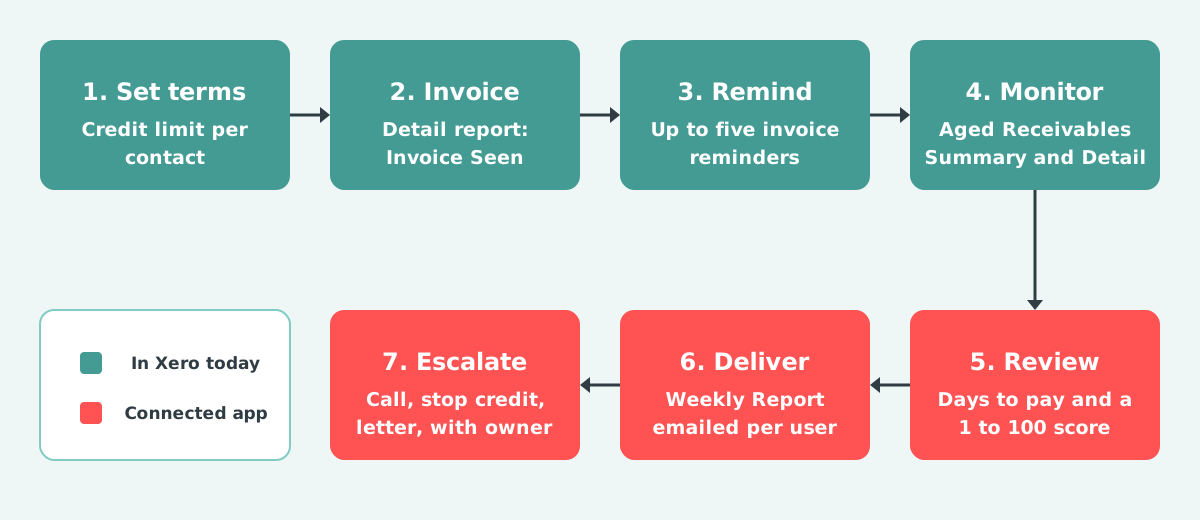
Set terms is the credit limit on the contact. Invoice has the Invoice Seen column on the Detail report. Remind is Xero's invoice reminders, up to five per organisation. Monitor is the Aged Receivables Summary and Detail.
Review needs days to pay per customer and a score that moves. Deliver needs a report that reaches the team on its own. Escalate needs a call, a stop credit or a letter, with an owner and a note.
One customer through the seven stages: Bramley Joinery has 30-day terms and a £4,000 credit limit. Its August invoice was seen the next day. Three reminders followed, and it sits at 22 days overdue on the Summary. From there the app takes over: 41 days to pay on average, a score of 54, Tom's name on Monday's report, and a phone call task at 30 days.
How does Paidnice report on Xero receivables?
Paidnice reads your Xero invoices and contacts and reports on them in three places: a live dashboard, a Reports area with three report types and a custom report builder in beta, and a 0 to 100 credit score shown against every contact.
Paidnice is accounts receivable automation for Xero and QuickBooks, credit control and debtor management run for you. The reporting sits on the same data the automation runs on, and customers see half as many late invoices in the first 30 days.
- Connect your Xero organisation. Invoices and contacts come across from Xero.
- Open the dashboard for Outstanding, Overdue, Days Sales Outstanding, Days Sales Overdue, Average Overdue Age, on-time percentage, average days to pay and average open invoice, with trend views, plus widgets for slowest payers, oldest invoices, expected payments and email delivery health.
- Run Aged Receivables by Contact. Who owes, how overdue, buckets of 1-30, 31-60, 61-90 and 90+ days, outstanding and overdue totals and unpaid counts, across entities and currencies.
- Open a contact for its summary cards: outstanding and overdue balance, revenue, unpaid invoice count, oldest overdue age and average days to pay, with each invoice's expected payment date and portal page views. Save the contact view and revisit it to see how the headline metrics have moved, or put contacts in a group to see their combined payer data.
- Turn on the Weekly Report in your notification settings, an opt-in summary email per user per organisation. Export invoices and contacts to CSV when a spreadsheet is the right tool.
Two more report types sit in the Reports area. Late Fees & Interest Charges lists every charge with its type, invoice, contact and paid status. Emails lists every message sent with its latest delivery status and delivered and bounced events, which answers "did they get it?" from one screen.
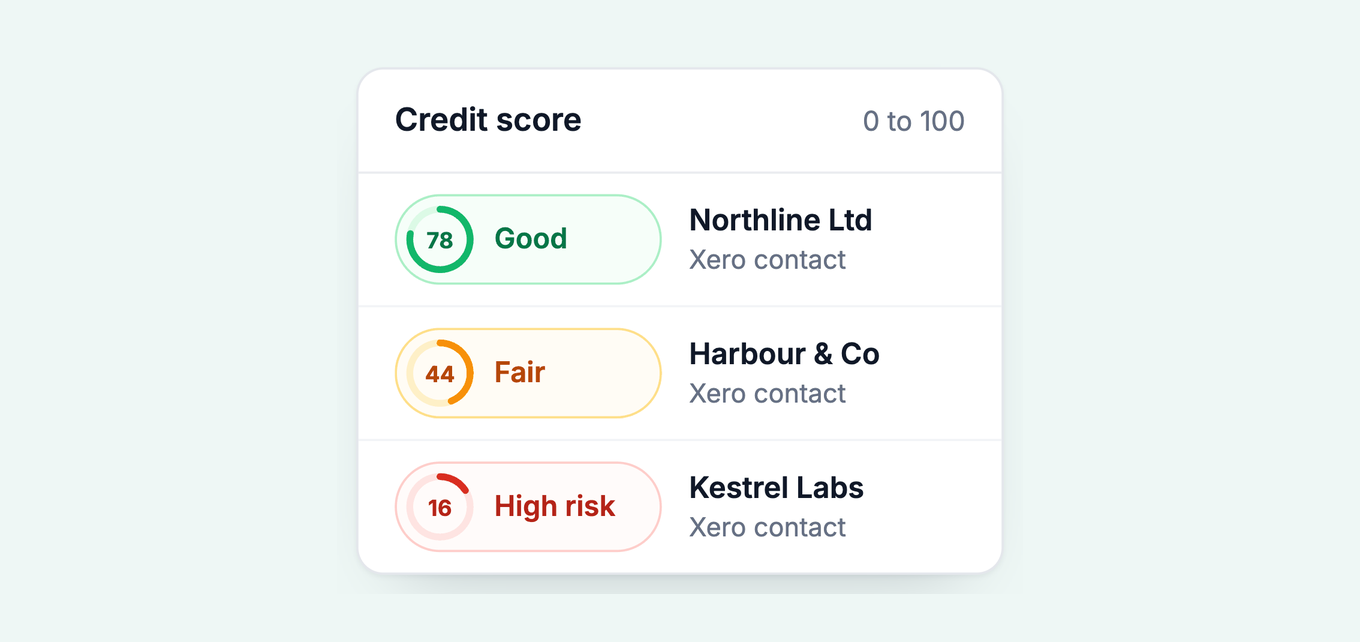
Every customer carries a credit score from 0 to 100, shown as a badge next to the contact name. Every contact starts at 100 and loses points for paying late and for the current overdue position, and the score falls into bands: Excellent, Good, Fair, Poor and High risk. It is built from the customer's own payment history with you, not a bureau credit check. That is the direction of travel the Aged Receivables report cannot give you, because Xero holds no payment history against the contact record. CSV exports are UTF-8 (the help centre covers the Excel currency symbol quirk) and statements export as PDF.
A saved view earns its keep on the second visit. Save a view of your ten largest accounts, come back a month later, and the change in oldest overdue age and average days to pay is the report.
Groups with several Xero organisations get one report across entities and currencies (multi-entity aged receivable reports). The full list is on the accounts receivable reporting page.
Which report answers which question?
Xero answers who owes what and for how long. Direction, behaviour, delivery and context come from the connected app's contact cards, dashboard, Emails report and Weekly Report.
| The question | Xero report | Paidnice view |
|---|---|---|
| Who owes us money, and how old is it? | Aged Receivables Summary, or Detail per invoice | Aged Receivables by Contact, bucketed 1-30 to 90+ days |
| Is this customer getting better or worse? | Run the report at two dates and compare by hand | Contact card, saved views, the 0 to 100 credit score |
| How fast do we get paid overall? | Business Snapshot: average time to get paid | Dashboard: average days to pay, on-time percentage, trend views |
| Did the customer see the invoice? | Detail report: Invoice Seen column | Invoice: portal page views; Emails report: delivered or bounced |
| Who should we call this week? | Sort the Summary by the oldest ageing period | Slowest payers and oldest invoices widgets; the Escalations page |
| What does the team get on Monday morning? | A PDF, Excel or Google Sheets export, sent by hand | The Weekly Report email, opt-in per user |
When are Xero's own reports enough?
Xero's own reports are enough while one person runs credit control and the whole overdue list fits on one screen.
Run the Aged Receivables Summary weekly, age it by due date, save it as a custom report, and group by Contact Group if you segment customers. Export to Google Sheets when a colleague without Xero needs a copy. Aging reports explains the buckets.
The signs you have outgrown it: someone rebuilds the report in Excel each week, a balance grew for two months before anyone noticed, or a second person started working the list. Credit control software for Xero compares the apps that close those gaps.
Common questions
What is credit control?
Credit control is the process of setting payment terms, invoicing, watching what each customer owes and following up until the money arrives. In Xero it runs on the Aged Receivables report, invoice reminders, statements and credit limits.
What is a credit control report?
A credit control report lists each customer's overdue balance with the context needed to act on it: how old the oldest invoice is, how the customer usually pays, what was done last and who owns the account.
Can I save a customised aged receivables report in Xero?
Yes. Set the ageing periods, columns and grouping, then click Save as custom and name it. Anyone with the Reports permission can open reports saved or published by other users.
Does Xero email reports automatically?
No. A finished report can be saved or exported to PDF, Excel or Google Sheets. The request for automatic report emailing holds 787 votes and sits at "In discovery".
Can I share a Xero report with someone who does not use Xero?
Yes, by export: a PDF or Excel file can be sent on, and a Google Sheets export needs a Google account. Xero charges no per-user fee, so a Viewer login is the other route.
What does a credit control process flow chart show?
The stages from agreed terms to escalation: set terms, invoice, remind, monitor, review, deliver and escalate, with the report or view that serves each stage and the point where Xero's own tools stop.
About the editorial team
Denym started Paidnice in 2022 after customers paying late left his own business short on payroll. He has led it to $1 billion collected on time across more than 1 million invoices, and writes about credit control, late fees and getting paid on Xero and QuickBooks.

 App of the Year