

Summary
A payment reminder WhatsApp message names the invoice, the amount and one pay link, in two or three short sentences, and gets firmer as the invoice ages. This page gives six templates, for the due date and for 3, 7, 14, 21 and 30 days overdue, plus three replies for when the customer answers.
- The message: Every template here names the invoice number and the amount, carries one link to view and pay, and runs to three sentences at most.
- The schedule: Start on the due date, then send at 3, 7, 14, 21 and 30 days overdue, firming the tone each time and ending with a dated final notice.
- The rules: WhatsApp lets a business message only people who opted in, and once 24 hours pass since the customer last messaged or called, only pre-approved templates.
Your last two emails about an invoice that is 7 days overdue got no answer. Your customer has agreed to WhatsApp messages, and more than 3 billion people in over 180 countries use WhatsApp, so a message there may be the one they see first. Here is what to send at each stage, and what to say when they answer.
What should a payment reminder WhatsApp message include?
A payment reminder WhatsApp message should include the customer's first name, the invoice number, the amount, the due date or days overdue, one link to view and pay, and an easy way to reply.
- Their first name. It reads as a note from a person.
- The invoice number and the amount. So they can find it without asking which one.
- The date. Either "due today" or the number of days overdue. The number does the firming for you.
- One link. A single link that opens the invoice and takes payment, such as a customer payment portal page.
- An invitation to reply. "Reply here if something is holding it up" turns a reminder into a conversation.
- Your business name. The customer may not have your number saved.
Keep it to two or three sentences, with no capitals for emphasis, no threats and no second link.
When should you send each WhatsApp payment reminder?
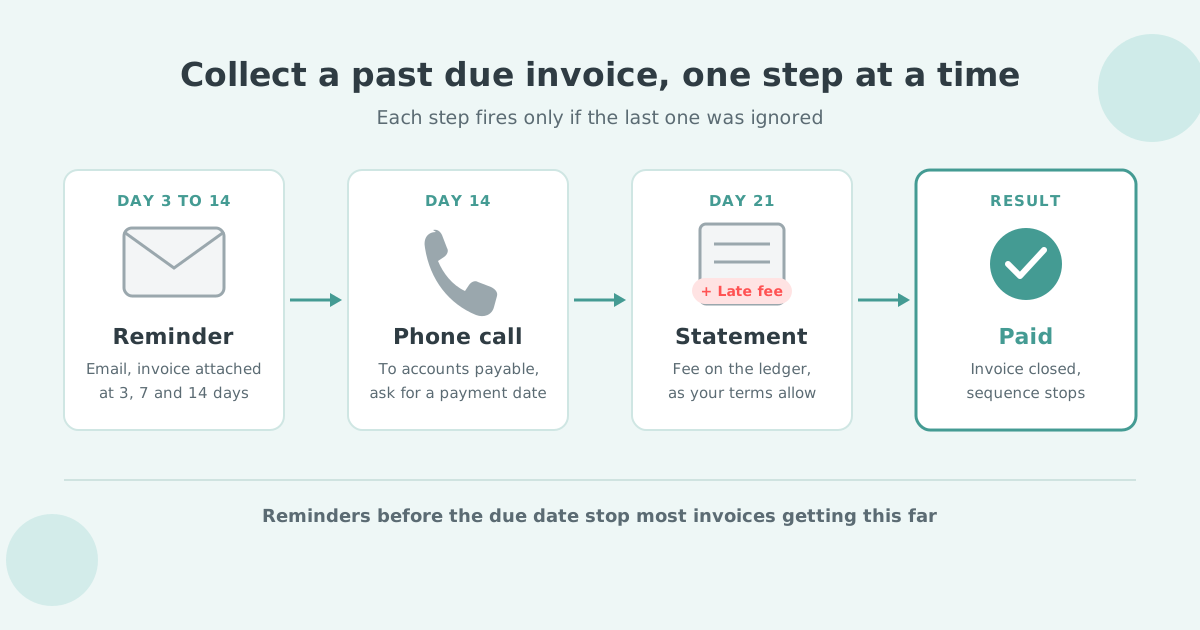
Send the first WhatsApp reminder on the due date, then at 3, 7, 14, 21 and 30 days overdue, so the tone firms up as the invoice ages and the last message names a dated next step.
| Days overdue | Goal | Tone |
|---|---|---|
| 0 (due date) | Put the invoice in front of them | Friendly |
| 3 | Ask if something is in the way | Friendly, direct |
| 7 | Ask for payment or a date | Direct |
| 14 | Set a pay-by date | Firm |
| 21 | State the late fee and the new total | Firm |
| 30 | Final notice with a dated next step | Final |
In every template below, replace each {placeholder} with your own details. {ActionDate} is the date you want payment by.
The same ladder works for text messages, and the SMS payment reminder templates follow it. What happens after day 30 is the subject of the invoice escalation ladder.
What do you send on the due date and at 3 days overdue?
On the due date send a short friendly reminder with the pay link; at 3 days overdue name the invoice as overdue and invite a reply if something is holding it up.
Hi {FirstName}, a quick reminder that invoice {InvoiceNo} for {Amount} is due today. You can view and pay it here: {PayLink}. Thanks, {BusinessName}
Hi {FirstName}, invoice {InvoiceNo} for {Amount} was due on {DueDate} and is now 3 days overdue. You can view and pay it here: {PayLink}. If something is holding it up, reply here and tell us. {BusinessName}
The word "overdue" appears for the first time, and so does the reply invitation. If there is a dispute or a cash problem, you want to hear about it on day 3.
What do you send at 7 and 14 days overdue?
At 7 days overdue ask for payment or a date, and at 14 days overdue set a pay-by date, keeping the tone direct and polite.
Hi {FirstName}, invoice {InvoiceNo} ({Amount}) is now 7 days overdue. Could you pay it today, or reply with the date you expect to pay? {PayLink} {BusinessName}
A reply with a date is a promise to pay, so note it against the invoice. If the date passes with no payment, the broken promise to pay guide covers the next message.
Hi {FirstName}, invoice {InvoiceNo} ({Amount}) is 14 days overdue. Please pay by {ActionDate}: {PayLink}. If that date is a problem, reply and let us know what works. {BusinessName}
At 14 days you set the date instead of asking for one. Pick a date three to five working days out, so it fits a payment run. The reply line stays, because a customer who objects to the date is still talking to you.
What do you send at 21 and 30 days overdue?
At 21 days overdue state the late fee and the new total, and at 30 days overdue send a final notice that names a date and the next step, still in a calm tone.
Hi {FirstName}, invoice {InvoiceNo} is 21 days overdue and a late fee of {FeeAmount} now applies under our terms. The total is {Total}: {PayLink}. If there is a problem with the invoice, reply and we will look at it today. {BusinessName}
A late fee applies automatically under your terms, and you can waive one deliberately for a customer who pays today. The fee gives the customer a reason to pay this invoice before the others on their desk.
If your terms carry no fee, the 21-day message becomes "invoice {InvoiceNo} is 21 days overdue, please pay by {ActionDate}". Reminders with no fee attached are a full sequence on their own.
Hi {FirstName}, this is a final reminder about invoice {InvoiceNo} ({Amount}), now 30 days overdue. Please pay by {ActionDate} so we do not need to move it to the next step in our collections process: {PayLink}. {BusinessName}
The final message names a date and a next step in a calm tone, and leaves room for the customer to pay without losing face. When the date passes with no reply or payment, the escalation step you have set up takes over.
What do you reply when the customer answers on WhatsApp?
Reply within the same chat: confirm the date when they promise to pay, send the invoice link when they ask for a copy, and acknowledge a problem and name who will respond when they dispute it.
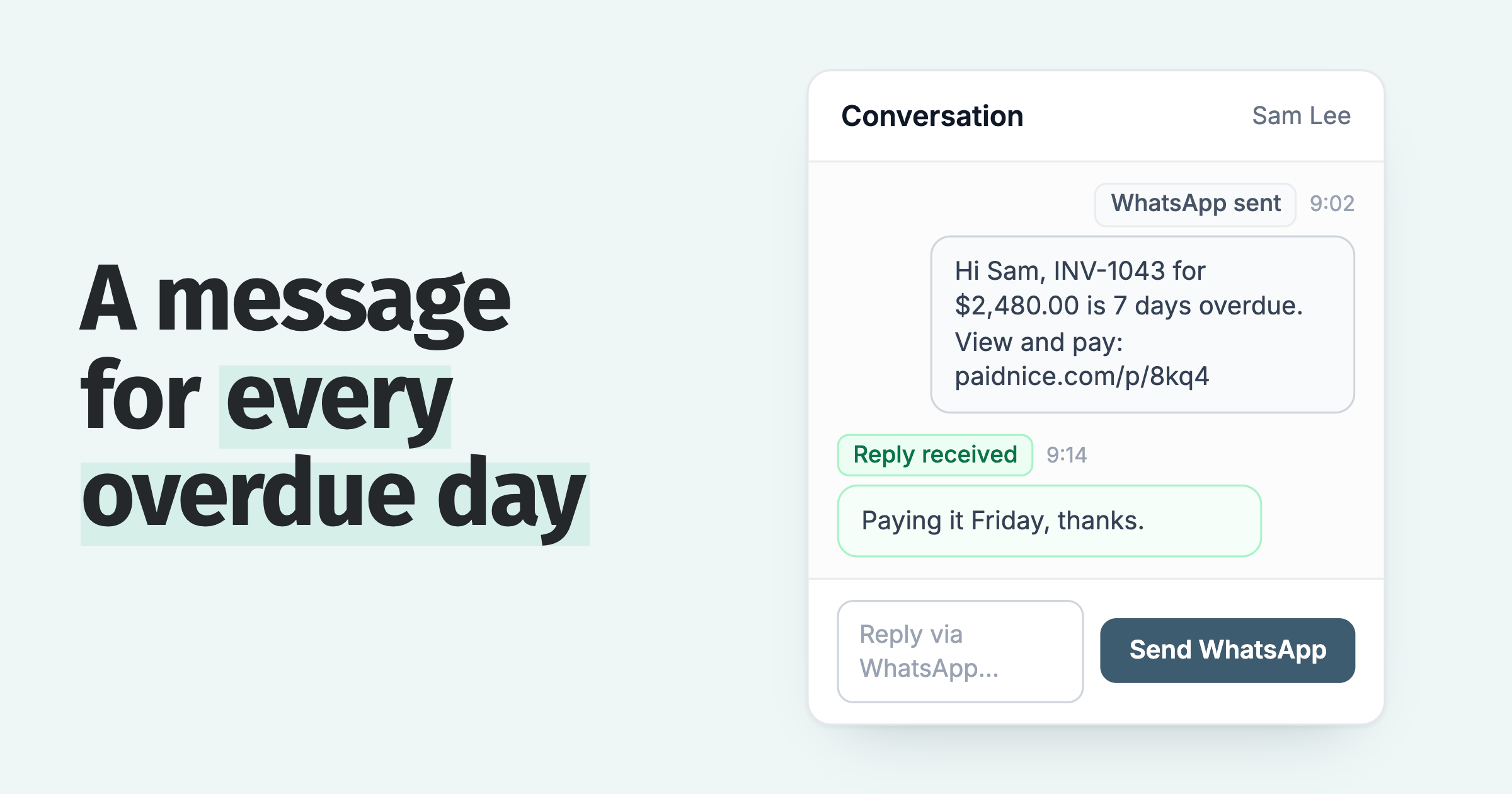
Thanks {FirstName}, we have {PromisedDate} noted for invoice {InvoiceNo}. The link is here if it is easier to pay sooner: {PayLink}
Repeating the date back turns a casual "Friday" into a commitment. For a larger balance, a promise to pay agreement puts it in writing.
Of course {FirstName}. Invoice {InvoiceNo} is here, and you can pay it from the same link: {PayLink}
Thanks for telling us, {FirstName}. We have noted a question on invoice {InvoiceNo}, and {OwnerName} will come back to you by {ReplyDate}.
The reply names the person and the date, so the customer knows who will answer and when. The disputed invoice guide covers the dispute process, and every other kind of answer is in the guide to customer replies to payment reminders.
When a customer replies on WhatsApp, the message lands on their contact in Paidnice. Your team answers on WhatsApp from the same screen, and the whole conversation stays with the invoice.
What are WhatsApp's own rules for payment reminders?
WhatsApp lets a business message only people who have opted in, and once 24 hours pass since the customer last messaged or called, a business can send only pre-approved template messages.
The WhatsApp Business Messaging Policy says a business may contact people only once it has received opt-in permission from the recipient, and that the business is solely responsible for determining the method of opt-in. The permission has to confirm that the customer wants to receive messages from you on WhatsApp.
When a customer messages or calls your business, a 24-hour customer service window opens. Inside it you can send free-form messages, such as the three replies above. Every new message from the customer resets the window to 24 hours.
Outside that window, template messages are the only type of message a business can send. The six reminders above follow that shape: fixed wording with placeholders. Sending WhatsApp reminders from Paidnice is covered on the WhatsApp payment reminders page.
How do WhatsApp, email and SMS fit in one reminder sequence?
Use email as the base of the sequence, add WhatsApp from the due date, and keep each channel to the steps where it helps, so a customer does not get the same nudge three times in a day.
Email carries the detail: the PDF, the statement, the terms. WhatsApp and SMS carry the nudge. A sensible split is email at every step, WhatsApp at the steps in the table above, and SMS payment reminders for customers who do not use WhatsApp. The email and SMS reminders page shows how the steps sit together.
In Paidnice, WhatsApp sits in the same reminder policy as email and SMS. You choose the channels for each step and each customer group, and a step can skip when a payment is promised or while a query is open.
The email wording is in the email payment reminder templates. If a customer ignores every channel, see customers who ignore invoice reminders.
Paidnice sends these reminders on WhatsApp, email and SMS from one policy, and your team answers replies from the same screen. Customers see half as many late invoices in the first 30 days.
Connect Xero or QuickBooks, add WhatsApp to a reminder step and approve it. Nothing sends until you do. Book a call or see the WhatsApp payment reminders page.
Payment reminder WhatsApp message questions
How to write a payment reminder message on WhatsApp?
Name the customer, the invoice number and the amount, give one link to view and pay, and invite a reply. Keep it to two or three sentences. The due date template above is the shortest version.
How do you politely send a payment reminder on WhatsApp?
Greet the customer by name, state the facts, ask a question instead of giving an order, and offer a reply route. Firmness comes from the days overdue and the pay-by date, so the wording can stay polite all the way to the final notice.
How do you set up payment reminders on WhatsApp?
Pick the template for the days overdue, fill in the placeholders and send it on the days in the schedule, once the customer has agreed to WhatsApp messages (see the rules). Software that holds your invoices can send the right template on the right day. In Paidnice, WhatsApp is a step in the same reminder policy as email and SMS.
 App of the Year