

A spreadsheet is enough for credit control while you have a handful of overdue invoices, one person chasing them and no late fees to apply. You have outgrown it when chasing takes a fixed block of your week, you have calculated interest by hand, or a customer went a month without a reminder.
Credit control software is better than Excel once you need the chasing and the charging to happen without you. Excel records the debt. Software acts on it: sends the reminder, works out the interest, posts the charge.
A spreadsheet is a record: every action still depends on someone opening the file and sending the email. Software connects to the ledger, chases on the schedule you set and escalates on silence. Our guide to credit control software for UK small businesses compares the tools; this page asks whether you need one at all.
A spreadsheet is enough while the overdue list fits on one screen, one person owns it, your customers pay when asked, and you have no plan to charge interest or a late fee.
Xero's built-in reminders stretch this stage: up to five email stages on one schedule for the whole organisation. Our page on Xero reminders versus a credit control app covers where they stop.
The three signs are time, fees and gaps: chasing has a standing slot in your diary, you have raised an interest charge by hand, and an invoice went unchased because nobody opened the file.
Time is the easiest sign to miss, because nobody bills for it. Gaps appear on the days nobody opens the file: a holiday or a busy month-end is usually why an invoice goes weeks past due before its first reminder. Fees are the sign that settles it, because the spreadsheet then becomes a calculator someone has to maintain.
The manual alternative to statement interest is an interest invoice raised once by hand, stale within a week because the debt kept ageing. Paidnice recalculates statement interest at the moment the statement is sent, so the figure the customer opens is right that morning.
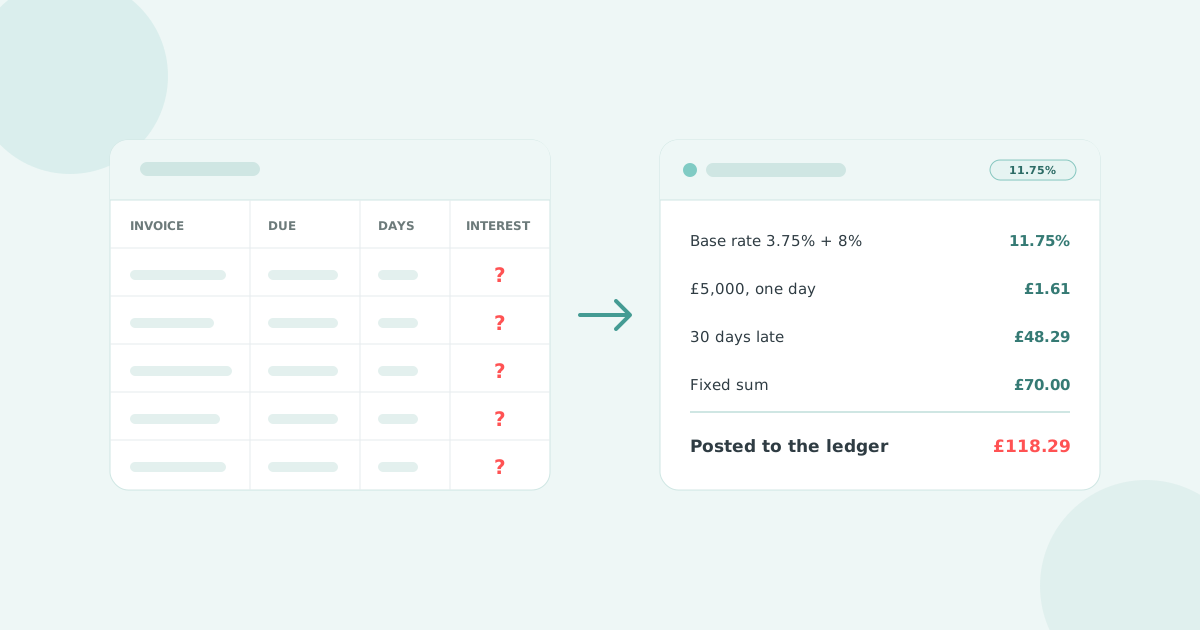
UK statutory interest is 8% above the Bank of England base rate, accrued daily per overdue invoice, plus a fixed sum of £40, £70 or £100. A spreadsheet can hold the formula. It cannot keep the answer current for every invoice, every day.
The right comes from the Late Payment of Commercial Debts (Interest) Act 1998 and applies whether or not your terms mention it. The gov.uk guidance sets the fixed sum at £40 under £1,000, £70 from £1,000 to £9,999.99, and £100 at £10,000 or more, once per invoice.
The rate in force on 30 June or 31 December holds for the following six months. The Bank Rate was 3.75% on 30 June 2026, so the statutory rate for the second half of 2026 is 11.75%.
| Statutory rate: 8% + 3.75% base rate | 11.75% |
| Interest for a year: £5,000 × 11.75% | £587.50 |
| Interest per day: £587.50 ÷ 365 | £1.61 |
| Interest at 30 days late: £1.61 × 30 | £48.29 |
| Fixed sum, £1,000 to £9,999.99 band | £70.00 |
| Total chargeable at 30 days late | £118.29 |
Those six lines are simple interest, and they are the easy part. The fourth line changes every day the invoice stays open, and every other overdue invoice has its own day count and its own band. Twelve overdue invoices is twelve daily recalculations. Then the base rate moves, a customer part-pays, a credit note lands, and each is a formula edit in a file one person understands.
Software reads the due date and balance from the ledger, applies the rate for the correct block, adds the fixed sum at the right band, and posts the result. Try our UK statutory interest calculator, and read how much you can charge for late fees.
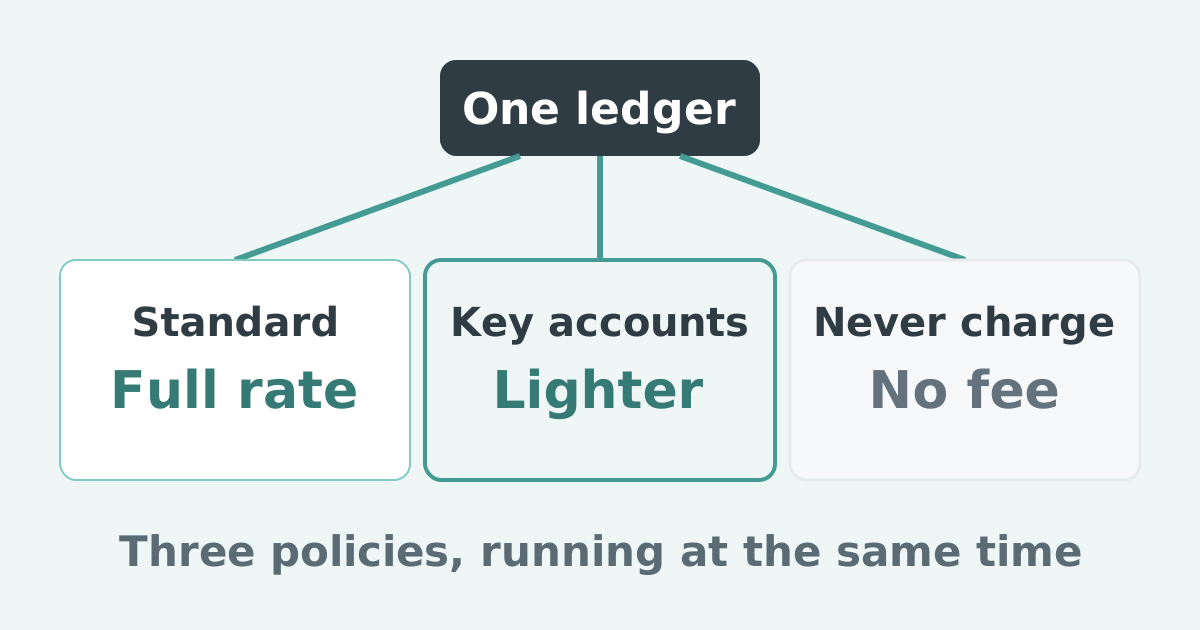
Paidnice applies the base rate either way the rules allow: locked for each six-month block as the Late Payment Order sets it, or following the Bank Rate as it changes. The £40, £70 or £100 fixed sum is a line on the same charge, which lands in Xero or QuickBooks Online as a Draft or Approved invoice, so it enters the customer's accounts payable and payment run.
Excel wins on cost and loses on everything that has to happen on a schedule. The table shows the split across cost, tracking, reminders, fees and interest, and reporting.
| Feature | Spreadsheet | Credit control software |
|---|---|---|
| Cost | The licence you already have, plus the hours of whoever maintains it. | From £49 a month, priced by invoice volume, not turnover. UK entry prices run £20 a user to £199 a month. |
| Tracking | Manual entry. Accurate on the day it was last updated. | Reads the ledger directly. |
| Reminders | None. A person checks due dates and sends each email. | Scheduled by customer group, escalating in tone, by email and SMS, plus statements. |
| Fees and interest | A formula, maintained by hand, per invoice, per day, per base-rate block. | Statutory rate applied, fixed sum added by band, charge posted to the ledger. |
| Reporting | Whatever pivot table someone built. | Aged receivables, DSO and expected payments, read from the ledger. |
Most people count the licence and forget the hours. Our comparison by turnover, seats and cost covers the paid side.
Three tools cover most UK businesses leaving a spreadsheet: Paidnice for Xero and QuickBooks Online, Chaser for larger firms, Satago for Sage 50 and Xero users who want credit scores.
Paidnice: accounts receivable automation for Xero and QuickBooks Online, best for businesses that want reminders, statements and statutory interest applied automatically, from £49 a month.
Essentials covers 150 invoices and 2 users, escalation and SMS included. Sign-up is free with no card; the first 20 actions are free. Reminders and statements alone are a complete use case, fees are optional, and Creditsafe credit checks come on the Custom plan. See every plan and the product overview.
Chaser: one of the oldest names in UK credit control, best for larger firms that want credit checks, letters and calls alongside chasing, priced on annual revenue from £199 a month. Compact covers turnover up to £4m; larger plans serve firms at £4m and more. Late fees run on one rule for the whole account and sync as a line item to Xero only.
Satago: UK credit control with credit risk data and invoice finance, best for Sage 50 or Xero businesses that want credit scores, from £25 a month inside Sage 50 or £45 standalone. The Sage 50 tiers include customer credit scores and a set number of full credit reports a year. The standalone app starts at Basic with 100 email reminders a month.
A startup on its first invoices should read what to set up at each stage first. A Xero business that only wants chasing automated should compare invoice chasing software for Xero, and which tools you can try first. If the fee is the only thing you want calculated, free late fee calculators calculate the fee and do not apply it.
The questions a spreadsheet user asks before moving: what Excel can still do, what Xero covers, and whether the fee has to be charged.
Can Excel calculate late payment interest?
Yes, for one invoice on one day. The formula is balance × (8% + base rate) ÷ 365 × days late. Excel cannot rerun it daily for every open invoice, switch blocks on 1 January and 1 July, or post the result to your ledger.
Are Xero's reminders enough instead of a spreadsheet?
For a short overdue list, yes. Xero has no native interest or late fee: the request to add interest to late invoices has sat on Xero's ideas board since 29 March 2012 with 1,114 votes and no committed plans.
Does a late fee have to be charged once it is calculated?
No. Software applies the charge automatically; you waive or credit it deliberately, with the reason on record. A charge that was never raised is not leverage.
Paidnice is accounts receivable automation that enforces your payment terms, trusted by thousands of businesses on Xero and QuickBooks. Credit control and debtor management, run for you.
Try it Now - It's FreeNo card required.



Optimize your cash flow with our suite of financial tools designed for AR professionals. Calculate DSO, aging analysis, late fees, and more.