
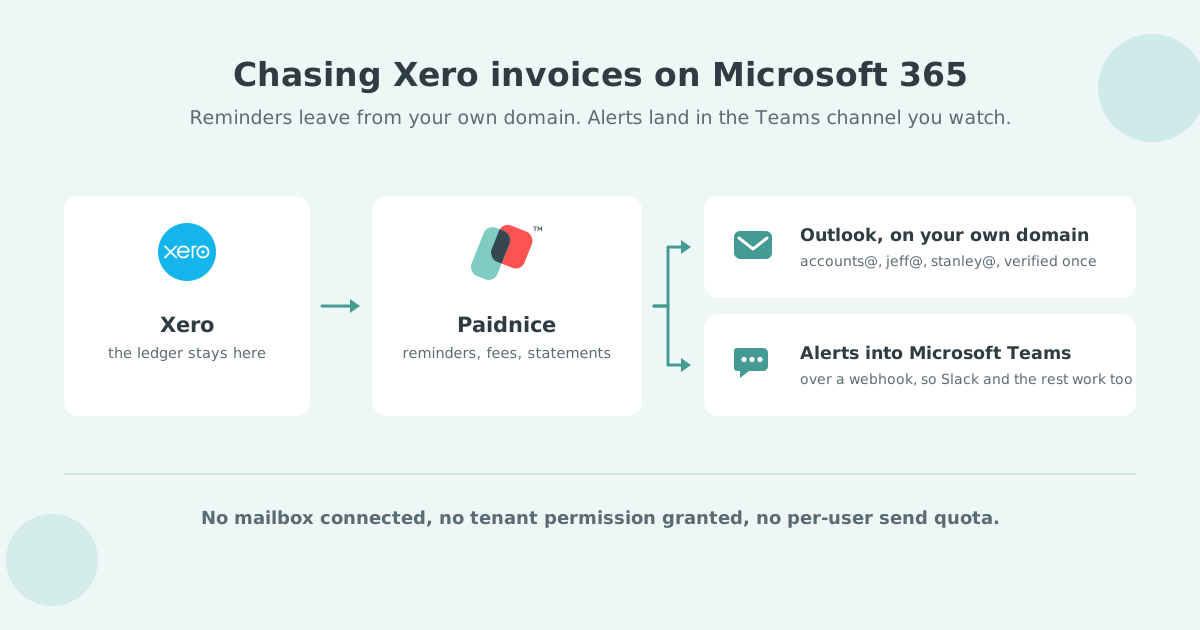

Paidnice and Satago are two of the credit control apps most often named for a Xero, Outlook and Microsoft Teams stack, and the difference is how they send. Paidnice authenticates your Microsoft 365 domain once and posts alerts into Teams. Satago sends through a connected Outlook or Gmail mailbox and adds credit checks and invoice finance.
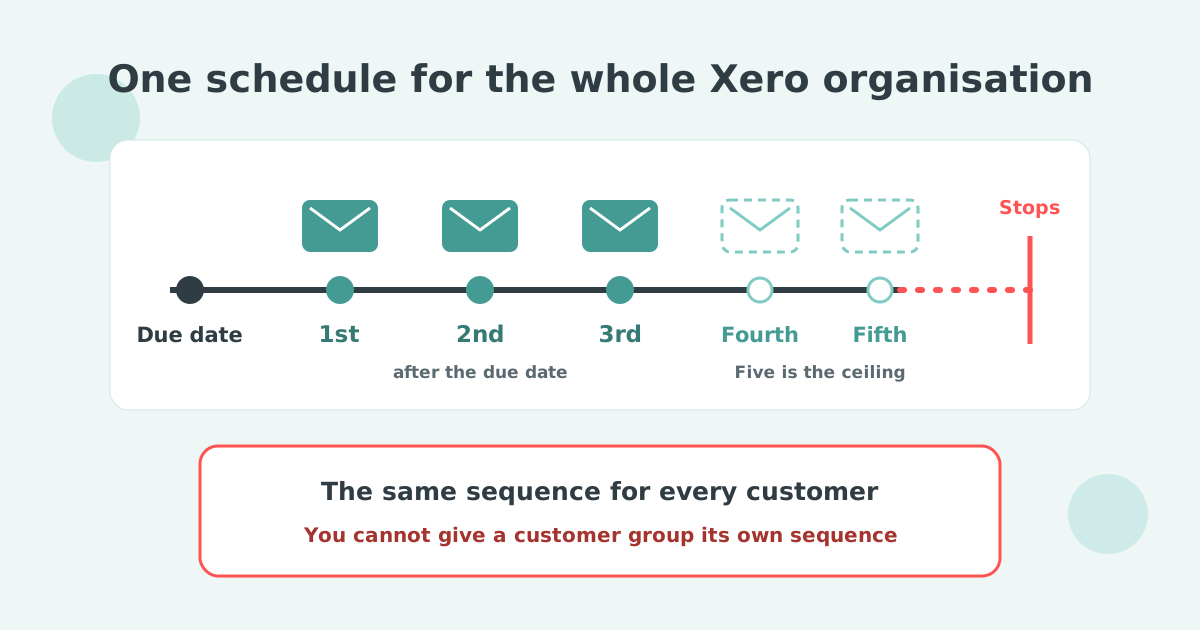
Xero holds one reminder schedule at organization level, with up to five reminders in it, and sets three of them up for you when you first turn the feature on. Every reminder fires against every invoice marked as sent.
Each reminder goes to the primary person on the contact plus anyone with "Include in emails" selected. The only balance control is a checkbox, Don't send reminders for amounts owing on an invoice under, and Xero applies that setting to all reminders. Xero's own setup article tells readers to search the Xero App Store for apps that allow more advanced invoice reminder options.
Nothing in Xero changes the sending domain, and nothing in Xero talks to Teams. Both jobs belong to a connected app.
A reminder only works if it arrives and is read. Xero Small Business Insights shows how much late payment there is to chase.
| Country | Paid late | Year on year |
|---|---|---|
| Australia | 4.3% | -2.7 pts |
| New Zealand | 5.1% | -0.5 pts |
| UK | 8.3% | -0.9 pts |
| US | 8.3% | -0.1 pts |
| Canada | 11.4% | +0.8 pts |
Source: Xero Small Business Insights, June 2026. See the full data on the Paidnice accounts receivable statistics dashboard.
That volume is why the sending address matters.
A credit control app can put your Outlook address on a Xero reminder in two ways: a mailbox connection that sends through one person's Microsoft 365 account, or domain authentication that sends on the domain's behalf after a one-off DNS change. To the customer the two look the same. The difference shows up in your admin center, in your send volume, and on the day the person who connected the mailbox hands in their notice.
Signing in authorizes one mailbox DNS records authorize your domain
Signing in and granting an app access authorizes one mailbox. Your domain's sending records are untouched, and the app is relaying through that account.
Domain authentication is a DNS change. You publish records that let the sending service sign mail as your domain, which is what a receiving server checks. Both routes get described as connecting your email, so the distinction is easy to miss on a pricing page.
Several tools will connect to an Outlook mailbox and send as that person, and if that is what you want, it is available. Our honest view is that it is the weaker design. You are granting tenant-level mailbox access and borrowing a send quota to get a From line you can have another way.
The failure modes are the giveaway. Somebody moves on and the chasing quietly stops. Somebody gets phished and the attacker inherits your invoice threads. Neither happens when the sending belongs to the domain instead of to a person. Domain authentication also sidesteps Outlook's per-account sending limits, and it keeps a collections round's bounces and complaints off the reputation of the mailbox the team uses for everything else.
Paidnice does not connect to a mailbox and does not read your inbox: on Pro plans you add your domain under Email Preferences, Paidnice returns the DNS records, and whoever manages your DNS publishes them. Sending runs through SendGrid.
Paidnice's setup guide is explicit about what follows: verify your top level domain once, then set up sending addresses inside Paidnice with no further verification.
One DNS job covers [email protected], [email protected] and [email protected]. Your Microsoft 365 admin is not asked to approve anything per address, and you are not buying a license to send from a name. Because domain authentication is a DNS setting rather than a per-app mailbox grant, the same verified domain covers Outlook, Gmail or any other mailbox your team moves to later, with no new setup.
This is what makes an escalation ladder cheap to run. Each sender profile carries a From name, a From address and a reply-to, so the due-date nudge comes from Accounts, the fortnight-overdue chase comes from a named credit controller, and the late fee notice comes from a director. The customer reads it as the matter moving up the building.
Sent copies of every Paidnice reminder, statement and late fee notice land wherever the BCC field on the sender profile points: a shared accounts mailbox in Outlook, your own inbox, or a CRM logging address. The field takes any address you choose.
Point it at a shared accounts mailbox and the whole team sees each reminder as it goes out. Point it at a CRM logging address and the thread lands on the customer record instead. Pipedrive, HubSpot and Salesforce all accept mail this way, as does any system that logs by BCC.
Replies are handled separately. The reply-to address on the profile decides where a customer's answer arrives, so it can land with the named sender, with a shared inbox, or with both.
Paidnice posts notifications into the Teams channel your team already has open, so an overdue account gets picked up by whoever is free, instead of sitting in one person's inbox.
The connection is an incoming webhook, so the destination is a setting rather than a product decision. Slack, Discord, Telegram and WhatsApp all accept incoming webhooks, and so do Zapier and Make for anything else in your stack. Our team will set it up with you.
Of the five apps in the table below, Paidnice is the only one that documents a Teams alert setup. Kolleno names Slack and Teams as external app targets for its workflow builder without a page for either; Chaser, ezyCollect and Satago document ledger, email and payment integrations, and nothing that posts into a Teams channel.
Paidnice and Satago are two of the apps most often named for a Xero and Microsoft 365 stack. Kolleno, Chaser and ezyCollect also come up, and the apps in the table below are separated by price and sending mechanism more than by features.
| Tool | Authentication | At volume | Teams alerts | Price from | Size fit | Ledger | Best for |
|---|---|---|---|---|---|---|---|
| Chaser | One mailbox login | Caution | None | £199/mo | £4m to £200m turnover | Xero, QBO, Sage, NetSuite | Reminder-led credit control for a finance team |
| Paidnice | Your own domain | Safe | Yes, via webhook | £49 / US$69/mo | Any size up to $50m a year | Xero, QBO | Own-domain sending, late fees and Teams alerts |
| ezyCollect | Not published | Not published | None | About A$275/mo | Not published | Xero, MYOB, QBO, NetSuite | Australia and New Zealand, ERP-connected AR |
| Kolleno | One mailbox login | Caution | Named, no page | US$650 per user/mo | Larger finance teams | Xero, QBO, NetSuite, Dynamics 365 | Cash application alongside collections |
| Satago | One mailbox login | Caution | None | £45/mo (£25 in Sage 50) | UK small business | Xero, Sage 50, QBO | Chasing plus credit reports and invoice finance |
Your own domain. You publish DNS records once and the app sends as your domain. No mailbox is connected, nothing reads your inbox, and there is no per-person send limit to hit.
One mailbox login. The app signs into one person's Gmail or Outlook and sends as them. Chasing shares that account's daily send limit and its bounce reputation, it stops when that person leaves, and a compromise of that mailbox reaches your invoice threads too.
The vendor documents neither method, so we have not assumed one either way.
Prices are entry tiers from each vendor's own materials; verify current pricing before you buy.
For a temp or perm desk the shortlist is sized differently, by weekly billing and self-billed accounts: see the best credit control software for recruitment agencies.
Kolleno is an order-to-cash platform for larger finance teams that connects Xero and sends reminders through an Outlook connection, from US$650 per user a month. It publishes the Xero integration alongside NetSuite, SAP, Sage Intacct and Dynamics 365 connectors. Custom-domain sending is set up by a Kolleno account manager rather than self-serve DNS. Kolleno's integrations page names Slack and Teams as external app targets for its workflow builder, with no dedicated Teams page, so overdue alerts into a Teams channel are not documented. Its cash application, which reads bank files and parses remittance emails, is the feature that separates it from the other tools here.
When several people chase from the same Xero organisation, read choosing credit control software for a finance team for how to split customer ownership and keep one send history.
Satago is a UK credit control app for Xero, Sage 50 and QuickBooks that sends chase emails through a connected Outlook or Gmail mailbox, from £45 a month standalone or £25 a month embedded in Sage 50. It sends automated chase emails through that connected mailbox rather than a verified domain, and pairs the chasing with credit reports and suggested credit limits on customers and optional invoice finance. The mailbox-connection trade-offs in this guide apply to Satago the same way they apply to any per-mailbox sender: sends count against that mailbox's Microsoft 365 limits, and chasing stops when the connected person leaves. Satago publishes no Teams integration.
Connecting a credit control app to a Microsoft stack is a DNS job and two integrations. Budget an afternoon.
That last step is the one teams forget. Two systems chasing the same invoice is worse than one.
The full buying criteria, covering late fees, statements, disputes and portals, are in credit control software for Xero. The Google version of this page is credit control software for Xero, Gmail and Slack, and the DNS walkthrough is in sending Xero invoices from your own domain. To see the Paidnice setup, go to credit control for Xero.
Will my Xero reminders go out from my own Outlook address?
They can, by one of two mechanisms. Some apps connect to your Outlook mailbox and send as you. Others authenticate your domain and send on its behalf. The From line looks the same to your customer.
Does my Microsoft 365 admin have to approve anything?
For a mailbox connection, usually yes, because the app is granted permission inside your tenant. For domain authentication the work is DNS records on your domain, so nothing is granted on anyone's Microsoft account.
Will chasing hit my Microsoft 365 sending limits?
It can, if the app relays through a mailbox, because those sends count against that account's limits. Sending on the domain's behalf through dedicated infrastructure is not bound by one user's quota.
Does adding more senders cost more on a Microsoft stack?
It depends how the tool prices. Paidnice charges on invoice volume rather than per user, and Pro plans include unlimited users, so a second or third sending address costs nothing extra.
Which Xero credit control apps post alerts into Microsoft Teams?
Paidnice posts to Teams over an incoming webhook, which also covers Slack, Discord, Telegram and WhatsApp. Elsewhere availability varies by tier, so check the plan the integration sits on before comparing prices.
Do replies come back into Outlook?
Yes. The reply-to address on the sender profile decides where a customer's answer lands, so replies arrive in the Outlook mailbox you nominate even though the reminder was sent on the domain's behalf.
Paidnice is accounts receivable automation that enforces your payment terms, trusted by thousands of businesses on Xero and QuickBooks. Credit control and debtor management, run for you.
Try it Now - It's FreeNo card required.



Optimize your cash flow with our suite of financial tools designed for AR professionals. Calculate DSO, aging analysis, late fees, and more.