
How to accept partial payments on invoices with Stripe

Summary

Stripe accepts partial payments on an invoice in three ways: an Invoice settings switch that lets the customer choose an amount, a Charge customer dialog in the Dashboard, and a PaymentIntent attached through the API. The invoice stays open until the balance reaches zero. On Xero and QuickBooks Online, Paidnice adds a minimum payment threshold.

  • The Stripe setting: Partial payments on the hosted invoice page are switched on in the Dashboard under Settings, Billing, Invoices; the invoice then shows a partially paid status until it is settled.
  • The minimum: Paidnice sets a minimum, such as 50% of the invoice, and the customer sees a Pay Other Amount button beside Pay In Full.
  • Price: Partial payments are included wherever Stripe is connected, on every Paidnice plan from US$69 a month for Essentials.
Contents▾

This guide covers what Stripe does on its own, and what a connected app adds when the invoice lives in Xero or QuickBooks Online rather than in Stripe Invoicing.

What are partial payments on an invoice?

A partial payment lets a customer pay less than the full invoice amount now and settle the rest later, without a new invoice being raised. The original invoice stays open, its remaining balance falls by the amount paid, and it is marked paid only when that balance reaches zero.

In Stripe the invoice carries an amount_paid and an amount_remaining field, and a customer who has paid part of it sees a "partially paid" status in their customer portal. The same idea applies in Xero and QuickBooks Online, where a payment recorded against an invoice reduces the amount owing and the invoice stays in Awaiting Payment.

How do you accept partial payments in Stripe?

Stripe Invoicing accepts a partial payment through a setting on the hosted invoice page, a manual charge in the Dashboard, or a PaymentIntent attached to the invoice by API. Each route pays any amount up to the invoice's remaining balance.

RouteWho chooses the amountWhere it lives
Hosted invoice pageThe customer, on the page Stripe emails themDashboard, Settings, Billing, Invoices: enable partial payments
Charge customerYou, from a saved payment methodDashboard, Billing, Invoices, open invoice, Charge customer, edit the Amount
APIYour code, one PaymentIntent per paymentCreate a PaymentIntent in the invoice's currency, then call /invoices/{id}/attach_payment

Three limits apply on the Stripe side. Partial payments are not supported on subscription invoices that Stripe charges automatically. An invoice with an open payment cannot be voided or edited. And if two open payments overlap and the customer overpays, Stripe credits the excess to the customer's credit balance and fires an invoice.overpaid event rather than refunding it. Stripe's own page on partial payments for invoices carries the API detail.

A separate mechanism, partial capture, is not a partial payment. When a PaymentIntent is created with capture_method=manual, Stripe holds the authorized amount and the capture call can take less than it, using amount_to_capture. The rest is released, not left owing. That suits a hotel hold or a deposit, not an invoice a customer is paying down over time.

How do partial payments work with Stripe and Paidnice?

Paidnice connects Stripe to the invoices in Xero or QuickBooks Online, so a customer can pay part of an accounting-system invoice from a reminder or the payment portal, and the payment is recorded against that invoice. You set a minimum, such as 50% of the total, and Paidnice keeps chasing only the balance that is left.

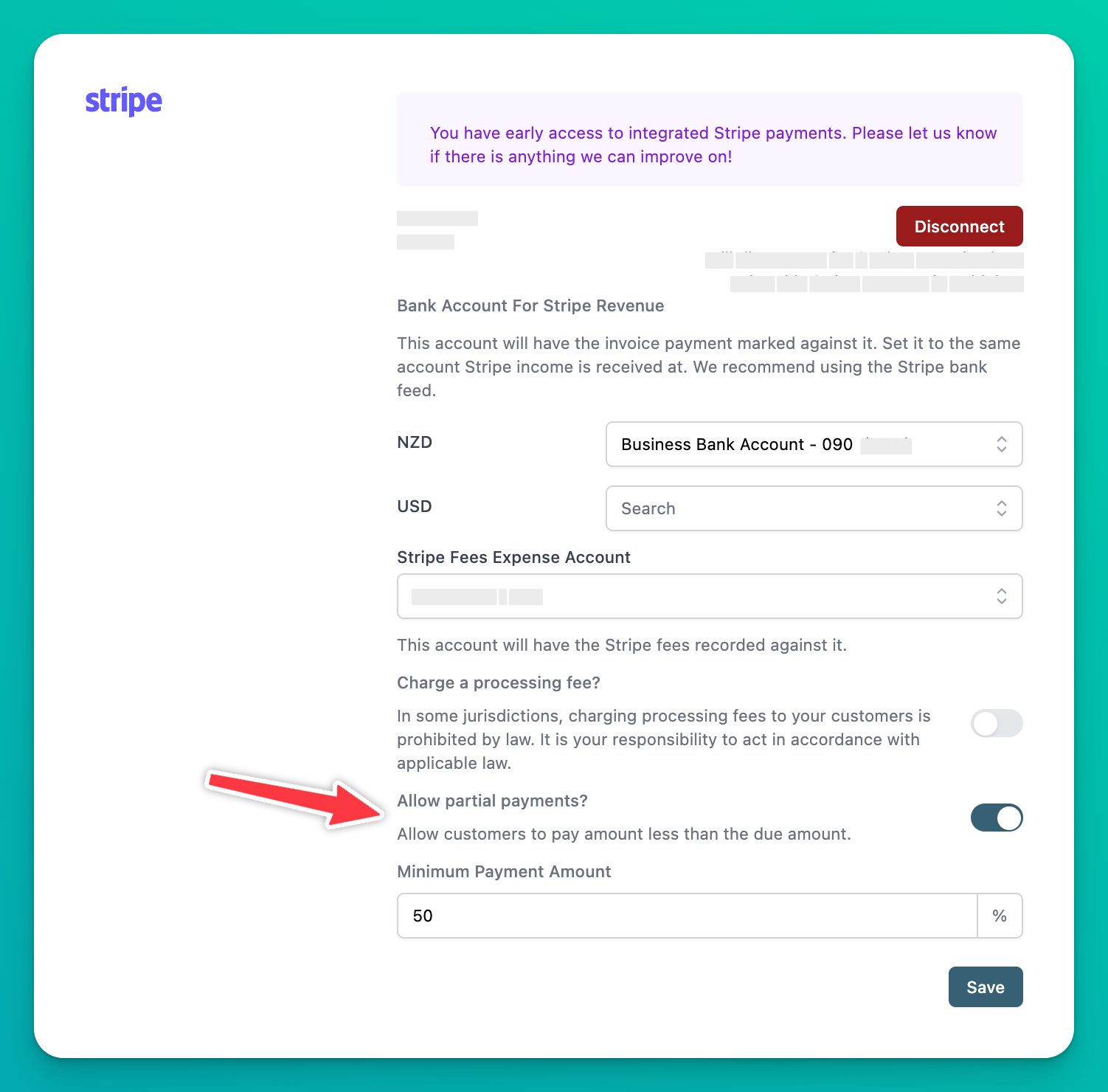
Paidnice Stripe settings with the Allow partial payments switch and a minimum payment amount field
  1. Connect your Stripe account in Paidnice.
  2. Switch on "Allow partial payments".
  3. Set the minimum payment, for example 50%.
  4. Save. Every reminder, statement and portal link now offers the option.

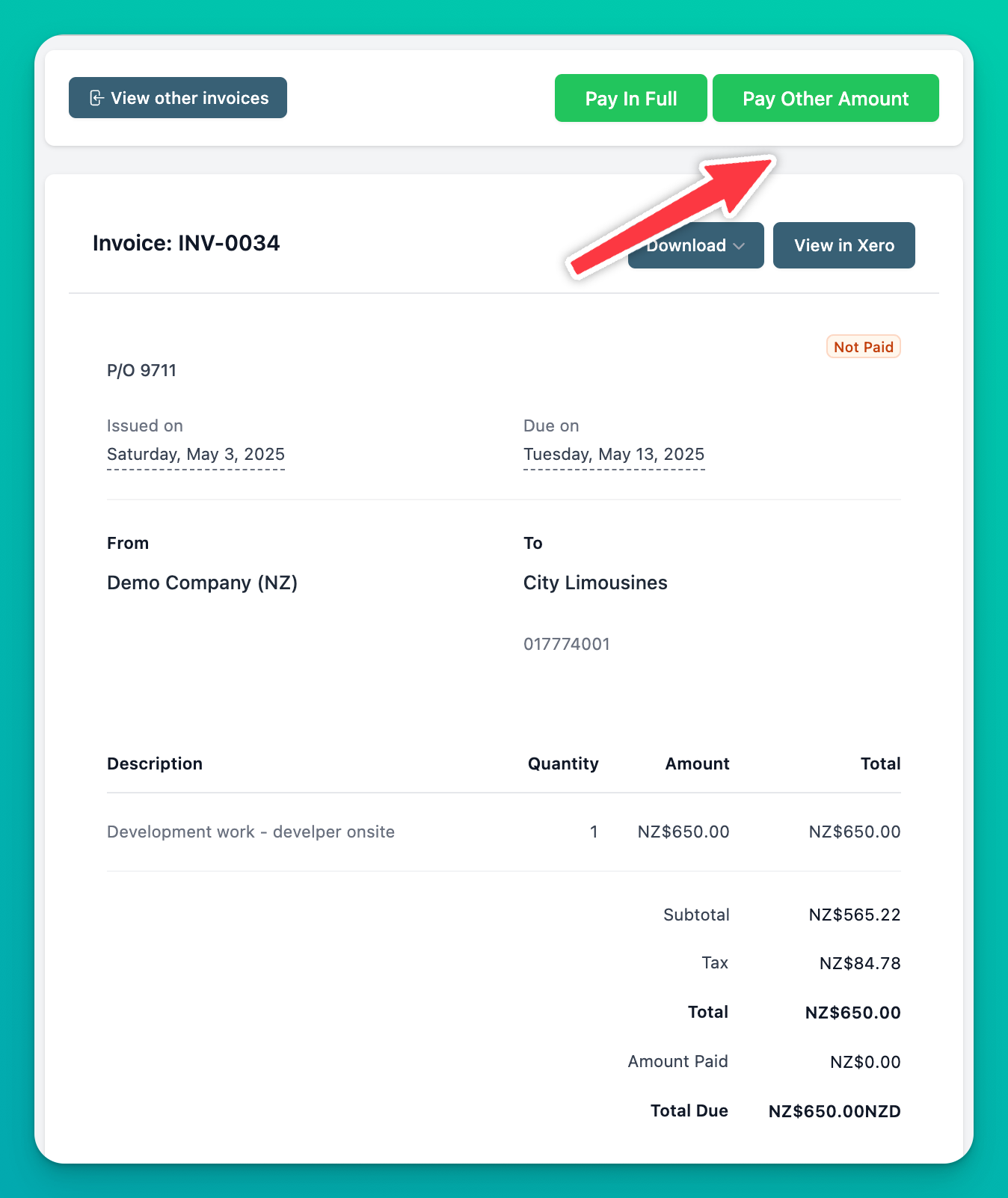
The customer sees a "Pay Other Amount" button next to "Pay In Full" when they open the invoice:

Customer invoice view showing Pay In Full and Pay Other Amount buttons

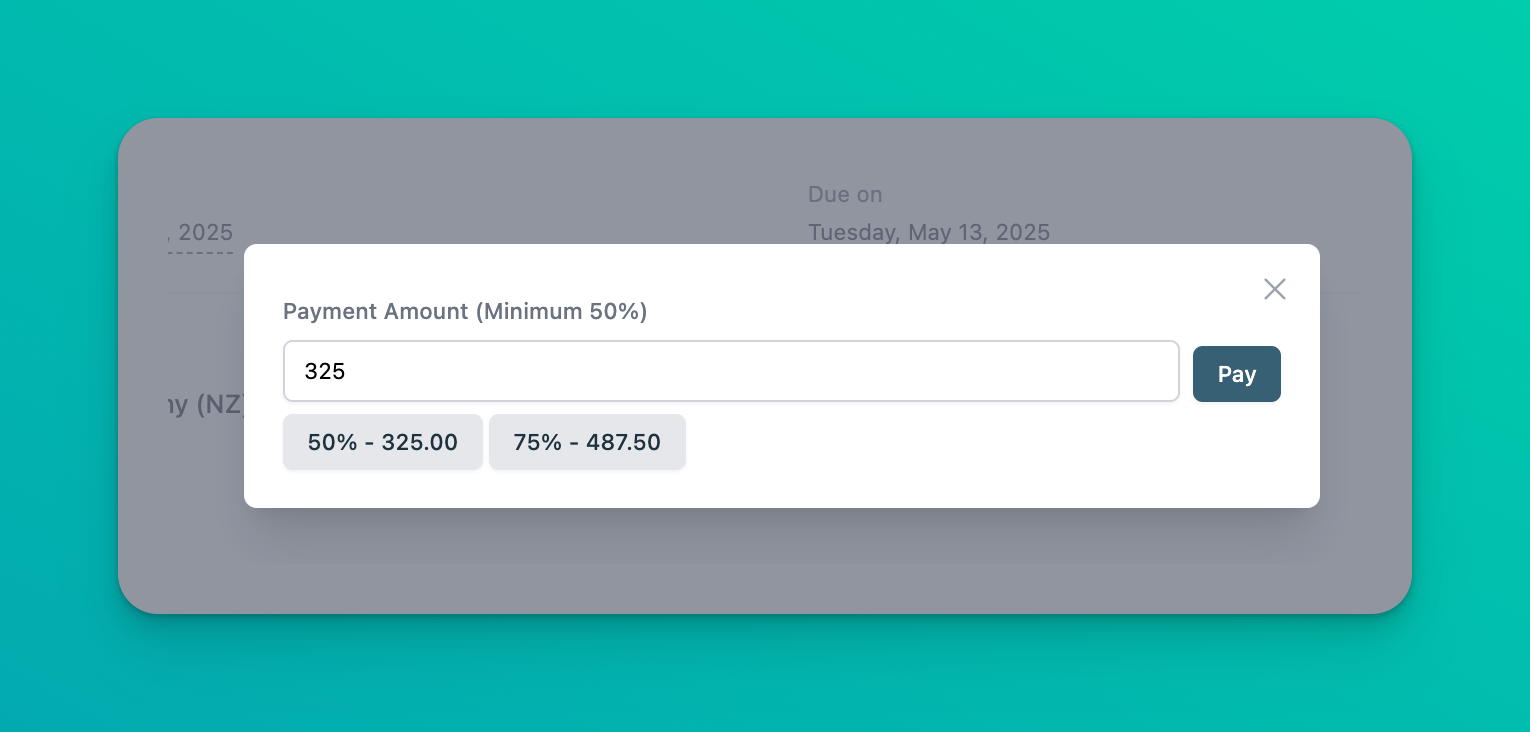
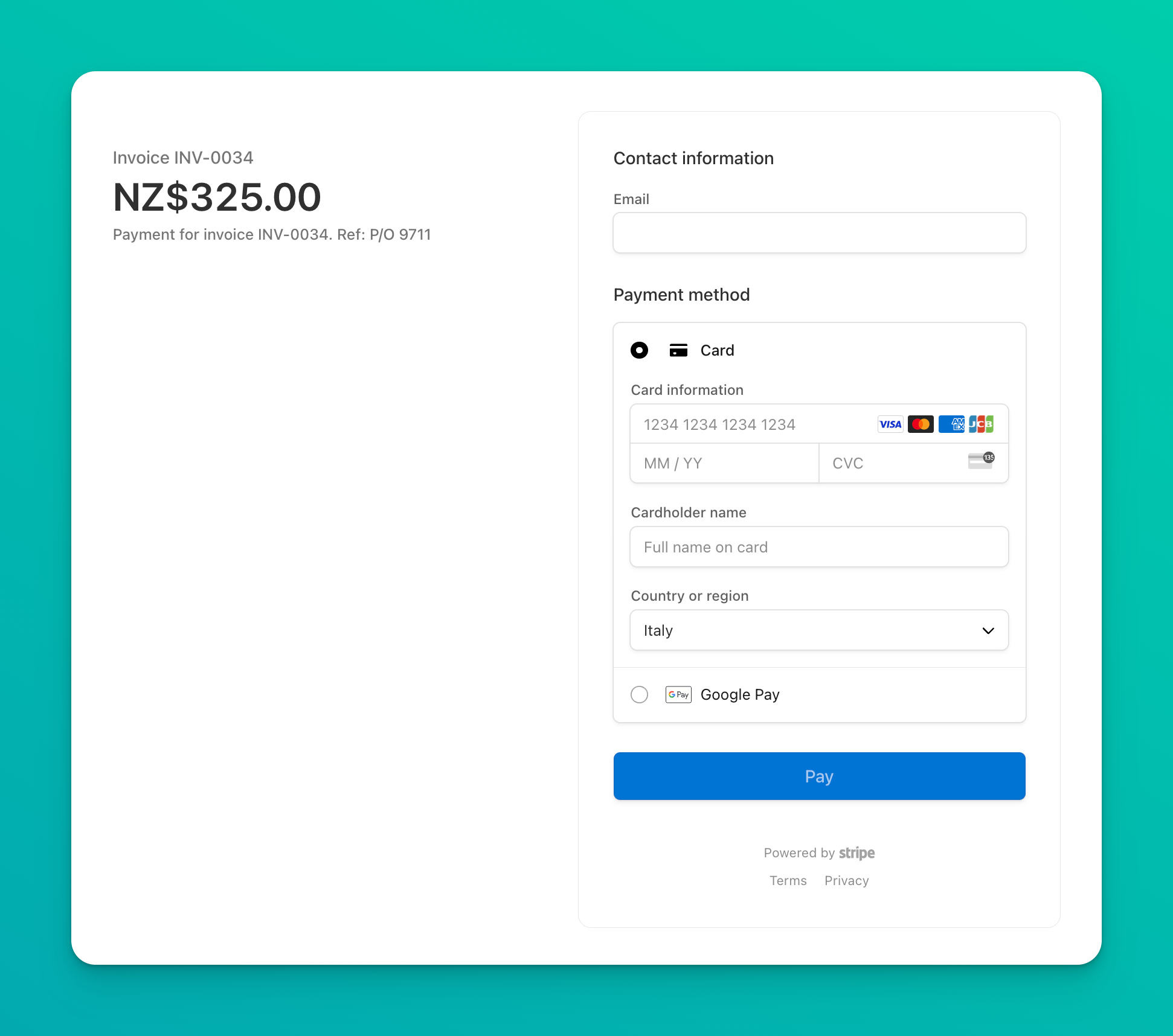
They choose the minimum or anything above it, and Stripe hosts the checkout:

Amount selector for a partial payment, with the minimum enforced
Stripe checkout screen for a partial invoice payment

The minimum is the part Stripe alone does not give you. On the hosted invoice page the customer can enter any amount, so a $10 payment on a $4,000 invoice is a valid partial payment. The Paidnice threshold is a percentage set once in Settings, and the customer cannot pay below it.

Why accept partial payments?

Partial payments get you paid something sooner instead of waiting for the whole invoice, which matters most on larger invoices and with slower-paying customers. A customer who cannot clear $8,000 this month can often clear $4,000, and the invoice that would have sat unpaid is half settled.

  • Cash arrives earlier. Part of the money lands now rather than all of it later.
  • Fewer abandoned invoices. When the only options are pay in full or ignore the email, larger invoices tend to get ignored.
  • Deposits and milestones without a second invoice. A design agency collecting 50% before a project starts, a consultancy billing by phase, an event planner taking a booking deposit.
  • A middle step before a payment plan. A customer who pays part of an invoice unprompted is usually a customer worth offering a payment plan rather than a late fee.

Is a partial payment the same as splitting a payment?

No. A partial payment is one customer paying less than the full amount now and the rest later. A split payment divides one transaction across several payers or several payment methods at the same time, which is a different Stripe feature and a different question.

Paidnice handles the first case. If a customer wants to pay one invoice half by card and half by bank transfer on the same day, that is two partial payments in sequence, and both are recorded against the invoice.

How do I turn on partial payments in Paidnice?

Open Settings in Paidnice, go to the Stripe payment provider, switch on "Allow partial payments" and set the minimum. Partial payments are included on every plan wherever Stripe is connected, from US$69 a month for Essentials, on both Xero and QuickBooks Online.

The Stripe integration page covers the connection itself. Card, ACH, BACS and Stripe direct debit all run through the same hosted checkout, and card and bank details never reach Paidnice.

Common questions

Does Stripe allow partial payments on invoices?
Yes. Enable partial payments under Settings, Billing, Invoices for the hosted invoice page, charge a partial amount from the Dashboard against a saved payment method, or attach a PaymentIntent to the invoice by API. The invoice stays open until its remaining balance is zero.

Can a customer pay part of a Xero or QuickBooks invoice through Stripe?
Yes, with a connected app. Paidnice adds a Pay Other Amount option to the invoice, enforces a minimum you set, and records each payment against the invoice in Xero or QuickBooks Online.

What happens if a customer overpays a Stripe invoice?
Stripe credits the excess to the customer's credit balance and fires an invoice.overpaid webhook. Refunding it is a separate step.

Is partial capture the same as a partial payment?
No. Partial capture takes less than an authorized hold and releases the rest, so nothing stays owing. A partial payment leaves a balance on the invoice for the customer to pay later.

Denym Bird

Written by

Denym Bird

Co-founder & CEO of Paidnice

Denym is a software entrepreneur and writes about accounts receivables management for small business.

Stop chasing invoices.
Start getting paid.

Paidnice is accounts receivable automation that enforces your payment terms, trusted by thousands of businesses on Xero and QuickBooks. Credit control and debtor management, run for you.

Try it Now - It's Free

No card required.

ACAcme Joinery 12 days overdue Checking policy Late fee applied Awaiting payment $4,120 $4,202
BRBrightwork Due today Reminder sent Still unpaid Final notice $1,880
CVCoverdale Due in 3 days Reminder sent Checking policy Exempt from fees Needs review Sent to your team $6,480

Try Our Free Accounts Receivable Calculators

Optimize your cash flow with our suite of financial tools designed for AR professionals. Calculate DSO, aging analysis, late fees, and more.

Explore Calculators