



Summary
A weekly AR team review should take about 30 minutes and cover six numbers: overdue balance and days sales overdue, promises due and broken, escalations past their scheduled date, customer replies still open, on-time payments with CEI, and each person's activity. Every account discussed leaves the meeting with one owner and one next date.
- Before the meeting: Reconcile last week's payments, so you do not discuss invoices that are already paid.
- The six numbers: Overdue and days sales overdue, promises, escalations past scheduled, open replies, on-time payments and CEI, and activity per person.
- What to skip: Invoices not yet due, customers on direct debit or a payment plan that is running, and accounts already with a collection agency.
Your AR team meets every Monday to go through the aged receivables report, line by line. Much of the meeting goes on accounts you already wrote off in your head. A customer asked us for exactly the fix: a view of the accounts that missed a deadline and need action this week, without the accounts frozen for write-off diluting it.
Here are the six numbers to look at in a weekly accounts receivable review, the order to take them in, and how to leave every account with an owner and a date.
Free: Payment reminder email templatesCopy the reminder emails for before, on and after the due date.What should you do before a weekly AR review?
Reconcile last week's payments before the meeting. An aged report with unreconciled payments shows paid invoices as overdue, and the team spends time on customers who have already paid.
We have seen this in setup calls: a customer whose ledger sync ran behind was chasing invoices that were already paid. Fix the data first, then look at the numbers.
- Reconcile the bank feed up to the end of last week.
- Tag accounts that are with a collection agency or waiting to be written off, and filter them out of the working view.
- Check that every overdue account has an owner. Unowned accounts go to the top of the agenda.
What are the six numbers to look at?
Look at six numbers in this order: the first three need action this week, and the last three tell you whether the process is working.
| # | Number | The question it answers | The action it leads to |
|---|---|---|---|
| 1 | Overdue balance and days sales overdue, against last week | Is the overdue pile growing or shrinking? | If it grew, find the two or three accounts that caused it |
| 2 | Promises due this week, and promises broken last week | Which customers said they would pay, and did they? | Call each broken promise in the next business day |
| 3 | Escalations past their scheduled date | Which calls, stop-credit decisions or letters are late? | Reassign or clear them before anything new |
| 4 | Customer replies still open or unassigned | Is anyone waiting for an answer from us? | Give each open reply an owner today |
| 5 | On-time payments and CEI, over 90 days | Is the process getting better? | If either falls for three weeks, change a reminder or the follow-up |
| 6 | Activity per person: calls, reach rate, promises kept | Is the work spread evenly, and is it working? | Move accounts when one person is overloaded |
Which numbers need action this week?
Overdue balance, promises and late escalations need action this week, because each one points at a named customer. Take them first while everyone is fresh.
Overdue balance and days sales overdue. Compare it with last week. If the balance rose, sort overdue by customer and find the few accounts that moved it. In most businesses a short list of customers holds most of the seriously overdue money.
Start with the worst few accounts. In a typical business, 2 customers in 3 never go seriously overdue. The worst 1 in 20 customers bill 24% of revenue and cause 70% of the seriously overdue money.
Promises. List the promises due this week and the ones broken last week. A broken promise gets a call within one business day, from the person who took it. See how to track promises kept and broken for each collector.
Escalations past their scheduled date. These are calls, stop-credit decisions or letters that should already have happened. Clear or reassign them before you add new ones.
Which numbers show whether the process works?
Open replies, on-time payments with CEI, and activity per person show whether your process is working. Read them as trends over several weeks, not as one week's result.
Open customer replies. A reply that says "paid last week" or "please resend the invoice" is a customer waiting on you. If replies sit in one person's inbox, nobody else can see them. One CFO told us they wanted a shared inbox because collection emails went to one named person and no one else could see them.
On-time payments and CEI. On-time payments shows whether customers pay by the due date. The collection effectiveness index shows how much of what fell due you collected. Read both over 90 days, so one large late payment does not decide the week.
Activity per person. Calls, how often the customer was reached, and promises kept show whether the work is spread evenly. See how to measure a credit controller's performance for how to read each one.
What does a 30-minute weekly AR review agenda look like?
A 30-minute weekly AR review spends most of its time on named accounts and only a few minutes on trends.
- 5 minutes: overdue balance and days sales overdue against last week, and the accounts that moved them.
- 10 minutes: broken promises and escalations past their scheduled date, one owner and one next date each.
- 5 minutes: open and unassigned customer replies.
- 5 minutes: on-time payments, CEI and activity per person.
- 5 minutes: decisions that need a manager: stop credit, a payment plan, a write-off or a collection agency.
Skip invoices that are not yet due, customers on direct debit, payment plans that are running on schedule, and accounts already with an agency. They are covered by a process, and discussing them uses up the time the late accounts need.
How do you run a weekly AR review in Paidnice?
In Paidnice, the six numbers come from three screens: the dashboard, Team Activity and the shared inbox. The dashboard reads your accounting system, and Team Activity and the inbox record the work done in Paidnice, so nobody has to prepare a report.
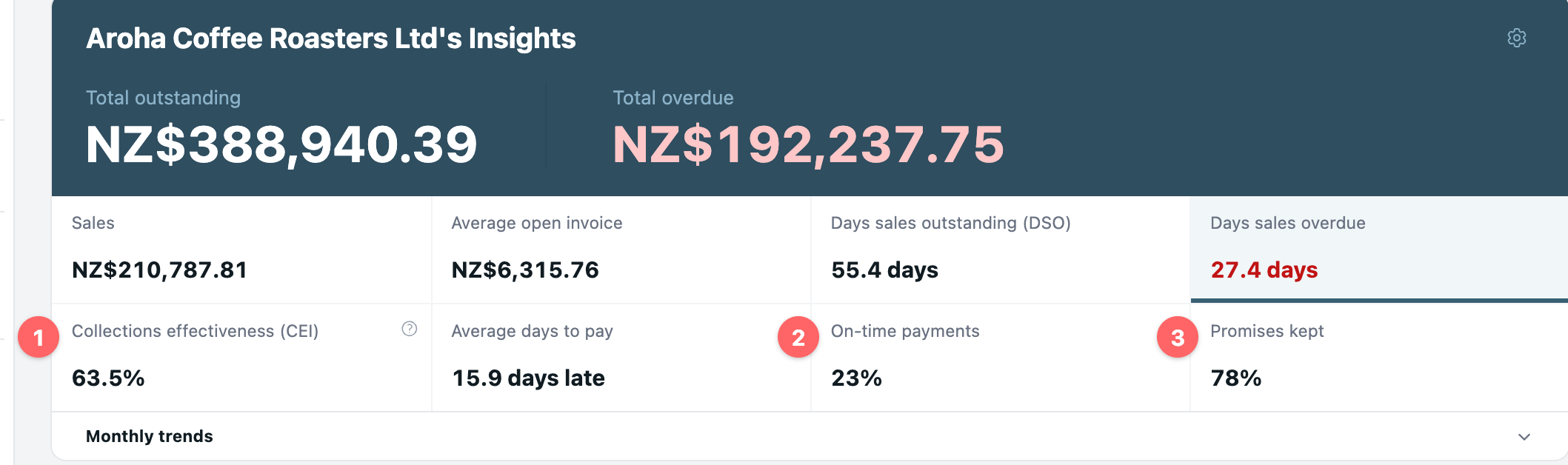
- Dashboard: total overdue, DSO, days sales overdue, average days to pay, CEI over a trailing 90 days (1), on-time payments (2) and promises kept (3), with per-group insights.
- Team Activity: escalations past scheduled, calls, reach rate, texts, emails, amount promised and promises kept for each person, with a 12-week trend.
- Shared inbox: every email and SMS reply to your reminders, filtered to Open, with an "Assigned to" owner and internal notes. See the shared inbox.
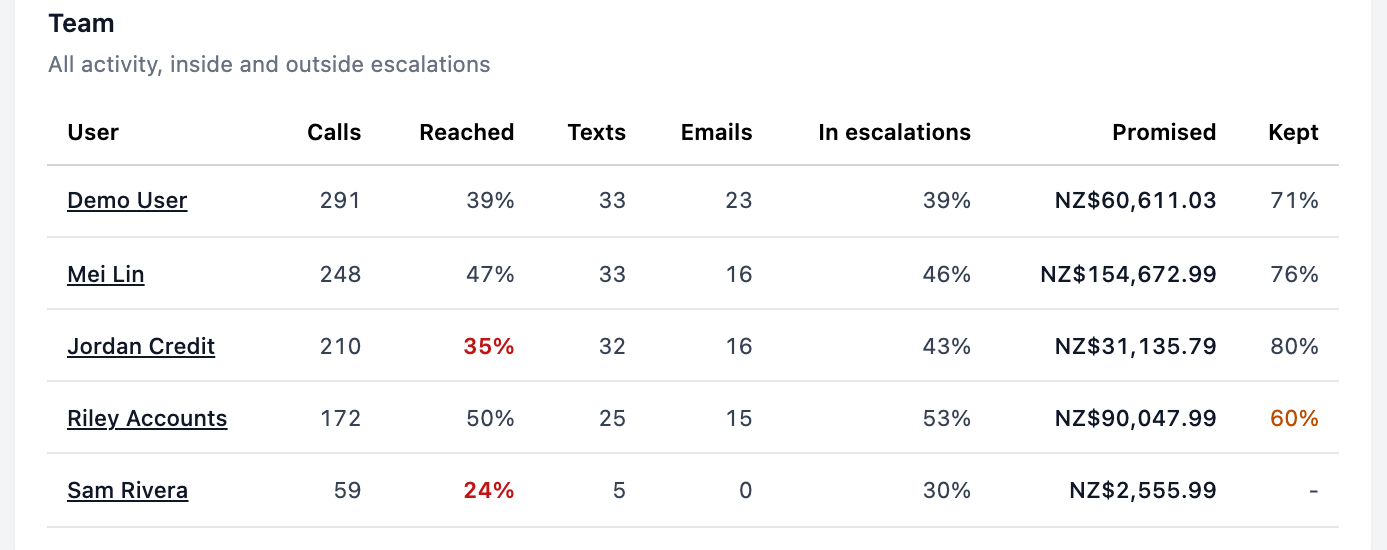
Each person can also switch on a weekly summary email of the organization's receivables, so the team arrives having seen the numbers. These reports are part of accounts receivable reporting. The dashboard, Team Activity and the shared inbox are on every plan.
💡 Paidnice insight
A promise recorded in Paidnice pauses reminders until the promised date, and the invoice owner can get an email when it breaks. Broken promises reach the right person on the day, so the weekly review can focus on customers who have broken a second promise.
Frequently asked questions
How long should a weekly AR meeting be?
About 30 minutes for a team of two to five people. If it runs longer, the agenda probably includes accounts that are not yet due or are already handled by a process.
Who should attend a weekly AR review?
Everyone who owns overdue accounts, plus the person who can approve stop credit, payment plans and write-offs. Sales can join for key accounts when a decision affects the relationship.
Should I review the aging report line by line?
No. Start from the accounts that changed since last week: new overdue balances, broken promises and late escalations. A full line-by-line read belongs in the month-end review.
What is the difference between a weekly and a monthly AR review?
The weekly review deals with named accounts and next actions. The monthly review looks at trends such as CEI, DSO and bad debt, and decides on write-offs and changes to terms.
What should I bring to a weekly AR review?
A reconciled overdue list sorted by customer, the promises due this week and broken last week, the escalations past their date, and the customer replies still open.
Paidnice features in this article
About the editorial team
Ashley is a co-founder and lead developer of Paidnice and has built accounting software for more than 10 years. He builds the ledger connections that put reminders, late fees and payments into Xero, QuickBooks and ERPs such as NetSuite and Business Central. Before Paidnice he co-founded A2X, ecommerce accounting software for Xero and QuickBooks.
 App of the Year
