


Summary
You can connect Xero to Paidnice in about two minutes, and nothing is sent to customers or changed in Xero until you turn on a policy and approve it. Paidnice reads sales invoices, payments, contacts, quotes and credits. It writes back only what a feature you use needs, such as a late fee invoice or a Stripe payment.
- What it reads: Sales invoices, payments, contacts, quotes, receivable credit notes, prepayments, overpayments, accounts and items. Bills are ignored.
- What it writes: Late fee and interest invoices, discount lines, the expected payment date, the sent status, notes and Stripe payments, each only when you use that feature.
- How to disconnect: Use the Connection tab under Settings, General, Advanced. Disconnecting stops sync and emails and does not cancel the subscription.
You are about to connect a credit control tool to Xero, and Xero asks you to allow access to your organisation. Before you click, you want to know what the software will read, what it can change, and whether a customer could get an email you did not plan.
Here is what Paidnice reads from Xero, what it writes back and when, and how to connect, disconnect and reconnect.
What can Paidnice see and change in your Xero file?
Paidnice reads your sales side: sales invoices, payments, contacts, quotes, receivable credit notes, prepayments, overpayments, accounts and items. It ignores bills. It changes Xero only when a feature you turn on needs to.
Nothing is sent to customers, and nothing changes in Xero, until you turn on a policy and approve it. Connecting by itself only imports data.
The connection uses OAuth 2.0, so you sign in on Xero’s own screen. Paidnice never sees or stores your Xero password. The security page covers how tokens and data are handled.
If you are still deciding whether you need more than Xero’s own reminders, see our comparison of Xero reminders and a credit control tool. The Xero credit control page shows what Paidnice does with the data once it is connected.
Free: Payment reminder email templatesCopy the reminder emails for before, on and after the due date.How do you connect Xero to Paidnice?
You connect from the Paidnice Dashboard, and it takes about two minutes. You need a Xero user who is allowed to authorize third-party software for the organisation.
- Start from the Dashboard. On the card "Get started: connect to Xero or QuickBooks", click Connect.
- Sign in to Xero. Use your normal Xero login.
- Choose the organisation. You can tick more than one. Each Xero organisation becomes its own Paidnice organization.
- Allow access. Xero sends you back to Paidnice.
- Answer the setup wizard. It asks about your business and the automations you want. Everything it creates is a draft.
Paidnice then runs a full import before it calculates any action. The help article on connecting Xero or QuickBooks has the same steps with the error messages you might see.
When the import is done, our guide to going live with reminders covers the first week.
What does Paidnice read from Xero, and how often?
Paidnice imports everything once when you connect, then keeps up with changes. Invoice and contact changes usually arrive within a minute or two.
| What Paidnice reads | When |
|---|---|
| Everything listed above, for all time | Once on first connect, before any action is calculated |
| Invoices and contacts | By webhook, usually within a minute or two |
| Quotes, prepayments and overpayments | Every 4 hours |
| Payments | A catch-up run twice a day |
| Accounts and items | Daily, and on connect |
Some invoices are left out. An invoice with no due date is skipped. Draft and Deleted invoices are not imported until they are approved. Only an approved invoice with a balance is chased.
You can force a refresh at any time. Check for updates on the Invoices page and the Contacts page pulls the latest data. The circular arrows in an invoice header resync that one invoice, and opening an invoice resyncs it and its contact.

The help article on how syncing works lists every timing.
What does Paidnice write back to Xero?
Paidnice writes to Xero only when you use a feature that needs it. The table lists each write.
| What Paidnice writes | Only when |
|---|---|
| A late fee invoice, or a late fee line on the original invoice | A late fee policy runs |
| A statement interest invoice | A statement interest policy runs |
| A prompt payment discount line | A discount policy applies it, and removes it on the removal date if unpaid |
| The expected payment date on an invoice | You set the date, or tick Also set the expected payment date on a payment promise |
| A note in the Xero history | Sync notes after each action is on. It is off by default. |
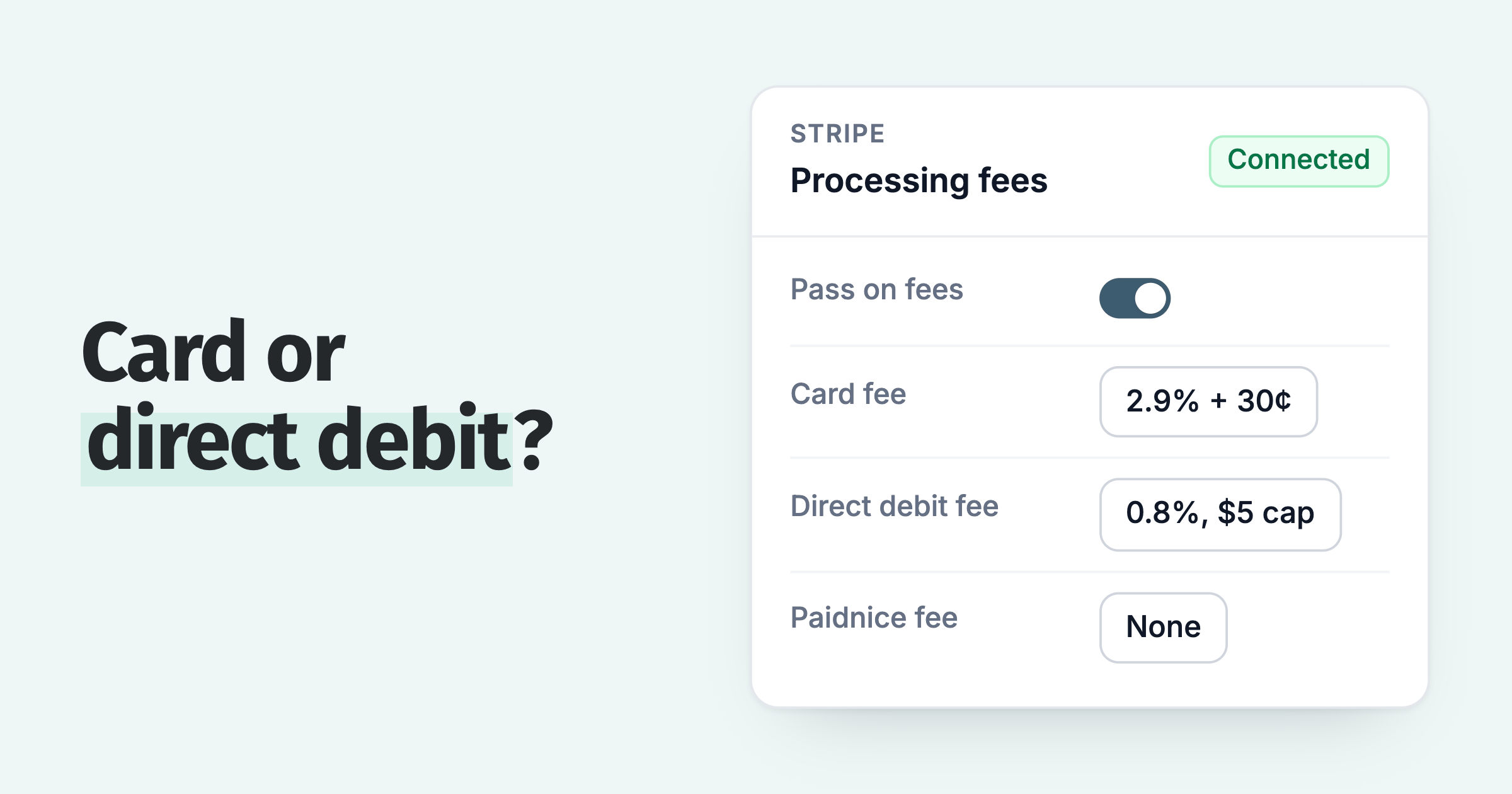
| A payment, the Stripe fee and any processing fee | A customer pays through your Stripe account connected to Paidnice |
| The sent status on a late fee invoice | Mark late fee invoices as sent is on, and the notification email goes out |
| The sent status on an invoice | A reminder policy has Mark as sent in accounting system on |
| A change to a contact person | You edit the person in Paidnice |
| A surcharge line on an invoice | You create a payment plan with a surcharge |
| Accepting or declining a quote | A customer does it in the portal |
A late fee policy in Draft creates nothing in Xero until you approve it. For the Stripe entries, see our post on card payments on a Xero invoice.
Contact details such as name, address and tax are never edited from Paidnice. Xero is the source of truth, and each sync overwrites them. Contact people are the exception: a change to a contact person in Paidnice is written back.
💡 Paidnice insight
We built each write-back to belong to a feature you turn on yourself. When a finance lead asks us what will change in Xero on the day they connect, the answer is nothing. You can connect first and decide on late fees, discounts and payments later.
What stays only in Paidnice?
Your working data stays in Paidnice and is never written to Xero: groups, tags, owners, frozen status, Paidnice-only contact people, payment promises and invoice queries.
Sync does not overwrite these. A contact keeps its group, tags and owner when its details change in Xero.
The frozen status is a good example. When you freeze an invoice or a contact to stop chasing, nothing is written to Xero and customers do not see it. A payment promise also stays in Paidnice, unless you tick the box that sets the expected payment date on the Xero invoice.
Who else can get in, and how do you disconnect?
Colleagues join in two ways, and neither creates a second setup. You disconnect from the Connection tab under Settings, General, Advanced.
A colleague who connects the same Xero organisation is matched to the existing setup and becomes a second connected user. You can also invite someone by email. An invited user needs no Xero login.
To disconnect, open Settings, General, Advanced, then the Connection tab. Click Disconnect from Xero, add a reason if you want to, and confirm. Only connected users see the button.
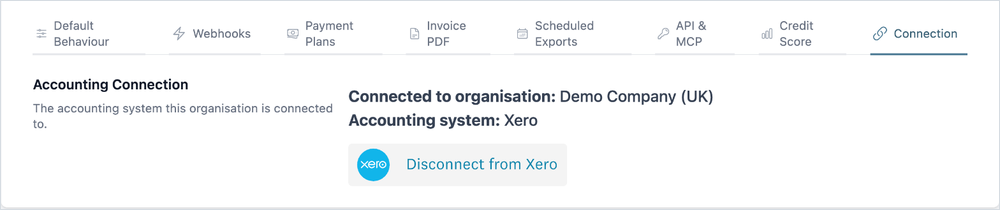
Disconnecting has three effects:
- Sync stops, and no emails go out.
- Your customers lose access to the portal.
- The subscription is not canceled. You cancel that separately.
What happens if the connection breaks?
If Paidnice loses access to Xero, it marks the organization as disconnected and emails the connected users. Nothing syncs and no emails go out until you reconnect.
You see a red box that reads “Organisation is not connected”, with a Reconnect button. The organization switcher shows “Disconnected - click to reconnect”.
Reconnecting keeps your groups, policies, templates and settings. It clears the old scheduled actions, runs a full import and recalculates the actions from current data.
Frequently asked questions
Does Paidnice email my customers as soon as I connect Xero?
No. Connecting imports your data and the setup wizard creates drafts. Nothing is sent to customers until you turn on a policy and approve it.
Can Paidnice edit or delete my Xero invoices?
Paidnice changes an invoice only through a feature you turn on. A late fee policy set to Update Invoice adds a line, and a discount policy adds a discount line and removes it later if the invoice is unpaid. Reminders and statements add no lines to an invoice. A reminder policy can mark the invoice as sent in Xero.
Can I connect more than one Xero organisation?
Yes. Tick more than one organisation on Xero’s screen, or add one later from the organization switcher with + Connect to Xero. Extra organizations are a Pro add-on.
Does Paidnice read my bills or supplier invoices?
No. Paidnice imports sales invoices and ignores bills. The full list of what it reads is in the first section of this post.
Can I connect an AI agent or my own system to the same data?
Yes. The public API and the MCP server are on every plan, and Paidnice switches the public API on for your organization when you ask. On the MCP consent page, leaving Write unticked makes the connection read only. See our post on the Paidnice MCP server for Xero.
Does this work the same way for QuickBooks Online?
Yes. You connect QuickBooks Online from the same Dashboard card with Connect to QuickBooks, and Paidnice uses QuickBooks wording such as customer and estimate. This post covers Xero. For what to expect from a tool on the Xero side, read our guide to credit control software for Xero.
Paidnice features in this article
About the editorial team
Jack is a co-founder of Paidnice and has built accounting software for more than 10 years. He builds the product that sends reminders, adds late fees and takes payments for businesses on Xero, QuickBooks and ERPs such as NetSuite and Business Central.
Ashley is a co-founder and lead developer of Paidnice and has built accounting software for more than 10 years. He builds the ledger connections that put reminders, late fees and payments into Xero, QuickBooks and ERPs such as NetSuite and Business Central. Before Paidnice he co-founded A2X, ecommerce accounting software for Xero and QuickBooks.
 App of the Year