



Summary
You can call customers about overdue invoices from Paidnice on every plan, once you have an active paid plan and a local phone number, in Australia, Canada, New Zealand, the UK or the US, or on Xero's Global edition. Calls are paid from prepaid credit. Paidnice shows the price per minute before the call, and charges only completed calls, per started minute.
- Phone numbers: You choose a local number in New Zealand, Australia, the UK, the US or Canada, and approval takes up to 3 business days.
- Call cost: The price per minute covers the call, the recording, the transcription and the AI summary, and a call of 2 minutes 10 seconds is charged as 3 minutes.
- Your first call: Click Call in the contact header, pick the person and the caller ID, check the price, then click Start call.
The third reminder went out and the customer still has not replied. You find their number in your accounting software, call from your mobile, then type what they said into a note afterward. The call itself appears nowhere in your records.
Here is how calling from Paidnice works: who can use it, how to get a phone number, how calls are charged, and how to place your first call.
Can you call customers from Xero or QuickBooks?
Xero and QuickBooks Online have no calling. In Paidnice you call from the contact page, paid from prepaid credit, once you have a local phone number and an active paid plan.
That leaves two gaps. The note depends on what the caller remembers, and the next person on the account cannot see what was agreed. Calling from Paidnice puts the call, the note and the customer’s invoices on one screen.
Free: Payment reminder email templatesCopy the reminder emails for before, on and after the due date.What does it cost to call customers about overdue invoices from Paidnice?
Calls are paid from prepaid credit. Your plan includes some credit each billing month, and you see the price per minute before every call. Only completed calls are charged.
The charging rules are short:
- You confirm the price first. The price per minute shows before the call, and nothing dials until you click Start call on the price screen.
- One price covers everything. It covers the call, the recording, the transcription and the AI summary.
- Completed calls only. A call is charged after it ends, per started minute. A call of 2 minutes 10 seconds is charged as 3 minutes.
- The rate depends on three things. They are the country of your caller ID, the country of the number you call, and whether that number is a landline or a mobile.
- Ring my phone adds cost. That extra leg is priced by the country of the phone number in My Account.
The Call pricing link on the Calls page shows the full rate table in your subscription currency. The subscription owner can buy more credit from the same page.
When your credit is used up, Start call is disabled. With under 5 minutes of credit left, you see a warning before you dial. One phone number is included with your subscription, and each extra number is added to the subscription.
Who can use calling in Paidnice?
Calling is on every Paidnice plan, and it needs an active paid plan. The free trial does not count.
Calls are turned on automatically for new organizations in Australia, Canada, New Zealand, the UK and the US, and for those on Xero’s Global edition. You know it is on when Calls shows in the sidebar. If you have an older organization and cannot see it, ask support to turn it on.
Only users who can edit settings can buy or release a phone number. See the full feature on the in-app calling page.
How do you get a phone number?
Open Calls. On the Welcome to Calls page, click Get started, then Choose your number. You pick a local number, then wait for approval in that country.
Local numbers are available in New Zealand, Australia, the UK, the US and Canada. Mobile and toll-free numbers are not available. The approval depends on the country:
- New Zealand, Australia and the UK. Each country needs its own approval, with an address and supporting documents for a Business or an Individual. The review takes up to 3 business days.
- The US and Canada. One business profile covers both countries, and the review takes 2 to 3 business days. Your business does not need to be in North America.
For the US and Canada, Paidnice emails the person who submitted the profile when it is approved or rejected. A rejection shows its reason on the Phone numbers tab.
💡 Paidnice insight
Our advice is to start the number approval before you need to call anyone. The review is the only wait in the setup, and it runs up to 3 business days. Everything after that, from the dialog to the price check, happens in one window.
How do you make your first call?
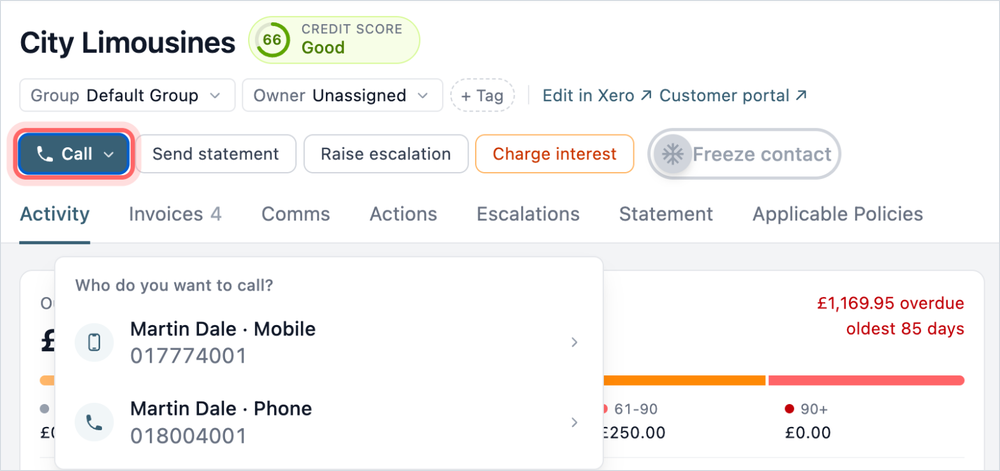
Open the contact and click Call in the contact header. You pick who to call, which number shows as your caller ID, and how you want to talk. Then you confirm the price.
- Click Call. The button is in the contact header. A phone icon also sits next to each person in the contact people card.
- Answer "Who do you want to call?". Pick the person and their number.
- Check Caller ID. A number in the customer's country is preselected and marked Recommended. A number from another country warns you about the international rate.
- Choose Call using. Pick Browser to use your computer's microphone and speakers, or Ring my phone so Paidnice rings your phone first and then dials the customer.
- Click Call, then check the price. A confirmation screen shows the price per minute.
- Click Start call. During a browser call you have Mute and Hang up.
This post covers the setup only. For what to say once the customer answers, see our guide to making collection calls. If nobody picks up, have a voicemail script ready.
Is the call recorded?
Nothing is recorded until you click Start Transcribing. Recording happens only when you turn on transcription, unless a user who can edit settings has turned on Auto transcribe calls for the whole organization.
Paidnice plays no consent message to the customer. You are responsible for the consent rules where you and the customer are, and our guide to call recording laws sets them out.
There is no pause. Stop & Remove transcription asks Delete the recording? and deletes it if you confirm. After that, you cannot start transcription again on the same call.
What happens after the call?
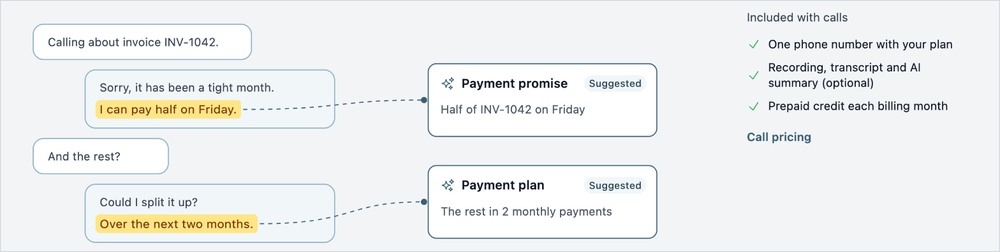
When transcription was on, the transcript is usually ready in under a minute. Paidnice adds a short summary and a suggested call outcome, and you save the call with Record activity.
Your team places the call. AI writes the summary and, when you click Draft follow up email, a draft email from the transcript. You edit the draft and send it yourself. To save what the customer agreed, see how to record a promise, a query and a plan.
The Calls page keeps the history. Tiles show the last 7 days: calls, answered calls, talk time, billable time and the total promised on calls. Below them, the call log lists each call by day, so you do not need a separate call log template.
What are the limits?
Calling from Paidnice is outgoing only, to five countries, one call at a time. A call is added to the contact’s activity only when you click Record activity.
- Countries you can call. New Zealand, Australia, the UK, Canada, and the US where US calling is on. Other countries are blocked.
- Incoming calls. A customer who rings your number hears a spoken message, then the call ends. There is no voicemail.
- One call at a time. You cannot place a second call while one is active.
- Escalations. An Escalate to call policy queues an escalation. You place the call from the escalation page, and the call is saved to the contact.
Frequently asked questions
Do I need a phone system to call from Paidnice?
No. Browser uses your computer’s microphone and speakers, and you can test both before the call. Ring my phone rings the phone number saved in My Account, then dials the customer.
Does Paidnice make the call for me?
No. A person on your team places every call and talks to the customer. AI writes the summary and the follow-up draft after the call.
Can I call customers during the free trial?
No. Calling needs an active paid plan, and the free trial does not count. Calling is on every plan.
Can I get a mobile or toll-free number?
No. Paidnice offers local numbers in New Zealand, Australia, the UK, the US and Canada. Mobile and toll-free numbers are not available.
What happens if my credit runs out during a call?
A call can run up to 5 minutes past your balance, then it ends. You see a warning before you dial when you have under 5 minutes of credit left.
Can a customer call my Paidnice number back?
They hear a spoken message, then the call ends. You can edit that message, up to 500 characters, so it tells them how to reach you.
Paidnice features in this article
About the editorial team
Ashley is a co-founder and lead developer of Paidnice and has built accounting software for more than 10 years. He builds the ledger connections that put reminders, late fees and payments into Xero, QuickBooks and ERPs such as NetSuite and Business Central. Before Paidnice he co-founded A2X, ecommerce accounting software for Xero and QuickBooks.
 App of the Year