



Summary
You can stop reminders when a customer says they will pay: record a payment promise on the invoice with a date and an amount. In Paidnice, reminders, SMS alerts, escalations, late fees and discounts scheduled before that date do not run. If the money does not arrive, the promise is marked broken and chasing restarts.
- What waits: Skip when payment promised is on by default on each policy, and payment plan reminders ignore it.
- Kept or broken: Paidnice checks every hour, and a promise breaks when the promised date plus the grace period passes unpaid.
- Xero and QuickBooks: On Xero the promise can set the invoice's expected payment date, and on QuickBooks the date stays in Paidnice.
A customer picks up the phone and says the payment will go out on Friday. You believe them, and you do not want another reminder to land in their inbox on Wednesday. You also do not want the invoice forgotten if Friday comes and goes.
Here is how to hold reminders until a promised date, and how chasing restarts if the money does not arrive.
How do you stop reminders when a customer says they will pay?
Record the promise against the invoice with a date and an amount. Reminders scheduled before that date do not run, and chasing restarts by itself if the money does not arrive.
That is three jobs: write the promise down, hold the reminders, and check on the day. This post covers the hold between the promise and the date. If you want the promise in writing from the customer, use our promise to pay template. The term itself is defined in the promise to pay dictionary entry.
Free: Payment reminder email templatesCopy the reminder emails for before, on and after the due date.What can Xero and QuickBooks do?
Xero has an expected payment date on the invoice, and a reminder switch per invoice with no restart date. QuickBooks Online has no reminder switch per invoice.
Xero lets you put an expected payment date on an invoice. To stop the reminders you turn them off for that invoice, and they stay off until someone turns them back on. Our post on how to pause one invoice has the steps. The switch has no restart date, so a missed promise depends on someone remembering it.
In QuickBooks Online, an Intuit community thread asks whether reminders can be turned off by customer or invoice. The only answer given there is the account-level switch. The person who asked had a customer paying in installments, and the thread gave them no workaround.
How do you record a promise in Paidnice?
Open the invoice, find the Payment promise row and click Record promise. Enter the date and the amount, then save.
- Open the invoice. A promise can only go on an unpaid invoice.
- Click Record promise. It is on the Payment promise row of the invoice page.
- Set the Promised payment date. Use the day the customer named.
- Check the Promised amount. It defaults to the full amount due. Lower it if the customer promised part.
- Add Notes. Write who made the promise and how, for example on a call.
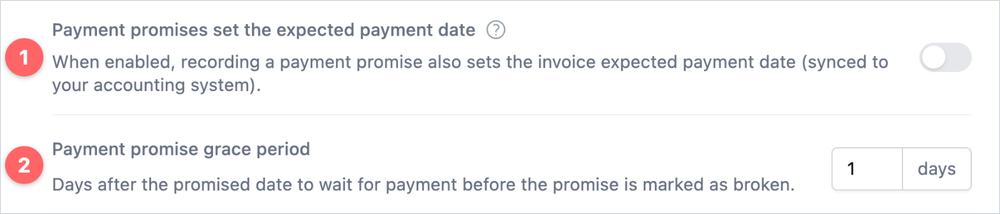
- Tick Also set the expected payment date. The Xero invoice then carries the same date. On QuickBooks Online the date stays in Paidnice.
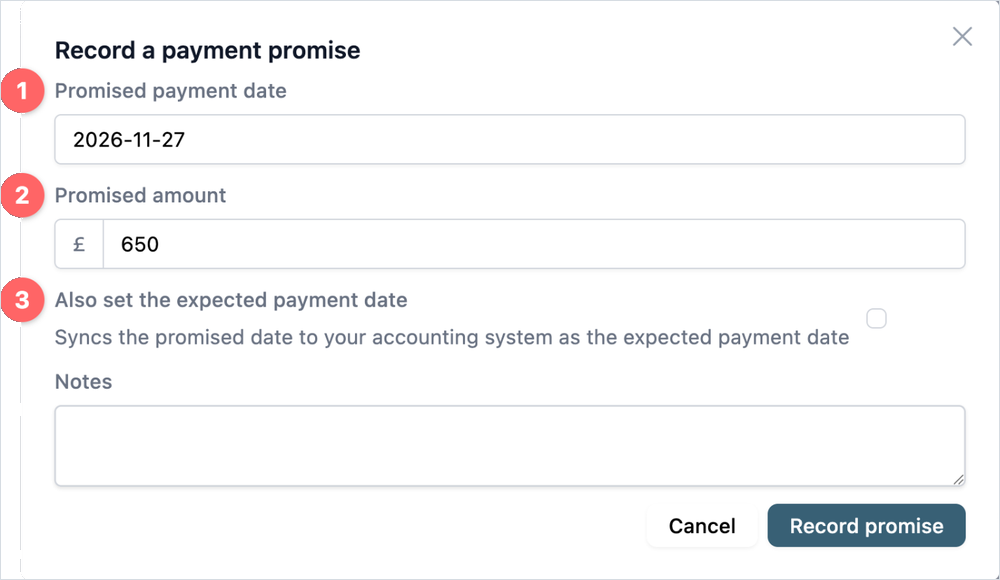
The invoice timeline then shows an entry such as “Promised $1,250.00 by 20 Nov 2026”, with the email address of the user who recorded it.
There are three other ways in:
- From an escalation. Record promise adds a note to the escalation with the promised date.
- From a call. The Agreed on the call form can hold a promise, as our post on what to record after a call shows.
- From the customer portal. With Allow customers to submit payment promises on, unpaid invoices show a Promise to pay button.
Which reminders wait?
Every policy with Skip when payment promised on. The setting is on by default, so reminders, SMS alerts, escalations, late fees and discounts scheduled before the promised date do not run.
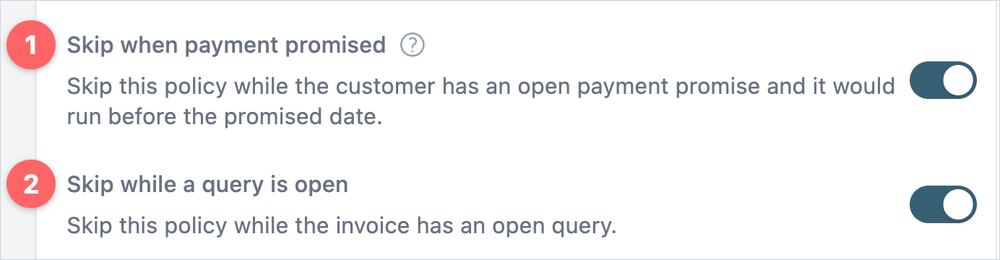
Two things do not wait:
- Payment plan reminders. They ignore the setting.
- Policies on the Promised Payment Date trigger. A reminder set to run 2 days before the promised date still goes. The open promise never skips it.
You can turn the setting off on one policy. The usual case is a late fee: turn it off on the late fee policy and the fee still applies on its normal date, so the customer keeps a reason to pay on the day they named.
What happens on the promised date?
Paidnice checks every open promise each hour and marks it kept or broken. You do not have to look at the invoice on the day.
- Kept. The invoice is paid in full, or payments dated on or after the day the promise was made add up to at least the promised amount.
- Broken. The promised date plus the grace period passes and the amount is not paid.
Both outcomes are written to the invoice timeline. A broken promise notifies the invoice owner. If the invoice has no owner, it goes to the contact owner, and after that to everyone with the Broken Payment Promise notification on.
💡 Paidnice insight
We set the Payment promise grace period to one day by default, because a bank transfer sent on the promised date can arrive the day after. You can change it under Organisation Settings, Advanced, Default Behaviour.
The hold only covers actions scheduled before the promised date. After that date, policies run as normal if the invoice is still unpaid. Our guide to a broken promise to pay covers the follow-up, including the Promise Broken trigger for a firmer email.
What are the limits?
A promise is a hold on one unpaid invoice with one date. These are the limits you will meet:
- Unpaid invoices only. You cannot record a promise on a paid invoice.
- One open promise per invoice. To change the date, click Cancel on the promise, then record a new one.
- No bulk option. Each invoice needs its own promise.
- The expected payment date stays. Canceling a promise does not clear the expected payment date it set.
- Portal promises are fixed for the customer. A customer cannot change or cancel a promise from the portal. A user in Paidnice cancels it.
Canceled promises stay in the invoice timeline, so the history is not lost.
How do you see every open promise?
On the Invoices page, open Filters, pick the Payment Promise column and choose Yes. Each invoice with an open promise also shows a raised hand icon in the list.
Two columns are hidden until you turn them on under Columns: Promised Date and Promised Amount. Sort by Promised Date to see which promises fall due this week. You can save the result as a view.
The Dashboard has a Promises kept tile. It shows the share of promises resolved in the last 90 days that were kept. To split promises by team member, see how to track promises by collector.
Frequently asked questions
Does the promise show in Xero or QuickBooks?
On Xero, the expected payment date is written to the invoice when you tick Also set the expected payment date. QuickBooks has no field for it, so on QuickBooks the date stays in Paidnice. The promise itself, with its amount and outcome, lives in Paidnice.
What if the customer pays part of the amount?
A promise is kept when payments dated on or after the day it was made add up to at least the promised amount. If the customer promised the full amount and pays less, the promise breaks once the grace period passes.
Can a customer make the promise themselves?
Yes. Turn on Allow customers to submit payment promises in the portal settings. The customer picks a date and an amount up to the amount due. You can also turn on Require verification for payment promises, so they verify their email address first.
Do late fees stop while a promise is open?
By default, yes. A late fee scheduled before the promised date does not run while Skip when payment promised is on for that policy. Turn the setting off on the late fee policy if you want the fee to apply anyway.
Who can record or cancel a promise?
Any user in the organization can record or cancel a promise on an unpaid invoice. Each invoice holds one open promise at a time.
Paidnice features in this article
About the editorial team
Ashley is a co-founder and lead developer of Paidnice and has built accounting software for more than 10 years. He builds the ledger connections that put reminders, late fees and payments into Xero, QuickBooks and ERPs such as NetSuite and Business Central. Before Paidnice he co-founded A2X, ecommerce accounting software for Xero and QuickBooks.
 App of the Year